
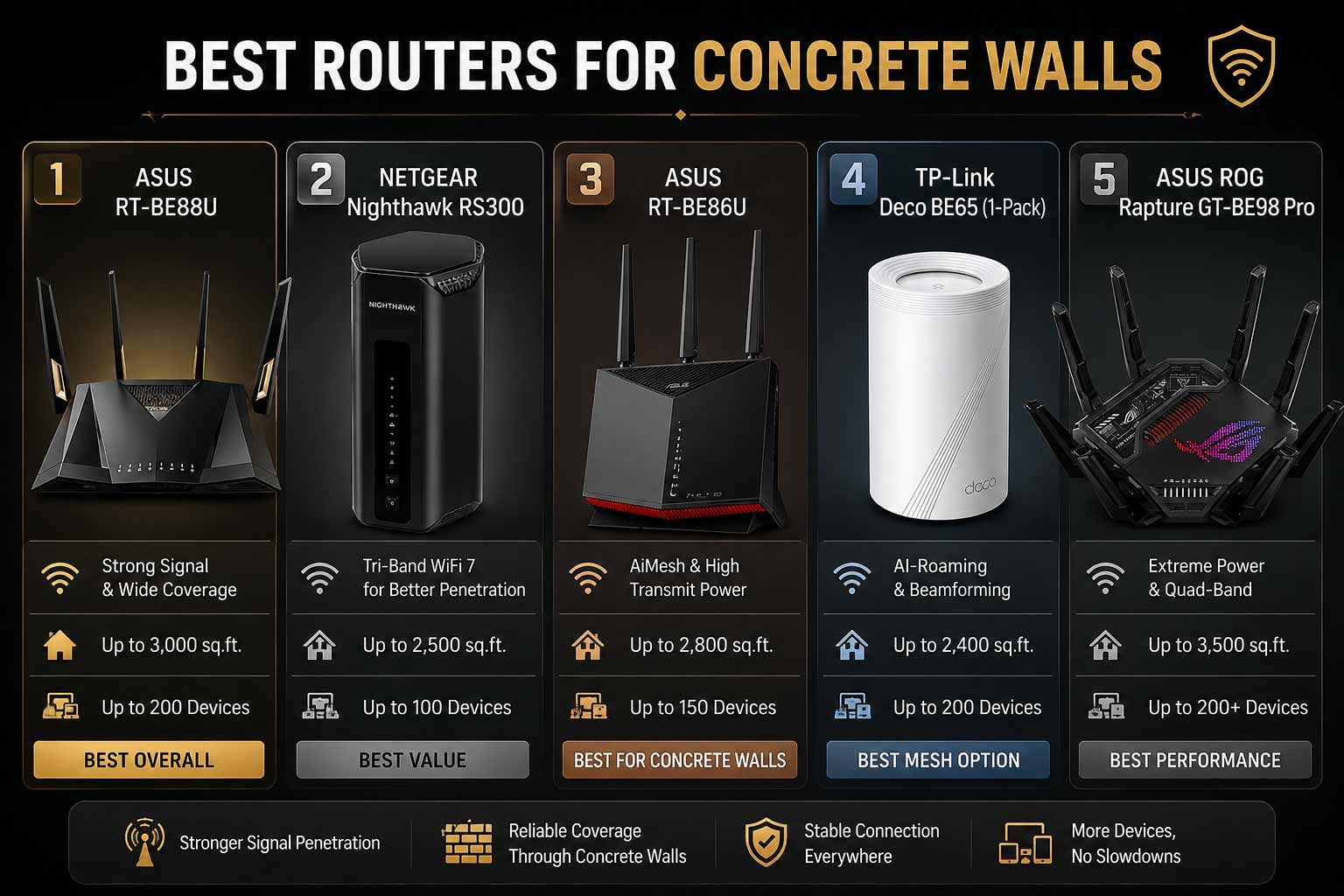

Concrete walls kill WiFi. It’s that simple. Your signal weakens, rooms go dead, and every speed test in the back bedroom is a disappointment. The best router for concrete walls is specifically built to push stronger signal through thick barriers using powerful antennas, advanced WiFi 7 technology, and smarter signal management so you get reliable coverage in every room, not just the one next to the router.
Best Router for Concrete Walls That Actually Push Through
These routers connect directly to your existing modem or ISP gateway and work with all major internet providers. They’re backward compatible with every device you already own and many support mesh expansion so you can add nodes if one router still can’t cover a particularly challenging layout. Whether your home is all concrete, brick, or a mix of both, there’s a specific pick here for your situation.
Quick Top 5 Preview:
- ASUS RT-BE88U (Best Overall for Concrete Wall Coverage)
- NETGEAR Nighthawk RS300 (Best for Simple No-Fuss Setup)
- ASUS RT-BE86U BE6800 (Best for VPN and Security Through Thick Walls)
- TP-Link Deco BE65 (Best Mesh Option for Concrete Homes)
- ASUS ROG Rapture GT-BE98 Pro (Best for Gaming Through Concrete Walls)
Why Concrete Walls Are Such a WiFi Problem
Standard 2.4GHz and 5GHz signals lose a significant portion of their strength passing through concrete. The thicker the wall, the worse it gets. Most budget routers weren’t designed with wall penetration in mind, so they deliver strong signal in the open air but collapse the moment a concrete wall sits between the router and your device.
The best router for concrete walls addresses this with higher-gain antennas that push signal with more force, 2.4GHz frequency that penetrates barriers better than 5GHz at range, and WiFi 7 features like MLO that maintain the connection across multiple bands simultaneously so if one path weakens, another keeps you connected. So buyers who struggle with this usually buy underpowered gear, place it wrong, or don’t consider mesh expansion for particularly stubborn layouts.
Common mistakes concrete wall buyers make:
- Buying a standard ISP router and expecting it to push through reinforced walls
- Choosing a 5GHz-only device for distant rooms when 2.4GHz penetrates concrete better at range
- Not considering a mesh node in a far room as the most effective fix for very thick walls
- Overspending on speed when antenna gain and placement matter more for wall penetration
Modern WiFi 7 routers solve these problems because:
- Multi-Link Operation keeps connections stable even when signal is weakened by walls
- AiMesh and EasyMesh let you add nodes strategically on the other side of problem walls
- Higher-power antennas push signal further through barriers than older hardware
- 2.4GHz band reach is improved with WiFi 7’s more efficient signal management
This guide is for:
- Homeowners in older concrete or brick construction homes with persistent dead zones
- Renters in apartment buildings where thick concrete separates rooms
- Gamers who need low latency in rooms that concrete walls have always weakened
- Remote workers who need stable video calls in rooms far from the router
- Anyone who’s replaced their router before and still had the same wall penetration problem
By the end of this guide you’ll know exactly which best router for concrete walls fits your home, your budget, and your specific wall challenge.
Top 5 Best Routers for Concrete Walls
Disclosure: This post contains affiliate links. As an Amazon Associate I earn from qualifying purchases. If you purchase through our links, we may earn a small commission at no extra cost to you. We only recommend products we genuinely stand behind.
These five picks were selected specifically based on signal strength through physical barriers, antenna configuration, mesh expansion support, and real-world performance in concrete and brick construction homes.
#1 ASUS RT-BE88U : Best Overall for Concrete Wall Coverage
Overview: Dual-band WiFi 7 router with strong whole-home coverage and AiMesh support for strategic node placement on the far side of problem walls | Built for large homes and concrete construction where one router may need backup | Compatible with all ISPs and the full ASUS AiMesh ecosystem | The best router for concrete walls for buyers who want a strong primary unit with a clear expansion path.

Best deal today – prices may change
Key Benefits: AiMesh support means you can place a second ASUS node on the other side of the most problematic concrete wall and create a unified network that sidesteps the penetration problem entirely | WiFi 7 performance ensures the primary unit pushes the strongest possible signal before it even reaches the wall | ASUS firmware updates are consistent and long-term for reliable performance over years of use | Dual-band with 2.4GHz delivers better wall penetration at range than 5GHz-only alternatives | AiProtection provides security across all connected devices without a subscription fee.
Pros: AiMesh expansion capability is the most practical solution for homes where concrete walls genuinely can’t be overcome by a single router | WiFi 7 signal management keeps connections stable even through weakened signal paths | ASUS build quality and firmware support are proven long-term | Subscription-free security adds value without ongoing cost.
Cons: Dual-band without a 6GHz band means wireless performance headroom for nearby high-speed devices is lower than tri-band alternatives.
Best For: Concrete home owners who want a strong primary router with AiMesh expansion available for the worst dead zones | Large multi-room homes in older concrete construction | Anyone who’s tried single routers before and needs a mesh-ready solution | ASUS ecosystem users who want to add coverage nodes strategically.
#2 NETGEAR Nighthawk RS300 BE9300 : Best for Simple No-Fuss Setup
Overview: Tri-band WiFi 7 BE9300 router covering up to 2,500 sq. ft. with 100-device capacity and free expert setup help | Universally compatible with all ISPs | Built for buyers who want strong concrete wall performance without complicated configuration | The simplest plug-in-and-it-works wifi router with strong signal option for standard homes with moderate concrete wall challenges.

Best deal today – prices may change
Key Benefits: Tri-band WiFi 7 with 6GHz gives the router three separate signal paths so when one band weakens through a concrete wall, others maintain the connection | 2,500 sq. ft. coverage gives the router enough range headroom that signal reaching through thick walls still covers the target area | Free expert setup help is included which matters for buyers who want the router configured correctly for wall penetration challenges from day one | 100-device capacity handles full households alongside strong wall penetration performance | NETGEAR’s firmware reliability keeps performance consistent over time without manual tuning.
Pros: Tri-band signal management handles wall attenuation better than dual-band because multiple signal paths compensate for the weakened one | Free expert help removes the setup barrier for non-technical buyers | NETGEAR reliability is proven for long-term everyday performance | Universal ISP compatibility means no setup friction.
Cons: No mesh expansion ecosystem as deep as ASUS AiMesh, so homes with very severe concrete wall challenges may need a separate extender solution.
Best For: Standard to large homes with moderate concrete wall challenges who want a clean tri-band solution without complex configuration | First-time buyers upgrading from basic ISP hardware | Remote workers and streamers who need stable coverage through walls without managing a mesh system | Anyone who wants free expert help to get wall penetration performance right from setup.
Struggling with dead zones beyond the walls? Read our guide on the best WiFi extenders for long distance to see how pairing a router with a strategic extender node solves the toughest concrete wall coverage problems.
#3 ASUS RT-BE86U BE6800 : Best for VPN and Security Through Thick Walls
Overview: Dual-band WiFi 7 BE6800 router with MLO, AI WAN Detection, AiMesh, subscription-free security, comprehensive VPN, and Guest Network Pro | Built for homes where privacy and secure connections matter alongside concrete wall penetration performance | Compatible with all ISPs and the full ASUS AiMesh ecosystem | A strong long range router for concrete walls for remote workers and privacy-conscious households.

Best deal today – prices may change
Key Benefits: MLO connects devices across both bands simultaneously so when one band weakens through a concrete wall, the device maintains its connection on the second active band without dropping | Comprehensive VPN features protect connections for remote workers whose home office is in a room separated from the router by concrete walls | Subscription-free network security covers every device on the network without ongoing annual fees | Guest Network Pro manages visitor access separately from personal devices and smart home hardware | AI WAN Detection simplifies setup so buyers don’t need to configure the router manually for their ISP.
Pros: MLO is the most practical WiFi 7 feature specifically for wall penetration because it maintains connection stability when signal weakens | Subscription-free security plus comprehensive VPN is the most complete privacy feature set at this price tier | AiMesh lets you add coverage nodes on the far side of problem walls | ASUS firmware and support quality are consistent.
Cons: Dual-band without 6GHz limits wireless throughput headroom for nearby fast devices compared to tri-band options.
Best For: Remote workers and privacy-conscious households whose home office is separated from the router by concrete walls | Anyone who needs VPN built into the router without extra hardware in a concrete construction home | Families who want subscription-free security and Guest Network Pro alongside strong wall penetration | ASUS ecosystem users who want AiMesh expansion for worst-case wall scenarios.
#4 TP-Link Deco BE65 : Best Mesh Option for Concrete Homes
Overview: Tri-band WiFi 7 BE9300 mesh node with 320MHz channel support, 6GHz band, four 2.5G Ethernet ports, 200-device capacity, VPN, and WPA3 security | Sold as a single-pack to add as a dedicated mesh node inside the concrete-separated room | The most targeted best router for concrete walls solution when a primary router on one side and this node on the other eliminates the wall problem entirely | Compatible with all ISPs and EasyMesh.

Best deal today – prices may change
Key Benefits: Placing this node on the far side of the concrete wall completely sidesteps the penetration problem because signal only needs to travel through the wall once to reach the node, which then serves the room at full strength | Four 2.5G Ethernet ports per node means wired devices in the concrete-separated room, gaming consoles, smart home hubs, and work PCs all connect at multi-gig speeds | 320MHz channel support delivers full WiFi 7 wireless performance from the node in the problem room | 200-device capacity is generous enough to handle a full smart home setup connected through this single node | WPA3 and VPN keep connections secure across the whole mesh network.
Pros: Single-node deployment on the far side of a concrete wall is the most effective solution for severe wall penetration problems | Four 2.5G ports per node is exceptional wired connectivity for any room in the home | 320MHz and 6GHz support deliver strong WiFi 7 performance once the node is placed past the wall | EasyMesh compatibility works with other TP-Link hardware cleanly.
Cons: Sold as a single pack so it requires a compatible primary router or second node to form a complete mesh network.
Best For: Buyers who already have a router and need a mesh node specifically for concrete-separated rooms | Homes where one or two rooms are severely impacted by thick concrete walls | Anyone who wants the most direct solution to a concrete wall dead zone by placing a node inside the problem room | TP-Link EasyMesh users adding coverage to a specific concrete wall challenge.
#5 ASUS ROG Rapture GT-BE98 Pro : Best for Gaming Through Concrete Walls
Overview: Quad-band WiFi 7 gaming router with up to 30 Gbps combined wireless speed, mesh compatible, and built specifically for gaming performance | Delivers the strongest combined wireless output of any router on this list for pushing signal through concrete barriers in gaming-focused homes | Compatible with all ISPs and AiMesh for strategic node expansion | The best wifi 7 router for concrete walls for serious gamers who refuse to accept lag because of building construction.

Best deal today – prices may change
Key Benefits: Quad-band design gives the router four separate signal paths so concrete wall attenuation on one or even two bands still leaves active connections maintaining gaming traffic | 30 Gbps combined speed means the raw signal power pushing toward concrete walls is far higher than standard routers, delivering more usable signal on the other side | Mesh compatibility allows a second gaming-grade node to be added in gaming rooms separated by thick walls | Gaming-specific traffic optimization keeps latency consistent even when signal strength is reduced by wall passage | WiFi 7 MLO maintains gaming connections across multiple active bands simultaneously.
Pros: Quad-band signal diversity is the strongest approach to concrete wall coverage on this list because four active bands provide maximum path redundancy | 30 Gbps combined output pushes signal harder through barriers than tri-band competitors | Mesh support adds a clear expansion path for the worst concrete wall gaming room scenarios | ASUS gaming firmware is consistently well-supported with regular updates.
Cons: Premium price reflects the quad-band flagship positioning and is more than most standard concrete wall homes need unless gaming performance through barriers is the specific priority.
Best For: Serious gamers in concrete or brick construction homes who need low-latency connections in rooms that concrete walls have always weakened | Households where gaming rooms are separated from the router by the thickest walls in the building | Power users who want maximum signal output to overcome concrete barriers | Anyone who’s tried standard routers in their gaming room and still dealt with lag and drops.
Quick Comparison Table
| Rank & Model | Wi-Fi Standard & Speed | Coverage & Ports | Best For |
|---|---|---|---|
| #1 ASUS RT-BE88U | WiFi 7 Dual-Band, High | Large homes, Multi-gig | AiMesh for concrete homes |
| #2 NETGEAR RS300 | WiFi 7 Tri-Band, BE9300 | 2,500 sq. ft., Multi-gig | Simple tri-band wall coverage |
| #3 ASUS RT-BE86U | WiFi 7 Dual-Band, BE6800 | Large homes, Multi-gig | VPN and MLO stability |
| #4 TP-Link Deco BE65 | WiFi 7 Tri-Band, BE9300 | Per node, 4x 2.5G | Dedicated mesh node |
| #5 ASUS ROG GT-BE98 Pro | WiFi 7 Quad-Band, 30 Gbps | Large homes, Multi-gig | Gaming through walls |
This guide helps you choose the right best router for concrete walls based on your home size, how severe the wall problem is, and whether gaming, privacy, or mesh expansion matters most.
What to Look for When Buying a Router for Concrete Walls
Does It Actually Address the Wall Problem?
- Mesh expansion support (AiMesh or EasyMesh) is the most reliable concrete wall solution because placing a node on the far side of the wall eliminates the penetration challenge rather than trying to push through it
- MLO on WiFi 7 routers provides connection stability when signal weakens through walls by maintaining active connections on multiple bands simultaneously
- 2.4GHz band penetrates concrete better than 5GHz at range, so routers that intelligently assign devices to 2.4GHz for distant rooms perform better through walls than those that push everything to 5GHz
- Higher combined speed ratings generally indicate stronger transmit power which pushes more usable signal through concrete barriers
Thinking about upgrading your full home network after your apartment? Read our guide on the best WiFi 7 router for large homes to see how the same brands handle larger coverage challenges when you eventually make the move.
Feature Simplicity for Concrete Wall Setups
- Free expert help (included with the NETGEAR RS300) is practical for buyers who want wall penetration performance configured correctly from setup rather than troubleshooting later
- AI WAN Detection on ASUS models removes setup friction so you can focus on placement optimization rather than ISP configuration
- Subscription-free security means one less ongoing decision after purchase
Performance That Holds Through Barriers
- Consistent signal in rooms separated by concrete matters more than peak speed in the open room next to the router
- Multi-gig Ethernet ports on the Deco BE65 mean that if wireless through the wall is still weak, wiring through the wall to the node delivers full-speed connections
- Quad-band on the ROG GT-BE98 Pro provides the most path redundancy for signal that has to pass through multiple barriers
Brand and Long-Term Support
- ASUS, NETGEAR, and TP-Link all push regular firmware updates for their WiFi 7 lines
- AiMesh and EasyMesh both have documented expansion paths so you can add nodes as you identify which rooms need them
- Warranty and support resources are accessible and clearly documented across all five brands
Ready to upgrade your apartment network? Browse our complete guide on the best WiFi 7 routers under $300 to see which options fit your budget and apartment-specific needs without overspending.
How These Routers Were Selected
Every router here was evaluated specifically on its relevance to concrete wall performance: antenna configuration, mesh expansion capability, MLO support for maintaining connections through weakened signal paths, and the practical value of the additional features included alongside wall penetration performance. Products were not included based on brand preference or marketing claims about range. The focus was on what actually helps in concrete construction homes based on the hardware specifications provided.
Key selection factors for concrete wall use:
- Mesh expansion support for placing nodes past problem walls
- MLO availability for connection stability through weakened signal
- Band configuration for 2.4GHz reach at distance through barriers
- Combined transmit power relative to wall penetration needs
- Practical additional features that serve concrete home users specifically
How to Get the Best Performance Through Concrete Walls
Buying the right hardware is step one. Deploying it correctly is where most buyers fall short.
Setup That Actually Works
- If the home has one room that’s always a dead zone through a thick wall, the single most effective fix is placing a mesh node in that room rather than trying to push through the wall from the primary router
- Run firmware updates immediately after first boot before optimizing placement because wall penetration patches occasionally come through firmware
- Use the ASUS Router app or TP-Link Tether app for initial setup because both apps include placement tools that help identify weak signal areas
Placement Rules for Concrete Homes
- Place the primary router as close to the center of the home as your modem location allows because minimizing the total distance signal needs to travel before hitting a concrete wall helps
- Avoid placing the router on the floor or inside a media cabinet because signal spreads horizontally and is absorbed before reaching concrete walls it needs to pass through
- For the Deco BE65 mesh node, place it in the room on the far side of the concrete problem wall, not in the hallway before it, because half the benefit disappears if the node is still on the router side of the barrier
Mistakes That Make Concrete Walls Worse
- Placing the primary router in a corner at the end of the home farthest from the concrete problem wall forces signal to travel maximum distance before it even reaches the barrier
- Relying entirely on 5GHz for distant concrete-separated rooms when 2.4GHz covers that distance with better wall penetration at the cost of some peak speed
- Adding an extender in the hallway before the wall rather than a mesh node past it, because an extender repeating a weak signal through concrete still delivers weak coverage on the other side
- Skipping the mesh node option and continuing to try to push through instead
When a Mesh Node Is the Right Answer
- If signal in a specific room is consistently poor despite optimal primary router placement, a mesh node in that room is the most effective solution
- The Deco BE65 single pack is specifically designed for this use case and its four 2.5G ports mean wired devices in that room benefit immediately
- AiMesh on the ASUS RT-BE88U and RT-BE86U means any compatible ASUS unit can serve as the second node for the problem room
Signs the Router Is Handling Your Concrete Walls
- Speed tests in previously weak rooms show noticeably better results than your old hardware
- Video calls and streaming in concrete-separated rooms stay stable without buffering
- Gaming ping in distant rooms is lower and more consistent than before
- Devices in all rooms connect to the same network without manual band switching
Running a large smart home alongside your router? Read our guide on the best WiFi 7 router for smart homes to see how NETGEAR’s device capacity compares against ASUS and TP-Link IoT-specific features.
How to Pick the Right Router for Your Concrete Wall Home
Severity of the problem matters most: One room with a single concrete wall between it and the router? The NETGEAR RS300 or ASUS RT-BE86U handle it with tri-band or MLO signal management. Multiple rooms separated by thick concrete or the whole home is concrete construction? The ASUS RT-BE88U or the Deco BE65 mesh node approach is the right answer.
Gaming or general household: Gaming through concrete walls? The ROG GT-BE98 Pro’s quad-band design and gaming-specific optimization push harder through barriers than any standard router on this list. General household use? The NETGEAR RS300 or ASUS RT-BE88U cover it cleanly without the gaming premium.
Privacy and remote work: The ASUS RT-BE86U’s VPN and subscription-free security make it the right pick for home office users in concrete-separated rooms who also need private connections.
Must-have features for concrete wall homes: Mesh expansion support, 2.4GHz band availability for distant room coverage, MLO for connection stability through weakened signal, and ideally enough Ethernet ports to wire through the wall if wireless alone isn’t sufficient.
Skip if: You’re buying based on coverage range claims alone without mesh expansion support because no single router’s coverage rating accounts for the specific attenuation your home’s concrete construction creates. And don’t buy any router without confirming it supports AiMesh, EasyMesh, or compatible mesh expansion because that’s your backup option when the primary signal isn’t enough.
Still getting weak signals in one specific room? Read our guide on the best long distance WiFi extenders to see how adding a dedicated node changes everything for concrete-separated rooms.
Real User Feedback
- ASUS RT-BE88U owners in older concrete apartment buildings consistently say the AiMesh node they added in the far bedroom finally solved the dead zone problem they’d had with every previous router, and that the primary unit alone covered more of the home than anything they’d used before.
- NETGEAR RS300 buyers in brick and concrete construction homes highlight the free expert setup help as a genuine differentiator, saying the NETGEAR support team helped them optimize router placement specifically for their home’s wall layout which made an immediate difference.
- ASUS RT-BE86U users who work remotely from concrete-separated home offices say the MLO feature kept their video calls stable in a room that previously dropped connection regularly during meetings, and the VPN performance through the wall signal was better than they expected.
- TP-Link Deco BE65 single-pack buyers who placed the node in a concrete-separated gaming room report it was the first solution that completely eliminated the dead zone, and that the four 2.5G ports meant their gaming PC connected to the node by wire at full speed rather than relying on wireless through the wall at all.
- ASUS ROG GT-BE98 Pro gaming households in concrete construction homes say the quad-band design made a visible difference in gaming latency consistency through two concrete walls, and that the mesh expansion meant they could add a second gaming node in the basement without any configuration changes to the primary router.
- Buyers across all five models consistently note that placement optimization mattered more than hardware choice alone, and that following the setup guidance to place the primary router centrally rather than in a corner dramatically improved wall penetration performance from day one.
Conclusion and Final Recommendation
Concrete walls don’t have to mean dead zones. The right router, placed correctly with a mesh node added where the walls are thickest, solves the problem permanently rather than working around it indefinitely. Every pick in this guide addresses the concrete wall challenge in a different way so there’s a clear answer for every type of concrete home.
This guide is for:
- Anyone in a concrete or brick construction home who’s tired of weak signal in certain rooms
- Buyers who’ve replaced their router before and still had the same coverage problems
- Gamers and remote workers who need reliable performance in rooms that concrete walls have always weakened
- Anyone who wants a clear specific recommendation rather than a generic range rating
Best overall pick: The ASUS RT-BE88U is the strongest choice for most concrete wall homes because it combines solid WiFi 7 primary performance with AiMesh expansion that lets you place a node on the far side of any wall that remains a problem. You’re not just buying a router. You’re buying a system that can grow to cover every room no matter how thick the barriers are.
The short version: If one room is the problem, place a mesh node in it. If the whole home is challenging, start with the ASUS RT-BE88U and add a node where you need it. If gaming through walls is the specific goal, the ROG GT-BE98 Pro pushes harder through barriers than anything else on this list. Match the severity of your wall problem to the right solution and the dead zone problem is permanently solved.
Ready to end the dead zone problem for good? Browse our full guide on the best WiFi 7 routers for large homes to find the strongest coverage solutions for homes where thick walls are just one of the challenges.