
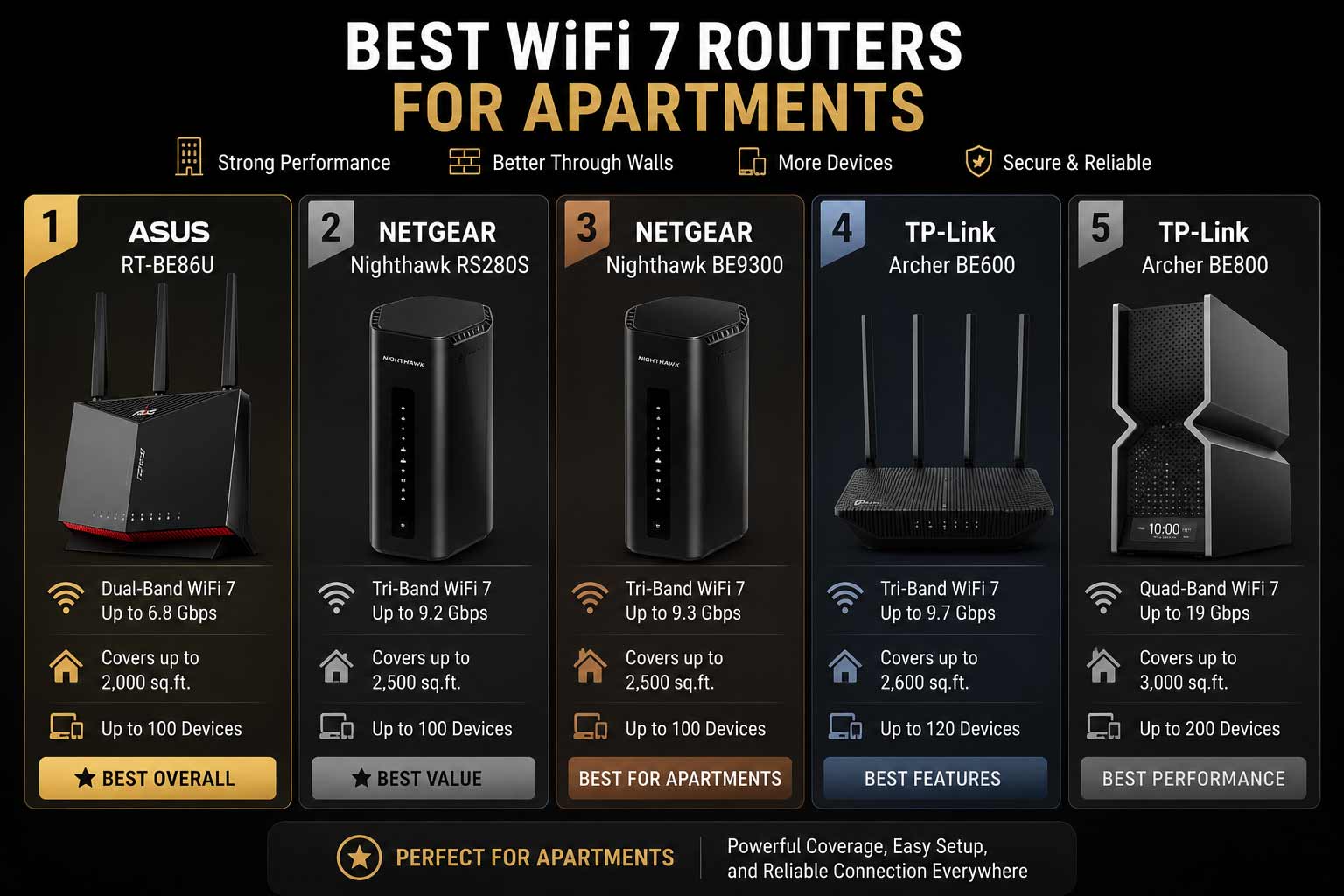

Apartment Wi-Fi is a different beast from suburban home Wi-Fi. In a building with 20, 50, or 100 units, you’re not just competing with your own devices for bandwidth. You’re competing with every router on every floor pushing signal through the same channels, creating a wall of interference that even expensive hardware can’t always push through. The best Wi-Fi 7 router for apartments is built specifically to handle this because it brings the 6GHz band, MLO, and smarter spectrum management to a space where those features matter more than anywhere else.
WiFi-7 Router for Apartments that Win the War on Interference
These routers connect directly to your existing modem or ISP gateway and work with all major internet providers. They stay backward compatible with older devices while giving newer hardware the full benefit of WiFi 7 improvements. In most apartments, a single quality WiFi 7 router provides complete coverage, and features like multi-gig ports, VPN support, and Guest Network Pro add practical everyday value without requiring complicated setup. Because in an apartment, the challenge isn’t coverage distance. It’s signal quality in a crowded wireless environment.
Here are five routers that actually handle apartment living well.
Quick Top 5 Preview:
- ASUS RT-BE86U BE6800 (Best for Privacy, VPN, and Subscription-Free Security)
- NETGEAR Nighthawk RS280S BE9200 (Best Apartment Router with Armor Included)
- NETGEAR Nighthawk BE9300 (Best for Gaming and VPN in Apartments)
- TP-Link Archer BE600 BE9700 (Best Feature-Dense Mid-Range Apartment Router)
- TP-Link Archer BE800 BE19000 (Best Premium Apartment Router for Power Users)
How to Choose the Best WiFi 7 Router for Apartments
The Apartment WiFi Problem Is About Congestion, Not Range
In a single-family home, the main router challenge is coverage distance. In an apartment, the main challenge is interference. Every router in your building is a potential source of congestion on the 2.4GHz and 5GHz bands. When your neighbor’s router and yours are broadcasting on the same or adjacent channels in the same frequency space, both connections suffer. The best WiFi 7 router for apartments solves this by giving your devices access to the 6GHz band, where almost no neighboring networks are broadcasting yet, and by using MLO to maintain a stable connection across multiple bands simultaneously even when one gets congested.
What Apartment WiFi Buyers Usually Get Wrong
- Buying based on coverage area ratings designed for large homes when apartment-specific needs are about signal quality in a congested space, not distance
- Choosing a WiFi 6 router when the 6GHz band available in WiFi 7 is the most meaningful improvement for crowded apartment wireless environments
- Ignoring VPN and Guest Network features that are genuinely more useful in apartment living where privacy from shared building infrastructure matters more
- Overpaying for large-home features like massive antenna arrays designed for 3,500 sq. ft. coverage when the apartment is 900 sq. ft.
Why WiFi 7 Makes a Bigger Difference in Apartments
The 6GHz band is the most impactful WiFi 7 improvement for apartment living specifically. Most buildings have dozens of networks on 2.4GHz and multiple networks competing on 5GHz. The 6GHz band is essentially empty in most residential buildings right now because it requires WiFi 7 hardware. That means your connection on 6GHz is clean, fast, and free from the congestion that slows down older hardware in apartment environments. Add MLO, which lets your devices connect across two bands simultaneously for more stable throughput, and WiFi 7 represents a genuinely meaningful upgrade for apartment dwellers.
Who This Guide Is For
- Apartment and condo residents dealing with inconsistent WiFi due to interference from neighboring networks
- Remote workers in apartments who need stable, reliable connections for video calls and large file transfers
- Gamers living in apartments who need low-latency WiFi that holds up even when the building’s wireless environment is crowded
- Privacy-conscious apartment dwellers who want VPN and secure guest networks built into the router
- Anyone upgrading from WiFi 5 or WiFi 6 who lives in a densely populated wireless environment
This guide helps you choose the right best WiFi 7 router for apartments based on your specific apartment situation, internet plan, and what you primarily use your network for every day.
Top 5 Best WiFi 7 Routers for Apartments
Disclosure: This post contains affiliate links. As an Amazon Associate I earn from qualifying purchases. If you purchase through our links, we may earn a small commission at no extra cost to you. We only recommend products we genuinely stand behind.
Every router here was selected based on how well it handles congested wireless environments, the practical feature value for apartment living specifically, and the real-world performance each delivers for different types of apartment users. Coverage ratings were given less weight than interference management and spectrum efficiency because that’s the actual challenge in apartment WiFi.
#1 ASUS RT-BE86U BE6800 : Best for Privacy, VPN, and Subscription-Free Security
Overview: Dual-band WiFi-7 BE6800 router with 4096-QAM, MLO, AI WAN Detection, Ai Mesh support, subscription-free network security, comprehensive VPN features, and Guest Network Pro | Built for apartment residents who prioritize privacy, secure connections, and flexible guest network management without paying recurring security fees | Compatible with all major ISPs and the full ASUS Ai Mesh ecosystem | One of the most privacy-focused WiFi-7 router for apartments options available.

Best deal today – prices may change
Key Benefits: Subscription-free network security means every device on the network is protected without an annual fee, which is a meaningful long-term cost advantage over Armor-based competitors | Comprehensive VPN features support multiple protocols for remote workers, privacy-conscious apartment users, and geo-unrestricted streaming without a separate VPN device | MLO connects devices across both bands simultaneously for lower latency even in congested apartment wireless environments | Guest Network Pro provides granular control over visitor access, which matters more in apartments where guests sharing building WiFi infrastructure is a regular reality | AI WAN Detection automatically identifies and configures the internet connection type for faster, less frustrating initial setup.
Pros:
Subscription-free security is the most significant long-term cost advantage in this group | VPN feature depth is the best of any router on this list for apartment users who care about network privacy | Guest Network Pro is a practical apartment-specific feature for managing visitor connections securely | MLO delivers meaningful latency improvements in the congested wireless environments typical of apartment buildings.
Cons: Dual-band without a 6GHz band means it doesn’t benefit from the least-congested WiFi 7 channel, which is the most impactful feature for cutting through apartment wireless interference.
Best For: Privacy-conscious apartment residents who want comprehensive VPN and subscription-free security built into the router | Remote workers who need stable VPN connections for home office use without separate hardware | Anyone in an apartment who frequently has guests and wants secure, granular Guest Network Pro management | ASUS ecosystem users who want AiMesh flexibility and no ongoing security subscription costs.
#2 NETGEAR Nighthawk RS280S BE9200 : Best Apartment Router with Armor Included
Overview: Tri-band WiFi 7 BE9200 router with a 2.5 Gig internet port, 1-Year Armor security, up to 2,500 sq. ft. coverage, and free expert setup help | Designed for apartment residents who want tri-band WiFi 7 performance including 6GHz band access alongside network-level security from day one | Compatible with all major ISPs | A solid and practical best wifi 7 router for apartments choice for users who want Armor protection without flagship pricing.

Best deal today – prices may change
Key Benefits: Tri-band WiFi 7 gives apartment devices access to the 6GHz band which is significantly less congested than 2.4GHz and 5GHz in dense apartment buildings | Armor security monitors every device in real time and is included from day one without an additional purchase | 2.5G WAN port matches standard and mid-tier multi-gig internet plans without overpaying for a 10G port that apartment internet plans typically don’t require | 2,500 sq. ft. coverage is well above what most apartments need from a single router, so signal strength is strong throughout the whole unit | Free expert help from NETGEAR is included for apartment dwellers unfamiliar with multi-gig router configuration.
Pros:
Tri-band with 6GHz is the right architecture for cutting through apartment wireless congestion | Armor included from day one is strong security value for apartment residents who want protection without a separate tool | 2.5G WAN port covers most apartment internet plans without unnecessary cost | NETGEAR firmware update track record is reliable for long-term apartment router use.
Cons: Armor renews at an annual cost after the first included year, so ongoing threat protection carries a recurring fee worth budgeting for.
Best For: Apartment residents who want tri-band WiFi 7 with 6GHz band access and Armor security at a practical price | Renters on standard or mid-tier internet plans who want strong wireless interference management built in | Anyone in a densely populated building who wants network-level security without a separate device | First-time WiFi 7 buyers in apartments who want free expert help for initial setup.
Want to compare the RS280S against the full NETGEAR lineup before deciding? Read our guide on the best NETGEAR WiFi 7 router to see how the 2.5G models stack up against the 10G options across different use cases.
#3 NETGEAR Nighthawk BE9300 : Best for Gaming and VPN in Apartments
Overview: Tri-band WiFi 7 gaming router with 9.3 Gbps combined speed, a 2.5 Gig internet port, VPN support, 100-device capacity, and free expert help | Covers up to 2,500 sq. ft. | Positioned specifically as a gaming router with built-in VPN for secure connections | The best wifi 7 router for gaming in an apartment environment where low latency and VPN privacy matter equally | Compatible with all major ISPs.
Best deal today – prices may change
Key Benefits: Tri-band WiFi 7 architecture gives gaming devices access to the less-congested 6GHz band in apartment buildings where 2.4GHz and 5GHz are typically overloaded | Built-in VPN covers both secure gaming connections and privacy from building-shared network infrastructure without a separate VPN device | 9.3 Gbps combined speed provides strong wireless headroom so the apartment’s internet plan is never the bottleneck on the wireless side | 100-device capacity handles apartments with many smart home devices alongside gaming hardware | Free expert help is included for VPN and gaming network configuration support.
Pros:
VPN plus tri-band WiFi 7 gaming performance is a combination that directly addresses the two main apartment network concerns: privacy and interference | 6GHz band access reduces the impact of neighboring network congestion on gaming latency | NETGEAR reliability and free expert support are consistent across the Nighthawk lineup | Good device capacity for apartment smart home setups.
Cons: No Armor security included, so apartment residents who want both VPN and built-in threat monitoring need to choose between this and the RS280S based on which feature matters more.
Best For: Apartment gamers who want tri-band WiFi 7 performance in a congested building alongside built-in VPN for secure connections | Remote workers who game and need VPN plus low-latency WiFi in a single router | Privacy-focused apartment residents who want encrypted connections without paying for a separate VPN service or device | Anyone looking for a tri band wifi 7 router for apartments with gaming and privacy features at a practical price.
#4 TP-Link Archer BE600 BE9700 : Best Feature-Dense Mid-Range Apartment Router
Overview: Tri-band WiFi 7 BE9700 router with a 10G WAN port, a 2.5G WAN port, three 2.5G LAN ports, 320MHz channel support, 2,600 sq. ft. coverage, 120-device capacity, VPN, and HomeShield | The most port-dense mid-range option on this list and strong value for apartment residents on multi-gig internet plans who want VPN, security, and wired connection flexibility in a single router | Compatible with all major ISPs.

Best deal today – prices may change
Key Benefits: 10G WAN port is a significant differentiator at this price tier because it means apartment residents on or upgrading to multi-gig internet plans never hit a hardware bottleneck | Three 2.5G LAN ports let wired devices including gaming PCs, smart home hubs, and streaming sticks connect at multi-gig speeds for the most stable apartment connections | 320MHz channel bandwidth delivers the full WiFi 7 wireless throughput on the 6GHz band for the fastest devices in the apartment | HomeShield provides security and parental controls through the TP-Link Tether app without requiring a separate security solution | VPN support is included for apartment residents who need secure connections.
Pros:
Five total multi-gig ports at this price tier is the strongest port density value on the list | 320MHz channel support delivers genuine full WiFi 7 performance rather than a limited implementation | Home Shield free tier covers basic security and parental controls for most apartment households without a subscription | 120-device capacity handles apartment smart home setups comfortably.
Cons: HomeShield’s advanced features including detailed parental controls and threat analytics require a paid subscription after the free trial, which adds an ongoing cost for apartment residents who want the full feature set.
Best For: Apartment residents on multi-gig internet plans who want a 10G WAN port alongside strong WiFi 7 wireless performance | Power users in apartments who need multi-gig wired connections for gaming PCs, NAS drives, or streaming hardware | Anyone looking for a wifi 7 router for multiple devices in an apartment with VPN, HomeShield, and strong wired port density in one package | Tech-forward apartment dwellers who want the most hardware value per dollar in the under-$300 WiFi 7 tier.
#5 TP-Link Archer BE800 BE19000 : Best Premium Apartment Router for Power Users
Overview: Flagship tri-band WiFi 7 BE19000 router with two 10G ports and four 2.5G ports, 12-stream 19 Gbps combined speed, a built-in LED screen, eight high-performance antennas, Private IoT network, VPN, HomeShield, EasyMesh, and free expert help | The most complete and premium wifi 7 router for apartments on this list for power users who want the best wireless interference management alongside maximum wired port density | Compatible with all ISPs and EasyMesh.

Best deal today – prices may change
Key Benefits: Eight high-performance antennas deliver exceptionally strong signal throughout an apartment even when placed in a less-than-ideal corner location, because the antenna array compensates for placement constraints common in apartment living | 6GHz tri-band access with BE19000 combined speed gives every band strong headroom in the congested wireless environments typical of apartment buildings | Private IoT network isolates smart apartment devices from personal devices in a single tap through the Tether app | Dual 10G plus four 2.5G ports give apartment power users more wired connection flexibility than any competing router at this tier | LED screen provides real-time network status for apartment setups where quick monitoring without opening an app is a convenience worth having.
Pros:
Eight antennas delivering strong signal even from a constrained apartment placement is the standout hardware advantage for apartment-specific use | The most complete feature set for apartment power users combining Private IoT, VPN, Home Shield, and dual 10G ports | LED screen is a practical daily convenience exclusive to this model | Easy Mesh means if the apartment has a tricky layout, a second node can be added without replacing the router.
Cons: The premium price reflects the dual 10G ports and eight-antenna design, and apartment residents who don’t need multi-gig internet or multiple 10G wired devices are paying for more than their typical setup requires.
Best For: Power users in apartments on multi-gig internet plans who want the best possible wireless interference management alongside dual 10G wired performance | Tech-forward apartment dwellers running smart home devices, gaming hardware, and NAS systems who want Private IoT isolation and maximum port density | Anyone who wants the most complete affordable wifi 7 router for apartments with eight antennas that overcome placement limitations | Premium apartment setups where a single router needs to handle many device types and usage scenarios simultaneously.
Quick Comparison Table
| Rank & Model | WiFi Standard & Speed | Coverage & Ports | Best For |
|---|---|---|---|
| #1 ASUS RT-BE86U | WiFi 7 Dual-Band, BE6800 | Apartments, Multi-gig | VPN, security, privacy |
| #2 NETGEAR RS280S | WiFi 7 Tri-Band, BE9200 | 2,500 sq. ft., 2.5G WAN | Armor security included |
| #3 NETGEAR BE9300 | WiFi 7 Tri-Band, 9.3 Gbps | 2,500 sq. ft., 2.5G WAN | Gaming and VPN |
| #4 TP-Link BE600 | WiFi 7 Tri-Band, BE9700 | 2,600 sq. ft., 10G + 3x 2.5G | Multi-gig port density |
| #5 TP-Link BE800 | WiFi 7 Tri-Band, BE19000 | Large, 2x 10G + 4x 2.5G | Premium power users |
This guide helps you choose the right best WiFi-7 router for apartments based on your building’s wireless environment, internet plan speed, primary use case, and whether privacy, gaming, or wired port density matters most.
What to Look for When Buying the Best WiFi 7 Router for Apartments
Congestion Management First
- In apartments, 6GHz band access is more valuable than any other single spec because it gives your devices a channel that neighboring networks aren’t using
- Tri-band models with 6GHz handle apartment interference better than dual-band alternatives by providing a dedicated clean channel alongside the congested 2.4GHz and 5GHz bands
- MLO support on the ASUS RT-BE86U lets devices connect across two bands simultaneously, so when one band gets congested the other maintains the connection without dropping
Features That Matter Specifically for Apartment Living
- VPN built into the router is more relevant in apartments than in suburban homes because shared building network infrastructure creates more potential privacy exposure
- Guest Network Pro and dedicated guest SSID management are practical apartment features because visitors are a regular part of apartment social life and keeping guest traffic off your personal network matters
- Subscription-free security like ASUS AiProtection on the RT-BE86U avoids ongoing fees, which matters for apartment renters who may move and upgrade hardware more frequently than homeowners
Performance Under Apartment-Specific Conditions
- 2,500 sq. ft. coverage from the NETGEAR picks is well above what most apartments need, so signal strength throughout the unit is strong rather than stretched to its limit
- Multi-gig LAN ports matter for apartment setups with gaming PCs or streaming hardware that benefits from wired connections even in a small space
- 320MHz channel support on the BE600 delivers full WiFi 7 wireless throughput that handles apartment interference better than narrower channel implementations
Brand and Support
- NETGEAR’s free expert help is a practical resource for apartment residents setting up multi-gig configurations for the first time
- ASUS firmware updates and subscription-free AiProtection keep the RT-BE86U relevant and secure without ongoing costs
- TP-Link HomeShield’s free tier covers basic apartment security needs without requiring an immediate subscription decision
Long-Term Value for Apartment Residents
- WiFi 7 backward compatibility means the router works with everything you own now and improves as you upgrade devices
- AiMesh on the ASUS RT-BE86U means if you move to a larger apartment later, coverage can expand without replacing the router
- EasyMesh on the BE800 provides the same flexibility for TP-Link users who may move to larger spaces
How These Routers Were Selected
Every router here was evaluated specifically on how well it handles the unique wireless conditions of apartment living: channel congestion from neighboring networks, compact coverage needs, privacy requirements, and the practical daily features that matter in a densely populated building. Brand firmware reliability, VPN and security feature quality, and practical setup accessibility for renters who may not have advanced networking experience all shaped the final selections.
Key selection criteria for apartment use:
- 6GHz band access for congestion management in dense wireless environments
- MLO support for connection stability when bands are congested
- VPN and privacy features relevant to apartment network sharing contexts
- Guest Network management quality for regular visitor access
- Security model: subscription-free, included first year, or free tier
- Coverage appropriate for apartment sizes rather than large home ratings
How to Get the Best WiFi Performance in Your Apartment
Apartment WiFi setup has some specific challenges that standard setup guides don’t address. These tips apply to all five picks and directly affect daily signal quality.
Initial Setup for Apartments
- Run setup through the manufacturer’s app because all five routers have app-guided flows that handle channel selection, band configuration, and security activation in a single process
- Update firmware immediately after setup because channel optimization patches that improve performance in congested environments often arrive in early firmware releases
- Enable 6GHz band connection priority for your fastest devices immediately after setup rather than leaving them on auto band selection
Placement Tips Specific to Apartments
- Central placement in the apartment matters more than in large homes because compact spaces benefit most from even signal spread rather than maximum range
- Avoid placing the router inside entertainment centers, cabinets, or closets because apartment walls are often thinner and neighboring network interference penetrates them more easily without additional obstruction from furniture
- For the BE800 with eight antennas, even a less-ideal corner placement delivers strong signal throughout the apartment because the antenna array compensates for placement constraints
Apartment-Specific Mistakes to Avoid
- Leaving channel selection on auto without checking whether automatic selection is choosing a congested channel shared with many neighbors
- Not enabling the 6GHz band network as a separate SSID for devices that support it because many devices default to the most familiar band rather than the least congested one
- Skipping Guest Network or Guest Network Pro setup because sharing your main password with visitors in an apartment building puts personal devices and visitors on the same network
- Ignoring VPN configuration on routers that include it because apartment building network infrastructure can expose traffic to other building users in some configurations
Tips for Better Apartment WiFi Performance
- Manually assign your gaming console, laptop, and 4K streaming device to the 6GHz band SSID because the less-congested channel delivers the most consistent performance in apartment environments
- Enable the ASUS Guest Network Pro or NETGEAR guest SSID to keep visitor traffic isolated from your personal devices and smart home hardware
- Use the router’s channel width settings to select 160MHz or 320MHz on the 6GHz band where available because wider channels deliver more throughput in the clean 6GHz spectrum
- Reboot the router weekly if you have many smart home devices because connection tables in apartment setups with frequent neighbor network changes benefit from regular clearing
Signs Your Apartment WiFi Is Working Right
- Speed tests from wireless devices show speeds consistent with your internet plan rather than dropping significantly below it
- Gaming ping is stable even during evening hours when the building’s wireless environment is most congested
- Video calls stay sharp and consistent without the lag spikes that indicate interference from neighboring networks
- Smart home devices connect reliably without the random disconnections that often indicate channel congestion issues
How to Pick the Right WiFi-7 Router for Your Apartment
Internet plan speed first: On a multi-gig plan above 2.5 Gbps? The BE600 or BE800 are the only options here with 10G WAN ports that deliver full plan speed. On a standard Gigabit or up to 2.5 Gbps plan? All five routers handle it without bottlenecking.
Privacy and security priority: Want subscription-free security and comprehensive VPN? ASUS RT-BE86U is the pick. Want Armor included for year one? RS280S. Want VPN for gaming without security subscription commitment? BE9300. Want HomeShield with a functional free tier? BE600 or BE800.
Gaming or general apartment use: For low-latency gaming in a congested building environment, tri-band models with 6GHz access (RS280S, BE9300, BE600, BE800) all handle apartment interference better than the dual-band RT-BE86U. But for privacy and VPN alongside gaming, the RT-BE86U’s MLO reduces latency effectively even without 6GHz.
Must-have features for any apartment WiFi 7 router: 6GHz band access for congestion management, MLO or tri-band for stable multi-device performance, Guest Network support, and at minimum one multi-gig Ethernet port for wired devices.
Things to avoid: Buying based purely on coverage ratings designed for large homes when your apartment is under 1,500 sq. ft. because those specs don’t tell you anything about interference management. And don’t skip Guest Network setup because in apartment buildings, sharing your main password is a privacy risk that’s easy to avoid.
Thinking about upgrading your full home network after your apartment? Read our guide on the best WiFi 7 router for large homes to see how the same brands handle larger coverage challenges when you eventually make the move.
Real User Feedback
- ASUS RT-BE86U apartment users in dense city buildings consistently say the subscription-free security and VPN combination made it the most practical router purchase they’ve made, citing the Guest Network Pro as an unexpected daily-use feature they now use for every visitor.
- NETGEAR RS280S buyers in apartments highlight the Armor security as the selling point, saying they appreciated having threat monitoring included from setup day rather than as an add-on and that the 6GHz band noticeably reduced the evening congestion they’d experienced with their previous WiFi 6 router.
- NETGEAR BE9300 apartment gamers report that gaming ping became more consistent after switching, particularly during prime-time hours when their building’s 2.4GHz and 5GHz channels were most congested, and that the built-in VPN made online gaming in international servers straightforward.
- TP-Link BE600 buyers on multi-gig apartment internet plans say the 10G WAN port was the primary reason they chose this over competing mid-range options, and that the three 2.5G LAN ports made wiring a gaming PC, streaming stick, and smart hub simultaneously a clean setup without needing a separate switch.
- TP-Link BE800 apartment power users mention the eight antennas as the feature that overcame their awkward modem placement in a corner near the building’s entry point, saying signal strength throughout the apartment improved dramatically compared to routers with fewer antennas placed in the same constrained location.
Alternatives Worth Considering
- ASUS RT-BE58U BE3600 : A more affordable ASUS WiFi-7 option with dedicated IoT, Kid’s, and VPN network support, worth considering for apartment family setups where separate managed networks for children’s devices and smart home hardware are priorities
- NETGEAR Nighthawk BE9300 paired with NETGEAR Armor separately : For apartment residents who want both VPN and Armor security and are willing to add Armor as a separate subscription to the BE9300 rather than choosing between models
- TP-Link Archer GE400 BE6500 : A budget gaming router alternative for apartment gamers who want a dedicated gaming port and Game Acceleration at a lower price point than the BE600 or BE800
- ASUS RT-BE88U : A dual-band WiFi-7 ASUS option with Ai Mesh for apartment residents who want the ASUS ecosystem without the VPN and Guest Network Pro depth of the RT-BE86U
Conclusion and Final Recommendation
Apartment WiFi doesn’t have to be a constant battle against your neighbors’ routers. The best WiFi 7 router for apartments brings the tools to win that battle, whether that’s 6GHz band access, MLO for stable latency, VPN for privacy, or Guest Network Pro for visitor management. Every router on this list solves apartment-specific problems in a different way, so there’s a clear answer for every type of apartment resident.
This guide is for:
- Apartment and condo residents dealing with interference and inconsistent WiFi from neighboring networks
- Remote workers in apartments who need stable, private connections for daily work
- Gamers in apartments who want low-latency WiFi that holds up in crowded wireless environments
- Anyone comparing WiFi 7 apartment options and wanting a clear, honest recommendation matched to their situation
Best overall pick: The NETGEAR Nighthawk RS280S BE9200 is the most balanced choice for most apartment residents. Tri-band WiFi 7 with 6GHz band access, 2,500 sq. ft. coverage that comfortably handles any apartment layout, Armor security included, and free expert help make it the most complete package for everyday apartment WiFi without overspending on features typical apartment setups don’t need. If interference from neighboring networks is your main frustration, the 6GHz band access alone makes this upgrade immediately noticeable.
The short version: In apartments, prioritize 6GHz band access and interference management over coverage range. Match the WAN port to your internet plan speed. Enable Guest Network from day one. And if privacy matters, pick a model with VPN built in. Any of the five picks here delivers a meaningfully better apartment WiFi experience than the WiFi 6 or WiFi 5 hardware most apartments are still running.
Ready to upgrade your apartment network? Browse our complete guide on the best WiFi 7 routers under $300 to see which options fit your budget and apartment-specific needs without overspending.