
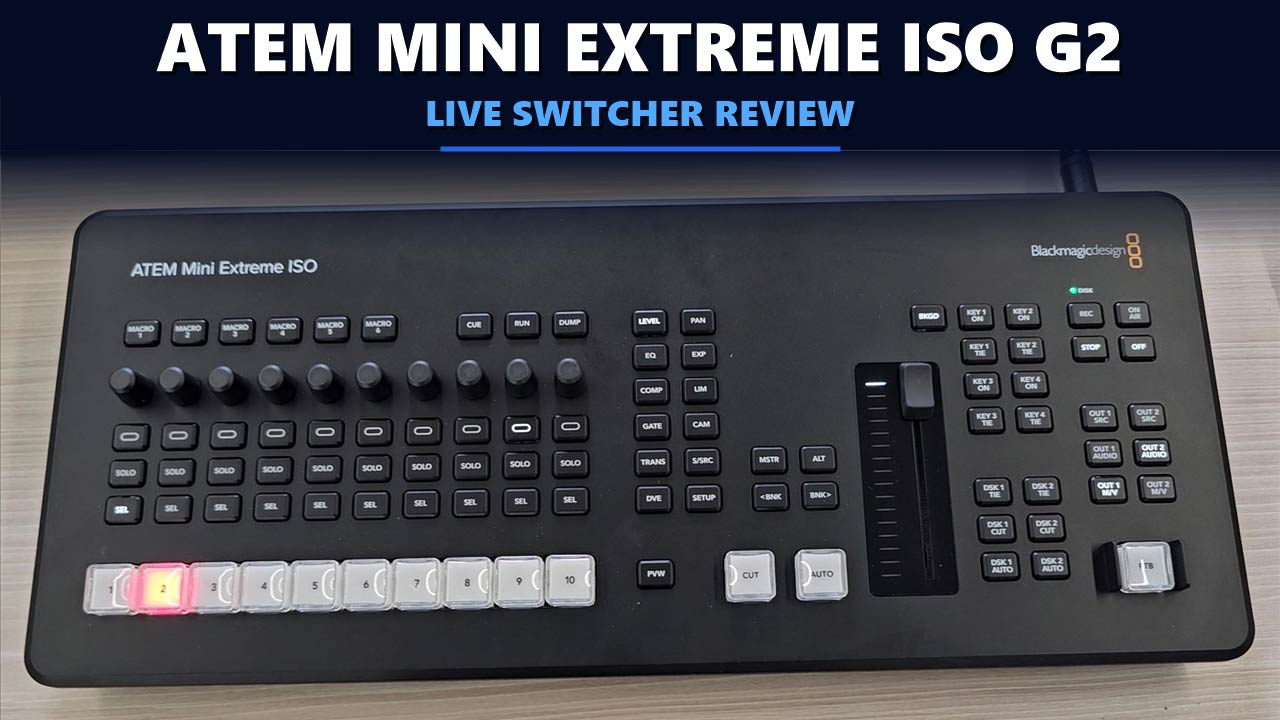

A live production switcher lets you cut between cameras, add graphics and send the finished show to a stream or a recording, all in real time. The Blackmagic ATEM Mini Extreme ISO G2 is the top model in the ATEM Mini range: 8 HDMI inputs, a built-in streaming engine, professional audio inputs and a recorder that saves every camera as its own file.
We have the ATEM Mini Extreme ISO G2 on our desk. This review walks through the box and the control panel with our own photos, and takes every specification from Blackmagic Design’s official technical specifications so you can decide whether it fits your studio.
Key Takeaways
- What it is: the ATEM Mini Extreme ISO G2 is a compact HD live production switcher with a built-in control panel.
- Video: 8 HDMI inputs, each with its own standards converter, and 3 HDMI outputs.
- Recording: ISO recording of all 8 inputs plus the program, to a CFexpress card or a USB-C disk.
- Audio: 2 XLR combo inputs with +48 V phantom power, MADI digital audio and a Fairlight mixer.
- Streaming: direct live streaming over RTMP and SRT, plus 2 USB-C webcam outputs.
- Main limits: HD only (up to 1080p60), HDMI inputs only, and a much higher price than the ATEM Mini Extreme.
Disclosure: This post contains affiliate links. If you buy through them, we may earn a commission at no extra cost to you.
ATEM Mini Extreme ISO G2 Review: A Broadcast Studio in One Panel
Quick Verdict
The ATEM Mini Extreme ISO G2 is built for multi-camera shows that need to be streamed live and edited afterwards. It switches 8 HDMI sources, records each one as a separate file, saves a DaVinci Resolve project of the whole show, and adds XLR audio, Thunderbolt and 10G Ethernet that the older ATEM Mini models do not have. It is an HD switcher with HDMI inputs only, so it is not the choice for Ultra HD or SDI workflows.
- Best for: multi-camera live streams, podcasts and talk shows, events, churches and schools that also want to re-edit the show
- Not for: Ultra HD production, SDI camera setups, or simple two-camera streams where a smaller ATEM Mini does the job

ATEM MINI EXTREME ISO G2
Blackmagic Design ATEM Mini Extreme ISO G2
✔ 8 HDMI inputs ✔ ISO recording of every input ✔ Built-in streaming
Price and stock change often. The button shows today’s price on Amazon.
📋 Key Specifications
| Type | HD live production switcher with built-in control panel |
| HDMI inputs | 8 × HDMI type A, 10-bit HD |
| HDMI outputs | 3 |
| Video standards | 720p and 1080i inputs accepted; 1080p output up to 60 fps |
| Audio inputs | 2 × XLR combo with +48 V phantom power, 1 × BNC MADI (32 channels) |
| Audio output | 1 × 6.35 mm headphone jack |
| Audio mixer | Fairlight, 26 inputs × 2 channels, 6-band EQ, compressor, gate, limiter |
| Recording | CFexpress slot and USB-C; 8 ISO inputs plus program as H.264 .mp4 |
| Streaming | RTMP and SRT over Ethernet or a shared USB-C internet connection |
| Webcam output | 2 × USB-C, 720p or 1080p |
| Computer ports | 2 × USB-C 3.1 Gen 1, 1 × Thunderbolt |
| Ethernet | 1 × 1G and 1 × 10G |
| Keyers | 4 upstream, 2 downstream, up to 4 advanced chroma keyers |
| Multiview | 4, 7, 10, 13 or 16 views |
| Power | External 12 V supply, 120 W maximum |
| Warranty | 1 year limited manufacturer’s warranty |
Source: Blackmagic Design, ATEM Mini Extreme ISO G2 technical specifications.
📦 What’s in the Box
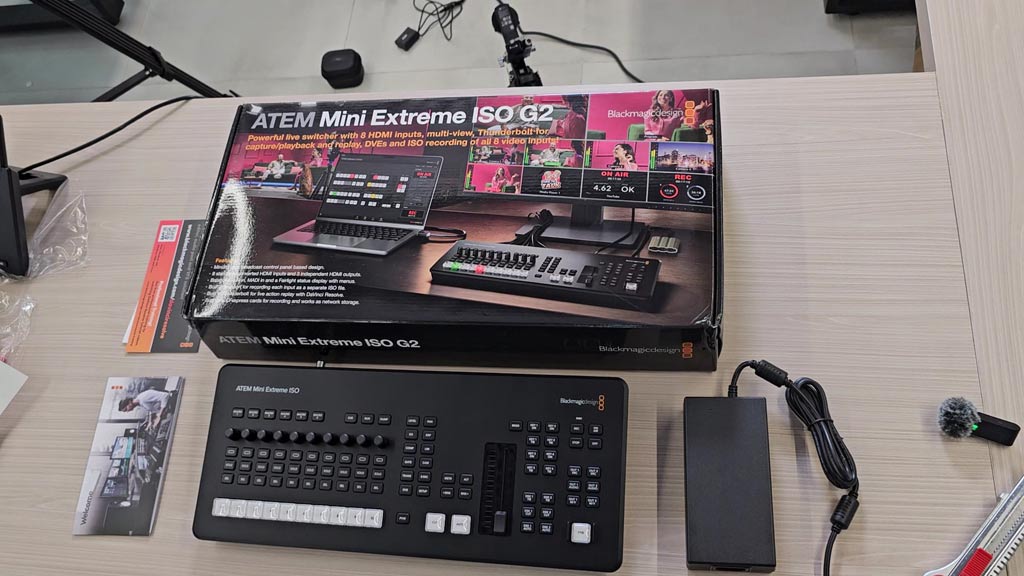
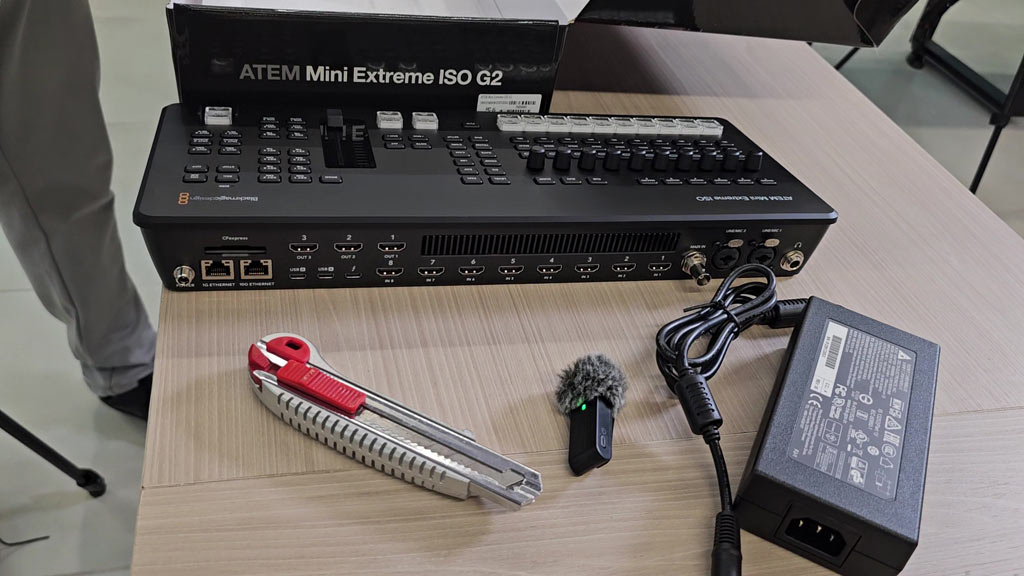
The ATEM Mini Extreme ISO G2 comes in a long, flat retail box. The front names the model and sums it up in one line: a live switcher with 8 HDMI inputs, multiview, Thunderbolt for capture, playback and replay, DVEs and ISO recording of all 8 video inputs. According to Blackmagic Design, the box contains:
- ATEM Mini Extreme ISO G2 switcher
- External 12 V DC power supply
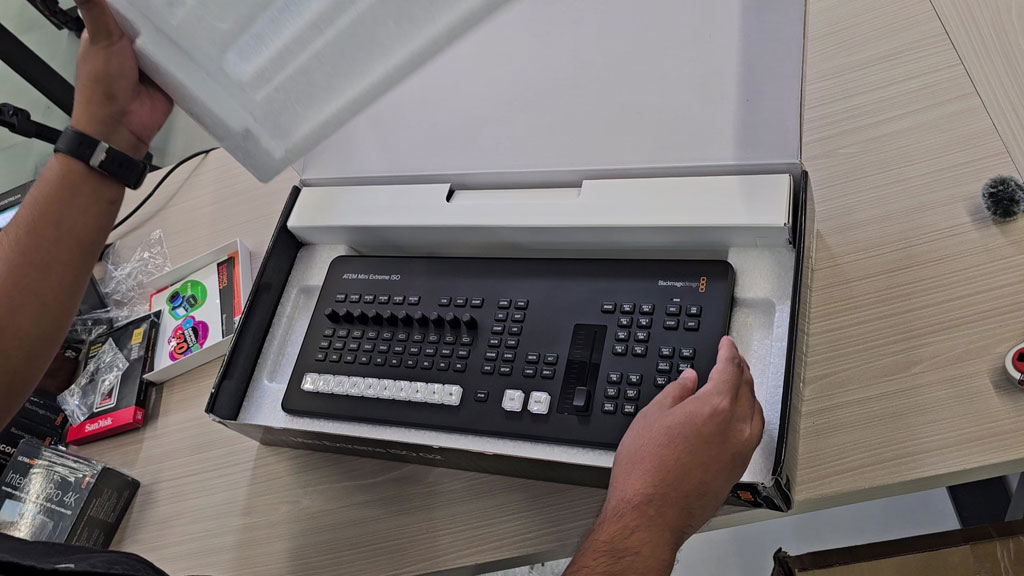
Inside, the switcher sits in a moulded foam tray, and the power supply is packed separately in the same box. Our box also had a welcome card. HDMI cables, storage media and microphones are not included, so plan for those separately.
🎛️ Control Panel and Design
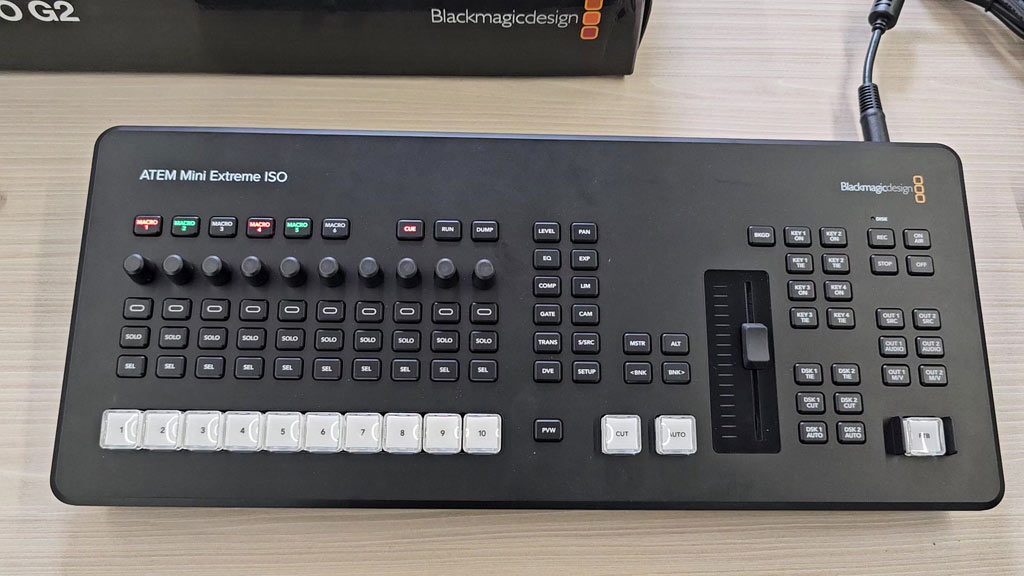
The whole top of the unit is the control panel, so there is no separate box to connect. On our unit, the layout reads from top to bottom: six macro buttons, a row of ten audio knobs, rows of on, SOLO and SEL buttons for each audio channel, and a row of ten large, backlit source buttons numbered 1 to 10. To the right sit the CUT and AUTO buttons, the transition fader, and the buttons for the keyers.
Blackmagic lists 10 direct cross points, 6 dedicated macro buttons, 8 key buttons, 6 AUX buttons, a fader bar, and separate record and stream buttons. The source buttons are large enough to find by touch, which matters when you are watching the cameras and not the panel.
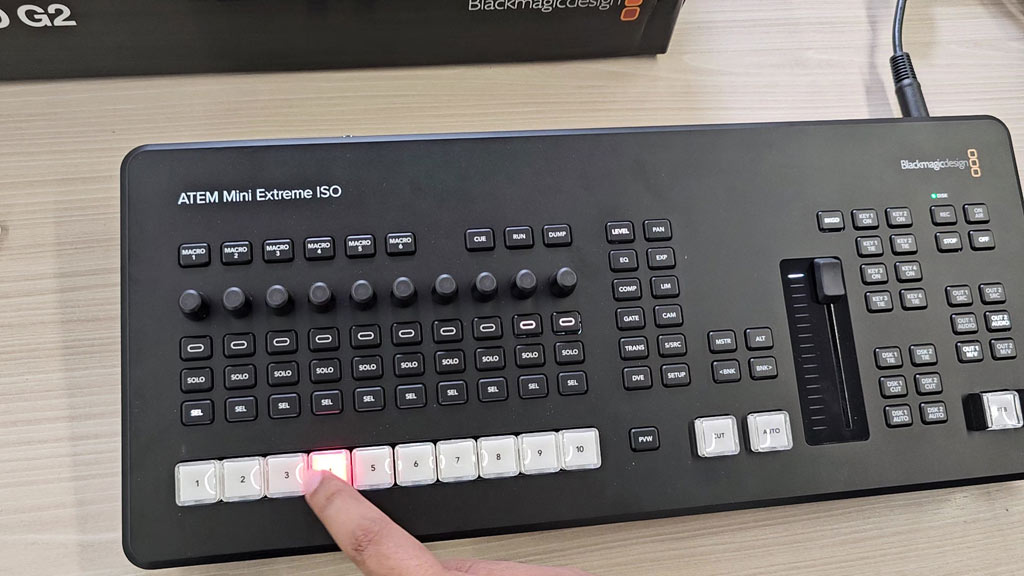
You can also run it from a computer. ATEM Software Control for Mac and Windows is included free, and the switcher works with Blackmagic’s optional hardware panels.
🎥 Video Inputs and Outputs
There are 8 HDMI inputs, and each one has its own re-sync and its own frame rate and format converter. In practice you can mix cameras, computers and game consoles that output 720p, 1080i or 1080p, and the switcher converts each one to the format of your show.
The 3 HDMI outputs are independent. Each can show the program, a camera or the multiview, which displays up to 16 views at once: program, preview, all 8 inputs, media players, and streaming, recording and audio status. Video is processed in 10-bit 4:2:2, and the outputs run at 1080p up to 60 frames per second.
🎤 Audio
Audio is the biggest step up from the earlier ATEM Mini models. The G2 has two balanced XLR combo inputs with +48 V phantom power, so professional microphones connect directly. A BNC MADI input brings in up to 32 more channels of digital audio, and the headphone output is a full-size 6.35 mm jack.
The built-in Fairlight mixer handles 26 stereo inputs, with a 6-band parametric EQ, compressor, gate and limiter on each channel. If you need more microphones than the two XLR inputs allow, a small analog mixer such as the one in our Yamaha MG10XU review can feed its main output into them. For monitoring, a closed-back headphone like the one in our Audio-Technica ATH-M30x review plugs into the 6.35 mm jack with its screw-on adapter.
💾 ISO Recording
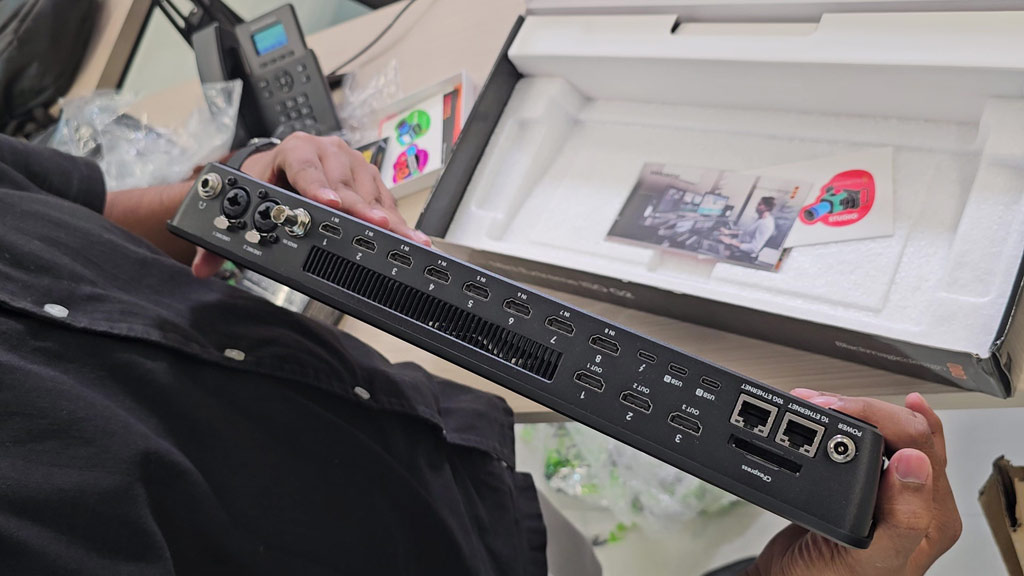
“ISO” means isolated recording. While you switch the live show, the G2 records every input as its own file, so you can fix or re-edit the show later. It records to a CFexpress card in the built-in slot or to a USB-C disk. Each recording includes:
- All 8 HDMI inputs as separate H.264 .mp4 files, at up to 70 Mb/s
- The program output as its own H.264 .mp4 file
- The audio inputs as separate 24-bit 48 kHz .wav files
- A DaVinci Resolve project file with every cut you made
Open the project in DaVinci Resolve and the whole show appears as an edit, ready for you to change shots, fix mistakes or remix the sound.
📡 Streaming and Webcam Output
The streaming engine is built in, so you do not need a computer or streaming software to go live. It streams directly using RTMP or SRT over Ethernet, or over an internet connection shared through USB-C. The two USB-C ports can also act as webcam outputs at 720p or 1080p, which is how you bring the switched show into Zoom, Teams or any other app that accepts a webcam.
It works the other way too. The switcher can receive up to 8 streaming sources from compatible Blackmagic Design cameras over a local network or the internet, and map them to its inputs as remote cameras.
⚡ Thunderbolt and 10G Ethernet
Two connections set the G2 apart from every other ATEM Mini. The Thunderbolt port handles fill and key video out, video in, Ethernet to storage and power through a single cable. Blackmagic describes it on the box as the connection for capture, playback and replay.
There are also two Ethernet ports. The 1G port is for streaming, control panels and the internet connection. The 10G port is for recording, and it gives other computers fast access to the storage in the switcher over the network.
✨ Keyers, Effects and Graphics
- 4 upstream keyers and 2 downstream keyers for titles, logos and lower thirds
- Up to 4 advanced chroma keyers for green screen work
- SuperSource and 2 DVEs for picture-in-picture layouts with several cameras on screen
- 2 media players with fill and key, and a media pool that holds 20 still images
- Camera control of focus, iris, zoom and colour on compatible Blackmagic Design cameras
Pros and Cons
The strengths and the trade-offs of the ATEM Mini Extreme ISO G2 at a glance
👍 WHAT WE LIKE
✔ 8 HDMI inputs. Each one has its own standards converter.
✔ ISO recording. Every input, the program and a DaVinci Resolve project are saved.
✔ Professional audio. XLR inputs with phantom power, MADI and a Fairlight mixer.
✔ Built-in streaming. RTMP and SRT with no computer needed.
✔ Fast connections. Thunderbolt, 10G Ethernet and a CFexpress slot.
✔ All-in-one panel. Large source buttons, macros and a transition fader.
👎 WHAT TO KNOW
✘ HD only. Outputs and streams top out at 1080p60.
✘ HDMI inputs only. There are no SDI video inputs.
✘ Higher price. It costs much more than the ATEM Mini Extreme.
✘ No timecode or reference input. Both are listed as “None”.
✘ Media not included. You supply the CFexpress card or USB-C disk.
In short: a complete HD studio with recording of every camera. The limits are HD resolution, HDMI-only inputs and the price.
⚖️ ATEM Mini Extreme ISO G2 vs ATEM Mini Extreme
| Feature | Extreme ISO G2 | Extreme |
|---|---|---|
| HDMI inputs | 8 | 8 |
| HDMI outputs | 3 | 2 |
| Audio inputs | 2 × XLR combo, MADI | 2 × 3.5 mm |
| Headphone jack | 6.35 mm | 3.5 mm |
| ISO recording | 8 inputs + program | Program only |
| Recording media | CFexpress, USB-C | USB-C |
| Thunderbolt | Yes | No |
| Ethernet | 1G + 10G | 1G |
| Audio mixer | 26 inputs | 11 inputs |
| Power use | 120 W max | 36 W |
| List price | US$2,245 | US$1,249 |
Both columns come from Blackmagic Design’s technical specifications. List prices are the ones shown on Blackmagic’s site when we wrote this and can change.
Who Should Buy the G2?
- Studios that stream live and also publish an edited version
- Shows with five to eight cameras or computer sources
- Productions that use XLR microphones
- Teams that edit in DaVinci Resolve
Who Should Skip It?
- Anyone who needs Ultra HD output
- Setups built on SDI cameras
- Streamers who never re-edit, who can save money with the ATEM Mini Extreme
❓ Frequently Asked Questions
What does ISO mean on the ATEM Mini Extreme ISO G2?
ISO means isolated recording. The switcher records each of its 8 HDMI inputs as a separate video file, as well as the program output.
Does the ATEM Mini Extreme ISO G2 support 4K?
No. It is an HD switcher. Its outputs, streams and recordings are 1080p at up to 60 frames per second.
How many cameras can you connect?
Eight, over HDMI. It can also receive up to 8 streaming sources from compatible Blackmagic Design cameras.
Can it stream without a computer?
Yes. The built-in streaming engine sends RTMP or SRT directly over Ethernet or a shared USB-C internet connection.
Does it have XLR microphone inputs?
Yes. It has two balanced XLR combo inputs with +48 V phantom power.
What does it record to?
A CFexpress card in the built-in slot, or an external disk connected by USB-C.
Related Reviews
- Yamaha MG10XU Review – a 10-channel audio mixer with effects and USB
- Audio-Technica ATH-M30x Review – a budget studio headphone for monitoring
✅ Bottom Line
The Blackmagic ATEM Mini Extreme ISO G2 puts a multi-camera studio into one panel: 8 HDMI inputs, built-in streaming, XLR audio and a recorder that keeps every camera as its own file. If you stream live and then edit, that combination is hard to match. If you only stream and never re-edit, the ATEM Mini Extreme gives you the same 8 inputs for much less. And if you need Ultra HD or SDI, this is not the right switcher.
ATEM MINI EXTREME ISO G2
Blackmagic Design ATEM Mini Extreme ISO G2
✔ 8 HDMI inputs ✔ ISO recording of every input ✔ Built-in streaming
Price and stock change often. The button shows today’s price on Amazon.

About the Author: Jason
I am a tech enthusiast and the reviewer behind Tech Buying Today. I photographed this ATEM Mini Extreme ISO G2 and its box myself, and the specifications in this review come from Blackmagic Design’s official technical specifications. Before I recommend anything, I compare the specifications, read the fine print and look for the trade-offs, then write it up in plain language so you can decide quickly.
Learn more about Tech Buying Today and how we choose what to recommend.