

Upgrading your Spectrum internet plan won’t make much difference if your router can’t keep up. Slow speeds, buffering, and dead zones are usually caused by outdated equipment rather than the internet service itself. The right spectrum wifi 6 router delivers faster speeds, better multi-device performance, and more reliable coverage so you actually get what you’re paying for when streaming, gaming, working from home, or just browsing.
Spectrum WiFi-6 Router: 5 Picks That Get More From Your Plan
Spectrum uses cable internet, which means most WiFi-6 routers require a separate DOCSIS 3.1 modem to connect to the service. You can’t plug a standard router directly into the cable outlet. But once paired with a compatible modem, these routers work cleanly with Spectrum and stay backward compatible with all your existing devices. Many also support mesh expansion, VPN features, and smart traffic management for everything from small apartments to large homes.
Quick Top 5:
- TP-Link Archer AX55 Pro (Best All-Round Spectrum WiFi 6 Router)
- ASUS RT-AX86U Pro (Best for Gaming on Spectrum)
- TP-Link Archer AX73 (Best Long-Range Coverage)
- TP-Link Archer AX21 (Best Budget Spectrum WiFi 6 Router)
- ASUS RT-AX68U (Best for Smart Homes on Spectrum)
Why Your Current Router Is Holding Back Your Spectrum Plan
Most ISP-provided routers are designed to be cheap and functional, not fast. When you upgrade your Spectrum plan but keep the same old hardware, you’re still living with the limitations of that old equipment. A spectrum wifi 6 router fixes the bottleneck by handling more devices simultaneously, reducing interference, and pushing faster speeds to every corner of your home.
What most Spectrum users get wrong:
- Keeping the ISP-provided router even after upgrading to a faster plan
- Buying a router without a separate DOCSIS 3.1 modem, which is required for Spectrum cable internet
- Choosing based on speed numbers alone without checking device capacity or coverage area
- Not enabling WiFi 6 features like OFDMA and MU-MIMO which are why multi-device performance improves
Why WiFi 6 routers are the right upgrade for Spectrum right now:
- OFDMA lets the router handle many devices at once without them competing for bandwidth
- WPA3 security is stronger and handles Spectrum’s recommended security settings better
- Dual-band and the efficiency improvements in WiFi 6 make real-world performance better even on existing devices
- Routers compatible with spectrum cable internet pair cleanly with any approved DOCSIS 3.1 modem
Who this guide is for:
- Spectrum subscribers who feel like they’re not getting the speeds they’re paying for
- Households with many connected devices across streaming, gaming, and smart home gear
- Remote workers who need stable Spectrum wifi 6 router setup for daily video calls
- Anyone tired of the ISP-provided hardware and ready to take control of their home network
This guide helps you find the right best wifi 6 router for spectrum based on your home size, device count, and what you actually use your internet for.
Top 5 Best Spectrum WiFi 6 Routers
Disclosure: This post contains affiliate links. As an Amazon Associate I earn from qualifying purchases. If you purchase through our links, we may earn a small commission at no extra cost to you. We only recommend products we genuinely stand behind.
Every router here was selected based on real-world Spectrum compatibility, multi-device performance, coverage quality, and the practical features that matter for everyday Spectrum subscribers. All require a separate DOCSIS 3.1 modem for Spectrum cable internet service.
#1 TP-Link Archer AX55 Pro : Best All-Round Spectrum WiFi-6 Router
Overview: Dual-band WiFi 6 AX3000 router with two 2.5 Gbps ports | Medium to large homes | Multi-gigabit wired connections, VPN, USB 3.0, Alexa compatible | Works with Spectrum when paired with a DOCSIS 3.1 modem | Best all-round spectrum wifi 6 router for households who want fast wireless and multi-gig wired performance together.

Best deal today – prices may change
Key Benefits: Two 2.5 Gbps ports let wired devices like gaming PCs and NAS drives connect at speeds well above standard Gigabit | OFDMA and MU-MIMO handle many simultaneous wireless connections without slowing anyone down | VPN support is built in so remote workers get secure connections without extra hardware | Alexa compatible for basic voice-controlled network management | WPA3 keeps the Spectrum connection secure.
Pros: Dual 2.5G ports at this price is exceptional value | Built-in VPN with OFDMA makes it strong for both gaming and remote work.
Cons: USB 3.0 port is useful but the storage sharing performance is limited compared to a dedicated NAS.
Best For: Spectrum subscribers who want multi-gig wired ports alongside strong WiFi 6 wireless | Remote workers and gamers needing VPN and fast simultaneous connections on Spectrum cable internet.
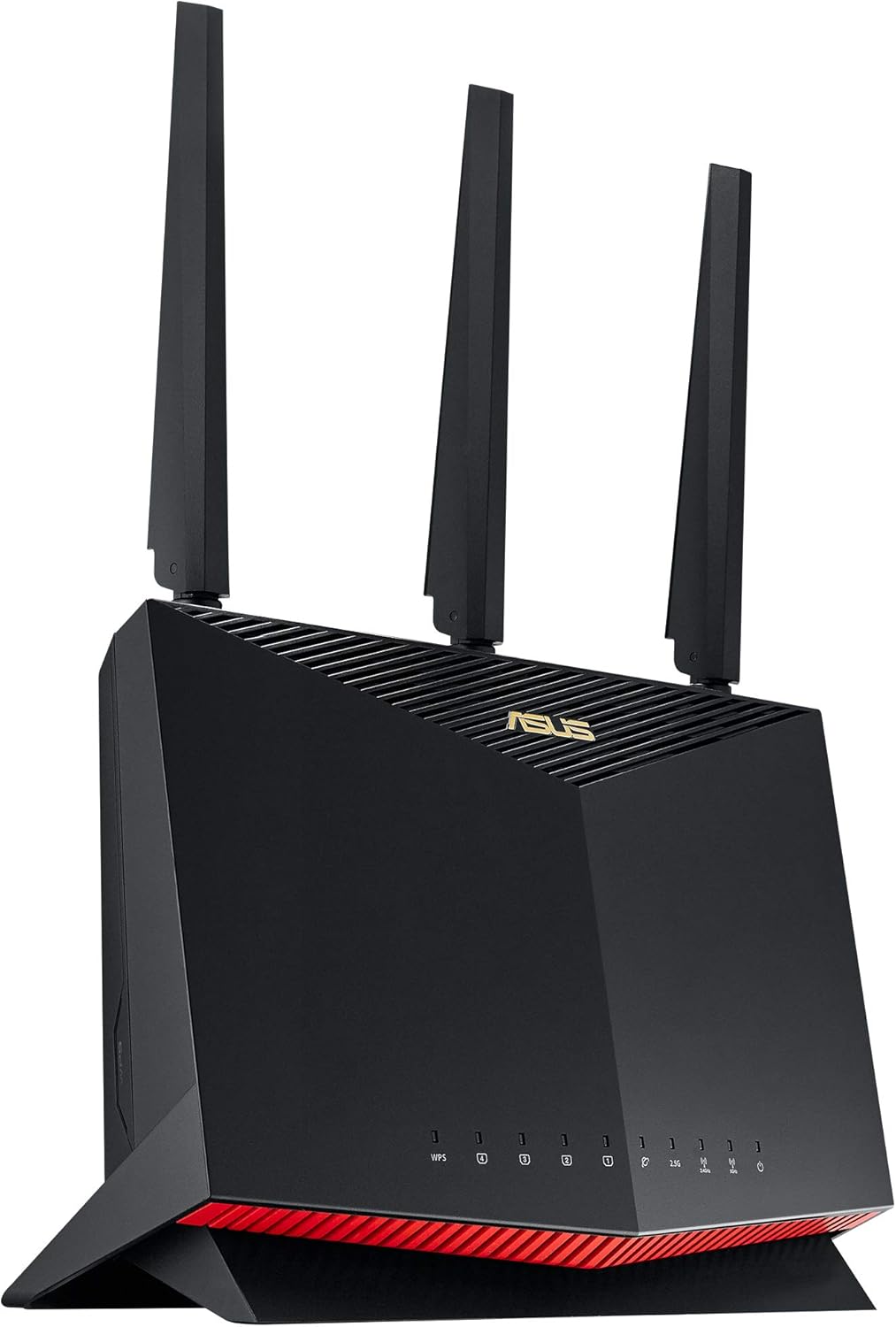
#2 ASUS RT-AX86U Pro : Best for Gaming on Spectrum
Overview: Dual-band WiFi 6 AX5700 gaming router with 2.5G port and dedicated gaming port | Medium to large homes | Mobile Game Mode, port forwarding, subscription-free AiProtection, AiMesh | Works with Spectrum via DOCSIS 3.1 modem | Best spectrum compatible wifi 6 router for gamers who want hardware-level traffic prioritization alongside Spectrum cable speeds.
Best deal today – prices may change
Key Benefits: Dedicated gaming port with hardware-level traffic prioritization keeps gaming latency consistent even when other household members are actively streaming or downloading | 2.5G WAN port handles Spectrum’s faster multi-gig plans without bottlenecking | Subscription-free AiProtection covers every device on the network with security monitoring at no extra annual cost | Mobile Game Mode reduces ping for mobile gaming devices | AiMesh expands coverage to larger homes without replacing the router.
Pros: Dedicated gaming port is hardware-level prioritization, not just a software label | Subscription-free AiProtection is a meaningful long-term cost advantage.
Cons: Higher price tier than the other routers on this list, which is more than casual users need.
Best For: Competitive gamers on Spectrum who want dedicated gaming traffic management | Households where gaming and streaming compete for bandwidth simultaneously.
Want to see how ASUS gaming routers compare across the full WiFi 6 and WiFi 7 lineup? Read our guide on the best ASUS WiFi 7 router for a full breakdown of every ASUS networking option.
#3 TP-Link Archer AX73 : Best Long-Range Coverage for Spectrum
Overview: Dual-band WiFi 6 AX5400 router built specifically for long-range coverage and streaming | Large homes | Strong signal reach, Gigabit WAN, dual-band | Works with Spectrum via DOCSIS 3.1 modem | Best spectrum wifi 6 router for large homes or multi-story properties where signal reach matters as much as speed.

Best deal today – prices may change
Key Benefits: AX5400 dual-band speed gives strong headroom for streaming, gaming, and browsing simultaneously without congestion | Long-range antenna design pushes signal further through walls and across floors than standard routers in this class | Gigabit WAN handles Spectrum’s standard and mid-tier cable plans cleanly | OFDMA manages multiple device connections without slowing peak performance | EasyMesh compatible for adding coverage nodes if one router doesn’t reach every room.
Pros: Long-range antenna design is the standout feature for larger homes | AX5400 speed handles Spectrum streaming plans without issue.
Cons: No 2.5G WAN port so users on Spectrum’s faster multi-gig tiers may see a hardware ceiling.
Best For: Spectrum subscribers in large homes or multi-story properties where coverage reach is the main problem | Households with many wireless devices spread across different rooms and floors.
#4 TP-Link Archer AX21 : Best Budget Spectrum WiFi 6 Router
Overview: Dual-band WiFi 6 AX1800 router with EasyMesh, Alexa support, and free expert help | Apartments and medium homes | Easy setup, Gigabit WAN, EasyMesh expansion | Works with Spectrum via DOCSIS 3.1 modem | The most affordable spectrum wifi 6 router setup option for standard Spectrum plans in smaller spaces.

Best deal today – prices may change
Key Benefits: AX1800 WiFi 6 handles standard Spectrum internet plans cleanly without paying for speed headroom that a basic cable plan never delivers | EasyMesh support means coverage expands by adding a node later without replacing the router | Alexa compatible for basic hands-free controls | Free expert support from TP-Link removes the setup barrier for first-time WiFi 6 buyers | WPA3 security keeps the Spectrum connection protected.
Pros: Most accessible price on this list with genuine WiFi 6 features | EasyMesh and Alexa support make it more capable than budget pricing suggests.
Cons: AX1800 speed is sufficient for standard Spectrum plans but limiting for multi-gig internet tiers.
Best For: Budget-conscious Spectrum subscribers in apartments or medium homes | Anyone installing spectrum internet for the first time who wants a straightforward, affordable WiFi 6 upgrade.
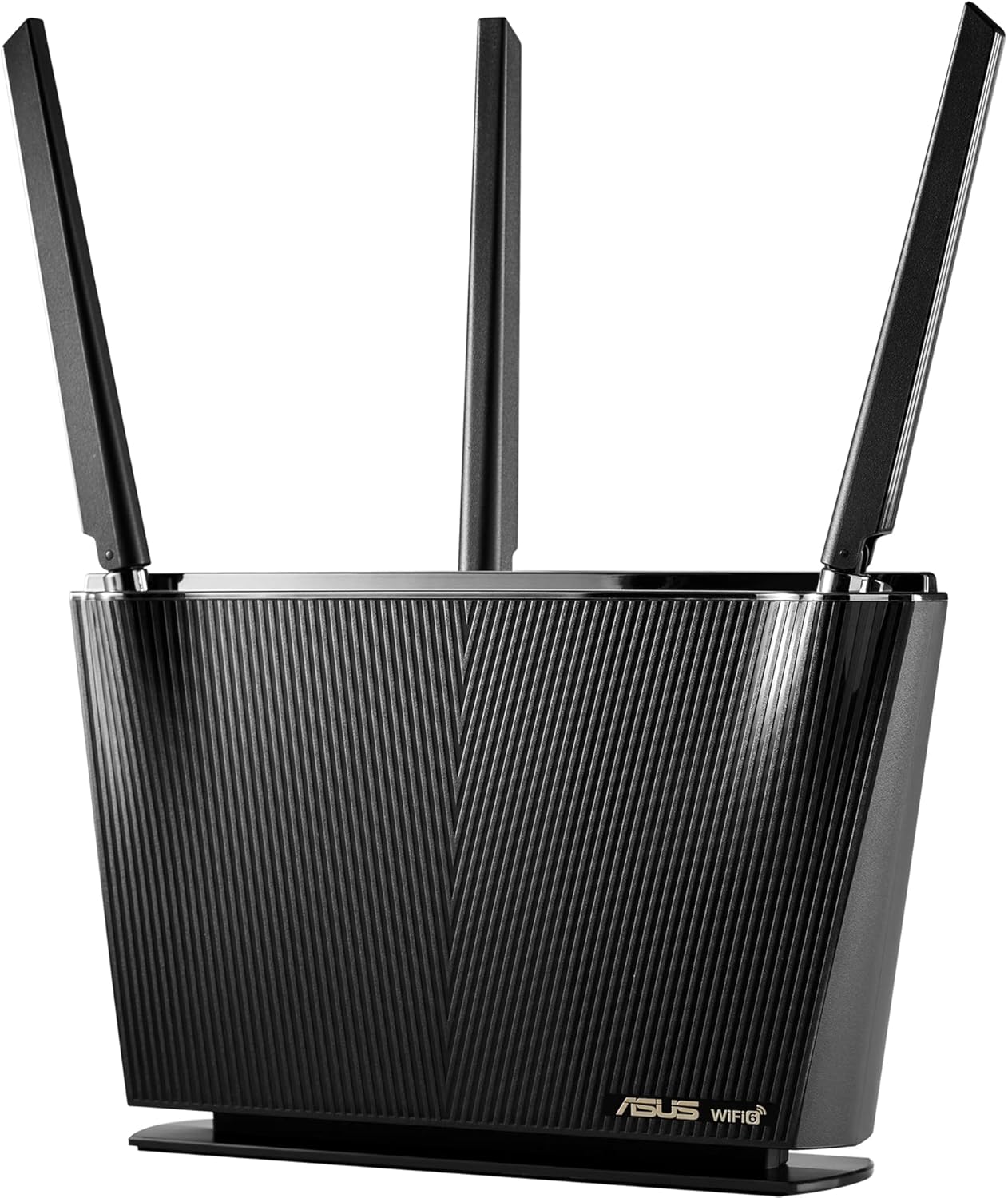
#5 ASUS RT-AX68U : Best for Smart Homes on Spectrum
Overview: Dual-band WiFi 6 AX2700 router with Trend Micro Lifetime AiProtection, AiMesh, and parental controls | Medium to large homes | 4 Gigabit LAN ports, OFDMA, WAN Aggregation | Works with Spectrum via DOCSIS 3.1 modem | Best spectrum compatible wifi 6 router for smart home households who want lifetime security and parental controls alongside Spectrum cable internet.
Best deal today – prices may change
Key Benefits: Trend Micro Lifetime AiProtection covers every smart device on the network with real-time threat monitoring at zero ongoing cost, which matters when cameras, locks, and sensors are all connected | AiMesh expands coverage as the smart home grows into more rooms | Parental controls are managed through the ASUS app without a third-party service | OFDMA handles many simultaneous IoT device connections without congestion | WAN Aggregation supports faster wired connections for setups that need it.
Pros: Lifetime AiProtection with no subscription is the strongest security value on this list | AiMesh and parental controls make it the most complete smart home option here.
Cons: AX2700 speed suits standard Spectrum plans well but isn’t the best choice for multi-gig cable tiers.
Best For: Smart home households on Spectrum who want lifetime security coverage with no annual fee | Families who need parental controls and AiMesh expansion alongside their Spectrum cable service.
Quick Comparison Table
| Rank & Model | WiFi Standard & Speed | Coverage & Ports | Best For |
|---|---|---|---|
| #1 TP-Link AX55 Pro | WiFi 6 Dual-Band • AX3000 | Medium-Large • 2×2.5G + Gigabit | Best all-round Spectrum router |
| #2 ASUS RT-AX86U Pro | WiFi 6 Dual-Band • AX5700 | Medium-Large • 2.5G + Gaming Port | Gaming on Spectrum |
| #3 TP-Link AX73 | WiFi 6 Dual-Band • AX5400 | Large • Gigabit | Long-range coverage |
| #4 TP-Link AX21 | WiFi 6 Dual-Band • AX1800 | Apartments/Medium • Gigabit | Budget Spectrum setup |
| #5 ASUS RT-AX68U | WiFi 6 Dual-Band • AX2700 | Medium-Large • 4× Gigabit | Smart home security |
This guide helps you choose the right spectrum wifi-6 router based on your home size, Spectrum plan tier, device count, and what you primarily use your connection for.
What to Look for When Buying a Spectrum WiFi 6 Router
Spectrum Requires a Separate DOCSIS 3.1 Modem
This is the most important thing to know before buying. None of these routers connect directly to Spectrum’s cable outlet. You need a separate DOCSIS 3.1 approved modem, either purchased or rented from Spectrum. Once paired with an approved modem, any of these routers work cleanly with Spectrum cable internet. Check Spectrum’s approved modem list before purchasing if you’re buying your own modem.
Match the Router Speed to Your Spectrum Plan
- On Spectrum’s standard 300-500 Mbps plans? AX1800 or AX2700 covers it cleanly
- On Spectrum’s Gigabit plan? AX3000, AX5400, or AX5700 gives proper headroom
- On Spectrum’s multi-gig tier? Look for a 2.5G WAN port like the AX55 Pro or RT-AX86U Pro
Features Worth Having for Spectrum Subscribers
- OFDMA handles many simultaneous device connections without throttling anyone’s speed, which matters for smart home setups
- MU-MIMO lets the router serve multiple devices at once rather than one at a time
- EasyMesh or AiMesh expansion means you can add coverage nodes later without replacing the router
- WPA3 is the current recommended security standard and works well with Spectrum’s network settings
Security That Doesn’t Require Annual Fees
Both the ASUS RT-AX86U Pro and RT-AX68U include security monitoring at no ongoing subscription cost. For smart home households where many IoT devices are connected, this long-term cost advantage is meaningful.
How These Routers Were Selected
Every router here was evaluated specifically for Spectrum cable internet compatibility, real-world performance for the device loads typical in Spectrum households, and practical feature value relative to price. Routers that require specific ISP equipment not compatible with Spectrum’s DOCSIS infrastructure were not included. Speed ratings were matched to common Spectrum plan tiers rather than theoretical maximums to give realistic recommendations.
Key selection factors:
- Compatibility with Spectrum cable internet via DOCSIS 3.1 modem pairing
- WiFi 6 speed tier relative to common Spectrum plan offerings
- Multi-device handling through OFDMA and MU-MIMO
- Security model: subscription-free, lifetime, or standard
- Mesh expansion support for growing households
- Price relative to the Spectrum plan tier the router is most appropriate for
How to Get the Most From Your Spectrum WiFi 6 Router
Initial Setup for Spectrum
- Connect the DOCSIS 3.1 modem to the cable outlet first and confirm it’s activated by Spectrum before connecting the router
- Connect the router to the modem via Ethernet and run the manufacturer’s app setup flow for the cleanest initial configuration
- Update router firmware immediately after setup because performance and security patches are often waiting from day one
Placement Tips for Spectrum Homes
- Place the router centrally in your home rather than near the cable outlet if possible because central placement reduces the average distance to all devices
- Avoid placing inside media cabinets or on the floor because enclosed spaces and floor placement both reduce wireless signal quality significantly
- For large homes using EasyMesh or AiMesh, space the primary router and secondary node to cover the home in two zones rather than placing them near each other
Mistakes Spectrum Subscribers Make
- Not registering the DOCSIS modem with Spectrum before connecting the router, which prevents the internet service from activating properly
- Plugging the router into the cable outlet directly instead of into the modem, which doesn’t work with Spectrum’s cable service
- Leaving both the router’s 2.4GHz and 5GHz networks named the same when specific devices need to connect to a particular band for best performance
- Not enabling OFDMA in the router settings because on some models it isn’t active by default
Tips for Better Spectrum Performance Daily
- Connect smart home devices to 2.4GHz for better range and reserve 5GHz for gaming consoles, laptops, and streaming devices that need the higher speed
- Wire gaming PCs and 4K streaming devices directly to the router’s Gigabit or 2.5G ports whenever cable runs are practical
- Use the router app to check which devices are consuming the most bandwidth and identify unexpected heavy users
- Restart the router once a week if you have many connected devices because connection table clearing keeps per-device performance consistent
Signs Your Spectrum Router Is Working Right
- Speed tests from a wired device show speeds close to your Spectrum plan tier
- Streaming and video calls work without buffering even during peak household usage hours
- Smart home devices stay connected reliably without random dropouts
- Gaming ping stays consistent even when other household members are streaming simultaneously
How to Pick the Right Spectrum WiFi 6 Router for Your Home
Spectrum plan tier first: On Spectrum’s standard plans below 500 Mbps? TP-Link AX21 or ASUS RT-AX68U cover it cleanly at reasonable prices. On the Gigabit plan? TP-Link AX73 or ASUS RT-AX86U Pro. On Spectrum’s multi-gig tier? TP-Link AX55 Pro with its 2.5G ports or the RT-AX86U Pro.
Gaming or smart home: Gaming on Spectrum? The ASUS RT-AX86U Pro’s dedicated gaming port and hardware traffic prioritization are built for exactly that. Smart home with many IoT devices? The ASUS RT-AX68U’s Lifetime AiProtection and AiMesh cover every connected device without annual fees.
Budget or long-range coverage: Smaller space or tighter budget? The TP-Link AX21 is the most accessible WiFi 6 upgrade for standard Spectrum plans. Large home where signal reach is the main problem? The TP-Link AX73’s long-range antenna design addresses that directly.
Must-have features for Spectrum subscribers: OFDMA for multi-device performance, a WAN port matched to your plan tier, EasyMesh or AiMesh compatibility for future expansion, and WPA3 security.
Important reminder: All five routers require a separate DOCSIS 3.1 modem for Spectrum cable internet. None connects directly to the cable outlet. Check Spectrum’s modem compatibility list before purchasing if you plan to buy your own modem rather than rent from Spectrum.
Thinking about upgrading your whole Spectrum home network? Read our guide on the best WiFi 7 router under $300 to see whether moving to WiFi 7 makes sense for your current Spectrum plan.
Real User Feedback
- TP-Link AX55 Pro owners on Spectrum Gigabit plans say the dual 2.5G ports were the main reason they chose it, and that wired speed tests finally matched what Spectrum was advertising after switching from their ISP-provided router.
- ASUS RT-AX86U Pro gamers on Spectrum report that the dedicated gaming port made peak-hour ping noticeably more consistent, and that subscription-free AiProtection covering every device on the network was an unexpected daily benefit they now rely on.
- TP-Link AX73 buyers in larger homes say the long-range antenna design reached rooms that their previous router couldn’t, and that streaming in the far bedroom finally ran without buffering after positioning the router centrally in the home.
- TP-Link AX21 first-time WiFi 6 buyers on standard Spectrum plans say the setup was faster than any previous router they’d installed, and that free TP-Link expert support answered their Spectrum modem pairing question within minutes.
- ASUS RT-AX68U smart home households say Lifetime AiProtection covering their cameras, locks, and sensors without an annual fee was the feature that justified the purchase, and that the ASUS app’s parental controls removed the need for a separate third-party service.
- Across all five routers, Spectrum subscribers consistently note that the biggest performance improvement came from proper modem registration with Spectrum before connecting the router, and that skipping that step caused activation issues that delayed setup unnecessarily.
Conclusion and Final Recommendation
Your Spectrum plan is only as fast as the hardware delivering it inside your home. The right spectrum wifi 6 router removes the bottleneck between your modem and your devices so you actually experience the speeds you’re paying for. Every router on this list works cleanly with Spectrum cable internet when paired with an approved DOCSIS 3.1 modem, and each one serves a different type of Spectrum subscriber well.
This guide is for:
- Spectrum subscribers tired of speeds that don’t match their plan tier
- Households where gaming, streaming, and smart home devices all compete for bandwidth
- First-time WiFi 6 buyers who want straightforward guidance on spectrum wifi 6 router setup
- Anyone comparing routers compatible with spectrum cable internet across different budgets
Best overall pick: The TP-Link Archer AX55 Pro is the strongest all-round spectrum wifi 6 router on this list. Dual 2.5G ports, built-in VPN, OFDMA, MU-MIMO, and Alexa compatibility together make it the most practical upgrade for most Spectrum households regardless of plan tier. Whether you’re gaming, working from home, or running a busy household, it handles Spectrum’s Gigabit and multi-gig plans without any hardware ceiling.
Short version: Match the router’s WAN port to your Spectrum plan speed. Make sure you have a DOCSIS 3.1 modem before ordering. Register the modem with Spectrum before plugging the router in. Any router on this list delivers a noticeably better Spectrum experience than standard ISP-provided hardware.
Ready to take full control of your Spectrum home network? Browse our complete guide on the best WiFi router for multiple devices to see how WiFi 6 and WiFi 7 routers compare for busy households on any ISP.