
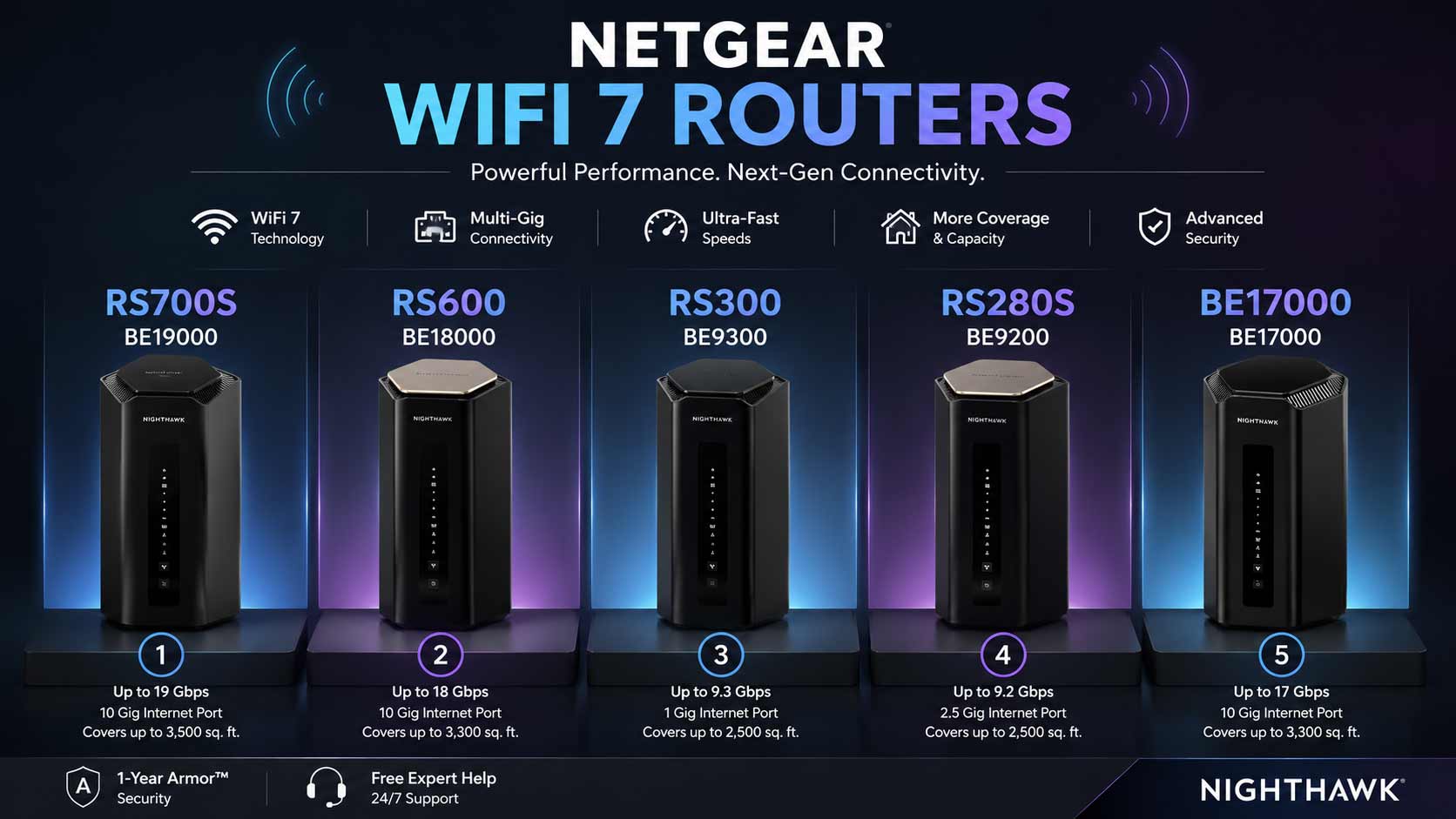

NETGEAR has been one of the most trusted names in home networking for years, and its WiFi 7 Nighthawk lineup is some of the best work the brand has done. Fast tri-band speeds, 10G internet ports, Armor security, VPN support, and coverage that handles very large homes from a single unit. A good NETGEAR wifi router takes everything frustrating about home networking and removes it from your daily life.
NETGEAR Wi-Fi Router: 5 Nighthawk Picks That Actually Deliver
These routers connect directly to your existing modem or ISP gateway and work with all major internet providers. They stay fully backward compatible with every device you already own, so you keep your older phones, laptops, smart TVs, and smart home hardware running exactly as before. Many models include 2.5G and 10G Ethernet ports, VPN support, and built-in security tools, making them suitable for everyday browsing, high-performance gaming, and multi-gig internet plans.
Quick Top 5:
- NETGEAR RS700S (Best Overall NETGEAR WiFi Router)
- NETGEAR RS600 (Best for High Device Count)
- NETGEAR RS300 (Best Value Tri-Band)
- NETGEAR RS280S (Best Mid-Range with Armor)
- NETGEAR BE17000 (Best for Gaming and VPN)
How to Choose the Right NETGEAR WiFi Router
The Core Problem Most Buyers Face
The Nighthawk WiFi 7 lineup is strong but covers a wide range of use cases, and picking the wrong model is where most buyers go wrong. The RS700S and RS600 both have 10G ports but serve different priorities. The RS280S and RS300 both cover 2,500 sq. ft. but handle security very differently. Without a clear decision framework, buyers end up paying for features they don’t need or missing the one that mattered most.
Common mistakes NETGEAR buyers make:
- Buying a 10G WAN model when their internet plan tops out at 500 Mbps
- Choosing based on Armor security without budgeting for the annual renewal after year one
- Picking a model rated for 2,500 sq. ft. when the home is 3,500 sq. ft.
- Overlooking VPN support on the BE17000 when it would have saved the cost of a separate device
Why the WiFi 7 Nighthawk lineup is a genuine upgrade:
WiFi 7 tri-band gives the router three separate bands including 6GHz so gaming, streaming, and smart home traffic don’t compete for the same channel. Compared to older NETGEAR wifi 6 router models or legacy hardware like the netgear ac1750 wifi router or netgear ac1000 wifi router, the Nighthawk WiFi 7 lineup brings lower latency, more device capacity, and 10G port support that older hardware couldn’t offer. The improvement from a legacy netgear r6250 smart wifi router is immediately noticeable in daily use.
Who this guide is for:
- Anyone comparing Nighthawk WiFi 7 models before deciding
- Large households where gaming, streaming, and remote work all compete for bandwidth
- Buyers upgrading from older NETGEAR hardware like netgear ac1000 or ac1750 models
- Anyone who wants a clear specific recommendation instead of a list of specs to decode
This guide gives you a direct answer for each NETGEAR wifi router based on your actual home size, internet plan, and usage priorities.
Top 5 Best NETGEAR WiFi Routers
Disclosure: This post contains affiliate links. As an Amazon Associate I earn from qualifying purchases. If you purchase through our links, we may earn a small commission at no extra cost to you. We only recommend products we genuinely stand behind.
Every router here was selected based on the specific value it delivers for a different type of NETGEAR buyer. Coverage rating, WAN port speed, security model, VPN availability, and device capacity all shaped the final selections.
#1 NETGEAR RS700S : Best Overall NETGEAR WiFi Router
Overview: Tri-band WiFi 7 BE19000 with 10G WAN covering 3,500 sq. ft. | 1-Year Armor and free expert help | All major ISPs | The netgear nighthawk rs700s wifi 7 router is the most complete single-purchase option for power users who want maximum coverage, speed, and security together.

Best deal today – prices may change
Key Benefits: 3,500 sq. ft. coverage is the highest single-router range here so large homes don’t need mesh expansion | 10G WAN delivers full multi-gig plan speed without bottlenecking | Armor monitors every device in real time during year one | Tri-band keeps gaming, streaming, and IoT traffic on separate bands | Free expert setup help is included.
Pros: Highest coverage and fastest speed on this list | 10G WAN handles the fastest residential plans | Armor and expert help from day one.
Cons: Armor renews at an annual cost after the first included year.
Best For: Large homes up to 3,500 sq. ft. on multi-gig plans | Power users who want Armor security and maximum wireless coverage together.
#2 NETGEAR RS600 : Best for High Device Count Without Subscriptions
Overview: Tri-band WiFi 7 BE18000 with 10G WAN covering 3,300 sq. ft. | 150-device capacity | No security subscription | Free expert help | The best netgear wifi router for large households where device count and long-term cost matter more than bundled security.

Best deal today – prices may change
Key Benefits: 150-device capacity is the highest here and handles smart home setups alongside family devices without hitting a connection limit | 10G WAN covers multi-gig plans at full speed | No subscription model means zero annual renewal cost | BE18000 tri-band gives all three bands strong headroom | Free expert help included.
Pros: 150-device capacity is the standout feature for smart home households | No subscription keeps long-term costs lower | 10G WAN matches the RS700S at the port tier.
Cons: No Armor security included so users who want built-in threat monitoring should consider the RS700S.
Best For: Large households with 50 or more simultaneous devices | Smart home setups where device capacity and no recurring fees matter most.
Want to compare the RS600 across the full NETGEAR lineup including mesh options? Read our guide on the best NETGEAR WiFi 7 router for a complete model comparison.
#3 NETGEAR RS300 : Best Value Tri-Band NETGEAR Router
Overview: Tri-band WiFi 7 BE9300 covering 2,500 sq. ft. | 100-device capacity | Universal ISP compatibility | Free expert help | No subscription | The most accessible entry into the NETGEAR wifi router WiFi 7 lineup for buyers who want tri-band performance without 10G port pricing.

Best deal today – prices may change
Key Benefits: Universal ISP compatibility means it connects to any modem or gateway without configuration friction | BE9300 tri-band handles gaming, streaming, and smart home traffic on three separate bands | 100-device capacity suits most average to large households | Free expert setup help removes the barrier for first-time buyers upgrading from older hardware | No subscription requirement keeps ongoing costs zero.
Pros: Universal ISP compatibility removes setup friction | Zero ongoing subscription cost | Free expert help from setup day.
Cons: 2.5G WAN limits users on plans above 2.5 Gbps who need 10G throughput.
Best For: Standard to large homes on Gigabit or mid-tier plans | Buyers who want zero ongoing costs and free expert help with a tri-band WiFi 7 upgrade.
#4 NETGEAR RS280S : Best Mid-Range NETGEAR Router with Armor
Overview: Tri-band WiFi 7 BE9200 with 2.5G WAN covering 2,500 sq. ft. | 1-Year Armor and free expert help | The best value netgear wifi router for buyers who want Armor security included without paying for a 10G port they don’t need yet.
Best deal today – prices may change
Key Benefits: Armor monitors every device in real time and is included from day one without a separate purchase | 2.5G WAN covers the vast majority of current residential internet plans cleanly | Tri-band separates gaming, streaming, and IoT traffic across three bands | 2,500 sq. ft. handles most average to large family homes | Free expert help is included.
Pros: Armor at mid-range pricing is the strongest security value in the NETGEAR WiFi 7 lineup | 2.5G WAN matches most current plans | Free expert help lowers the setup barrier.
Cons: Armor renews annually after year one, worth budgeting when comparing against the RS300.
Best For: Households on standard to 2.5 Gbps plans who want Armor built in | First-time WiFi 7 buyers who want security and expert help from day one.
#5 NETGEAR BE17000 : Best for Gaming and VPN
Overview: Tri-band WiFi 7 gaming router with 17 Gbps combined speed | 10G WAN | Built-in VPN | 150-device capacity covering 3,300 sq. ft. | Free expert help | The best netgear nighthawk ax5400 wifi alternative for users who specifically need VPN built into a 10G capable gaming router.
Best deal today – prices may change
Key Benefits: Built-in VPN removes the need for a separate VPN device for remote workers and gamers accessing geo-restricted servers | 10G WAN delivers full multi-gig plan speed for gaming without bottlenecking | Tri-band gaming architecture dedicates bandwidth to gaming across three bands | 150-device capacity handles large gaming households with consoles, PCs, phones, and smart home gear | Free expert setup help included.
Pros: VPN at 10G port tier is a rare practical combination | Gaming tri-band delivers consistently low latency | 150-device capacity suits large multi-user households.
Cons: No Armor security included so users who want both VPN and threat monitoring need to weigh this against the RS700S.
Best For: Competitive gamers and remote workers on multi-gig plans who want VPN built in | Large gaming households up to 3,300 sq. ft. with many simultaneous connections.
Quick Comparison Table
| Rank & Model | WiFi Standard & Speed | Coverage & WAN Port | Best For |
|---|---|---|---|
| #1 NETGEAR RS700S | WiFi 7 Tri-Band • BE19000 | 3,500 sq. ft. • 10G WAN | Maximum coverage + NETGEAR Armor |
| #2 NETGEAR RS600 | WiFi 7 Tri-Band • BE18000 | 3,300 sq. ft. • 10G WAN | Up to 150 devices, no subscription |
| #3 NETGEAR RS300 | WiFi 7 Tri-Band • BE9300 | 2,500 sq. ft. • 2.5G WAN | Best value tri-band router |
| #4 NETGEAR RS280S | WiFi 7 Tri-Band • BE9200 | 2,500 sq. ft. • 2.5G WAN | Mid-range performance + Armor |
| #5 NETGEAR BE17000 | WiFi 7 Tri-Band • 17 Gbps | 3,300 sq. ft. • 10G WAN | Gaming + VPN |
This guide helps you choose the right NETGEAR wifi router based on your home size, internet plan speed, device count, and whether Armor security or VPN matters most.
What to Look for When Buying a NETGEAR WiFi Router
Match the WAN Port to Your Internet Plan
This is the first decision. If your plan delivers 1 Gbps or below, the RS300 or RS280S deliver identical internet performance at a lower price than the 10G models. If your plan is above 2.5 Gbps, only the RS700S, RS600, or BE17000 handle it without capping your speeds.
Armor or VPN: Pick Your Priority
- Want Armor? RS700S for large homes or RS280S for mid-range pricing
- Want VPN? BE17000 with 10G and gaming architecture
- Want no subscription at all? RS300 or RS600
Coverage Area vs. Device Count
The RS700S covers 3,500 sq. ft. for the largest single-router coverage here. The RS600 covers 3,300 sq. ft. but adds 150-device capacity, making it the right call for large smart home households even with slightly smaller coverage.
NETGEAR-Specific Support Value
Free expert help is included across all five routers. NETGEAR’s firmware update cadence is consistent and security patches come through the same automatic channel as performance improvements, which matters for long-term ownership across all models.
How These Routers Were Selected
Every router here was evaluated on WAN port speed versus typical internet plan tiers, coverage area for real home sizes, security model transparency, device capacity for different household complexity levels, and NETGEAR’s firmware reliability. The goal was to give each model a distinct reason to exist rather than ranking five versions of the same router at different price points.
Key selection factors:
- WAN port speed relative to common residential internet tiers
- Coverage area matched to realistic home sizes
- Security model: Armor included, subscription-free, or VPN included
- Device capacity for different household complexity
- Free expert help and firmware update history
- Clear feature differentiation between each model
How to Get the Best From Your NETGEAR Nighthawk Router: Initial Setup
- Download the Nighthawk app before powering on the router because it handles ISP detection, band configuration, and Armor or VPN activation in one guided flow
- Update firmware immediately after setup because NETGEAR frequently releases performance patches shortly after product launches
- Activate Armor on RS700S and RS280S models during setup rather than later because threat detection builds device profiles from the first connection
Placement Tips
- Central elevated placement on a shelf or in a hallway gives the strongest signal spread across all three bands
- For the RS700S covering 3,500 sq. ft., position toward the center of the property rather than one end so coverage reaches equally in all directions
- Keep all Nighthawk routers away from large metal appliances, thick concrete walls, and other 2.4GHz devices
Mistakes Worth Avoiding
- Not activating Armor during setup because threat detection starts from the first device connection
- Leaving VPN settings at default on the BE17000 without configuring them for your actual use case
- Skipping firmware updates because NETGEAR patches both performance issues and security vulnerabilities regularly
- Clustering high-demand devices on one band when tri-band architecture is specifically designed to spread that load
Daily Performance Tips
- Assign gaming consoles and 4K streaming devices to 5GHz or 6GHz bands rather than leaving them on auto selection
- Wire gaming PCs and NAS drives directly to the multi-gig Ethernet ports when cable runs are available
- Use the Nighthawk app’s device list to identify any unexpected high-bandwidth connections
- Reboot once a week if you have many connected devices because connection table clearing keeps per-device performance consistent
Signs It Is Working Right
- Speed tests from wired devices match your internet plan rather than capping below it
- Gaming ping stays low and stable even during peak evening household usage hours
- 4K streaming runs on multiple devices simultaneously without buffering
- Smart home devices stay online reliably without random dropouts
How to Pick the Right NETGEAR Router
Internet plan speed first: Above 2.5 Gbps? RS700S, RS600, or BE17000 only. At Gigabit or up to 2.5 Gbps? RS300 or RS280S deliver identical internet performance at a lower price.
Armor vs. VPN vs. no subscription: Armor? RS700S or RS280S. VPN? BE17000. No ongoing subscription? RS600 or RS300.
Home size and device count: Homes up to 2,500 sq. ft.? RS300 or RS280S. Up to 3,300 to 3,500 sq. ft.? RS700S, RS600, or BE17000. More than 100 simultaneous devices? RS600 or BE17000.
Must-haves for any NETGEAR Nighthawk WiFi 7 buyer: Tri-band architecture, WAN port matched to your internet plan, free expert help, and either Armor, VPN, or a confirmed no-subscription preference.
Consider skipping if: You’re upgrading from a working netgear rax5-100pas wifi 6 dual band router or netgear nighthawk ax1750 smart wifi router that still handles your plan speed and device count. WiFi 7 is a meaningful upgrade for gaming, dense device households, and multi-gig plans but not every household needs it yet.
Want to compare NETGEAR against TP-Link and ASUS at the WiFi 7 tier? Read our complete guide on the best WiFi 7 router for large homes to see every top option compared honestly.
Real User Feedback
- RS700S owners on multi-gig fiber plans say it was the first router where full plan speeds showed up in wired speed tests across the whole house, and Armor caught unusual traffic from a smart home device within the first week of use.
- RS600 buyers with 30 or more active devices chose it specifically for the 150-device capacity, reporting that random dropouts during evening hours disappeared completely after switching from a router that hit its connection limit daily.
- RS300 buyers upgrading from older netgear wifi 6 router or netgear ac1000 wifi router models say the WiFi 7 performance difference was immediate and that universal ISP compatibility meant full speeds from the first boot without any ISP-specific configuration needed.
- RS280S users upgrading from legacy models like the netgear nighthawk ac2300 smart wifi router say Armor security included at mid-range pricing justified the upgrade, and the 2.5G WAN port finally matched their mid-tier multi-gig plan speed without overpaying for a 10G port they didn’t need.
- BE17000 gamers who also work remotely say the built-in VPN replaced a standalone VPN router they had been maintaining separately, and gaming latency through the 10G WAN port was consistently lower than on their previous setup.
- Across all five routers, buyers say free expert setup help from NETGEAR made initial configuration smoother than any previous router purchase, and having support during setup rather than only after problems arose was a meaningful practical difference.
Conclusion and Final Recommendation
NETGEAR’s Nighthawk WiFi 7 lineup is one of the most clearly differentiated router ranges available right now. Each model has a specific reason to exist and a specific buyer it serves best. The right NETGEAR wifi router for your home comes down to three things: your internet plan speed, whether you want Armor security or VPN support, and how many devices your household runs at once.
This guide is for:
- Anyone comparing Nighthawk WiFi 7 models before making a final decision
- Households where WiFi performance is a daily frustration despite a fast internet plan
- Buyers upgrading from older NETGEAR hardware like the netgear ac1750 wifi router who want a clear current recommendation
- Anyone who wants honest guidance without wading through marketing language
Best overall pick: The NETGEAR RS700S is the most complete NETGEAR wifi router on this list. BE19000 speed, 10G WAN, 3,500 sq. ft. coverage, Armor security, and free expert help make it the strongest single investment for power users in large homes. For multi-gig internet plans and demanding households, this router removes every hardware bottleneck.
Short version: Check your internet plan speed. Decide between Armor, VPN, or no subscription. Match device capacity to your household. Do those three things and the right NETGEAR wifi router is obvious.
Ready to complete your home network setup? Read our guide on the best WiFi 7 router under $300 to see which NETGEAR and competing models deliver the best value without overspending.