
Dead zones are frustrating. You walk from the living room to the bedroom and your call drops, your game lags, or your stream buffers. One router, no matter how expensive, can’t always reach every corner of a large home. The best TP-Link mesh WiFi system fixes this by spreading strong signal across your whole home through multiple nodes that work together as one seamless network, so your phone, laptop, and everything else just stays connected wherever you go.
Best TP-Link Mesh WiFi System: 5 That Cover Every Room Every Time
TP-Link Deco systems connect to your existing modem or ISP gateway and work with every major internet provider. They’re backward compatible with all your older devices and unlock the latest WiFi 7 features for newer hardware. Features like AI-Roaming, wired backhaul, HomeShield security, and support for hundreds of devices make Deco the most complete mesh solution on the market right now.
Quick Top 5:
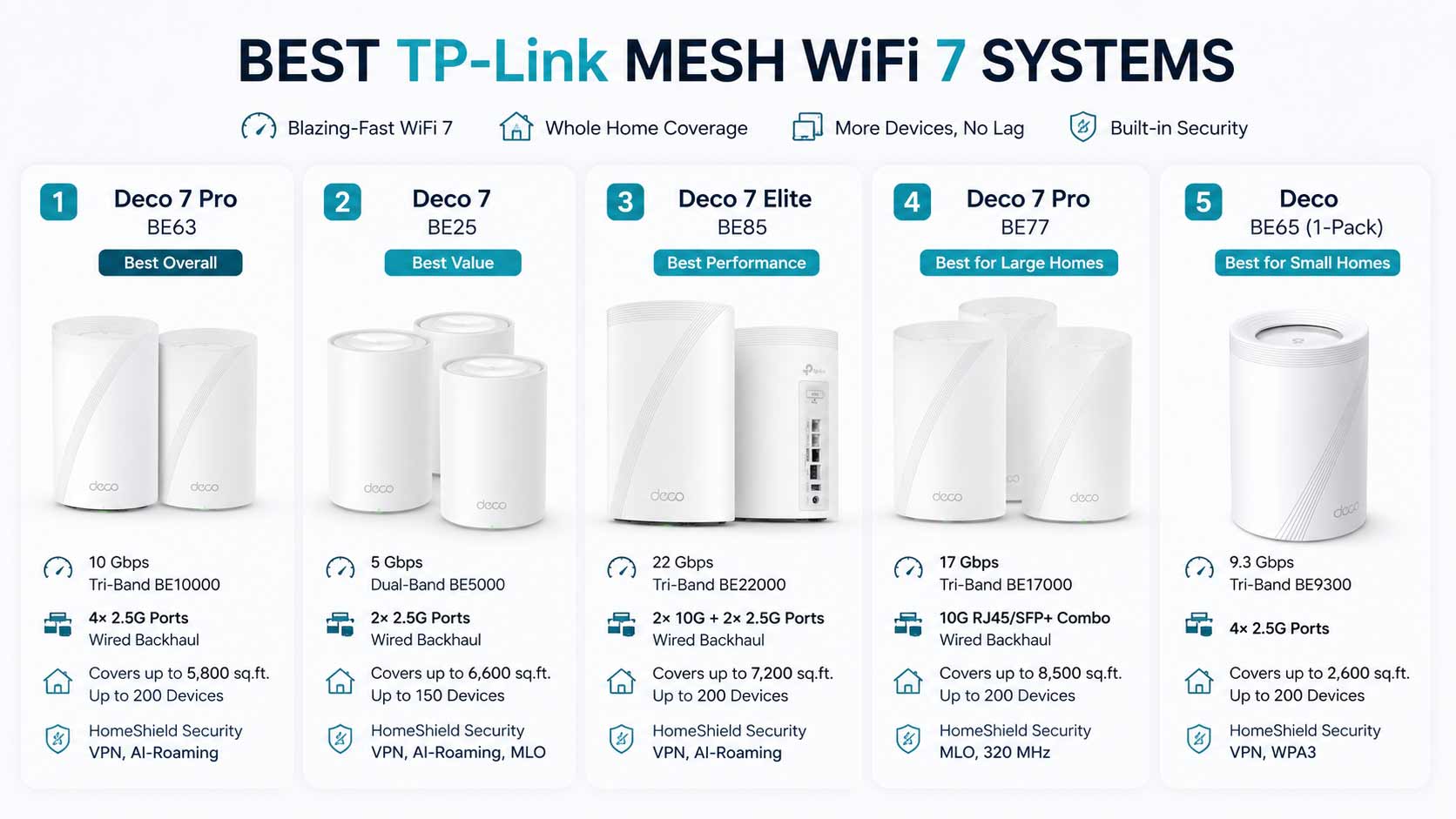
- TP-Link Deco 7 Pro BE63 2-Pack (Best All-Round for Most Homes)
- TP-Link Deco 7 BE25 3-Pack (Best Large Coverage Value)
- TP-Link Deco 7 Elite BE85 2-Pack (Best Premium Performance)
- TP-Link Deco BE77 3-Pack (Best for Very Large Properties)
- TP-Link Deco BE65 1-Pack (Best Single Add-On Node)
Why Most People Still Have Dead Zones
A single router puts all its signal in one spot. The further you get from it, and the more walls, floors, and furniture between you and it, the weaker your WiFi gets. The best TP-Link mesh WiFi system solves this by placing multiple nodes around your home so every room gets its own strong local signal rather than a stretched, weakened version from a distant router.
What buyers usually get wrong:
- Buying one more expensive router instead of a mesh system designed for coverage
- Choosing the wrong pack size for their home and still having weak rooms
- Not using wired backhaul between nodes when Ethernet runs are available
- Paying for more speed than their internet plan delivers
Why Deco systems are genuinely better now:
- WiFi 7 AI-Roaming switches your device to the nearest node before you even notice signal weakening
- Wired backhaul between nodes means the fastest possible signal at every node in the home
- HomeShield security covers every device on every node from one app
- EasyMesh compatibility means the system grows node by node as your needs change
This guide is for:
- Homeowners tired of dead zones no matter what router they’ve tried
- Large families where everyone is online simultaneously in different rooms
- Gamers and remote workers who need reliable coverage away from the main modem
- Smart home users with many devices spread across the whole house
- Anyone ready to stop fighting their WiFi and just have it work
By the end of this guide you’ll know exactly which best TP-Link mesh WiFi system fits your home size, device count, and budget, so you can stop second-guessing and start using it.
Top 5 Best TP-Link Mesh WiFi Systems
Disclosure: This post contains affiliate links. As an Amazon Associate I earn from qualifying purchases. If you purchase through our links, we may earn a small commission at no extra cost to you. We only recommend products we genuinely stand behind.
Every Deco system here was selected based on real whole-home coverage performance, wired backhaul flexibility, speed tier, and the value it delivers for different household sizes. These aren’t just spec comparisons. They’re matched to the type of home they actually serve best.
#1 TP-Link Deco BE63 (2-Pack) : Best Overall TP-Link Mesh WiFi System
Overview
The TP-Link Deco BE63 strikes the best balance between performance, coverage, and value. This tri-band WiFi 7 mesh system delivers fast speeds, reliable whole-home coverage, and excellent wired connectivity through four 2.5GbE ports on each node. It’s powerful enough for gaming, streaming, smart homes, and multi-device households without reaching flagship pricing.

Best deal today – prices may change
Pros
- Tri-band WiFi 7 performance
- Four 2.5GbE ports per node
- Supports wired backhaul
- Easy setup and management
- Strong value for the hardware offered
Cons
- Very large homes may require a 3-pack system
Best For
Families, gamers, and power users looking for a future-ready WiFi 7 mesh system that performs well in most homes.
#2 TP-Link Deco BE25 (3-Pack) : Best Value for Large Homes
Overview
The TP-Link Deco BE25 is an excellent choice for homeowners who need wide coverage without paying premium prices. With three nodes included, it can blanket large homes with stable WiFi 7 connectivity while keeping costs lower than TP-Link’s higher-end tri-band models.

Best deal today – prices may change
Pros
- Excellent whole-home coverage
- Includes three nodes
- Affordable WiFi 7 solution
- EasyMesh compatibility
- Great value for large homes
Cons
- Dual-band design limits peak performance compared to tri-band models
Best For
Large homes and multi-story properties where coverage is more important than maximum wireless speed.
#3 TP-Link Deco BE85 (2-Pack) : Best Premium TP-Link Mesh System
Overview
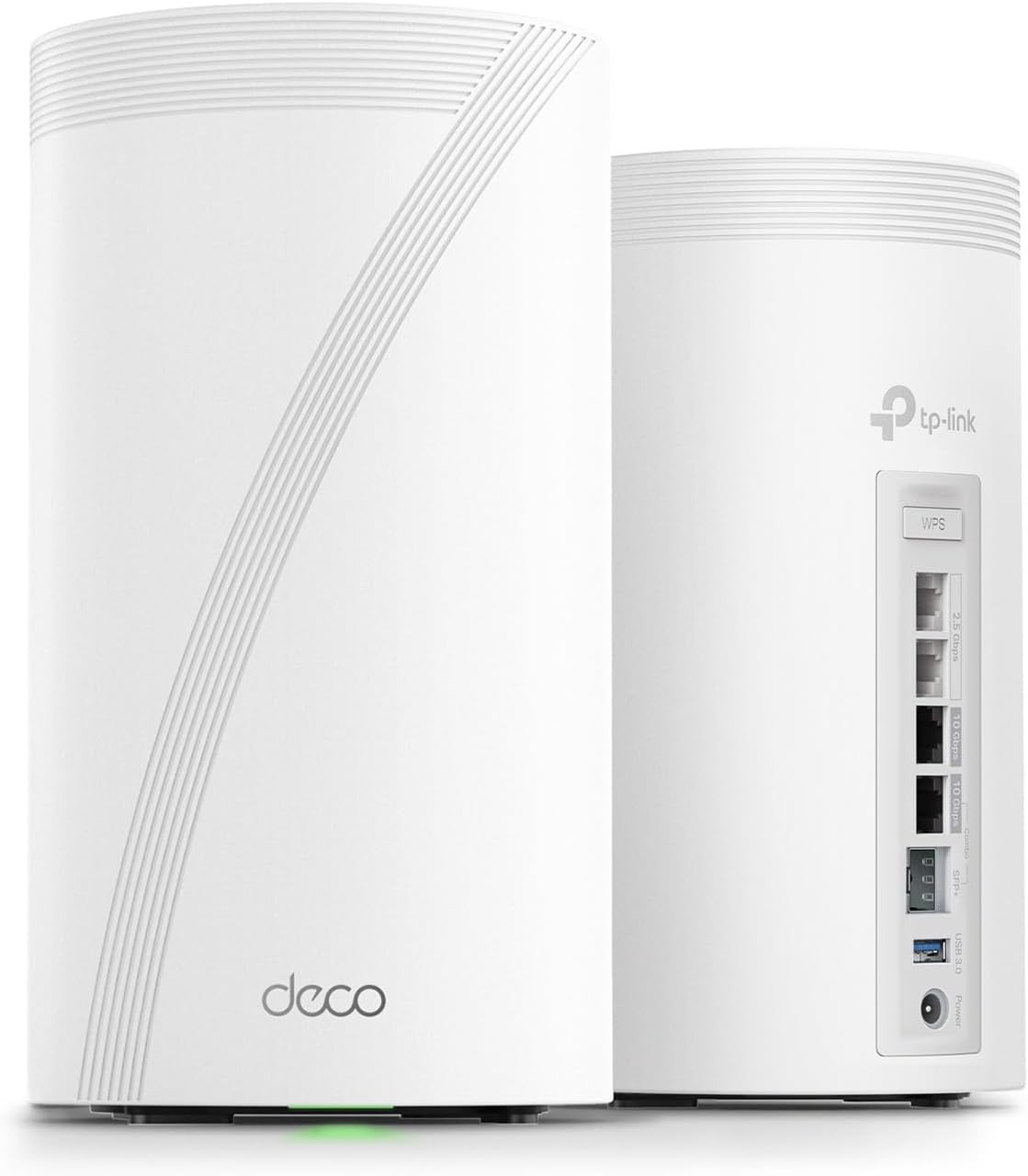
The Deco BE85 is TP-Link’s flagship WiFi 7 mesh system for users who want top-tier performance. With dual 10G ports, tri-band connectivity, and ultra-fast wireless speeds, it’s built for multi-gig internet plans, advanced smart homes, and demanding workloads.
Best deal today – prices may change
Pros
- Exceptional WiFi 7 performance
- Dual 10G ports per node
- Excellent coverage and stability
- Strong future-proofing
- Ideal for multi-gig internet
Cons
- Expensive compared to most mesh systems
Best For
Power users, gamers, content creators, and households running high-speed multi-gig internet connections.
#4 TP-Link Deco BE77 (3-Pack) : Best for Very Large Homes
Overview
The TP-Link Deco BE77 is designed for homeowners who need maximum coverage without sacrificing performance. Its three-node setup and advanced WiFi 7 features make it a strong choice for large properties where traditional routers struggle to reach every room.

Best deal today – prices may change
Pros
- Covers very large homes
- Strong WiFi 7 performance
- 10G wired backhaul support
- Excellent roaming experience
- Ideal for multi-story properties
Cons
- More expensive than mid-range mesh systems
Best For
Large homes, multi-story properties, and users who want consistent WiFi coverage across a wide area.
#5 TP-Link Deco BE65 — Best Expansion Node
Overview
The TP-Link Deco BE65 is a versatile WiFi 7 mesh node designed to extend coverage where you need it most. With four 2.5GbE ports, 6GHz support, and strong device capacity, it’s an excellent addition to an existing Deco network.

Best deal today – prices may change
Pros
- Four 2.5GbE ports
- Supports WiFi 7 and 6GHz connectivity
- Excellent expansion option
- Strong device capacity
- Flexible deployment
Cons
- Not intended as a complete whole-home solution on its own
Best For
Users expanding an existing Deco setup, covering a difficult room, or improving connectivity in home offices, garages, and other hard-to-reach areas.
Quick Comparison Table
| Rank & Model | Wi-Fi Standard & Speed | Coverage & Ports | Best For |
|---|---|---|---|
| #1 Deco 7 Pro BE63 (2-Pack) | WiFi 7 Tri-Band, BE10000 | Large homes, 4x 2.5G | All-round coverage |
| #2 Deco 7 BE25 (3-Pack) | WiFi 7 Dual-Band, BE5000 | 6,600 sq. ft., 2x 2.5G | Large coverage value |
| #3 Deco 7 Elite BE85 (2-Pack) | WiFi 7 Tri-Band, BE22000 | Large homes, 2x 10G + 2x 2.5G | Premium power users |
| #4 Deco BE77 (3-Pack) | WiFi 7 Tri-Band, BE17000 | 8,500 sq. ft., 1x 10G combo | Very large properties |
| #5 Deco BE65 (1-Pack) | WiFi 7 Tri-Band, BE9300 | Per node, 4x 2.5G | Single add-on node |
This guide helps you choose the right best TP-Link mesh Wi-Fi system based on your home size, how many rooms need coverage, your internet plan speed, and whether you need wired backhaul or just strong wireless.
What to Look for When Buying a TP-Link Mesh WiFi System
Match the Pack Size to Your Home First
- Under 3,500 sq. ft.? The Deco 7 Pro BE63 2-pack covers it cleanly
- 3,500 to 6,600 sq. ft.? The Deco 7 BE25 3-pack gives three distributed nodes for better even coverage
- Over 6,600 sq. ft. or a very large property? The Deco BE77 3-pack and its 8,500 sq. ft. coverage is the right answer
- Just need one specific room covered? Deco BE65 single pack targets exactly that
Features That Actually Matter in Daily Use
- AI-Roaming is the most practically useful feature because it keeps devices connected to the nearest node automatically as you move around the house
- Wired backhaul between nodes always delivers better inter-node throughput than wireless backhaul, so if you can run Ethernet between node locations it’s worth doing
- HomeShield covering every node from one app means no device in the whole home is unprotected regardless of which node it connects to
- MLO on the BE25, BE85, and BE77 keeps connections stable when roaming between nodes in large properties
Performance That Stays Consistent
- Tri-band nodes handle mixed device loads more cleanly than dual-band because the third band separates traffic
- Four 2.5G ports on the BE63 and BE65 nodes give wired devices multi-gig connections without a separate switch
- 320MHz channel support on the BE65, BE85, and BE77 delivers the full WiFi 7 wireless throughput benefit
TP-Link Support and Long-Term Value
- TP-Link pushes regular firmware updates to the Deco lineup through the Tether app automatically
- Free expert support is included with the Deco 7 Pro BE63 and accessible through TP-Link for other models
- EasyMesh compatibility means you can add more nodes later without replacing the whole system
How These Systems Were Selected
Every system here was evaluated on total coverage footprint, per-node port configuration, AI-Roaming quality, wired backhaul support, and the practical value it delivers for different home sizes. Systems that just claimed large coverage without the port density and backhaul support to back it up were not included. The goal was to find five TP-Link Deco options that each clearly lead their specific use case rather than five versions of the same product.
Selection factors:
- Pack count and total coverage for realistic home sizes
- Wired backhaul port speed per node
- AI-Roaming and MLO for seamless device roaming
- HomeShield coverage across all nodes
- WiFi 7 standard completeness: tri-band, 320MHz, 6GHz access
- TP-Link Tether app management quality
How to Get the Most Out of Your TP-Link Deco Mesh System
Placement and setup make as much difference as which system you buy. These tips apply to all five picks.
Initial Setup
- Set up the primary node first and connect it to your modem before powering on any secondary nodes because the Tether app walks you through it in the right order
- Update firmware on all nodes immediately after setup completes because TP-Link frequently releases performance patches shortly after product launches
- Create your HomeShield device categories during setup rather than returning to it later because it starts monitoring from the first connection
Placement for Best Whole-Home Coverage
- Space nodes evenly across your home rather than clustering them near the modem because the whole point of mesh is distributing signal rather than concentrating it
- For two-story homes, put one node on each floor with the primary node near your modem
- For the BE77 3-pack in a very large home, think of the property as three coverage zones and place each node in the center of its zone rather than lining them up in a row
Mistakes Worth Avoiding
- Placing all nodes within 10 feet of each other because that defeats the whole purpose of a mesh system
- Running wireless backhaul when Ethernet cable runs are available between node locations because wired backhaul is always faster
- Skipping firmware updates because TP-Link’s AI-Roaming and mesh coordination improvements come through firmware
- Not enabling HomeShield during setup because it starts building device profiles from the first connection and retroactive setup misses early network activity
Tips for Stronger Daily Performance
- Use the Tether app’s AI-Roaming setting and confirm it’s enabled because some firmware versions don’t activate it by default
- Connect gaming consoles, streaming devices, and work PCs via Ethernet to the nearest node’s 2.5G ports for rock-solid connections
- Assign smart home devices to 2.4GHz for better range to distant corners of the home and reserve 5GHz and 6GHz for devices that need speed
- Check the Tether app monthly for firmware updates and review which devices are using the most bandwidth
Signs It’s Working Right
- You get full-speed WiFi in every room including ones that were dead zones before
- Your phone switches between nodes automatically without dropping its connection as you move through the house
- Video calls and streaming work without interruption everywhere in the home
- Gaming ping stays consistent across the whole property regardless of which room you’re in
How to Pick the Right TP-Link Deco System for Your Home
Home size is the first decision: Under 3,500 sq. ft., Deco 7 Pro BE63 2-pack. 3,500 to 6,600 sq. ft., Deco 7 BE25 3-pack. Over 6,600 sq. ft., Deco BE77 3-pack. Just one room to cover, Deco BE65 single pack.
Speed vs. coverage: The Deco 7 Elite BE85 2-pack gives the highest per-node speed at BE22000 with dual 10G ports for multi-gig internet plans and 10G LAN devices. The Deco 7 BE25 3-pack trades lower per-node speed for the most total coverage area.
Wired backhaul: If you can run Ethernet cable between node locations, every system here supports wired backhaul and it makes a real performance difference. The BE77’s 10G SFP+ combo port supports fiber backhaul for users with fiber-to-the-home connections.
Must-have features: AI-Roaming for seamless device movement, HomeShield for whole-home security, EasyMesh for future expansion, and at minimum 2.5G ports per node for wired device connections.
Skip if: You’re buying a 3-pack for a 1,200 sq. ft. apartment because you’ll have more nodes than you need and signal overlap becomes noise. Match the pack count to the home size and you’ll get exactly what you need without overcomplicating it.
Already decided on Deco but want to compare it with other brands? Read our guide on the best WiFi 7 router for large homes to see how TP-Link Deco stacks up against single-router options for large properties.
Real User Feedback
- Deco 7 Pro BE63 2-pack owners in large family homes consistently say it was the first mesh system that actually eliminated the dead zone in the back bedroom without any complicated configuration, and the four 2.5G ports per node made wiring the gaming console and smart hub in each room simple.
- Deco 7 BE25 3-pack buyers in homes over 5,000 sq. ft. report that three nodes spread evenly across the property gave every floor consistent speeds for the first time, and that AI-Roaming made moving between floors with a laptop seamless without any manual network switching.
- Deco 7 Elite BE85 2-pack owners on multi-gig internet plans say it was the only Deco system that kept up with their 5 Gbps fiber plan at both nodes, and that AI-Roaming plus the dual 10G ports made it feel like professional-grade hardware at a home price.
- Deco BE77 3-pack buyers with very large properties highlight the SFP+ backhaul port as the feature that made the difference for their fiber-to-the-home setup, and that 8,500 sq. ft. coverage from three nodes meant no part of their property was unreachable anymore.
- Deco BE65 single-pack buyers who placed the node in a concrete-separated room or garage say it was the most targeted fix they’d found for a specific dead zone problem, and that four 2.5G ports meant every wired device in that room connected at multi-gig speed.
- Across all models, buyers consistently say the TP-Link Tether app made setup faster than any mesh system they’d tried before, and that HomeShield gave them visibility into their whole network that their previous router setups never provided.
Conclusion and Final Recommendation
Dead zones aren’t a WiFi problem. They’re a coverage distribution problem. And the best TP-Link mesh WiFi system solves it by putting strong signal everywhere in your home rather than concentrating it near the modem. Every Deco system on this list is a complete upgrade from a single router for homes that have struggled with coverage.
This guide is for:
- Homeowners who’ve tried multiple routers and still have problem rooms
- Large families where multiple people need fast WiFi in different rooms simultaneously
- Gamers and remote workers who need reliable coverage away from the main modem
- Anyone ready to buy the right system the first time instead of upgrading again in a year
Best overall pick: The TP-Link Deco 7 Pro BE63 2-Pack is the strongest balanced choice for most homes. Tri-band WiFi 7, four 2.5G ports per node, HomeShield security, VPN, and free expert support make it the most complete package for everyday family households that want whole-home coverage without flagship pricing. Two nodes cover most large homes cleanly and EasyMesh expansion means you can add a third node later if you need it.
The short version: Match the pack count to your home size, enable AI-Roaming in the Tether app, and use wired backhaul between nodes if you can. Do those three things and your WiFi will cover every room consistently. The best TP-Link mesh WiFi system is the one that fits your home, and every option on this list clearly fits a specific type of buyer.
Ready to end the dead zone problem permanently? Browse our full guide on the best TP-Link Deco WiFi 7 mesh system for large homes for a deeper breakdown of each model’s coverage performance.