

Your internet plan got faster. Your router probably didn’t keep up. When you’re on a multi-gig internet plan, running a NAS for large file transfers, or gaming and streaming simultaneously across many devices, a standard Gigabit router becomes the slowest thing in your setup. A 10 Gbps router removes that bottleneck entirely by giving your network the wired and wireless throughput to match the speed you’re actually paying for.
10 Gbps Router: 5 That Finally Match Your Internet Speed
These routers connect directly to your modem or ISP gateway and work with all major internet providers. To fully use the 10G WAN port, you need a compatible multi-gig internet plan. But even if you’re still on a standard plan right now, a 10 gigabit router future-proofs your setup so you don’t need to replace hardware when your ISP speeds up. They stay backward compatible with every standard device you already own and most include mesh expansion for whole-home coverage.
This guide cuts through the options and tells you exactly which 10 Gbps router fits your specific situation.
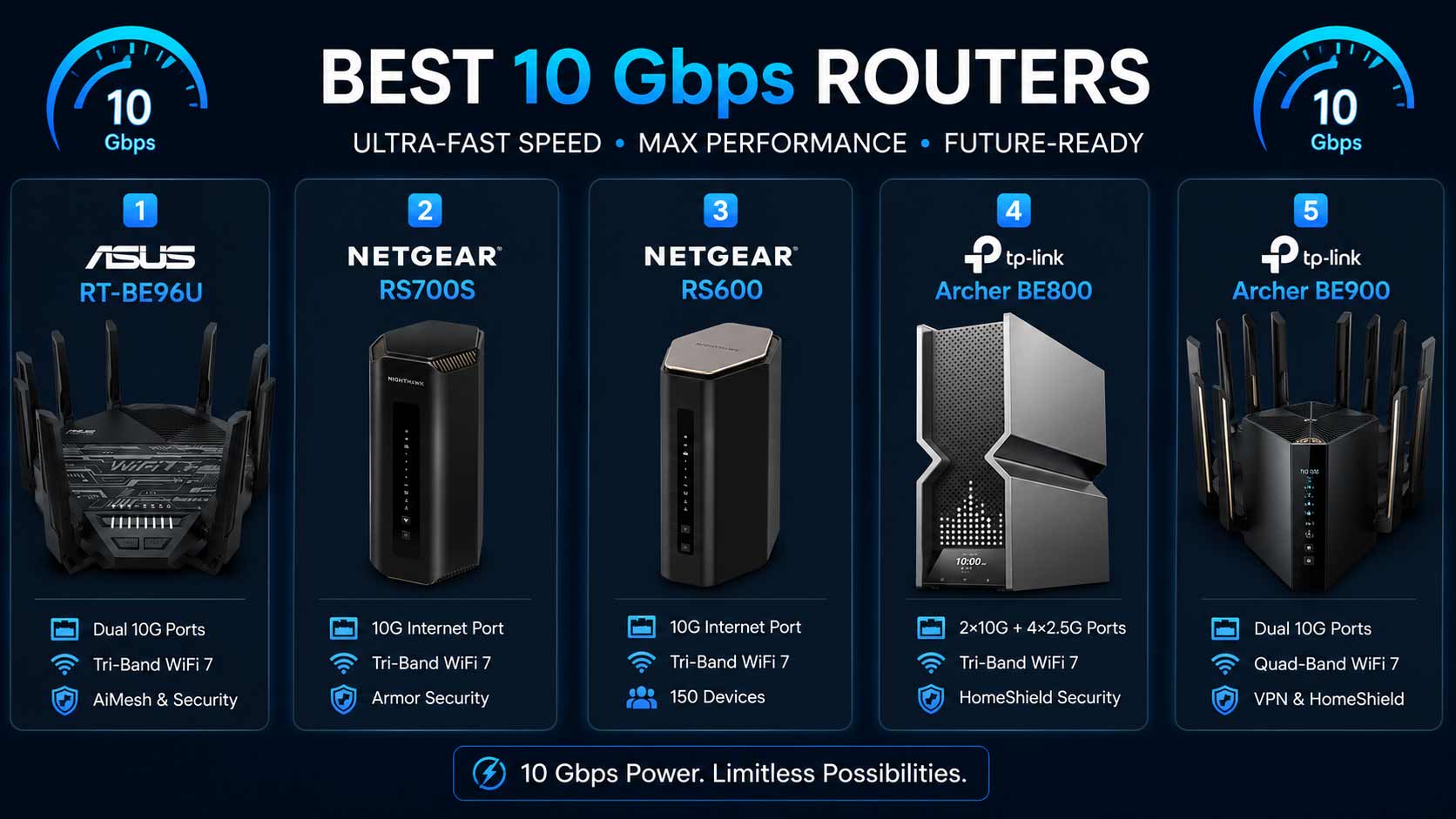
Quick Top 5:
- ASUS RT-BE96U (Best Overall with Lifetime Security)
- NETGEAR RS700S (Best for Large Home Coverage)
- NETGEAR RS600 (Best for High Device Count)
- TP-Link Archer BE800 (Best Dual 10G with LED Screen)
- TP-Link Archer BE900 (Best Premium Quad-Band Pick)
Who Actually Needs a 10 Gig Router?
A standard Gigabit WAN port delivers up to 1 Gbps from your internet plan to your router. That’s fine for most households today. But if you’re on a 2.5 Gbps, 5 Gbps, or 10 Gbps fiber plan, that Gigabit port is capping your speeds at one tenth of what you’re paying for. A router with 10gb wan port solves that immediately.
You also benefit from a 10 gbps router if:
- You run a NAS and want to transfer large files between storage and your computer at full speed locally
- You want one high-speed wired connection for a gaming PC or workstation alongside your internet connection
- You’re planning to upgrade your internet plan within the next year or two and want hardware that’s already ready
Common mistakes buyers make:
- Buying a 10G router without checking whether their modem or ONT supports multi-gig throughput first
- Connecting the 10G WAN port with a Cat 5e cable which physically limits it below 10G speeds
- Paying for dual 10G ports without having a second 10G device to use the LAN port
- Choosing based on wireless speed numbers when the 10G port is the actual reason they need this router
Why WiFi-7 makes 10G routers better now: Older 10G routers created a mismatch: 10G wired but weak wireless. WiFi-7 tri-band and quad-band designs now match the wired 10G capability with wireless speeds that keep up. MLO keeps wireless connections stable even when one band gets congested. So the whole network performs at the same high tier instead of having one fast lane and several slow ones.
This guide is for:
- Multi-gig internet subscribers on plans above 2.5 Gbps
- Content creators, NAS users, and home office professionals who need fast local network transfers
- Power users and gamers who want 10G wired connections for PCs and consoles
- Anyone planning ahead for faster internet plans who wants to buy the right hardware once
Top 5 Best 10 Gbps Routers
Disclosure: This post contains affiliate links. As an Amazon Associate I earn from qualifying purchases. If you purchase through our links, we may earn a small commission at no extra cost to you. We only recommend products we genuinely stand behind.
Every router here was selected because it has a genuine 10G WAN or LAN port backed by WiFi 7 wireless performance that matches it. No models included just because they claim “10G” without the wireless side keeping up.
#1 ASUS RT-BE96U : Best Overall 10 Gbps Router
Overview: Tri-band WiFi-7 BE19000 router with dual 10G ports, Lifetime Internet Security, MLO, and Ai Mesh support | Large homes and demanding setups on multi-gig internet plans | Built for power users who want both 10G WAN for their internet plan and 10G LAN for a NAS or workstation simultaneously | The best 10 gbps router for anyone who wants no ongoing security costs alongside dual 10G performance.

Best deal today – prices may change
Key Benefits: Two 10G ports means your multi-gig internet connects on one and a NAS or high-speed workstation connects on the other at the same time, no separate switch needed | Lifetime Internet Security covers every device forever without any renewal fee, which saves meaningful money over years of ownership | MLO connects wireless devices across two bands simultaneously so the wireless side of the network keeps up with the 10G wired performance | Ai Mesh lets you add coverage nodes for very large homes without replacing the router | 320MHz channel support delivers full WiFi-7 wireless throughput.
Pros: Dual 10G ports with Lifetime Security is the strongest long-term value at this tier | MLO keeps wireless as stable as the wired performance | AiMesh expansion is clean and reliable within the ASUS ecosystem | ASUS firmware update record is consistent for long-term performance.
Cons: Dual 10G port premium is most useful when you have at least one 10G LAN device alongside your multi-gig internet plan.
Best For: Multi-gig internet subscribers who also run a NAS or 10G workstation | Power users who want Lifetime Security without calculating annual renewal costs | Large homes needing tri-band WiFi 7 alongside dual 10G wired performance | Anyone buying a 10 gig router once and owning it for years without hidden ongoing fees.
#2 NETGEAR RS700S : Best 10 Gbps Router for Large Home Coverage
Overview: Tri-band WiFi-7 BE19000 router with a single 10G WAN port covering up to 3,500 sq. ft. | Includes 1-Year Armor security and free expert setup help | Built for large home owners on multi-gig internet plans who want strong whole-home wireless coverage alongside 10G wired internet delivery | The cleanest high speed 10 gbps router for users who prioritize coverage and security together.

Best deal today – prices may change
Key Benefits: 3,500 sq. ft. single-router coverage is the highest coverage rating on this list, so most large homes don’t need a mesh node when the 10G RS700S is centrally placed | 10G WAN delivers full multi-gig internet plan speed to wired devices without any hardware bottleneck at the router | Armor security monitors every connected device in real time during the first year | Tri-band WiFi-7 keeps device traffic separated across three bands so large-home device loads don’t create congestion | Free expert setup help is included for buyers who want 10G configuration support from day one.
Pros: Most coverage from a single router on this list | 10G WAN handles even the fastest residential internet plans | Armor included means network security from day one | NETGEAR firmware reliability is strong for long-term use.
Cons: Single 10G port means it handles the WAN connection only, so users who also want 10G LAN for a NAS need the ASUS RT-BE96U or TP-Link BE800 instead.
Best For: Large homes up to 3,500 sq. ft. on multi-gig internet plans | Households where coverage is as important as 10G wired speed | Anyone who wants Armor security included without a separate purchase | First-time 10G buyers who want free expert help for the configuration.
Want to see how the RS700S compares across NETGEAR’s full WiFi 7 lineup? Read our guide on the best NETGEAR WiFi 7 router to compare all five Nighthawk models side by side.
#3 NETGEAR RS600 : Best 10 Gbps Router for High Device Count
Overview: Tri-band WiFi-7 BE18000 router with a single 10G WAN port, 150-device capacity, and coverage up to 3,300 sq. ft. | No security subscription required | Free expert help included | The right 10gb ethernet router for large households where device count matters as much as port speed.

Best deal today – prices may change
Key Benefits: 150-device capacity is the highest on this list, which matters when a large household has many smart home devices, phones, laptops, and wired hardware all connected simultaneously | 10G WAN delivers multi-gig internet plan speed without hardware bottlenecking | No subscription requirement means no annual cost for maintaining full router performance, which gives it a better total cost of ownership than Armor-based competitors over time | BE18000 tri-band speed gives all three bands strong headroom even when 150 devices are active | Free expert help is included for setup support.
Pros: 150-device capacity is a standout practical feature for smart home and large family setups | No ongoing subscription keeps costs lower over years of ownership | 10G WAN matches the RS700S at the port tier | NETGEAR reliability is consistent across the lineup.
Cons: No Armor security included, so users who want built-in threat monitoring need to choose between this and the RS700S based on which feature matters more.
Best For: Large households with 50 or more active connected devices on multi-gig internet | Smart home setups where device capacity and 10G internet delivery need to coexist | Anyone who wants a router with 10gb wan port and maximum device capacity without a recurring security fee | Families where everyone is online simultaneously across many device types.
#4 TP-Link Archer BE800 : Best Dual 10G with LED Screen
Overview: Tri-band WiFi-7 BE19000 router with two 10G ports and four 2.5G ports, a built-in LED screen, eight high-performance antennas, Private IoT, VPN, Home Shield, and Easy Mesh | The most comprehensive wired port configuration on this list | Built for power users who need simultaneous 10G WAN and 10G LAN alongside premium wireless coverage | The best wifi-7 router with 10gb port option for users with NAS drives or 10G workstations.

Best deal today – prices may change
Key Benefits: Two 10G ports plus four 2.5G ports creates six total multi-gig connections so a gaming PC, NAS, gaming consoles, and streaming devices all connect at multi-gig speeds simultaneously with no switch needed | Eight high-performance antennas push signal further across large homes than standard four-antenna designs so the 10G wired capability isn’t undermined by weaker wireless coverage | Built-in LED screen shows real-time network status without opening an app, which is a daily convenience for users monitoring a demanding home network | Private IoT network is a one-tap setup in the TP-Link Tether app for smart device isolation | Easy Mesh means the router scales with additional nodes without replacement.
Pros: Dual 10G ports with six total multi-gig connections is the most complete wired port configuration available in a home router | Eight antennas deliver better signal consistency at range | LED screen is a practical daily tool exclusive to this model | EasyMesh provides a clear expansion path.
Cons: Dual 10G port value is maximized only when a 10G LAN device like a NAS or workstation is present alongside a multi-gig internet plan.
Best For: Power users with multi-gig internet and a 10G NAS or workstation needing simultaneous 10G WAN and LAN | Content creators and home office professionals who transfer large files frequently | Large homes needing both maximum wireless antenna coverage and comprehensive multi-gig wired ports | Anyone building the most complete home network possible without a separate managed switch.
#5 TP-Link Archer BE900 : Best Premium Quad-Band 10 Gbps Router
Overview: Quad-band WiFi-7 BE24000 router with dual 10G Ethernet ports, 12 high-performance antennas, a LED touch screen, and VPN support | The highest combined wireless speed on this list at BE24000 | Built for the most demanding home and home-office networks where quad-band wireless performance and dual 10G ports are both required | Compatible with all major ISPs.

Best deal today – prices may change
Key Benefits: Quad-band design gives the router four separate wireless bands, which means four separate signal paths so heavy wireless device loads and band congestion have more headroom to work with than tri-band alternatives | BE24000 combined speed is the highest wireless output on this list and matches the dual 10G wired capability so neither side of the network creates a bottleneck | Dual 10G ports handle multi-gig WAN and a 10G LAN device simultaneously at full speed | LED touch screen provides real-time network controls and monitoring without a phone or laptop | 12 antennas push signal further than eight-antenna designs for very large homes | VPN support covers secure connections across the whole network.
Pros: Quad-band is the strongest wireless congestion management available in a home router | BE24000 combined speed is the highest on this list | Dual 10G ports handle both WAN and LAN at full speed simultaneously | LED touch screen is the most interactive network display available in this tier | 12 antennas deliver the best wireless range on this list.
Cons: The premium price reflects the quad-band and 12-antenna flagship configuration and is more than most homes need unless maximum wireless performance alongside dual 10G is specifically required.
Best For: The most demanding home networks where both quad-band wireless and dual 10G wired performance are required simultaneously | Content creators and home professionals with multi-gig internet plans and multiple 10G devices | Large homes where 12 antennas and quad-band coverage eliminate every dead zone | Anyone who wants the absolute best tri band 10 gbps router performance available in a single home router purchase.
Quick Comparison Table
| Rank/Model | WiFi Standard | Max Speed/Coverage | Best For/10G Ports |
| #1 ASUS RT-BE96U | WiFi 7 Tri-Band | BE19000/Large homes | Dual 10G + Lifetime Security/2x 10G |
| #2 NETGEAR RS700S | WiFi 7 Tri-Band | BE19000/3,500 sq. ft. | Large home coverage/1x 10G WAN |
| #3 NETGEAR RS600 | WiFi 7 Tri-Band | BE18000/3,300 sq. ft. | 150 devices, no subscription/1x 10G WAN |
| #4 TP-Link BE800 | WiFi 7 Tri-Band | BE19000/Large homes | Best wired port density/2x 10G + 4x 2.5G |
| #5 TP-Link BE900 | WiFi 7 Quad-Band | BE24000/Large homes | Quad-band flagship/2x 10G |
This guide helps you choose the right 10 gbps router based on whether you need one or two 10G ports, your internet plan speed, home size, and whether wireless coverage or wired port density matters most.
What to Look for When Buying a 10 Gbps Router
One 10G Port or Two?
This is the first decision and it determines which router is right for you.
- One 10G port (WAN only): You have a multi-gig internet plan and want the router to deliver the full plan speed. The RS700S, RS600 cover this perfectly.
- Two 10G ports (WAN and LAN): You have a multi-gig internet plan AND a 10G NAS, workstation, or switch that also needs a 10G connection simultaneously. The ASUS RT-BE96U, TP-Link BE800, or BE900 are the right picks.
Buying dual 10G when you only have one 10G device wastes port capacity. Buying single 10G when you need both WAN and LAN at 10G creates a new bottleneck.
Check Your Internet Setup First
- Confirm your modem or ONT supports multi-gig throughput because an ISP modem that caps at 1 Gbps delivers 1 Gbps regardless of the router’s WAN port rating
- Use Cat 6A or better Ethernet cable to connect the 10G WAN port because Cat 5e physically limits the connection below 10G
- Confirm your ISP plan actually delivers above 2.5 Gbps because a 10G router on a 500 Mbps plan delivers identical internet performance to a standard Gigabit router
Features Worth Having at This Tier
- Lifetime Security on the ASUS RT-BE96U saves recurring annual fees compared to Armor-based alternatives
- LED screen on the BE800 and touch screen on the BE900 make daily network monitoring practical without app dependency
- Private IoT on the BE800 isolates smart home devices in one tap, which matters more in setups with many connected devices
- AiMesh and EasyMesh expansion support means coverage can grow without replacing the router
Performance That Holds Under Load
- Tri-band and quad-band designs handle congested multi-device networks better than dual-band because the additional bands absorb traffic overflow
- MLO on ASUS models keeps wireless connections stable even under heavy load by connecting devices across two bands simultaneously
- Eight and twelve antenna designs push signal further across large homes so the 10G wired backbone isn’t undermined by weaker wireless
How These Routers Were Selected
Every router here was selected based on whether the 10G port configuration is matched by wireless WiFi 7 performance, practical port density for different use cases, and brand support quality for long-term ownership. Routers that included 10G ports as a marketing label without the wireless performance to match were excluded. Coverage area, security model, and the practical feature value for demanding home networks all shaped the final selections.
Key criteria:
- Genuine 10G WAN and/or LAN port availability
- WiFi 7 wireless performance tier matched to the 10G wired capability
- Number of total multi-gig ports for wired device flexibility
- Security model: Lifetime, subscription-free, or first-year-included
- Mesh expansion support for future coverage scaling
- Firmware reliability and long-term brand support history
How to Get the Most Out of Your 10 Gbps Router
Initial Setup for 10G Configurations
- Connect the router’s 10G WAN port to your modem or ONT with a Cat 6A cable before anything else because this is the single most common setup mistake that limits 10G performance
- Run firmware updates immediately after first boot because 10G port optimization patches are common in early firmware releases
- Activate security features during setup: Lifetime Security on ASUS, Armor on NETGEAR, or HomeShield on TP-Link all benefit from being enabled from the first connection
Placement for Large-Home 10G Setups
- Central elevated placement gives the strongest wireless signal spread to match the 10G wired performance
- Plan your Cat 6A cable runs to your NAS or 10G workstation at setup time because routing cable through walls later is harder
- For the BE800 and BE900 with eight and twelve antennas respectively, open placement away from media cabinets gives the antenna array maximum benefit
Mistakes That Waste Your 10G Investment
- Using Cat 5e instead of Cat 6A for the 10G WAN or LAN connections because Cat 5e physically caps throughput below 10G
- Not confirming your NAS or workstation has a 10G network card before assuming the 10G LAN port delivers full speed to that device
- Leaving VPN enabled on interfaces you don’t need secured because misconfigured VPN adds latency to all traffic on that path
- Not checking the modem first, because a standard ISP modem limits the connection before it even reaches the 10G router
Tips for Day-to-Day 10G Router Performance
- Connect your NAS directly to the 10G LAN port and use the Tether or ASUS app to confirm it’s negotiating at 10G rather than falling back to 2.5G
- Assign gaming consoles and streaming devices to 2.5G LAN ports so the 10G port stays dedicated to the highest-throughput connections
- Use the LED screen on the BE800 or BE900 to monitor active throughput without opening an app during large file transfers
- Reboot the router once a week if you have a high device count because connection table management benefits from regular clearing in demanding setups
Signs Your 10G Router Is Performing Right
- Speed tests from a wired device show speeds matching your multi-gig internet plan rather than capping at 1 Gbps
- NAS file transfers complete significantly faster than they did on a Gigabit connection
- Gaming ping stays low and consistent even during large downloads running simultaneously
- Wireless devices throughout the home get strong signal because the tri-band or quad-band wireless architecture keeps up with the 10G wired side
How to Choose the Right 10 Gbps Router for Your Setup
One 10G port or two first: Only have a multi-gig internet plan with no 10G LAN devices? RS700S or RS600. Have both a multi-gig plan and a 10G NAS or workstation? ASUS RT-BE96U, BE800, or BE900.
Security and no ongoing fees: ASUS RT-BE96U’s Lifetime Security is the best long-term value if you want threat monitoring without annual renewals. RS600 if you want no subscription at all and maximum device capacity.
Coverage vs. port density: RS700S gives the most coverage from a single router. BE800 gives the most total multi-gig ports. BE900 gives the highest wireless performance from quad-band design.
Must-have for any 10G router: Cat 6A cable from modem to router, a modem or ONT that delivers multi-gig throughput, and at least one 10G capable client device. Without those three things, the 10G port delivers nothing above a standard Gigabit router.
Skip if: You’re on a 500 Mbps or 1 Gbps internet plan with no 10G LAN devices because a standard router delivers identical internet performance at a fraction of the cost.
Looking for a complete comparison of 10G options across ASUS, NETGEAR, and TP-Link? Read our full guide on the best WiFi 7 router with 10Gb port to see every top 10G model compared with honest recommendations for each use case.
Real User Feedback
- ASUS RT-BE96U owners on multi-gig fiber plans consistently say the dual 10G ports changed how their home network works because for the first time their NAS transfers and internet speeds both run at full speed simultaneously without needing a separate managed switch.
- NETGEAR RS700S buyers in large homes say it was the first router that covered their whole property at full speed without needing a mesh node, and that the 10G WAN port delivered their multi-gig plan speeds to wired devices exactly as the ISP advertised.
- NETGEAR RS600 owners with large smart home setups highlight the 150-device capacity as the feature that made them choose it over the RS700S, saying their previous router’s connection limit was causing random dropouts that disappeared immediately after switching to the RS600.
- TP-Link BE800 users who run a NAS server at home say the dual 10G port configuration was the deciding factor because no other router at this price offered both 10G WAN for their internet plan and a dedicated 10G LAN for their storage server without a separate switch.
- TP-Link BE900 buyers who need the quad-band wireless performance say the 12-antenna design made a noticeable difference in signal reach across very large homes, and that the LED touch screen is used daily to monitor large file transfers and gaming sessions without opening any app.
- Across all five routers, buyers consistently note that confirming Cat 6A cable and a compatible modem before setup made the 10G performance immediately match expectations, and that setups where the modem wasn’t checked first were disappointed by speeds that looked identical to their old Gigabit router until the modem was upgraded.
Conclusion and Final Recommendation
If your internet plan is already faster than 1 Gbps, a standard router is slowing you down right now. A 10 gbps router removes that hardware ceiling and delivers the speed your ISP is actually sending to your home. Every router on this list does that while adding the wireless WiFi 7 performance to match.
This guide is for:
- Multi-gig internet subscribers whose current router caps their plan speed
- NAS users and home office professionals who need 10G local network performance
- Power users and gamers building a home network that stays fast for years
- Anyone comparing 10G routers across ASUS, NETGEAR, and TP-Link and wanting a clear answer
Best overall pick: The ASUS RT-BE96U is the strongest choice across all use cases. Dual 10G ports, Lifetime Internet Security, MLO, tri-band WiFi 7, and AiMesh expansion together make it the most complete 10 gbps router available without any ongoing subscription requirement. For users who want to buy once and own a network that handles everything for years, this is the router.
Short version: Check your modem first. Use Cat 6A cable. Then match the router to whether you need one or two 10G ports. Do those three things and any router on this list will deliver exactly what multi-gig internet actually promises.
Already sorted your router and want to extend multi-gig coverage further? Read our full guide on the best WiFi 7 router for large homes to see how 10G models handle coverage alongside wired performance in very large properties.