
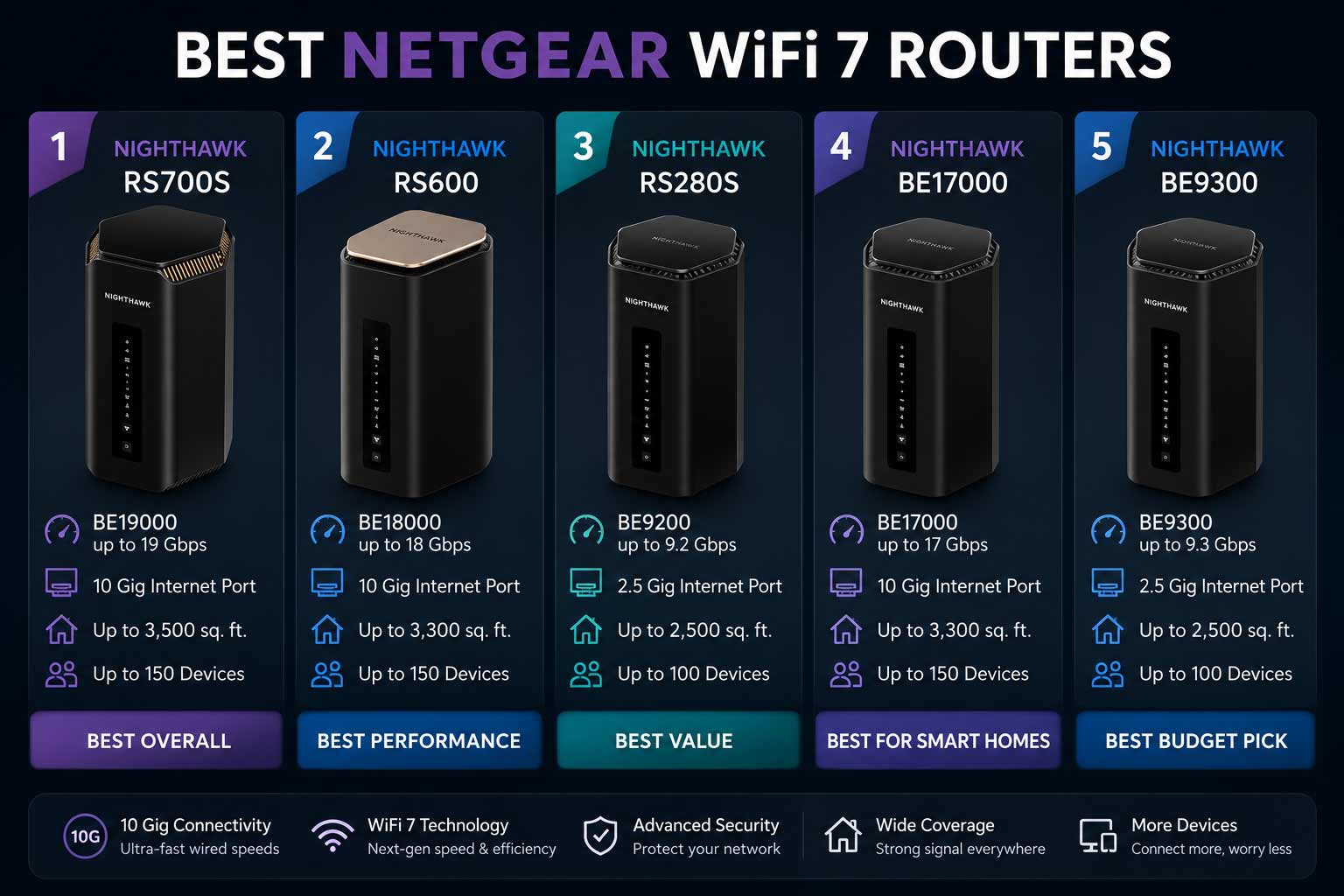

NETGEAR built its Nighthawk reputation on high-performance networking, and the WiFi 7 lineup carries that forward with some of the most capable home routers available right now. Fast tri-band speeds, 10 Gig internet ports, built-in VPN support, Armor security, and coverage that handles very large homes from a single unit. The best NETGEAR WiFi 7 router is a straightforward upgrade for anyone whose network is struggling to keep up with gaming, 4K streaming, and the growing number of devices in a modern home.
Best NETGEAR WiFi-7 Router: 5 Nighthawk Picks Worth Your Money
These routers connect directly to your modem or ISP gateway and work with every major internet provider. They stay backward compatible with older devices so nothing drops off the network when you upgrade. Models with 2.5G and 10G Ethernet ports give wired devices like gaming PCs, NAS drives, and multi-gig internet connections the throughput they deserve. And free expert setup help is included across the lineup so first-time buyers have support available from day one.
Here are five NETGEAR WiFi 7 Nighthawk routers, each matched to a different buyer type, with a clear honest recommendation for each.
Quick Top 5 Preview:
- NETGEAR Nighthawk RS700S BE19000 (Best Overall with Armor Security)
- NETGEAR Nighthawk RS600 BE18000 (Best for Large Homes and High Device Count)
- NETGEAR Nighthawk RS280S BE9200 (Best Mid-Range with Included Security)
- NETGEAR Nighthawk BE17000 (Best for Gaming and VPN)
- NETGEAR Nighthawk BE9300 (Best Everyday VPN Router)
How to Choose the Best NETGEAR WiFi 7 Router
The Problem Most Nighthawk Buyers Face
NETGEAR’s WiFi 7 lineup is strong but it covers a wider range than most people realize. There are models with 10G ports and models with 2.5G ports. Models with Armor security included and models with VPN instead. Models rated for 3,500 sq. ft. and models that top out at 2,500 sq. ft. Picking the wrong one means you either overspend on hardware your setup won’t use or underspend and hit the same frustrations you started with. The best NETGEAR WiFi 7 router for your home isn’t always the most expensive one in the range.
What Most NETGEAR Buyers Get Wrong
- Choosing a 10G port model when their internet plan tops out at 500 Mbps and they’ll never see the benefit
- Prioritizing Armor security without factoring in the annual renewal cost after year one
- Buying the highest-speed model without checking whether the coverage rating actually matches their home size
- Overlooking VPN support as a feature when it’s built into two models on this list and adds genuine value for remote workers and gamers
Why the NETGEAR WiFi 7 Lineup Is a Real Step Forward
WiFi 7 changes daily network performance in ways older routers simply can’t replicate. The 6GHz band gives the fastest devices a clean, uncongested channel away from the 2.4GHz and 5GHz traffic everyone else in the neighborhood is using. Multi-gig ports mean the router hardware stops being the speed bottleneck as internet plans get faster. And NETGEAR’s Armor security platform provides real-time threat detection for every device on the network, which matters more as smart home device counts grow. Free expert help from NETGEAR across the whole lineup removes the setup barrier for buyers who don’t want to figure it all out alone.
Who This Guide Is For
- Power users and gamers on multi-gig internet plans who want maximum wired and wireless performance
- Large households where many people game, stream, and work from home at the same time
- Remote workers who need VPN support built directly into the router without extra hardware
- Smart home users with many devices who want network-level security and strong device capacity
- Anyone comparing NETGEAR WiFi 7 models and wanting a clear, specific recommendation for each scenario
This guide gives you a direct recommendation for each of the five NETGEAR WiFi 7 routers based on your actual usage, so you’re not guessing when you check out.
Top 5 Best NETGEAR WiFi 7 Routers
Disclosure: This post contains affiliate links. As an Amazon Associate I earn from qualifying purchases. If you purchase through our links, we may earn a small commission at no extra cost to you.
Every router here was selected based on real-world performance value, WAN port configuration, NETGEAR-specific features like Armor and VPN, and how well each model serves a specific buyer scenario. No picks based on brand loyalty or peak speed claims alone.
#1 NETGEAR Nighthawk RS700S BE19000 : Best Overall with Armor Security
Overview: Flagship tri-band WiFi 7 router with BE19000 combined speed, a 10 Gig internet port, and 1-Year Armor security included | Covers up to 3,500 sq. ft. | Includes free expert setup help | The best NETGEAR WiFi 7 router for power users who want maximum speed, the largest single-router coverage on this list, and built-in network security from day one | Compatible with all major ISPs.

Best deal today – prices may change
Key Benefits: BE19000 combined tri-band speed gives all three bands strong headroom so gaming, 4K streaming, smart home traffic, and personal devices never compete for the same bandwidth | 10 Gig WAN port means even the fastest current residential internet plans won’t be bottlenecked by the router hardware | 3,500 sq. ft. coverage is the highest single-router range on this list and handles most large homes without needing mesh expansion | Armor security runs real-time threat detection on every connected device during the included year | Free expert help makes initial setup accessible for buyers who want guidance.
Pros:
Highest coverage rating and fastest combined speed of all five picks | 10G WAN port is essential for multi-gig internet plan subscribers | Armor security included from day one protects every device without separate hardware | NETGEAR’s firmware update track record keeps this relevant long after purchase.
Cons: Armor security renews at an annual cost after the included first year, so ongoing protection has a recurring price worth factoring into the total budget.
Best For: Power users and large-home owners on multi-gig internet plans | Households with 3,500 sq. ft. or more that need the strongest single-router coverage available | Anyone who wants the fastest netgear wifi 7 router with network-level security included | Smart home setups where Armor’s device threat monitoring adds real daily value.
#2 NETGEAR Nighthawk RS600 BE18000 : Best for Large Homes and High Device Count
Overview: Tri-band WiFi 7 router with BE18000 combined speed, a 10 Gig internet port, and support for 150 simultaneous devices | Covers up to 3,300 sq. ft. | No security subscription required and includes free expert setup help | The best NETGEAR WiFi 7 router for large households where device count and coverage matter more than a security subscription | Compatible with all major ISPs.

Best deal today – prices may change
Key Benefits: 150-device capacity is the highest on this list and makes this the right choice for smart homes, large families, and setups where IoT devices, phones, laptops, and consoles all run simultaneously | 10 Gig WAN port handles multi-gig internet plans without the router hardware limiting throughput | BE18000 tri-band speed gives every band strong headroom for simultaneous heavy usage across many devices | No security subscription means no ongoing annual fee for maintaining full router performance | Free expert help is included for setup support from day one.
Pros:
150-device capacity is the standout practical specification for large and smart home setups | No subscription requirement keeps total cost of ownership lower than Armor-based models over time | 10G WAN port matches the RS700S at the flagship port tier | 3,300 sq. ft. coverage handles most large homes from a single router.
Cons: No Armor security included, so users who want network-level threat monitoring will need to evaluate whether a separate security solution fits their setup.
Best For: Large households with 50 or more active devices | Smart home setups where device capacity matters as much as speed | Anyone who wants high performance netgear wifi 7 router capability without a recurring security subscription | Multi-gig internet subscribers who need 10G WAN and strong tri-band coverage across a large home.
Running a large smart home alongside your router? Read our guide on the best WiFi 7 router for smart homes to see how NETGEAR’s device capacity compares against ASUS and TP-Link IoT-specific features.
#3 NETGEAR Nighthawk RS280S BE9200 : Best Mid-Range with Included Security
Overview: Tri-band WiFi 7 router with BE9200 combined speed, a 2.5 Gig internet port, and 1-Year Armor security included | Covers up to 2,500 sq. ft. | Includes free expert setup help | A practical mid-range netgear wifi 7 router for households on standard Gigabit or multi-gig plans up to 2.5 Gbps who want Armor security without the flagship price | Compatible with all major ISPs.

Best deal today – prices may change
Key Benefits: Armor security included from year one gives every device on the network real-time threat protection without paying for it separately | 2.5G WAN port covers the vast majority of current residential internet plan speeds without the cost premium of a 10G port | BE9200 tri-band speed gives each band enough headroom for gaming, streaming, and general household use simultaneously | 2,500 sq. ft. coverage suits most average to large family homes from a single unit | Free expert help is available from day one for buyers who want setup guidance.
Pros:
Armor included at the mid-range price point is the best security value in the NETGEAR WiFi 7 lineup | 2.5G WAN port is the right match for most current internet plans without paying for hardware you won’t use | Tri-band architecture keeps gaming, streaming, and general traffic separated cleanly | NETGEAR firmware reliability is consistent across the Nighthawk series.
Cons: The 2.5G WAN port limits you if you’re already on or planning to upgrade to an internet plan above 2.5 Gbps, so check your ISP tier before committing.
Best For: Households on standard Gigabit or multi-gig plans up to 2.5 Gbps | Buyers who want Armor security without paying flagship pricing for a 10G port they don’t need yet | Homes up to 2,500 sq. ft. with standard to moderate device counts | Anyone moving from WiFi 6 to WiFi 7 for the first time who wants security built in from day one.
#4 NETGEAR Nighthawk BE17000 : Best for Gaming and VPN
Overview: Tri-band WiFi 7 router with 17 Gbps combined wireless speed, a 10 Gig internet port, VPN support, and 150-device capacity | Covers 3,300 sq. ft. | Specifically marketed as a gaming router and includes free expert setup help | The best netgear wifi 7 router for gaming users and remote workers who need VPN built directly into the hardware without a separate device | Compatible with all major ISPs.
Best deal today – prices may change
Key Benefits: Built-in VPN support lets gamers access geo-restricted servers and remote workers maintain secure connections without a separate VPN router or subscription service | 10 Gig WAN port delivers full multi-gig internet plan speed without hardware bottlenecking | Tri-band WiFi 7 architecture dedicated for gaming separates gaming traffic from general household use across three bands | 17 Gbps combined speed gives each band strong throughput headroom even under heavy simultaneous gaming and streaming load | 150-device capacity handles large gaming households with consoles, PCs, phones, and smart devices all running at once.
Pros:
Built-in VPN is the standout feature that differentiates this from the RS700S and RS600 at a similar port tier | Gaming-specific tri-band marketing reflects a router architecture genuinely suited to low-latency gaming traffic | 150-device capacity suits large gaming households | Free expert help accessible from day one for setup questions.
Cons: No Armor security included, so buyers who want both VPN and built-in threat protection need to evaluate whether a separate security solution or the RS700S with Armor better fits their priorities.
Best For: Competitive online gamers on multi-gig internet plans who also use VPN for geo-restricted game servers | Remote workers who need VPN built into the router alongside strong gaming performance | Large gaming households up to 3,300 sq. ft. with 150 or more active devices | Anyone who wants the best netgear wifi 7 router for gaming with VPN as a first-class hardware feature.
#5 NETGEAR Nighthawk BE9300 : Best Everyday VPN Router
Overview: Tri-band WiFi 7 router with 9.3 Gbps combined wireless speed, a 2.5 Gig internet port, VPN support, and 100-device capacity | Covers 2,500 sq. ft. | Includes free expert setup help | A well-balanced netgear wifi 7 router for everyday households on standard internet plans who want VPN built in and solid tri-band WiFi 7 performance without flagship pricing | Compatible with all major ISPs.
Best deal today – prices may change
Key Benefits: Built-in VPN support covers remote work, secure browsing, and geo-adjusted gaming connections without extra hardware cost | 2.5G WAN port matches most current residential internet plans without paying for 10G port capacity that standard plans can’t deliver | Tri-band WiFi 7 keeps household network traffic organized across three bands so gaming and streaming don’t interfere with each other | 9.3 Gbps combined speed gives strong wireless performance for average to large households | Free expert help makes setup accessible for buyers who want guidance.
Pros:
VPN at this price tier is a genuine value for remote workers and privacy-focused buyers | Tri-band WiFi 7 performance is solid for standard to mid-tier internet plans | 2.5G WAN port is the right configuration for most households without over-spending | NETGEAR’s reliability and firmware support track record are consistent.
Cons: 100-device capacity is reasonable for most households but may feel limiting in large smart home setups where the RS600’s 150-device capacity would be the better fit.
Best For: Remote workers and privacy-conscious households who want VPN without buying separate hardware | Homes up to 2,500 sq. ft. on Gigabit or mid-tier multi-gig internet plans | Gamers who use VPN for geo-restricted servers and want it built into the router | Anyone looking for an everyday netgear wifi 7 router with built-in VPN at a practical mid-range price.
Quick Comparison Table
| Rank & Model | Standard & Speed | Coverage & WAN Port | Best For |
|---|---|---|---|
| #1 Nighthawk RS700S | WiFi 7 Tri-Band, BE19000 | 3,500 sq. ft., 10 Gig | Max speed and Armor security |
| #2 Nighthawk RS600 | WiFi 7 Tri-Band, BE18000 | 3,300 sq. ft., 10 Gig | 150 devices, no subscription |
| #3 Nighthawk RS280S | WiFi 7 Tri-Band, BE9200 | 2,500 sq. ft., 2.5 Gig | Mid-range with Armor included |
| #4 Nighthawk BE17000 | WiFi 7 Tri-Band, 17 Gbps | 3,300 sq. ft., 10 Gig | Gaming and VPN |
| #5 Nighthawk BE9300 | WiFi 7 Tri-Band, 9.3 Gbps | 2,500 sq. ft., 2.5 Gig | Everyday VPN router |
This guide helps you choose the right best NETGEAR WiFi-7 router based on your internet plan speed, home size, device count, and whether Armor security or VPN support matters more to your daily setup.
What to Look for When Buying the Best NETGEAR WiFi 7 Router
Match the Hardware to Your Internet Plan First
- The single most important spec check is whether your internet plan speed actually benefits from a 10G WAN port because if your plan tops out at 1 Gbps the 2.5G port models deliver identical internet performance at a lower price
- Check your home square footage against the router’s coverage rating because buying a router rated for 2,500 sq. ft. and expecting it to cover 4,000 sq. ft. reliably sets up the same dead zones you started with
- Device capacity matters in smart home and large family setups because a router that hits its connection limit slows down for every device simultaneously
NETGEAR-Specific Features Worth Understanding
- Armor security included in the RS700S and RS280S covers every device with real-time threat detection but renews annually after year one, so factor that cost into the long-term budget
- VPN built into the BE17000 and BE9300 means no separate router or VPN appliance is needed for remote work and secure gaming connections
- Free expert help from NETGEAR is genuinely useful for initial setup and is included across the whole lineup, not just premium models
- NETGEAR’s firmware update cadence is reliable and security patches come through the same automatic update channel as performance improvements
Consistent Performance Under Load
- Tri-band architecture across all five picks means IoT devices, streaming, and personal traffic each have dedicated band access which prevents congestion during peak household usage hours
- 10G WAN port models future-proof the router for residential internet plans that are getting faster every year in most markets
- 150-device capacity on the RS600 and BE17000 handles smart home and large family setups that a 100-device router would struggle with during evening peak hours
NETGEAR Reliability and Long-Term Value
- The Nighthawk brand has a strong track record for firmware support and NETGEAR pushes updates consistently across the WiFi 7 lineup
- Warranty terms are clearly documented and NETGEAR support is accessible through multiple channels including the included free expert help
- WiFi 7 backward compatibility means your investment stays relevant as newer devices enter the home over the coming years
Thinking Long-Term
- 10G WAN port models (RS700S, RS600, BE17000) are the most future-proof option for buyers planning to upgrade to faster internet plans within the next several years
- The decision between Armor security and VPN support is the key differentiating factor across the five models and choosing based on your actual daily security and connectivity needs matters more than brand tier alone
- All five routers support standard WiFi devices so nothing in your existing home network gets left behind
How These Routers Were Selected
Every router here was evaluated on WAN port configuration, coverage capacity, NETGEAR-specific features like Armor and VPN, device capacity, and real-world value for different household types. Theoretical wireless speed was given less weight than practical port configuration, coverage range, and the everyday usefulness of security and VPN features. NETGEAR’s firmware reliability and support quality shaped the final list alongside the hardware specifications.
Key selection factors:
- WAN port speed relative to common residential internet plan tiers
- Coverage area rating matched to realistic home sizes
- Armor security model: included, subscription, or not available
- VPN support availability and whether it’s a primary or secondary feature
- Device capacity for smart home and large family setups
- Free expert help availability and NETGEAR firmware update history
How to Get the Best Out of Your NETGEAR Wi-Fi 7 Router
NETGEAR’s Nighthawk app makes most of the setup process accessible, but a few configuration choices at the start make a real difference in daily performance.
Initial Setup Steps
- Download the Nighthawk app before connecting the router to power because it guides you through ISP detection, password setup, and Armor or VPN activation in a single flow
- Update firmware immediately after the initial setup completes because NETGEAR frequently releases performance patches shortly after product launches
- Activate Armor during setup on RS700S and RS280S models rather than leaving it for later because it starts building device baseline profiles from the first connection
Placement for Best Coverage
- Central elevated placement on a shelf or in a hallway gives the most even signal spread across large homes because all three tri-band frequencies benefit from fewer obstructions between the router and devices
- For the RS700S covering 3,500 sq. ft., map out where dead zones existed before and position the router to give the weakest areas the most direct signal path
- Keep all NETGEAR Nighthawk routers away from large metal appliances, thick concrete walls, and other 2.4GHz devices which all degrade signal quality
Mistakes That Reduce NETGEAR Performance
- Not activating Armor on RS700S and RS280S models during setup because threat protection starts from the first device connection and retroactive activation misses early network profiling
- Leaving VPN settings on the BE17000 and BE9300 at defaults without configuring them for your actual use case because unconfigured VPN can slow general traffic if active on the wrong interface
- Skipping the firmware update step after initial setup because NETGEAR patches both security vulnerabilities and performance issues through firmware
- Connecting too many high-demand wireless devices on one band when the tri-band architecture is designed to spread that load
Tips for Stronger Daily Performance
- Wire your most bandwidth-intensive devices, gaming consoles, 4K streaming boxes, and desktop PCs directly into the multi-gig Ethernet ports for the most stable connections
- Use the Nighthawk app’s device list to identify which devices are consuming the most bandwidth and check whether any unexpected high-usage devices are present
- Enable QoS settings if you notice gaming or video call quality drop during peak household usage because traffic prioritization through the Nighthawk app is straightforward to configure
- Reboot the router once a week if you have a high device count because periodic connection table clearing keeps latency consistent over time
Signs It’s Working the Way It Should
- Gaming ping is lower and more stable than on the previous router even during evenings when the whole household is online
- 4K streams on multiple devices run without buffering simultaneously
- Armor alerts appear in the Nighthawk app confirming it’s actively monitoring devices
- VPN connections stay stable without speed degradation on BE17000 and BE9300 models
How to Pick the Right NETGEAR WiFi 7 Router
Internet plan speed first: On a plan above 2.5 Gbps? You need the RS700S, RS600, or BE17000 with 10G WAN ports. On a standard Gigabit or multi-gig plan up to 2.5 Gbps? The RS280S or BE9300 deliver full plan speed without the 10G port cost.
Armor security vs VPN: Want network-level threat protection included? Go with the RS700S for flagship performance or the RS280S for mid-range value. Both include Armor for year one. Want VPN built in instead? The BE17000 for 10G plans or the BE9300 for standard plans are the right picks. Want neither subscription commitment? The RS600 gives you 10G, 150 devices, and no ongoing security fee.
Home size and device count: Homes up to 2,500 sq. ft.? RS280S or BE9300 cover it. Homes up to 3,300 sq. ft.? RS600 or BE17000. Need the maximum 3,500 sq. ft. from a single router? RS700S is the only pick here that delivers it.
Must-have features for any NETGEAR WiFi 7 buyer: Tri-band architecture, a WAN port matched to your internet plan, free expert help for setup, and either Armor or VPN depending on your security and connectivity priorities.
Things to avoid: Buying a 10G port model if your internet plan tops out at 1 Gbps. Choosing based on Armor without planning for the annual renewal cost. And ignoring device capacity when you have 40 or more active devices because hitting the limit slows the whole network.
Want to see how NETGEAR stacks up against TP-Link at the router level? Read our guide on the best TP-Link WiFi 7 router to compare HomeShield, EasyMesh, and 10G port configurations side by side.
Real User Feedback
- RS700S owners on multi-gig plans consistently say it was the first router that delivered their full plan speed wirelessly across the whole house, and that Armor’s device monitoring caught unexpected network activity from a smart home device within the first week of use.
- RS600 buyers with large smart home setups specifically cite the 150-device capacity as the reason they chose it over the RS700S, saying their previous router hit its connection limit during evening hours and caused dropouts that disappeared immediately after switching.
- RS280S users upgrading from WiFi 6 say the combination of tri-band WiFi 7 performance and Armor included at the mid-range price made it the easiest upgrade decision in the lineup, and that 2,500 sq. ft. coverage matched their actual home size closely enough that no mesh node was needed.
- BE17000 gamers who also work remotely call the built-in VPN the most practical feature in their home network setup, saying configuring VPN through the Nighthawk app was significantly easier than setting up a standalone VPN router and the performance impact on gaming was minimal.
- BE9300 remote workers upgrading from basic WiFi 6 routers report that the VPN setup through NETGEAR’s app was their main motivation and that the tri-band WiFi 7 performance was a bonus improvement they noticed immediately during video calls and large file transfers.
Alternatives Worth Considering
- ASUS RT-BE96U BE19000 : The most direct competitor to the RS700S at the flagship tier, with dual 10G ports, Lifetime Security instead of a subscription, and Ai Mesh expansion in the ASUS ecosystem
- TP-Link Archer BE800 BE19000 : A strong alternative to the RS600 for buyers who want dual 10G ports, eight antennas, and a built-in LED screen with Home Shield and Easy Mesh instead of NETGEAR’s platform
- NETGEAR Orbi 970 WiFi-7 : The premium NETGEAR mesh option for buyers who need whole-home coverage distributed across multiple nodes rather than a single powerful router
- ASUS RT-BE9700 Tri-Band : A mid-range ASUS alternative to the RS280S for buyers who prefer Ai Mesh and subscription-free Ai Protection security over NETGEAR Armor with a renewal cost
Conclusion and Final Recommendation
NETGEAR’s WiFi 7 Nighthawk lineup is one of the most complete single-brand router ranges available right now. Every model covers a real use case, and the decision between them mostly comes down to three things: how fast your internet plan is, whether you want Armor security or VPN support, and how many devices your household runs simultaneously. The best NETGEAR WiFi 7 router for your home is the one that gets all three of those right.
This guide is for:
- Anyone comparing NETGEAR Nighthawk WiFi 7 models before making a final decision
- Power users and gamers who want the most capable NETGEAR hardware for their specific setup
- Buyers unsure whether Armor security or built-in VPN better fits their daily needs
- Anyone upgrading from WiFi 6 and wanting a clear honest recommendation for each use case
Best overall pick: The NETGEAR Nighthawk RS700S BE19000 earns the top spot because it combines the highest coverage rating, fastest combined speed, 10G WAN port, and Armor security in a single package. For power users on multi-gig internet plans in large homes who want network-level threat protection included from day one, no other router on this list delivers as complete a package. It’s the strongest single investment in the NETGEAR WiFi 7 lineup for buyers who plan to own it for years.
The short version: Check your internet plan speed, pick WAN port accordingly, then decide between Armor and VPN based on your actual daily needs. Any of the five picks above delivers a genuinely better network than WiFi 6 hardware. The best NETGEAR WiFi 7 router is the one that matches your real home situation, not the one with the highest number on the product page.
Ready to make your final decision? Browse our complete guide on the best WiFi 7 routers across NETGEAR, ASUS, and TP-Link to compare every top option side by side before you buy.