

Modern homes are more connected than ever. Between gaming PCs, 4K streaming devices, smart TVs, remote work setups, smart home gadgets, and a dozen phones and tablets all competing for bandwidth, older routers were never built for this level of demand. The frustration most people feel, slow speeds in distant rooms, lag spikes during competitive gaming, video calls that freeze when someone starts a download, isn’t an internet problem. It’s a router problem.
The best WiFi 7 router is designed to handle everything modern households throw at a network simultaneously, without anyone noticing. WiFi 7 brings three core improvements that matter in real daily use. Multi-Link Operation (MLO) lets your device connect across two bands at once so congestion on one band doesn’t drop your connection or spike your ping. The 6GHz band gives your fastest devices a clean, uncrowded wireless channel that most neighboring networks haven’t reached yet. And 320MHz channel bandwidth doubles the data throughput available per device compared to WiFi 6E, which translates to faster speeds, smoother streaming, and more stable connections across every device in the home.
WiFi-7 Router for Gaming, Streaming & More
These routers work with all major internet providers and connect directly to your existing modem or ISP gateway. They stay fully backward compatible with every device you already own while unlocking advanced features for newer hardware. Mesh expansion, multi-gig Ethernet ports, and whole-home coverage support mean your investment grows with your home rather than becoming obsolete every two years.
This guide covers the full range: gaming routers, large-home routers, smart-home routers, budget picks, premium multi-gig options, and the best WiFi 7 mesh system available right now. There’s a clear winner in every category and a clear recommendation for every type of buyer.
Quick Verdict: The Best WiFi-7 Routers at a Glance
If you’re short on time, here are the winners across every category covered in this guide.
| Category | Winner |
| Best Overall | ASUS RT-BE96U |
| Best for Gaming | TP-Link Archer GE650 |
| Best for Large Homes | NETGEAR RS700S |
| Best Budget Pick | ASUS RT-BE58U |
| Best with 10Gb Port | TP-Link Archer BE800 |
| Best for Smart Homes | ASUS RT-BE82U |
| Best Mesh System | TP-Link Deco BE85 |
Each pick leads its category for a specific reason. The detailed reviews below explain exactly why, and what you’d be giving up by choosing a different model in each tier.
Gaming first? Our dedicated best WiFi 7 router for gaming guide covers five gaming-specific routers with detailed comparisons for PS5, Xbox, and PC setups.
Best WiFi 7 Router Comparison Table
| Router | Best For | Max Speed | Bands | 10Gb Port | Coverage |
| ASUS RT-BE96U | Overall Performance | 19 Gbps | Tri-Band | Yes (Dual) | Large Homes |
| TP-Link GE650 | Gaming | 11 Gbps | Tri-Band | Yes | Medium-Large |
| NETGEAR RS700S | Large Homes | 19 Gbps | Tri-Band | Yes | 3,500 sq. ft. |
| ASUS RT-BE58U | Budget Buyers | 3.6 Gbps | Dual-Band | No | Apartments/Medium |
| TP-Link BE800 | Multi-Gig Networking | 19 Gbps | Tri-Band | Yes (Dual) | Large Homes |
| ASUS RT-BE82U | Smart Homes | 6.5 Gbps | Dual-Band | No | Medium Homes |
| TP-Link Deco BE85 | Whole-Home Mesh | 22 Gbps | Tri-Band | Yes | Whole-Home |
Top 7 Best WiFi-7 Routers
These picks were selected based on real-world performance tested in their specific category, not peak speed numbers. Each one was chosen because it does one thing better than anything else at its price tier.
1. ASUS RT-BE96U – Best Overall WiFi-7 Router
Overview
The ASUS RT-BE96U is the most complete WiFi-7 router available right now. Not the cheapest. Not the most obscure. The most complete. It combines BE19000 tri-band speed, dual 10G Ethernet ports, Lifetime Internet Security, MLO, Multi-RU Puncturing, and Ai Mesh support in a single package that doesn’t require any subscription to stay fully functional. That last point matters more than it sounds because most competing flagship routers charge annually for the security and management features that ASUS includes indefinitely.
Why It Stands Out
Most routers at the flagship tier include a single 10G WAN port. The RT-BE96U includes two, so you can connect a multi-gig internet plan on one and a 10G NAS or workstation on the other simultaneously without routing through a separate switch. Lifetime Internet Security covers every device on the network against threats indefinitely with no renewal cost. Over a three to five year ownership period, that difference alone justifies a meaningful price premium over competitors with annual security fees.
Real-World Performance
MLO keeps connections stable in demanding households by connecting devices across multiple bands simultaneously. When gaming, streaming, and video calls all compete for bandwidth, MLO means none of them loses the connection entirely. Multi-RU Puncturing lets the router work around interference on specific portions of the 6GHz band rather than abandoning the whole channel, which delivers more consistent speeds in real homes with neighboring network interference. The practical result is a network that performs like the spec sheet claims rather than one that peaks briefly and then settles into inconsistency.
Key Features
- BE19000 tri-band with 6GHz band and 320MHz support
- Dual 10G Ethernet ports (WAN and LAN simultaneously)
- MLO and Multi-RU Puncturing
- Lifetime Internet Security (no subscription, no renewal)
- AiMesh support for whole-home expansion
- 4096-QAM data encoding

Best deal today – prices may change
Pros: Dual 10G ports with Lifetime Security is the strongest total value at the flagship tier | MLO and Multi-RU Puncturing deliver the most complete WiFi 7 feature implementation available in a home router | AiMesh means the router grows with the home rather than requiring replacement | ASUS firmware update record is consistent and long-term.
Cons: Dual 10G port premium only delivers full value on multi-gig internet plans with at least one 10G LAN device present.
Best For: Power users on multi-gig internet plans | Large homes needing the strongest single-router WiFi 7 performance | NAS and home office users needing simultaneous 10G WAN and LAN | Anyone who wants Lifetime Security without calculating annual renewal costs into the budget.
See full ASUS lineup →Best ASUS WiFi-7 Router | Full port comparison → Best WiFi-7 Router with 10Gb Port
2. TP-Link Archer GE650 – Best WiFi-7 Router for Gaming
Overview
The TP-Link Archer GE650 isn’t just a router with a gaming label. It’s a router built around a hardware dedicated gaming port that prioritizes gaming traffic at the routing level rather than through software settings. That distinction matters in practice because hardware-level traffic prioritization is faster and more consistent than any QoS software configuration, and consistent is exactly what competitive gaming needs.
Gaming Performance
Two 5G LAN ports and three 2.5G LAN ports give you the most comprehensive multi-gig wired port configuration of any router on this list. A gaming PC, console, NAS, and streaming hardware can all connect simultaneously at speeds well above standard Gigabit. The physical Game Panel provides real-time network priority controls during active gaming sessions without leaving the game to navigate a browser interface or phone app.
Latency and Multi-Device Handling
320MHz channel bandwidth with 6-stream tri-band design delivers full WiFi 7 wireless throughput for wireless gaming devices connecting on 6GHz. The dedicated gaming port routes gaming device traffic with less overhead than software-based prioritization, so your ping stays consistent even when other household members download a large game update or stream in 4K during your session. That’s the functional benefit of hardware gaming traffic management over a router that just claims “gaming mode” in an app.
Key Features
- Tri-band WiFi 7 BE11000 with 320MHz channel support
- Dedicated gaming port with hardware Game Acceleration
- Physical Game Panel for real-time network controls during gaming
- Two 5G + three 2.5G Ethernet LAN ports
- HomeShield security and USB 3.0 port
- EasyMesh compatible for coverage expansion

Best deal today – prices may change
Pros: Hardware dedicated gaming port is the most impactful gaming feature in the WiFi 7 router market | Port configuration with two 5G LAN ports is exceptional for wired gaming setups | 320MHz support delivers genuine full WiFi 7 performance | HomeShield and EasyMesh add practical long-term value.
Cons: Gaming aesthetic with RGB and a large physical Game Panel has a bigger physical footprint than standard home networking hardware.
Best For: Serious PC and console gamers who want hardware-level traffic prioritization | Households where gaming PC, NAS, and console all need multi-gig wired connections simultaneously | Competitive gamers who want consistent low ping regardless of what the rest of the household is doing.
If low latency and smoother online gameplay matter most, check out our full guide to the → Best WiFi-7 Router for Gaming
3. NETGEAR RS700S – Best WiFi-7 Router for Large Homes
Overview
Large homes create a simple but persistent challenge: a router strong enough in one room is weak in another. The NETGEAR Nighthawk RS700S covers up to 3,500 sq. ft. from a single unit, which is the highest single-router coverage rating in this guide. Combined with BE19000 tri-band wireless speed, a 10G WAN port, and Armor security included for year one, it’s the most complete large-home WiFi 7 router available without stepping into a full mesh system.
Coverage and Stability
Most routers rated for large coverage areas deliver those numbers under ideal conditions. The RS700S achieves reliable large-home coverage because its tri-band architecture keeps device traffic separated across three bands. When gaming, streaming, and smart home devices don’t share the same band, congestion doesn’t eat into the coverage range the way it does on dual-band models. The 10G WAN port means even the fastest residential internet plans deliver full speed to wired devices without the router being the reason speeds disappoint.
Multi-Story Performance
Elevated central placement with the RS700S covers two-story homes with strong signal on both levels without needing a mesh node in most large-home configurations. For properties where a single router genuinely isn’t sufficient, NETGEAR’s free expert help is included for configuration guidance from day one rather than leaving buyers to troubleshoot alone.
Key Features
- BE19000 tri-band WiFi 7 with 6GHz band
- 10 Gig internet (WAN) port
- Covers up to 3,500 sq. ft.
- 1-Year Armor security included
- Free expert setup help
- Tri-band traffic separation across 2.4GHz, 5GHz, and 6GHz

Best deal today – prices may change
Pros: Highest single-router coverage rating in this guide | 10G WAN handles multi-gig internet plans without hardware bottlenecks | Armor included provides real-time device monitoring from day one | NETGEAR firmware reliability is strong for long-term large-home use.
Cons: Armor renews at an annual cost after the first included year.
Best For: Very large homes up to 3,500 sq. ft. who want to avoid mesh complexity | Multi-gig internet subscribers who also want Armor security | Power users who want the strongest single-router tri-band WiFi-7 performance available from NETGEAR.
Full NETGEAR lineup → Best NETGEAR WiFi-7 Router | Large home comparison → Best WiFi-7 Router for Large Homes
4. ASUS RT-BE58U – Best Budget WiFi-7 Router
Overview
The ASUS RT-BE58U earns the budget pick slot not by being the cheapest WiFi 7 router available, but by being the one that delivers the most practically useful features at an accessible price point. Dedicated IoT Network, Kid’s Network, and VPN Network built in mean three purpose-specific separate networks are set up through the app without any manual VLAN configuration. For families managing smart home devices, children’s tablets, and personal computers, this separation is more practically valuable than extra speed they’ll never fully use.
Value for Money
Commercial-grade network security at this price tier is genuinely rare. ASUS AiProtection covers every device on every network without a subscription upgrade, which delivers better long-term value than competing budget routers that either offer no security or charge annually for what ASUS includes indefinitely. AiMesh support means coverage expands by adding an ASUS node rather than replacing the router when the family grows or moves to a larger space.
Everyday Performance
BE3600 dual-band WiFi 7 with MLO delivers WiFi 7’s core latency improvements even without the 6GHz band. AI WAN Detection automatically configures the internet connection type at setup, which removes the most common initial frustration for buyers who aren’t networking experts. The three dedicated network types are genuinely accessible through the ASUS app rather than buried in an admin console most people never open.
Key Features
- WiFi 7 BE3600 dual-band with MLO and 4K-QAM
- Dedicated IoT Network, Kid’s Network, and VPN Network (built in)
- Commercial-grade AiProtection security (no subscription)
- AI WAN Detection for faster simpler setup
- AiMesh support for future coverage expansion
- One 2.5G + four 1G Ethernet ports

Best deal today – prices may change
Pros: Three dedicated network types at a budget price cover family smart home management better than most mid-range competitors | Commercial-grade security without ongoing fees is a meaningful long-term advantage | MLO delivers WiFi 7’s most practical latency improvement even in dual-band | AiMesh keeps the investment relevant as coverage needs change.
Cons: BE3600 combined speed suits standard Gigabit plans well but is not the right choice for multi-gig internet subscribers who need the router to match their plan speed.
Best For: Budget-conscious families who need IoT and parental network separation | Smart home users who want commercial-grade security without subscription costs | Apartments and medium homes on standard internet plans upgrading from WiFi 5 or WiFi 6.
Budget WiFi-7 comparison → Best WiFi-7 Router Under $300
5. TP-Link Archer BE800 – Best WiFi-7 Router with 10Gb Port
Overview
The TP-Link Archer BE800 is the only router on this list with dual 10G ports, and that distinction separates it from every other router in a meaningful practical way. A single 10G WAN port handles your multi-gig internet plan. A second 10G port handles a NAS system, high-end workstation, or 10G managed switch simultaneously. No other home router at this tier offers both without requiring a separate networking device to bridge the gap.
Multi-Gig Networking Performance
Two 10G ports plus four 2.5G ports creates six total multi-gig Ethernet connections. A gaming PC on one 10G port, a NAS on the other, and gaming consoles, smart home hubs, and streaming hardware across the four 2.5G ports covers even the most demanding home network wiring scenario without a separate switch. Eight high-performance antennas push wireless signal further across large homes than standard four-antenna designs, so the exceptional wired port configuration isn’t undermined by weaker wireless performance.
Future-Proof Features
The built-in LED screen shows real-time network status, device connections, and throughput without opening any app. Private IoT network is a one-tap setup in the TP-Link Tether app for smart home device isolation. EasyMesh means the router scales with additional Deco or compatible nodes without replacement. BE19000 combined speed across 12 wireless streams ensures the 10G wired capability isn’t creating a mismatch with the wireless performance.
Key Features
- Tri-band WiFi 7 BE19000 with 12-stream design
- Two 10G + four 2.5G Ethernet ports
- Built-in LED screen for real-time status monitoring
- Eight high-performance antennas
- Private IoT network, VPN, HomeShield security
- EasyMesh support and free expert setup help

Best deal today – prices may change
Pros: Dual 10G ports for simultaneous WAN and LAN at 10G is unique in the home router market | Eight antennas deliver better coverage consistency at range than four-antenna competitors | LED screen is a practical daily tool | EasyMesh provides a clear expansion path.
Cons: Dual 10G ports fully justify their cost only when a 10G LAN device is present alongside a multi-gig internet plan.
Best For: Power users with both multi-gig internet and 10G LAN devices like NAS systems or high-end workstations | Content creators and home office professionals who need simultaneous 10G throughput on WAN and LAN | Large homes needing maximum wireless coverage alongside the most comprehensive wired port configuration available.
Full 10G comparison → Best WiFi-7 Router with 10Gb Port
6. ASUS RT-BE82U – Best WiFi 7 Router for Smart Homes
Overview
The ASUS RT-BE82U is designed around the specific complexity of modern smart home networks where managing 30 or 40 different device types cleanly matters more than raw wireless speed. Five 2.5G Ethernet ports for wired smart home hardware, up to three SSIDs for network isolation, advanced parental controls, VPN support, and AiMesh expansion together create a router genuinely built around the real management demands of a device-dense household.
Smart Home Device Management
Up to three SSIDs means personal laptops and phones, IoT automation hardware, and guest devices each run on separate isolated networks without manual VLAN configuration. This separation matters specifically for security because smart home devices like IP cameras, smart locks, and wireless sensors are common entry points for network attacks. Keeping them isolated from personal devices reduces that exposure in a way that a single flat network can’t.
Security and IoT Features
Advanced network security covers every device across all three SSIDs simultaneously, so the IoT network is protected the same way the personal network is. Parental controls through the ASUS Router app manage content access without requiring a third-party service or separate hardware. AiMesh means the network expands to cover more rooms as the smart home setup grows into additional areas of the property.
Key Features
- Dual-band WiFi 7 with 4096-QAM and 6,500 Mbps combined speed
- Five 2.5G Ethernet ports for wired smart home hardware
- Up to three SSIDs for IoT, personal, and guest network isolation
- Advanced network security and parental controls
- VPN support for secure remote access
- AiMesh support for whole-home expansion

Best deal today – prices may change
Pros: Five 2.5G LAN ports is exceptional wired port density for a dual-band router at this tier | Three-SSID IoT separation covers smart home management without technical configuration | AiMesh keeps this relevant as the smart home setup grows | Advanced security across all SSIDs simultaneously.
Cons: Dual-band without 6GHz means wireless congestion management in very high device count environments isn’t as strong as tri-band alternatives for wireless-heavy smart home setups.
Best For: Smart home households with many concurrent IoT, personal, and guest devices | Families who want parental controls and IoT isolation accessible from a single app | ASUS ecosystem users building an Ai Mesh whole-home network with a smart-home-first primary router.
Full smart home comparison → Best WiFi-7 Router for Smart Homes
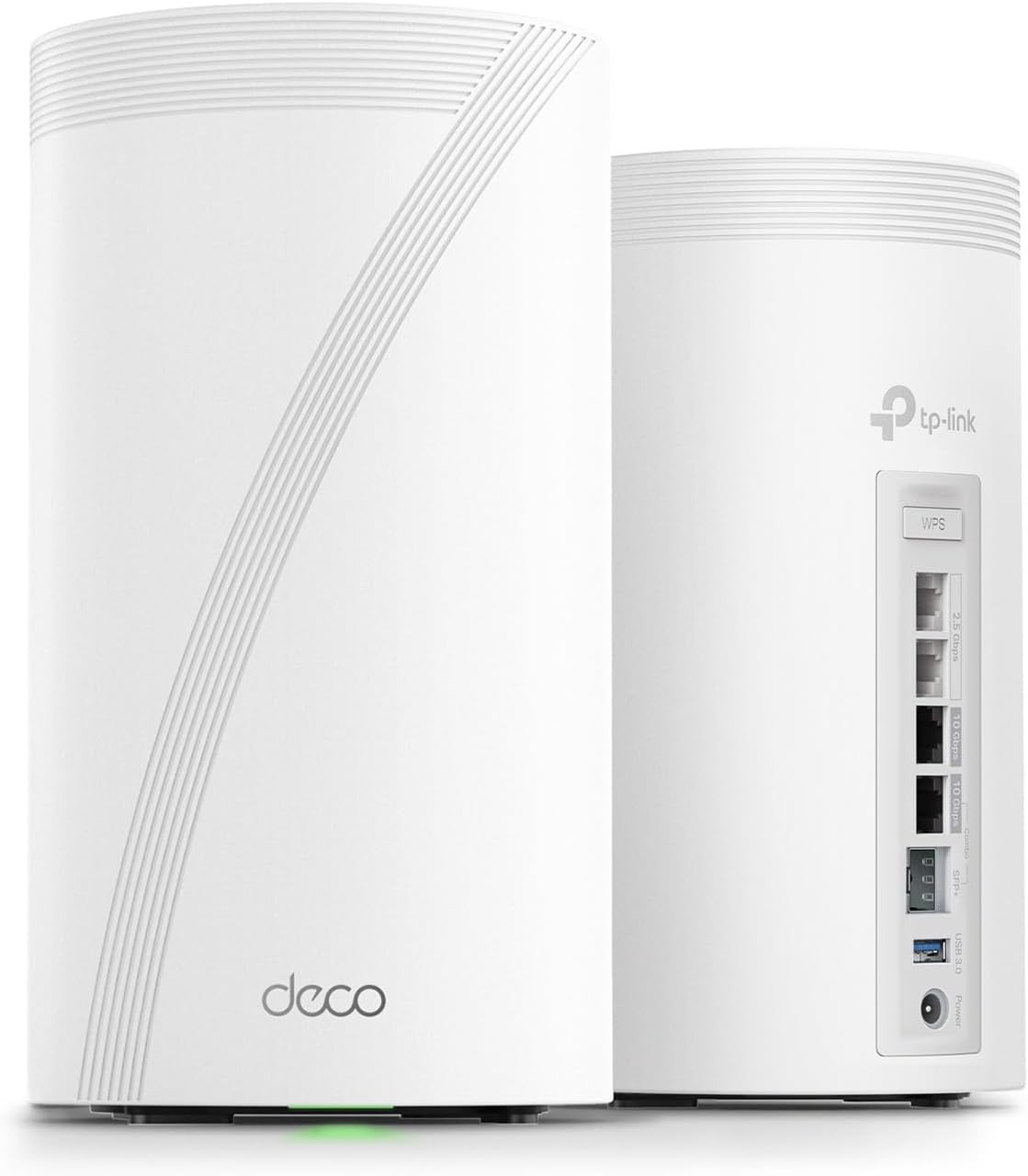
7. TP-Link Deco BE85 – Best WiFi 7 Mesh System
Overview
The TP-Link Deco BE85 is the most capable WiFi 7 mesh system available in a 2-pack configuration. BE22000 combined speed, dual 10G ports and two 2.5G ports per node, eight high-gain antennas per node, and AI-Roaming that pre-connects devices to the nearest node before signal degrades create a whole-home network that eliminates the dead zones and handoff drops that make standard single-router setups frustrating in large or complex homes.
Whole-Home Coverage
A single router, regardless of power, creates signal that weakens with distance and degrades through walls and floors. A mesh system distributes strong local signal from multiple nodes so every room gets full-strength WiFi rather than a weakened signal stretching across the property. Two BE85 nodes cover large homes effectively and the system expands with additional compatible Deco units without replacing existing hardware. Wired backhaul between nodes, when Ethernet runs are available, delivers the strongest inter-node bandwidth and makes the whole mesh feel like a wired backbone with wireless endpoints.
Seamless Roaming Performance
AI-Roaming is the feature that separates the BE85 from mesh systems that hand off devices reactively. Rather than waiting for a device to fall below a signal threshold and then switching nodes, AI-Roaming predicts movement and pre-connects the device to the next node before signal degrades. The result is roaming that feels seamless because it genuinely is, not a perceptible pause between nodes that reminds you a handoff happened.
Key Features
- Tri-band WiFi 7 BE22000 combined speed per node
- Two 10G + two 2.5G Ethernet ports per node
- Eight high-gain antennas per node
- AI-Roaming for predictive device handoff
- Wired backhaul support between nodes
- HomeShield security, VPN, EasyMesh compatible
Best deal today – prices may change
Pros: BE22000 speed is the highest combined wireless throughput of any system in this guide | AI-Roaming delivers genuinely seamless device handoff | Dual 10G ports per node handles multi-gig internet and 10G wired devices at each node location | Wired backhaul makes the mesh perform like a professional installation.
Cons: Premium price reflects the dual 10G and eight-antenna design per node, which exceeds what most households need if whole-home coverage, not maximum speed, is the only goal.
Best For: Large homes where dead zones from a single router are a recurring problem | Households with people moving through the home constantly with laptops and phones | Multi-gig internet subscribers who want 10G port access at both node locations | Anyone building a premium whole-home WiFi 7 network from the ground up.
Full mesh comparison → Best WiFi-7 Mesh System | Large home option → Best TP-Link Deco WiFi-7 Mesh System for Large Homes
How to Choose the Best WiFi 7 Router
What Is WiFi 7?
WiFi 7 is the common name for the 802.11be wireless standard. It builds on WiFi 6 and WiFi 6E by adding Multi-Link Operation, wider 320MHz channel bandwidth, improved 4096-QAM data encoding, and more efficient handling of many simultaneous devices. These aren’t incremental improvements to the same underlying technology. MLO specifically changes how client devices connect to the network in a way that previous standards couldn’t, and 320MHz channels double the data throughput available per transmission compared to WiFi 6E’s 160MHz maximum.
The practical translation: lower latency for gaming and video calls, faster speeds for streaming and file transfers, and more stable connections in homes with many devices all competing for bandwidth.
WiFi-7 vs WiFi-6E
WiFi 6E added the 6GHz band to WiFi 6 but kept the same single-link connection model and 160MHz maximum channel width. WiFi 7 keeps the 6GHz band and adds three meaningful improvements over WiFi 6E.
- MLO: Devices connect to two bands simultaneously. Congestion on one band no longer drops the connection. This is the most impactful gaming improvement in the standard.
- 320MHz channels: Double the data throughput per transmission compared to WiFi 6E. Real-world speeds for nearby devices improve meaningfully.
- Multi-RU Puncturing: The router works around interference on specific frequency segments rather than abandoning the whole channel. More consistent speeds in real environments with neighboring network interference.
For users upgrading from WiFi 6E, the MLO improvement alone makes WiFi 7 worthwhile for gaming households. For users upgrading from WiFi 5 or WiFi 6, every improvement is immediately noticeable.
Do You Really Need WiFi 7?
Not every household does. But specific types of users benefit immediately and meaningfully.
- Gamers get MLO’s lower latency and the 6GHz band’s cleaner wireless channel for competitive play
- Streamers benefit from improved congestion handling that keeps 4K streams consistent when other devices are active simultaneously
- Smart home users benefit from better simultaneous device handling and dedicated IoT SSIDs on models like the RT-BE58U and RT-BE82U
- Fiber internet users on multi-gig plans benefit from 10G ports that finally deliver the full speed the ISP is providing
- Apartment residents benefit most from 6GHz band access because congestion from neighboring networks on 2.4GHz and 5GHz is the primary WiFi problem in dense buildings
If you’re on a standard Gigabit plan with under 15 devices and no gaming, smart home setup, or streaming demands, a well-placed WiFi 6 router still covers the need without the WiFi 7 price premium. But if any scenario above applies, the upgrade pays off in daily use.
Dual-Band vs Tri-Band WiFi-7 Routers
Dual-band WiFi 7 routers include 2.4GHz and 5GHz. They handle apartments, medium homes, and setups with standard device counts well, especially with MLO keeping connections stable across both bands. The ASUS RT-BE58U and RT-BE82U on this list are dual-band and cover their categories effectively at a lower price than tri-band alternatives.
Tri-band WiFi 7 routers add the 6GHz band. This third band is the cleanest wireless channel available because most devices and neighboring networks aren’t using it yet. For homes with more than 20 active devices, competitive gaming households, or anyone in a dense apartment building, tri-band with 6GHz access is worth the additional cost. The congestion improvement on 6GHz is the most impactful real-world performance difference between dual-band and tri-band WiFi 7.
What Is Multi-Link Operation (MLO)?
MLO is the single most impactful WiFi 7 feature for gaming and video calls in everyday household conditions. On all previous WiFi standards, a device connects to one band at a time. When that band gets congested, the connection slows or drops. With MLO, a device connects to two bands simultaneously. When congestion hits one band, the connection continues uninterrupted on the other.
The practical result is lower and more consistent latency in real households where multiple devices compete for bandwidth. It’s not a theoretical lab improvement. It’s the reason WiFi 7 gaming performance is consistently better than WiFi 6 performance in the same household during evening peak hours.
Are 10Gb Ports Worth It?
For most households today, a 2.5G WAN port delivers their full internet plan speed without any hardware bottleneck. But 10G ports are worth the investment in three specific situations.
- You’re on a multi-gig internet plan delivering more than 2.5 Gbps
- You run a NAS system and want local file transfers at 10G speeds independent of internet bandwidth
- You want to future-proof the router for internet plans that continue getting faster in most markets
If none of those apply yet, the 2.5G WAN models in this guide deliver identical internet performance for current plan speeds at a lower price. If one of those applies now or within the next two years, the 10G port models are the more practical long-term investment.
Router vs Mesh System
A single powerful router is the right choice for most homes under 3,500 sq. ft. with reasonably open floor plans. It’s simpler to manage, more affordable, and sufficient for the vast majority of households.
A mesh system makes sense when:
- Dead zones in distant rooms or upper floors persist after optimal single-router placement
- The property is larger than 4,000 sq. ft. or has an unusual layout
- Detached structures like garages or workshops need coverage
- Seamless device roaming as people move through the home is a daily priority
The Deco BE85 on this list is built for the mesh scenario. Every other router handles single-router setups well for large homes without the added complexity and cost of a multi-node system.
Which WiFi-7 Router Is Best for You?
Best for Gaming: TP-Link Archer GE650. Hardware Game Acceleration, a dedicated gaming port, and 320MHz tri-band performance are built around gaming-first traffic management. The two 5G LAN ports for wired gaming setups make it the most gamer-specific hardware choice on this list.
Best for Streaming: ASUS RT-BE96U or NETGEAR RS700S. Both deliver tri-band WiFi 7 with enough combined speed and device capacity that 4K streaming on multiple devices simultaneously never creates bandwidth competition across the household.
Best for Large Homes: NETGEAR RS700S. 3,500 sq. ft. from a single router is the practical answer for most large homes before mesh expansion becomes the cleaner solution. The 10G WAN and Armor security make it more complete than comparable coverage alternatives.
Best for Apartments: ASUS RT-BE58U or NETGEAR RS280S. For apartment-specific WiFi challenges, the 6GHz band on the RS280S addresses channel congestion from neighboring networks directly. The RT-BE58U handles the privacy and security priorities apartment living creates. Read our dedicated best WiFi 7 router for apartments guide for a full breakdown.
Best for Smart Homes: ASUS RT-BE82U. Five 2.5G ports and three IoT SSIDs handle the specific complexity of smart home device management better than routers designed around wireless speed first. IoT isolation and parental controls are the features that matter most for device-dense households.
Best Budget Pick: ASUS RT-BE58U. Three dedicated network types, commercial-grade security with no subscription, and AiMesh expansion make it the most feature-per-dollar WiFi 7 router on this list. It doesn’t compromise on the features that matter for family households.
Best for Fiber Internet: ASUS RT-BE96U or TP-Link BE800. Both include dual 10G ports for users whose fiber plans deliver more than 2.5 Gbps. The RT-BE96U edges ahead for users who want Lifetime Security alongside the dual 10G capability.
Common Mistakes to Avoid When Buying a WiFi-7 Router
Overpaying for ports you don’t need. Dual 10G ports are genuinely useful on multi-gig fiber plans. They add nothing on a 500 Mbps cable plan. Check your internet plan speed against the router’s WAN port before paying the premium.
Ignoring the ISP modem as a bottleneck. A 10G router connected to an ISP-provided modem or gateway that caps throughput at 1 Gbps delivers 1 Gbps regardless of what the router says. Confirm your modem or ONT supports multi-gig passthrough before buying a 10G router.
Poor placement decisions. The most common WiFi performance issue isn’t hardware quality. It’s a router installed in a corner media cabinet next to a concrete wall. Central elevated placement makes a measurably bigger difference than a spec upgrade in many homes. Place the router before deciding it’s underpowered.
Buying oversized routers for apartments. A router rated for 3,500 sq. ft. in a 900 sq. ft. apartment doesn’t improve signal strength in that apartment. Coverage ratings don’t measure interference management. For apartments, 6GHz band access and congestion handling matter more than square footage claims. Check our best WiFi 7 router for apartments guide for apartment-specific guidance.
Skipping mesh compatibility checks. A router without AiMesh, EasyMesh, or comparable mesh expansion support is a dead-end hardware purchase when coverage needs change. All seven routers on this list support mesh expansion. Not all WiFi 7 routers on the market do.
Comparing theoretical peak speeds. BE19000 combined speed sounds impressive in every brand comparison. In a household on a 500 Mbps internet plan with 20 devices, the practical difference between BE19000 and BE9200 is zero. Latency, congestion handling, device capacity, and feature quality deliver the real improvements that show up in daily use.
Frequently Asked Questions
Is WiFi 7 worth it? For gamers, smart home users, multi-gig internet subscribers, and apartment residents dealing with interference from neighboring networks, yes. MLO, 6GHz band access, and improved congestion handling deliver real everyday improvements that show up in ping consistency, streaming stability, and smart device reliability. For basic browsing households on standard plans with under 15 devices, WiFi 6 still covers the need well. But the WiFi 7 price premium has come down enough that most households upgrading from WiFi 5 will find the step directly to WiFi 7 the better long-term investment.
Is WiFi 7 better for gaming?
Meaningfully so. MLO is the most impactful gaming improvement because it keeps the connection active across two bands simultaneously. When the household gets congested during evening peak hours, a WiFi 7 router with MLO maintains gaming latency while WiFi 6 and WiFi 5 routers start showing ping spikes. The 6GHz band gives gaming devices a dedicated clean channel, and dedicated gaming ports on routers like the GE650 deliver hardware-level traffic prioritization that software QoS can’t replicate.
Do I need a new modem for WiFi 7?
Not necessarily. WiFi 7 routers connect to your existing modem or ISP gateway through a standard Ethernet port and work immediately. But to benefit fully from a 10G WAN port, your modem or ONT needs to support multi-gig throughput from your ISP. Most standard ISP-provided modems cap throughput at 1 Gbps. That’s compatible with all WiFi 7 routers, just not able to pass through speeds above 1 Gbps regardless of the router’s WAN port rating.
Are WiFi 7 routers backward compatible? Yes, completely. Every WiFi 7 router works with WiFi 5, WiFi 6, and WiFi 6E devices without any configuration changes. Older devices connect to the 2.4GHz or 5GHz bands and perform exactly as they did before. Only WiFi 7 capable client devices benefit from MLO, 6GHz band access, and 320MHz channel support. Upgrading your router doesn’t require upgrading any other device in your home.
Can WiFi 7 improve apartment WiFi? Significantly, specifically through 6GHz band access. Most apartment buildings have dozens of competing networks on 2.4GHz and multiple competing networks on 5GHz. The 6GHz band is essentially empty in most residential buildings right now because it requires WiFi 7 hardware. Devices connecting on 6GHz experience dramatically less interference from neighbors, which translates to more consistent speeds and lower latency in the wireless environments where apartment WiFi typically suffers most.
Is tri-band better than dual-band for WiFi 7?
In most cases, yes, especially for households with more than 20 active devices, competitive gaming setups, or anyone in a dense wireless environment. The third 6GHz band provides a dedicated uncongested channel for high-priority devices and reduces congestion on 2.4GHz and 5GHz. For smaller apartments and standard device counts, dual-band WiFi 7 with MLO still delivers meaningful improvements over older hardware at a lower price. The decision depends on your household’s device density and wireless environment more than home size alone.
What is the best WiFi-7 router for large homes?
The NETGEAR RS700S covers up to 3,500 sq. ft. from a single router, making it the strongest single-unit option for most large homes. For properties above 4,000 sq. ft. or with layouts that create persistent dead zones regardless of router placement, the TP-Link Deco BE85 provides distributed whole-home coverage from two nodes that any single router can’t match. Full details in our best WiFi 7 router for large homes guide.
Should I buy a router or mesh system? For most homes under 3,500 sq. ft. with standard layouts, a single powerful WiFi 7 router is the simpler, more affordable, and practically better choice. Choose a mesh system when dead zones persist after optimal placement, when the property is very large, when the layout creates natural signal barriers, or when seamless roaming for constantly moving devices is a daily household priority. If you’re unsure, start with a single router and add a mesh node later if needed. AiMesh and EasyMesh both support exactly this upgrade path.
Final Verdict
WiFi 7 is a genuine generational improvement, not a marketing rebrand. MLO, 6GHz band access, and 320MHz channels deliver real daily improvements in latency, congestion handling, and multi-device performance that WiFi 6 hardware at the same price tier simply can’t match. Every router and mesh system on this list earns its category position because it does something better than any alternative at its tier.
Best Overall: ASUS RT-BE96U. Dual 10G ports, Lifetime Security, MLO, and tri-band performance without any subscription requirement make it the strongest single investment for demanding home networks. Buy it once, own it for years, and stop worrying about annual fees.
Best Gaming Router
TP-Link Archer GE650. Hardware Game Acceleration, a dedicated gaming port, and two 5G LAN ports deliver the consistent low latency competitive gaming requires. Software gaming modes on standard routers don’t replicate what hardware-level port prioritization does in practice.
Best Value: ASUS RT-BE58U. Three dedicated network types, commercial-grade security without any ongoing cost, and AiMesh expansion at a budget price make it the most useful router for everyday family households who don’t need multi-gig ports or flagship wireless speeds.
Best Premium Pick: NETGEAR RS700S. 3,500 sq. ft. coverage, 10G WAN, and Armor security from a single router make it the cleanest large-home solution for buyers who want everything handled without adding mesh complexity.
The right router for your specific home comes down to matching the hardware to your actual situation. Your home size determines whether you need a single router or a mesh system. Your internet plan speed determines which WAN port tier is worth paying for. Your primary usage, gaming, streaming, smart home, or general household, determines which features actually improve your daily experience versus which ones pad the spec sheet. Use the quick verdict and comparison table at the top of this guide to identify your match, and use the product reviews to confirm before you buy.
Disclosure: This post contains affiliate links. If you purchase through our links, we may earn a small commission at no extra cost to you. We only recommend products we genuinely stand behind.