

The best WiFi for a retail store keeps the card reader online first, and it keeps customers on a separate guest network second. I looked at what a small shop really needs, and then I checked four routers against the brands’ own pages.
First, two of them are wired routers with no WiFi, so they need an access point. The other two are cable modem and WiFi router combos for a tiny shop on cable internet. As a result, the right pick depends on your internet type and on how much you want to separate guests from payments.
Key Takeaways
- Wire the card reader: a cable is steadier than WiFi, so plug the reader into the router when it allows it.
- Separate the guests: give customers their own WiFi name, and keep payment devices on the shop network.
- A backup line: TP-Link says both the ER605 and the ER707-M2 support failover and a USB 4G/LTE backup.
- No WiFi on two picks: the TP-Link ER605 and ER707-M2 are wired routers, so you add an access point for WiFi.
- Cable shops only: NETGEAR says the CAX30S does not work with fiber, and both combos are cable modems.
Disclosure: This post contains affiliate links. If you buy through them, we may earn a commission at no extra cost to you.
How I researched this
- I read the TP-Link Omada product pages for the ER605 and the ER707-M2, and the NETGEAR page for the CAX30S.
- For the Motorola MG8702 I read the Motorola data sheet and user manual that Cox hosts, because I did not find a Motorola product page.
- I only list products that pass my rule of 4.0 stars or more and 500 or more bought a month.
- I did not test these routers myself, so the advice comes from the brand pages and spec sheets.
- Prices are left out because they change every week.
What WiFi Does a Small Retail Store Really Need?
A shop asks more from its network than a home does, because every sale depends on it. Still, the list is short, and each item has a simple fix.
- A steady card reader: a wired connection avoids WiFi dropouts at the counter.
- A separate guest network: customers can join without sharing the network your payment devices use.
- Coverage on one floor: most small shops need one good router, or one router and one access point.
- A backup line: if the main line drops, a second connection keeps you selling.
- Simple control: you should be able to change the password and see who is connected.
Because your payment provider may have its own network rules, ask them before you change anything. Also, I am not making any claim about payment rules in this guide.
Which Setup Fits Your Shop?
| Your shop | Best setup | Why |
| A tiny shop on cable internet with one card reader | A cable modem and WiFi router combo (CAX30S or MG8702) | One box replaces a modem and a router, and it is simple to set up |
| A shop that wants guests on a separate network | A wired router (ER605 or ER707-M2) plus an access point | TP-Link lists 802.1Q VLAN on both routers, which is how networks are kept apart |
| A shop that cannot afford to go offline | The ER605 or the ER707-M2 with a USB 4G/LTE dongle | Both pages list failover and a USB mobile backup |
| A shop on fiber | A wired router, not a cable combo | NETGEAR says the CAX30S is not compatible with fiber internet |
That table is a rule of thumb, not a guarantee, because your internet type and your payment setup both matter.
The 4 Best Routers for a Retail Store
I ordered them from the wired routers that give you the most control to the all-in-one combos that are simplest to set up. As a result, the first two need an access point and the last two do not.
1. TP-Link ER605 V2: the backup-line pick

BACKUP LINE
TP-Link ER605 V2 wired VPN router
✔ Five Gigabit ports ✔ Up to 3 WAN ports ✔ USB 4G backup
TP-Link lists five Gigabit ports on the ER605, with one WAN port and two WAN/LAN ports, plus two LAN ports. For failover, it supports load balancing on up to three WAN ports, and its page lists link backup too. Besides that, it has one USB 2.0 port, and TP-Link says a 4G or 3G modem on that port works as a WAN backup.
To keep networks apart, the page lists 802.1Q VLAN and access control lists. However, the ER605 has no WiFi, so you add an access point. TP-Link also notes that cloud management needs the Omada controller.
WHAT WE LIKE
✓ Failover and a USB mobile backup
✓ 802.1Q VLAN and access control lists
✓ Five Gigabit ports
WATCH OUT FOR
✕ No WiFi, so you need an access point
✕ Cloud management needs the Omada controller
✕ The page does not state warranty terms
Skip it if: you want one box with WiFi built in, or you do not want to set up a separate access point.
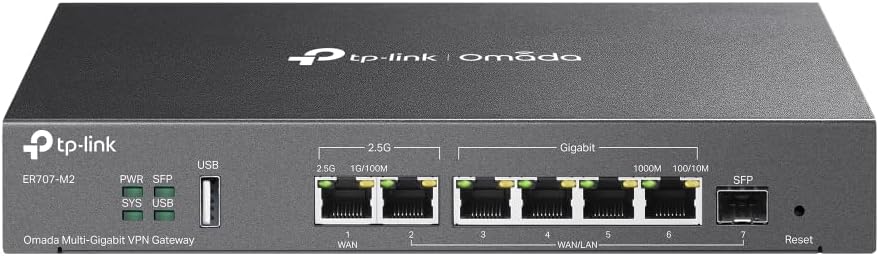
2. TP-Link Omada ER707-M2: for a busier shop
BUSIER SHOPS
TP-Link Omada ER707-M2 wired VPN router
✔ Two 2.5 Gbps ports ✔ Up to 6 WAN ports ✔ USB LTE backup
The ER707-M2 has two 2.5 Gbps ports, one SFP port and four Gigabit ports. Besides that, TP-Link says it supports load balancing on up to six WAN ports, and it lists failover and LTE backup through the USB port. It also lists 802.1Q VLAN.
So it suits a shop with several internet lines or a lot of devices. On the other hand, it has no WiFi either, and the page does not state warranty terms.
WHAT WE LIKE
✓ Up to six WAN ports with failover
✓ Two 2.5 Gbps ports plus an SFP port
✓ USB LTE backup and 802.1Q VLAN
WATCH OUT FOR
✕ No WiFi, so you need an access point
✕ More router than a tiny shop needs
✕ The page does not state warranty terms
Skip it if: your shop has one internet line and a handful of devices, because the ER605 already covers that.
3. NETGEAR Nighthawk CAX30S: the simple cable-shop pick

ALL-IN-ONE
NETGEAR Nighthawk CAX30S cable modem router
✔ DOCSIS 3.1 modem ✔ WiFi 6 AX2700 ✔ Four Gigabit ports
First, NETGEAR’s page describes a DOCSIS 3.1 cable modem with a WiFi 6 router in the same box, rated AX2700. It also has four Gigabit Ethernet ports, which leaves room for a card reader and a printer, and it lists certified speeds of up to 800 Mbps on Xfinity and up to 1 Gbps on Spectrum and Cox.
However, NETGEAR says it is not compatible with fiber internet or cable voice service. The page also does not mention a guest network, so I could not confirm one. Warranty coverage needs an authorized reseller and registration.
WHAT WE LIKE
✓ Modem and WiFi 6 router in one box
✓ Four Gigabit ports
✓ Named for Xfinity, Spectrum and Cox
WATCH OUT FOR
✕ Not for fiber or cable voice
✕ The page does not mention a guest network
✕ Warranty needs an authorized reseller and registration
Skip it if: your shop is on fiber, or you want guests on a separate network that the page confirms.
4. Motorola MG8702: an older all-in-one

BUDGET COMBO
Motorola MG8702 cable modem and WiFi router
✔ DOCSIS 3.1 modem ✔ AC3200 WiFi ✔ Four Gigabit ports
In short, Motorola’s data sheet describes a DOCSIS 3.1 cable modem with 32×8 channel bonding and an AC3200 dual-band router, rated at 3,200 Mbps for WiFi. Then, the user manual lists four Gigabit Ethernet ports, and the data sheet lists a 2-year warranty.
Overall, it is an older WiFi 5 class design, so it suits a small shop with modest needs. Moreover, I found no guest network mention in the documents, so I could not confirm that feature.
WHAT WE LIKE
✓ Modem and router in one box
✓ Four Gigabit ports
✓ 2-year warranty on the data sheet
WATCH OUT FOR
✕ WiFi 5 class, older than the CAX30S
✕ I could not confirm a guest network
✕ I read a data sheet, not a Motorola product page
Skip it if: you want WiFi 6, or a guest network that the maker confirms.
All 4 Routers Compared
| Router | Type | WiFi | Backup line | Warranty on the brand page |
| TP-Link ER605 V2 | Wired router | None | Failover and USB 4G/3G | Not stated |
| TP-Link ER707-M2 | Wired router | None | Failover and USB LTE | Not stated |
| NETGEAR CAX30S | Cable modem and router | WiFi 6, AX2700 | None listed | NETGEAR limited, needs reseller and registration |
| Motorola MG8702 | Cable modem and router | AC3200 | None listed | 2 years (data sheet) |
How to Set Up a Simple Shop Network
- First, connect the router to your internet line. For a combo, connect the coax cable and activate it with your provider.
- Then plug the card reader into the router with an Ethernet cable if the reader supports it.
- Next, give customers a guest WiFi name that is different from your shop network, if your router or access point supports it.
- After that, change the default admin password and keep the shop network password private.
- Finally, if you cannot afford downtime, add a backup line, such as a USB 4G dongle on the ER605 or the ER707-M2.
Also, your payment provider may ask for specific steps, so check with them first.
When These Picks May Not Fit
- Your shop is on fiber. NETGEAR says the CAX30S does not work with fiber, so use a wired router with your provider’s fiber equipment.
- You need a guest network you can confirm. The two combos did not mention one, so a wired router with an access point is the safer plan.
- You need many access points. A larger shop may need a managed setup, and this guide covers small shops only.
- Your payment provider supplies the router. In that case, ask them before you add your own.
Real-World Checks Before You Buy
Spec sheets only tell half the story, so run these quick checks in your own shop first.
- Walk the floor with your phone. Stand at the register, the fitting rooms and the back room, and load a page in each spot. A weak corner usually means you need an access point there, not a faster plan.
- Count what must stay online. List the card reader, the POS tablet, the printer and any cameras. Then plug the most important ones in with Ethernet, so a busy Saturday on the WiFi cannot knock them off.
- Ask about a guest network. Neither combo’s brand page mentions one. So if guest WiFi matters to you, ask the maker before you order, or choose a TP-Link router with an access point that offers it.
- Plan the access point. The ER605 and the ER707-M2 have no WiFi of their own. Therefore, budget for an access point and look for guest network and VLAN support on its spec sheet.
- Check the warranty in the box. The TP-Link product pages do not list warranty terms, so confirm them with the seller. Likewise, NETGEAR says its warranty needs an authorized reseller and registration.
- Look at the model page on order day. Brands update their pages, so check the details again before you buy.
WiFi for a Retail Store FAQ
Do I need a business router for a small shop?
Not always. A tiny shop on cable internet can use a combo, but a wired router gives you VLAN support and a backup line.
Should customers use the same WiFi as my card reader?
Yes, it is safer to keep them separate. For example, TP-Link lists 802.1Q VLAN on both wired routers, and a separate guest network is a common way to do it.
Do the TP-Link routers include WiFi?
No. Neither product page mentions WiFi, so you must add an access point.
What if my internet goes down?
TP-Link says both the ER605 and the ER707-M2 support failover and a USB mobile backup. The two combos list no backup line.
Do the combos work with fiber?
No. NETGEAR says the CAX30S is not compatible with fiber internet, and both combos are cable modems.
Related Guides
- Need a modem too? See our best modem and router for small business guide.
- More office picks are in our best WiFi router for small business guide.
- Compare cable modems in our best cable modem under $300 guide.
Final Recommendation
First, decide how your shop connects to the internet. On cable, a tiny shop can start with the NETGEAR CAX30S, and the Motorola MG8702 is the older, simpler alternative.
If you want guests kept apart from payments, or a backup line, choose the TP-Link ER605 and add an access point. The ER707-M2 is for shops with more lines and more devices. Whichever you pick, wire the card reader, keep guests on their own network and ask your payment provider about its rules.