

If your Spectrum internet works perfectly near the router but struggles in bedrooms, upstairs areas, or the backyard, a Spectrum WiFi booster can help strengthen the signal and eliminate frustrating dead zones.
Spectrum uses standard WiFi technology, so most modern WiFi boosters and range extenders connect to the network and improve coverage without replacing your router. No special setup is needed.
Here’s a quick look at our top 5 picks for Spectrum users in 2026:
- TP-Link BE3200 Wi-Fi 7 Range Extender RE223BE: Best overall
- TP-Link AX1800 WiFi 6 Extender (RE600X): Best balanced WiFi 6
- NETGEAR WiFi Mesh Range Extender (EX5000): Best compact budget
- NETGEAR WiFi Mesh Range Extender (EX6400): Best for larger reach
- ASUS RP-AX58 AX3000: Best WiFi 6 value
We picked these because they work well with Spectrum routers and give a reliable boost in daily use.
How to Choose the Best Spectrum WiFi Booster
Dead zones turn a simple evening of streaming into constant buffering. It gets worse when the Spectrum router sits in a far corner or the house has thick walls.
Buyers often run into these problems:
- Slow speeds, random drops or a very weak signal in far rooms
- Not knowing if the booster will pair with Spectrum equipment
- Buying a model that is too weak, or more than they need
- Paying for features they never use
Current boosters use WiFi 6 or WiFi 7, which copes better with a busy network. Connections are steadier, and setup is done in an app in a few minutes.
This guide is for beginners, for gamers and remote workers who cannot have lag, for people in big homes or apartments, and for any Spectrum customer tired of patchy coverage.
This guide will help you choose the right Spectrum WiFi booster based on your setup, usage needs, and expectations.
Top 5 Spectrum WiFi Booster in 2026
Disclosure: This post contains affiliate links. As an Amazon Associate I earn from qualifying purchases. If you purchase through our links, we may earn a small commission at no extra cost to you.
We picked these for how well they work with Spectrum, how reliable they are day to day, and their value for the price.
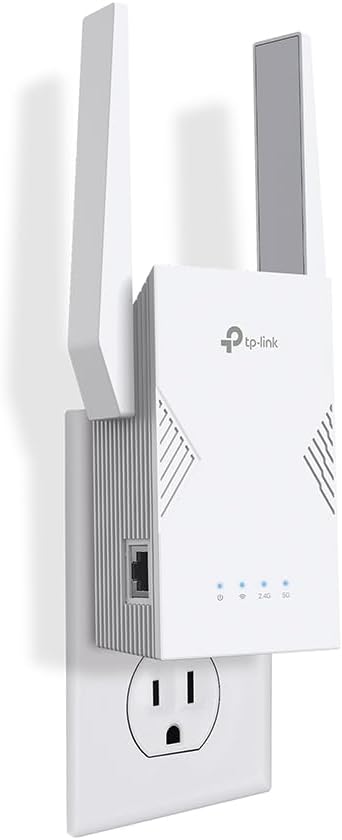
#1 TP-Link BE3200 Wi-Fi 7 Range Extender RE223BE: Best Overall Choice
Best deal today, prices may change.
- Next-gen WiFi 7 dual-band repeater with Ethernet | Medium-large homes/apartments | Heavy streamers, gamers, multi-device families on Spectrum | Excellent compatibility with Spectrum routers
- Very fast with low delay | Simple app/EasyMesh setup | Handles 64+ devices | Everyday high-demand use
- Top-tier real-world boost | Clean design | Trusted TP-Link | MLO + Gigabit port
- No 6GHz band (still dual-band focus)
- Gigabit Spectrum plans | Larger homes needing future-proof coverage | Users wanting max efficiency
#2 TP-Link AX1800 WiFi 6 Extender Internet Booster (RE600X): Best Balanced WiFi 6

Best deal today, prices may change.
- WiFi 6 dual-band extender with Gigabit Ethernet | Small-medium homes | Streaming, browsing, remote work on Spectrum | Great all-around compatibility
- Consistent performance | Easy Tether app/OneMesh | Reliable multi-device support | Versatile AP mode
- Strong value speeds | User-friendly | Solid brand | OneMesh + Ethernet
- Not the longest range for huge homes
- Mid-tier Spectrum users | Balanced needs | WiFi 6 upgrade without overkill
#3 NETGEAR WiFi Mesh Range Extender (EX5000): Best Compact Budget Pick

Best deal today, prices may change.
- Compact wall-plug AC1200 booster | Small apartments/spot fixes | Beginners and light users on Spectrum | Plug-and-play compatibility
- Reliable basic extension | Super simple setup | Good for everyday devices | Discreet design
- Easy install | Affordable | NETGEAR trust | Compact reliability
- Shorter coverage than desktop models
- Budget Spectrum setups | Small spaces | Quick weak-spot fixes
#4 NETGEAR WiFi Mesh Range Extender (EX6400): Best for Extended Reach

Best deal today, prices may change.
- AC1900 mesh-capable extender with smart roaming | Medium-large homes | Multi-device households on Spectrum | Broad compatibility
- Strong coverage push | Easy management | Handles 35+ devices | Smart roaming
- Excellent real-world range | User-friendly | Trusted NETGEAR | FastLane tech
- Bulkier than plugs
- Larger Spectrum homes | Roaming needs | Medium-heavy use
#5 ASUS RP-AX58 AX3000: Best WiFi 6 Value

Best deal today, prices may change.
- WiFi 6 dual-band AiMesh extender | Medium homes | Modern/gaming setups on Spectrum | Works with AiMesh
- Efficient WiFi 6 speeds | App/AiMesh setup | High device capacity | Future-ready
- Impressive performance | AiMesh mesh | ASUS quality | Great value
- Setup app can feel rough
- WiFi 6 Spectrum users | Device-heavy homes | Value seekers
Quick Comparison of Spectrum WiFi Booster
| Rank & Model | WiFi & Speed | Price & Coverage | Best For |
|---|---|---|---|
| 1. TP-Link RE223BE | BE3200 WiFi 7, 3.2 Gbps | Mid-High, Up to 2,400 sq ft | Overall/future-proof |
| 2. TP-Link RE600X | AX1800 WiFi 6, 1.8 Gbps | Mid, Up to 1,500 sq ft | Balanced WiFi 6 |
| 3. NETGEAR EX5000 | AC1200, 1.2 Gbps | Low, Up to 1,000 sq ft | Compact budget |
| 4. NETGEAR EX6400 | AC1900, 1.9 Gbps | Mid, Up to 2,100 sq ft | Extended reach |
| 5. ASUS RP-AX58 | AX3000 WiFi 6, 3 Gbps | Mid, Up to 2,200 sq ft | WiFi 6 value |
For one network in the whole home, see our guide to the best WiFi mesh extenders: Best WiFi Mesh Extender : Top Picks for Seamless Whole-Home Coverage
What to Look for When Buying a Spectrum WiFi Booster
Suitability for Your Setup and Daily Usage
- Works with Spectrum routers (they use standard WiFi, so this is easy)
- Fits your home size, from a small apartment to a large multi-level house
- Tailored to activities: gaming/streaming needs fast bands, outdoor wants durability
- Dual-band or tri-band; WiFi 6/7 for future-proofing
Feature Simplicity and Transparency
- Clear specs for speed and coverage, with no vague claims
- Skip extras you will not use
- Straightforward instructions (app or WPS wins)
Performance and Stability
- No random disconnects
- Even strength room-to-room
- Smooth multi-device handling
- Ethernet port for wired stability (great for consoles)
Brand Reliability and Support
- Solid names like TP-Link, NETGEAR, ASUS
- Frequent firmware updates
- Helpful apps, guides, and support
- Good warranty/returns
Long-Term Value for Everyday Use
- Tough build that lasts
- WiFi 6/7 readiness
- Expandable (mesh compatible)
- Easy app/web tweaks
How These Spectrum WiFi Booster Were Selected
We chose them for how they work in daily use: fit for the home, clear features, easy setup, long-term reliability and a brand that supports its products.
- Daily performance and practical usability
- Suitability for different home setups and user needs
- Feature clarity and specification transparency
- Ease of setup and overall user experience
- Reliability and consistency over regular use
- Brand reputation and long-term support
How to Use a Spectrum WiFi Booster Effectively
Good placement and a careful setup make any booster work better on your Spectrum network.
Proper Initial Setup
- Place it halfway between the router and the weak area
- Follow the WPS or app steps
- Update firmware first
Optimal Placement and Positioning
- Keep it away from thick walls, metal and microwaves
- Test based on layout
- Avoid anything else that blocks the signal
Common Setup Mistakes to Avoid
- Placing it too far from the router
- Not checking which band your Spectrum router uses
- Skipping the setup steps
- Connecting too many devices
Performance Optimization Tips
- Use 5GHz when you are near, 2.4GHz when you are far
- Use a cable for devices that need the most speed
- Restart as needed
Signs It’s Working Properly
- A stable signal in every room
- No drops
- Smooth video and calls
- Full coverage boost
(Boost tips? See our Spectrum extender setup post.)
How to Pick the Right Spectrum WiFi Booster
Match your Spectrum plan: on a gigabit plan or faster, choose WiFi 6 or WiFi 7. The RE223BE is the best fit.
Your own booster or Spectrum’s pods: your own booster is cheaper and more flexible. Spectrum’s pods are simple to use but come with a fee.
Placement: put it halfway, where the router signal is still strong, and test it.
Must-haves: dual-band or better, an Ethernet port and app control.
Avoid: old single-band models, models that get no updates, and a model that does not fit your home size.
Looking for an extender for gaming? Read our guide: Best Gaming WiFi Extender That Actually Improves Your Signal
Real User Feedback
Spectrum users like the TP-Link RE223BE for its speed and the way it clears dead zones, the RE600X as an easy WiFi 6 upgrade, and the NETGEAR EX5000 as a small, low-cost fix. The most common praise is fast setup and a stable boost. The most common tip is to test a few spots before you settle on one.
Alternatives & Honorable Mentions
- Spectrum’s WiFi 7 pods (official ease)
- TP-Link RE715X (WiFi 6 classic)
- Linksys RE7310 (value alternative)
Frequently Asked Questions About Spectrum WiFi Booster
Does a Spectrum WiFi booster work with my setup?
Yes. Spectrum uses standard WiFi, so pairing is easy. For the best results, choose a dual-band or WiFi 6 model.
How easy is installation?
Plug it in and follow the app or press WPS. For most people it takes under 10 minutes.
Where should I place it?
Halfway to the dead zone, in a raised spot, with as few walls in between as possible.
Booster, pods or mesh?
A booster fixes one area. Pods are Spectrum’s own option. A mesh system covers the whole home with one network.
Can I add more later?
Yes. Many models with EasyMesh or AiMesh let you add more units.
Final Recommendation
This guide is for Spectrum users who are comparing boosters and want solid performance without paying for extras.
Our top pick is the TP-Link BE3200 RE223BE. It is fast, reliable and easy to set up, and it clears Spectrum dead zones well.
Match the booster to your home and the way you use the internet. The one that fits your home is the right one.