
Spectrum Compatible WiFi Extender That Actually Improves Your Signal
Spotty WiFi can make even simple tasks frustrating. If your internet works fine near the router but slows down in bedrooms, upstairs, or the backyard, a spectrum compatible WiFi extender can solve that problem without changing providers or rewiring your home.
Instead of replacing everything, you simply extend what you already have.
How to Choose the Best Spectrum Compatible WiFi Extender
Dead zones happen when your router’s signal can’t reach certain areas. Walls, floors, distance, and interference all weaken the signal.
Here’s what usually frustrates buyers:
- Slow speeds or lag spikes in far rooms
- Random connection drops
- Not knowing if it will work with Spectrum
- Buying a model too weak (or too powerful)
- Overpaying for features they never use
Modern extenders are far better than older models. With Wi-Fi 6 technology, better chipsets, and app-based setup, today’s devices are:
- More stable
- Easier to install
- Better at handling multiple devices
- Designed for streaming, gaming, and remote work
This guide is built for:
- Beginners who want something simple
- Gamers and remote workers who need low latency
- Large homes or multi-level layouts
- Device-heavy households
- Anyone using Spectrum who wants consistent coverage
This guide will help you choose the right spectrum compatible WiFi extender based on your home layout, usage habits, and performance expectations.
What to Look for When Buying a Spectrum Compatible WiFi Extender
Suitability for Your Setup and Daily Use
Before anything else, make sure the extender:
- Works with standard Spectrum routers and modems
- Matches your home size
- Supports your main activity (streaming, gaming, work calls)
- Offers dual-band (2.4GHz + 5GHz) or Wi-Fi 6
Small apartment? You don’t need extreme-range marketing claims.
Large multi-story home? A basic plug-in extender won’t cut it.
Feature Simplicity and Transparency
Avoid vague marketing phrases like “super boost technology.”
Instead, look for:
- Clear coverage specs
- Honest device capacity numbers
- Straightforward app setup
- WPS button support
- Ethernet port (if you need wired gaming/PC use)
Performance and Stability
A good extender should:
- Maintain steady connection without drops
- Deliver consistent signal strength
- Handle multiple devices smoothly
- Support Ethernet if needed
Stability matters more than flashy speed claims.
Brand Reliability and Support
Stick to established networking brands that offer:
- Regular firmware updates
- Easy app management
- Clear support documentation
- Solid return policy
Reliable support matters long-term.
Long-Term Value
Think ahead.
Choose something that is:
- Durable
- Future-ready (Wi-Fi 6 preferred)
- Expandable (EasyMesh or mesh compatible)
- Simple to manage over time
Top 5 Spectrum Compatible WiFi Extenders (2026)
These picks were selected based on real-world performance, reliability, compatibility, ease of use, and long-term value — not marketing hype.
01# Amazon eero 6 Add-On Extender – Best Overall Choice
Important: This requires an existing eero mesh system.

Amazon eero 6 Add-On Extender
Amazon eero 6 mesh wifi add-on extender – Add up to 1,500 sq. ft. of Wi-Fi 6 coverage. Required eero mesh wifi system not included
If you already use eero, this is one of the smoothest upgrades available.
Overview
- Adds up to 1,500 sq. ft. of Wi-Fi 6 coverage
- Seamlessly expands an existing eero network
- Works with Spectrum (bridge mode recommended)
Key Benefits
- Stable Wi-Fi 6 performance
- Seamless roaming (no network switching)
- Clean app-based management
- Handles modern smart homes easily
Pros
- Excellent mesh stability
- Very beginner-friendly
- Strong brand ecosystem
- Smooth device handoff
Cons
- Requires eero base system
Best For
- Homes already using eero
- Multi-device households
- Users wanting seamless mesh expansion
02# 2026 Long-Range WiFi Booster – Best for Maximum Coverage
Designed for extreme reach in larger homes.

2026 Long-Range WiFi Booster
2026 WiFi Extender, 15888 sq.ft Internet Extender WiFi Booster, Long Range Wireless Repeater Signal Amplifier for Home, Mesh Wi-Fi 99% Faster | Broader Than Ever, Support 55+ Devices, 1-Tap Setup
Overview
- Large advertised coverage range
- Supports many connected devices
- 1-tap setup
Key Benefits
- Broad signal push
- Good for multi-level homes
- Simple plug-and-play use
Pros
- Affordable for large spaces
- Easy installation
- Covers wide areas
Cons
- Real-world range depends on walls and layout
Best For
- Large properties
- Outdoor coverage needs
- Spectrum users with distant dead zones
03# TP-Link RE615X (AX1800 Wi-Fi 6 – Best Budget Option
A strong balance of price and performance.

TP-Link RE615X (AX1800 Wi-Fi 6
TP-Link RE615X AX1800 WiFi 6 Range Extender w/Ethernet Port | 1.8G Dual-Band Wireless Repeater Amplifier | Up to 2100 Sq. Ft., 64 Devices | Internet Signal Booster | APP Setup | EasyMesh Compatible
Overview
- Wi-Fi 6 dual-band
- Ethernet port included
- EasyMesh compatible
Key Benefits
- Reliable modern speeds
- Easy app setup
- Strong compatibility with Spectrum
Pros
- Great value
- Stable performance
- Ethernet support
Cons
- Not ideal for very large homes
Best For
- Budget-conscious buyers
- Medium apartments or homes
- Users upgrading to Wi-Fi 6
04# TP-Link RE515X (AX1500 Wi-Fi 6) – Best Premium on a Budget
Slightly lighter specs but solid everyday performance.
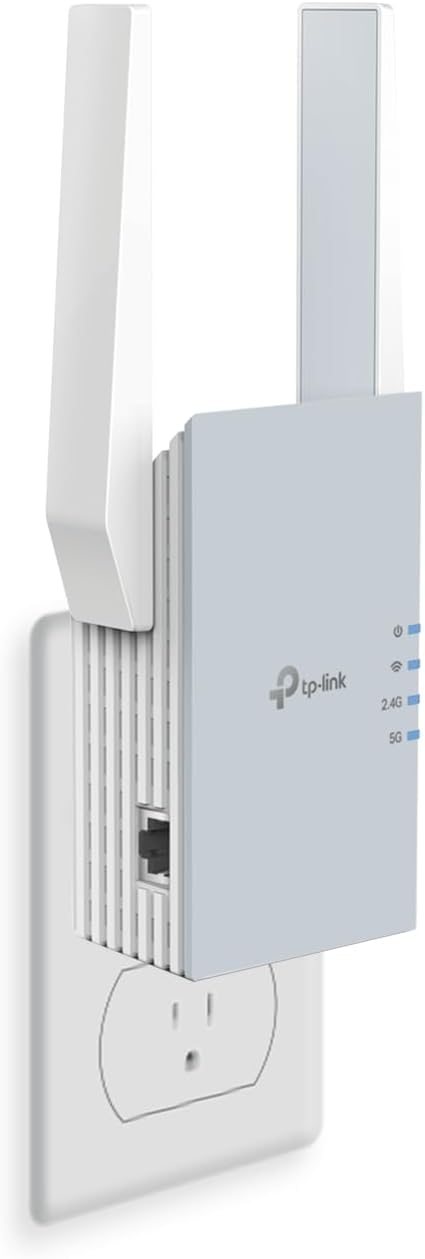
TP-Link RE615X (AX1800 Wi-Fi 6
TP-Link RE515X AX1500 WiFi 6 Range Extender w/Ethernet Port | 1.5G Dual-Band Wireless Repeater Amplifier | Up to 1800 Sq. Ft., 64 Devices | Internet Signal Booster | APP Setup | EasyMesh Compatible
Key Benefits
- Efficient Wi-Fi 6
- Gigabit Ethernet
- Easy app control
Pros
- Smooth and stable
- Handles streaming and gaming well
- Trusted brand
Cons
- Slightly smaller coverage area
05# TP-Link Deco S4 (3-Pack Mesh System) – Best Everyday Mesh Value
This replaces your router and extender with a unified mesh system.

TP-Link RE615X (AX1800 Wi-Fi 6
TP-Link Deco S4 Mesh AC1900 WiFi System – Up to 5,500 Sq.ft. Coverage, Replaces WiFi Router and Extender, Gigabit Ports, Works with Alexa, Deco S4(3-Pack)
Key Benefits
- Whole-home mesh coverage
- Gigabit ports
- Alexa compatibility
- Expandable setup
Pros
- No separate networks
- Seamless roaming
- Great for larger homes
Cons
- Higher upfront cost
Quick Comparison of the Best Spectrum Compatible WiFi Extender
| 1 | eero 6 Add-On | Mesh Expansion | Add-on 1,500 sq ft | Seamless mesh | App-based | Excellent |
| 2 | Long-Range Booster | Maximum Reach | Large claimed area | Extreme range focus | 1-tap | Good |
| 3 | TP-Link RE615X | Budget Wi-Fi 6 | Medium homes | EasyMesh + Ethernet | Simple | High |
| 4 | TP-Link RE515X | Premium Budget | Medium | Wi-Fi 6 stability | Easy app | Strong |
| 5 | Deco S4 Mesh | Full Replacement | Whole-home mesh | Unified network | App seamless | Long-term |
How These Spectrum Compatible WiFi Extenders Were Selected
We focused on:
- Daily real-world performance
- Suitability for different home sizes
- Ease of setup
- Stability under regular use
- Feature clarity
- Brand support reliability
No hype. No inflated marketing claims.
How to Use a Spectrum Compatible WiFi Extender Effectively
Proper setup makes a huge difference.
Proper Initial Setup
- Place extender halfway between router and weak zone
- Use app or WPS setup
- Update firmware immediately
Optimal Placement Tips
- Avoid thick walls and metal
- Keep away from microwaves and large appliances
- Elevate slightly off the floor
Common Mistakes to Avoid
- Placing too far from router
- Ignoring bridge mode when needed
- Connecting too many devices at once
Signs It’s Working Properly
- Strong signal in previous dead zones
- Fewer drop-offs
- Smooth streaming and video calls
Frequently Asked Questions
Is a spectrum compatible WiFi extender hard to install?
No. Most modern models offer app-guided setup or one-button WPS pairing.
Will it work with my Spectrum router?
Most extenders support standard Wi-Fi protocols and work with Spectrum equipment.
Where should I place it?
Between your router and the weak signal area — not in the dead zone itself.
What’s better: extender or mesh?
Extenders are cheaper and simpler. Mesh systems provide smoother whole-home coverage.
Final Recommendation
If you already use eero, the Amazon eero 6 add-on is the smoothest upgrade.
If you want standalone Wi-Fi 6 value, the TP-Link RE615X offers strong performance without overspending.
The key is simple:
- Match the extender to your home size
- Consider your device load
- Prioritize stability over marketing claims
Weak WiFi doesn’t mean you need a new provider. The right extender can completely change your experience.
Check availability and choose the one that fits your setup — not just the one with the biggest numbers.
If your are looking for Best Best WiFi Range Extender Netgear : Top Picks to Boost Your Signal read this article!!