

The best modem for Xfinity is one that Xfinity itself lists as compatible, and ideally one it marks as recommended. So I checked five cable modems against Xfinity’s own compatible-devices list instead of trusting a retailer’s “works with Xfinity” label.
Two of them carry Xfinity’s “Recommended” flag, while the other three are compatible but unflagged. Each fits a different plan speed, so read the table before you choose.
Key Takeaways
- Xfinity’s own picks: the Hitron CODA56 and the ARRIS SURFboard S33 are marked “Recommended” on Xfinity’s list.
- Faster plans: the CODA56, S33, NETGEAR CM3000 and ARRIS S34 are listed for downloads up to about 2.3 Gbps.
- Gigabit plans: the ARRIS SB8200 is listed up to 957 Mbps, so it suits plans up to 1 Gbps.
- No WiFi inside: all five are modems only, so you still need a router.
- Before you buy: check the exact model in Xfinity’s My Device Info tool, because Xfinity updates its list.
Disclosure: This post contains affiliate links. If you buy through them, we may earn a commission at no extra cost to you.
How I researched this
- I read Xfinity’s “Full List of Compatible Devices” (the PDF marked last updated March 26, 2025) and copied the speeds and flags exactly.
- Then I read each manufacturer’s product page for ports, plan ratings and warranty.
- I did not test these modems myself, so the advice comes from Xfinity’s list, the brand pages and spec sheets.
- Prices are left out because they change every week.
Last updated: October 22, 2026
What Xfinity’s Own Compatible-Devices List Says
Most guides repeat the brand’s claims. Xfinity publishes its own list, however, and that is the one that counts. It says that “devices not shown on this list are either incompatible with the Xfinity network or no longer supported by the device manufacturer.”
It also explains the Recommended flag, because Xfinity says it refreshes its recommendations quarterly “based solely on network performance data” and that manufacturers do not influence them. So here is how my five modems appear on that list.
| Modem | Speeds on Xfinity’s list | Marked Recommended? |
| Hitron CODA56 | Up to 2.33 Gbps down, up to 455 Mbps up | ✔ Yes |
| ARRIS SURFboard S33 | Up to 2.33 Gbps down | ✔ Yes |
| NETGEAR Nighthawk CM3000 | Up to 2.33 Gbps down, up to 486 Mbps up | Listed, not marked |
| ARRIS SURFboard S34 | Up to 2.32 Gbps down, up to 444 Mbps up | Listed, not marked |
| ARRIS SURFboard SB8200 | Up to 957 Mbps down (v2 and v3 revisions: 936 and 934) | Listed, not marked |
Every modem in the table is DOCSIS 3.1. Xfinity shows upload speeds only for its “next gen speed tier” models, so the S33 and SB8200 have no upload figure in that list. Still, “not marked Recommended” does not mean “bad”. It means Xfinity has not flagged the model, and the modem still works on its network.
Also, a few other recommended modems on Xfinity’s list are worth a look, such as the NETGEAR CM2000 and CM1100. However, I left them out because I could not confirm that they meet my sales and rating rules. Among Xfinity’s recommended modems without WiFi, the NETGEAR CM2050V is the one with voice support.
Which Modem Fits Your Xfinity Plan?
| Your situation | Look at | Why |
| Gigabit plan, simple setup | ARRIS SB8200 | Listed up to 957 Mbps and rated by ARRIS for plans up to 1 Gbps |
| Faster plan, want Xfinity’s flag | Hitron CODA56 or ARRIS S33 | Both are marked Recommended and listed up to 2.33 Gbps |
| Faster plan, upload speed matters | NETGEAR CM3000 | The highest upload figure of my five on Xfinity’s list, at 486 Mbps |
| Faster plan, ARRIS preferred | ARRIS S34 | Listed up to 2.32 Gbps, with next-gen upload tiers on the ARRIS page |
| You need Xfinity Voice | None of these five | No phone port on any of them, so check the CM2050V on Xfinity’s list |
That table is a rule of thumb, not a guarantee. Your plan, your wiring and your router all play a part. For example, a modem rated for 2.5 Gbps does nothing for you on a 500 Mbps plan.
The 5 Best Modems for Xfinity
I ordered them by how well they match Xfinity’s own list first, then by plan speed.
1. Hitron CODA56: Xfinity’s recommended pick
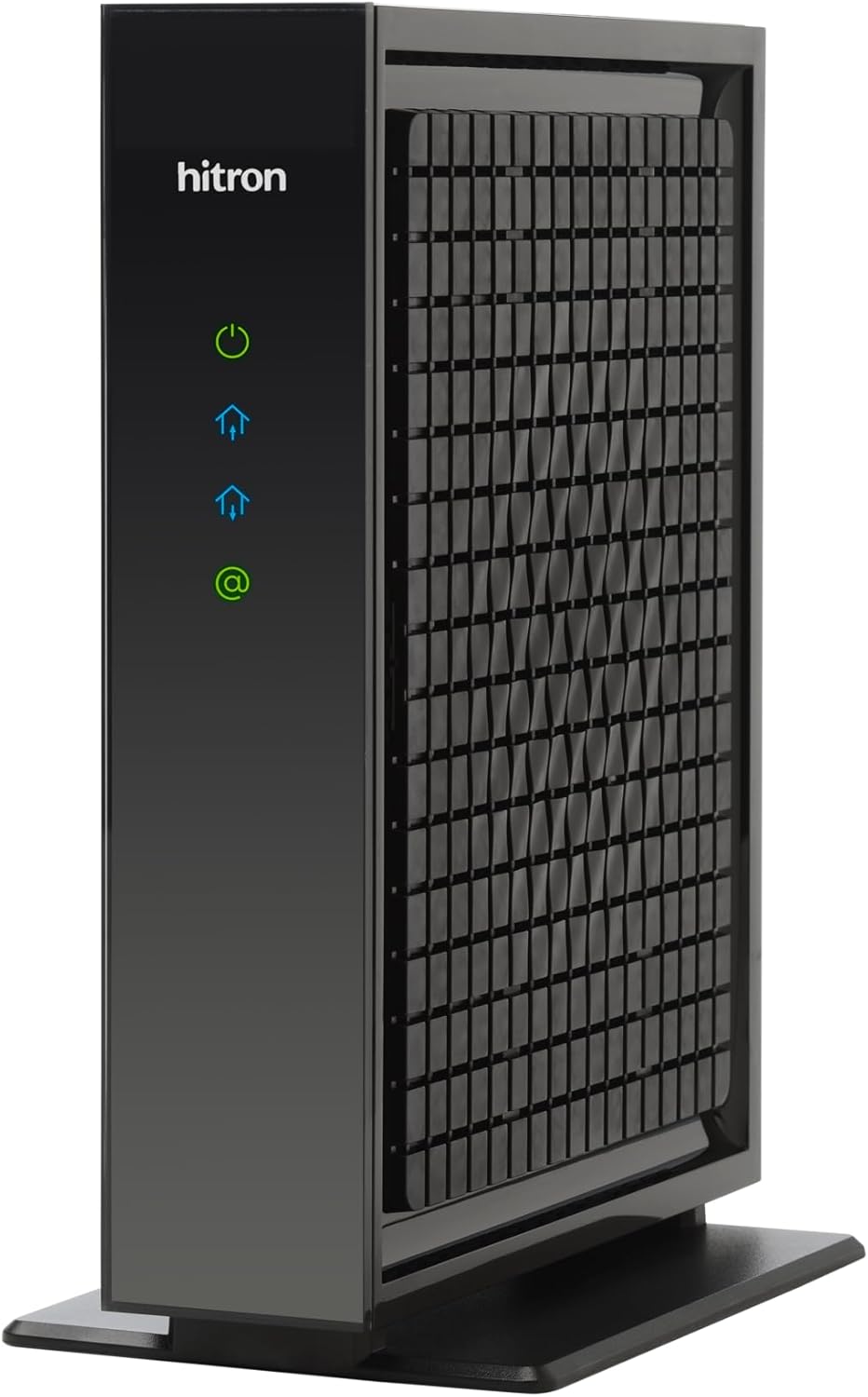
XFINITY RECOMMENDED
✔ DOCSIS 3.1 ✔ One 2.5 Gbps port ✔ Plans up to 2.5 Gbps
The CODA56 is the cleanest match for Xfinity, because Xfinity marks it Recommended and lists it up to 2.33 Gbps down and 455 Mbps up. Hitron’s page also says it is approved for Xfinity, Xfinity Business, Spectrum and Cox Gigablast. It has one 2.5 Gbps port, and Hitron rates it for plans up to 2.5 Gbps.
One catch is that Hitron’s page does not state warranty terms, so ask the seller before you order.
WHAT WE LIKE
✓ Marked Recommended on Xfinity’s list
✓ One 2.5 Gbps port for faster plans
✓ Hitron lists Xfinity, Spectrum and Cox approval
WATCH OUT FOR
✕ One Ethernet port, so you may need a switch
✕ No built-in WiFi or voice
✕ Warranty terms are not on the product page
Skip it if: you have a plan under 1 Gbps, or you need Xfinity Voice.
2. ARRIS SURFboard S33: Recommended, with two ports

XFINITY RECOMMENDED
ARRIS SURFboard S33 cable modem
✔ DOCSIS 3.1 ✔ 2.5 Gbps + 1 Gbps ports ✔ 2-year warranty
Xfinity also marks the S33 as Recommended, with downloads up to 2.33 Gbps. ARRIS says it is best for cable plans up to 2.5 Gbps and that Cox, Comcast Xfinity and Charter Spectrum tested and qualified it. It adds a second port, so a 1 Gbps device can connect without a switch.
ARRIS also says compatibility may vary by model and provider. So confirm your exact unit in My Device Info, because the list shows several S33 revisions.
WHAT WE LIKE
✓ Marked Recommended on Xfinity’s list
✓ One 2.5 Gbps and one 1 Gbps port
✓ 2-year limited warranty from ARRIS
WATCH OUT FOR
✕ No built-in WiFi
✕ No digital voice
✕ The list shows more than one S33 revision
Skip it if: you need phone service through Xfinity, or you want a modem with WiFi built in.
3. NETGEAR Nighthawk CM3000: the highest upload figure here

FASTER PLANS
NETGEAR Nighthawk CM3000 cable modem
✔ DOCSIS 3.1 mid/high split ✔ 2.5 Gbps + 2x 1 Gbps ✔ Link aggregation
Xfinity lists the CM3000 up to 2.33 Gbps down and 486 Mbps up, the highest upload figure of my five. NETGEAR’s page, however, names Xfinity at 2 Gbps down and 200 Mbps up. It has one 2.5 Gbps port and two 1 Gbps ports, and it supports link aggregation.
There is a warranty catch. NETGEAR says coverage needs an authorized reseller and registration, so buy from one and register the modem.
WHAT WE LIKE
✓ Highest upload figure of the five on Xfinity’s list
✓ Three Ethernet ports
✓ Mid/high-split DOCSIS 3.1
WATCH OUT FOR
✕ Not marked Recommended by Xfinity
✕ Warranty needs an authorized reseller and registration
✕ No voice support
Skip it if: you would rather follow Xfinity’s Recommended flag.
4. ARRIS SURFboard S34: next-gen upload tiers

FASTER PLANS
ARRIS SURFboard S34 cable modem
✔ DOCSIS 3.1 ✔ 2.5 Gbps + 1 Gbps ports ✔ 2-year warranty
The S34 is rated by ARRIS for plans up to 2.5 Gbps, and it lists next-gen upload tiers. Meanwhile, Xfinity lists it up to 2.32 Gbps down and 444 Mbps up. It also has a 2.5 Gbps port, a 1 Gbps port and a 2-year limited warranty.
WHAT WE LIKE
✓ Listed up to 2.32 Gbps on Xfinity’s list
✓ Two Ethernet ports
✓ 2-year limited warranty
WATCH OUT FOR
✕ Not marked Recommended by Xfinity
✕ No built-in WiFi
✕ No digital voice
Skip it if: you want the highest upload figure, which the CM3000 lists.
5. ARRIS SURFboard SB8200: the gigabit plan pick

ARRIS recommends the SB8200 for plans up to 1 Gbps and names Cox, Spectrum and Xfinity. Meanwhile, Xfinity lists it up to 957 Mbps, with the later revisions at 936 and 934 Mbps. So it suits a gigabit plan but not a faster one.
WHAT WE LIKE
✓ A good match for gigabit plans
✓ Two 1 Gbps ports
✓ 2-year limited warranty
WATCH OUT FOR
✕ Listed under 1 Gbps on Xfinity’s list
✕ Not marked Recommended by Xfinity
✕ No WiFi and no phone port
Skip it if: your plan is faster than 1 Gbps, or you expect to upgrade soon.
All 5 Modems Compared
| Modem | Ports | Warranty on the brand page |
| Hitron CODA56 | One 2.5 Gbps | Not stated |
| ARRIS S33 | 2.5 Gbps + 1 Gbps | 2-year limited |
| NETGEAR CM3000 | 2.5 Gbps + 2x 1 Gbps | Needs an authorized reseller and registration |
| ARRIS S34 | 2.5 Gbps + 1 Gbps | 2-year limited |
| ARRIS SB8200 | Two 1 Gbps | 2-year limited |
How to Activate Your Own Modem With Xfinity
Xfinity describes the steps in its support article on activating a gateway or an approved customer-owned modem with the Xfinity app, and only the Primary user or a Manager on the account can do it.
- Open the Xfinity app and sign in with your Xfinity ID, then tap Get Started.
- Connect the coaxial cable to the modem and to an active cable outlet. Xfinity says to make sure the connection is “finger tight”.
- Check that the modem’s lights are on, then tap Check Connection so the app can test the outlet.
- If the outlet is active, create your WiFi name and password, then confirm and finish.
Xfinity says activation should take about 20 minutes. Home network setup can then take up to 10 minutes. These are Xfinity’s own figures, so your time may differ.
When Buying Your Own Modem May Not Pay Off
- Your plan already includes the gateway. Xfinity’s article says the latest Internet plans “include the Xfinity Gateway at no extra cost”, so check your bill before you buy.
- You use Xfinity Voice. If so, remember that none of my five has a phone port.
- You want one box for modem and WiFi. These are modems only, so you also need a router.
- Your plan is slow. In that case, a 2.5 Gbps modem gives no extra speed on a 300 Mbps plan.
What I Could Not Confirm
- Xfinity may have changed its list after March 26, 2025, so check My Device Info for your exact model before you order.
- I found no DOCSIS 4.0 modem on Xfinity’s list, and I could not confirm any DOCSIS 4.0 buying advice from Xfinity. Overall, every modem here is DOCSIS 3.1.
- I could not confirm what Xfinity charges you for equipment today, because it depends on your plan and your bill.
Best Modem for Xfinity FAQ
Which modem does Xfinity recommend?
On the list I read, Xfinity marks the Hitron CODA56 and the ARRIS S33 as Recommended among my five. It also marks other models such as the NETGEAR CM2000 and CM1100.
Can I use any DOCSIS 3.1 modem?
No. Xfinity says devices not shown on its list are either incompatible or no longer supported by the manufacturer, so look up the exact model first.
Do these modems include WiFi?
No. All five are modems only, so you also need a router or a gateway.
Will a faster modem speed up a slow plan?
No, the plan sets your speed. A modem only removes a limit, so match the modem to your plan.
Related Guides
- Compare more picks in our best cable modem under $300 guide, which covers seven modems.
- Need the router side? See the best router for Xfinity for modem-router combos.
- Weak signal in one room? Read our best WiFi extender for Xfinity guide.
Final Recommendation
If you want to follow Xfinity’s own advice, pick the Hitron CODA56 or the ARRIS S33, because both carry the Recommended flag and both are listed up to 2.33 Gbps.
On a gigabit plan, however, the ARRIS SB8200 is enough. If upload speed matters most, then the NETGEAR CM3000 has the highest figure of the five. Before any of them, though, look up the exact model in My Device Info.
Sources
- Full List of Compatible Devices (Xfinity PDF, last updated Mar 26, 2025)
- Using your own modem, router, or gateway (Xfinity Support)
- Activating a gateway or third-party modem with the Xfinity app (Xfinity Support)
- Hitron: CODA56 product page
- ARRIS SURFboard: S33 product page
- NETGEAR: Nighthawk CM3000 product page
- ARRIS SURFboard: S34 product page
- ARRIS SURFboard: SB8200 product page