

A small business needs internet that stays up, and the gear matters more than most owners expect. The best modem and router for small business are usually two separate boxes, because then you can replace one without touching the other.
So I picked four cable modems and two business routers that pair well. I also explain how to match their ports, since the wrong pair can quietly cap your speed.
Key Takeaways
- Best modem overall: the ARRIS SURFboard S34, with a 2.5 Gbps port and a 2-year warranty from ARRIS.
- Best value multi-gig modem: the Hitron CODA56, which Hitron lists as approved for Xfinity Business.
- Plan up to 1 Gbps? The ARRIS SB8200 is enough.
- Best router for most offices: the TP-Link ER605, with up to three WAN connections and a USB port for 4G backup.
- Multi-gig plan or many VPN tunnels: the TP-Link Omada ER707-M2 has 2.5 Gbps ports and up to 100 IPsec tunnels.
- Biggest catch: the ER605 has Gigabit ports only, so it caps a faster plan at 1 Gbps.
Disclosure: This post contains affiliate links. If you buy through them, we may earn a commission at no extra cost to you.
How we chose these products
- I started with DOCSIS 3.1 modems that the brands list for Xfinity, Spectrum and Cox, plus wired routers made for small offices.
- Then I kept only products that buyers rate 4 stars or higher and that sell steadily.
- Next I checked ports, plan speeds, VPN limits and provider notes on the brands’ own pages.
- Nothing here was lab-tested by us, and prices are left out because they change every week.
Last updated: October 20, 2026
Why Pair a Modem With a Business Router?
A modem only connects you to your provider, while a router runs your office network. Business routers also add features that home routers often lack, such as several VPN tunnels and a backup internet line. Because the two jobs are separate, you can also upgrade either one later.
However, the two routers here have no WiFi. So you add an access point for wireless, which keeps the WiFi easy to replace.
Before You Buy: 4 Checks for a Business Line
- Does your plan allow your own equipment? Many business plans do. I could not find a published rule from Xfinity Business or Spectrum Business, so ask them and get the answer in writing.
- Do you need a static IP? Static IPs are sold on business plans. Ask your provider whether one works with equipment you own, and get the answer in writing.
- Is your phone line through the cable company? None of these modems works with cable-bundled voice. NETGEAR and Hitron both say so, and the SB8200 has no phone port. Keep your provider’s voice modem if you use one.
- Does the router’s port match your plan? The router’s WAN port must be as fast as your plan. A Gigabit port tops out near 940 Mbps in practice.
How to Match Your Modem and Router
However, this is the part most guides skip. A fast modem only helps if the router’s WAN port can keep up, so match the ports first.
| Pair | Link between them | Plan it fits | Why it works |
|---|---|---|---|
| SB8200 + ER605 | Gigabit to Gigabit | Up to 1 Gbps | ARRIS rates the SB8200 for plans up to 1 Gbps, while the ER605 has Gigabit ports. |
| S34 + ER605 | Gigabit to Gigabit | Up to 1 Gbps | The ER605 caps the link at Gigabit, so the S34 has room to grow. |
| S34 + ER707-M2 | 2.5 Gbps to 2.5 Gbps | Up to 2.5 Gbps | ARRIS rates the S34 for plans up to 2.5 Gbps, and the router’s WAN port matches. |
| CODA56 + ER707-M2 | 2.5 Gbps to 2.5 Gbps | Up to 2.5 Gbps | Hitron lists plans up to 2.5 Gbps, so the same match works. |
| CM3000 + ER707-M2 | 2.5 Gbps to 2.5 Gbps | Up to 2 Gbps on Xfinity | NETGEAR’s table lists Xfinity at 2 Gbps down, Spectrum and Cox at 1 Gbps. |
Meanwhile, VPN speed is a second limit. TP-Link lists these throughput figures for the ER707-M2, and they sit well below a multi-gig plan.
| VPN type (ER707-M2) | Throughput listed by TP-Link |
|---|---|
| IPsec | 673.3 Mbps |
| WireGuard | 343 Mbps |
| OpenVPN | 135 Mbps |
So if staff work over a VPN, expect the tunnel to be slower than your plan. Overall, pick the VPN type that fits your needs, not the one with the biggest tunnel count.
Best Modem and Router for Small Business: All 6 Picks Compared
Prices change week to week, so I left them out. Also, every modem here is DOCSIS 3.1 and sold for cable internet only.
| Product | Type | Ports | Best for | Good to know |
|---|---|---|---|---|
| ARRIS S34 | Modem | 2.5 Gbps + 1 Gbps | Most business lines | 2-year warranty from ARRIS |
| Hitron CODA56 | Modem | 2.5 Gbps | Value multi-gig | Listed for Xfinity Business |
| NETGEAR CM3000 | Modem | 2.5 Gbps + 2x 1 Gbps | Link aggregation | Plan limits listed by provider |
| ARRIS SB8200 | Modem | 2x 1 Gbps | Plans up to 1 Gbps | 2-year warranty from ARRIS |
| TP-Link ER605 | Router | 5x Gigabit | Most small offices | Up to 3 WAN, USB 4G backup |
| TP-Link ER707-M2 | Router | 2x 2.5 Gbps + 5x Gigabit | Multi-gig, many tunnels | Up to 6 WAN ports |
The 4 Best Cable Modems for Small Business
1. ARRIS SURFboard S34: Best Overall

BEST OVERALL
ARRIS SURFboard S34 DOCSIS 3.1 Multi-Gig Cable Modem
✔ 2.5 Gbps port ✔ Next-gen upload ✔ 2-year warranty
The S34 is the modem I would buy first, because it keeps working if your plan gets faster. ARRIS lists one 2.5 Gbps port and one 1 Gbps port, and it rates the modem for plans up to 2.5 Gbps.
It also supports next-generation upload tiers, with switchable low and mid support, which helps on plans with faster uploads. ARRIS lists Cox, Spectrum and Xfinity, and it backs the modem with a 2-year limited warranty. However, it has no WiFi and no digital voice, so you still need a router.
WHAT WE LIKE
✓ 2.5 Gbps port plus a 1 Gbps port
✓ Next-generation upload support
✓ 2-year limited warranty
✓ Listed for Xfinity, Spectrum and Cox
WATCH OUT FOR
✕ No WiFi, so you need a router
✕ No digital voice
✕ Needs a 2.5 Gbps router to use its fastest port
Skip it if: your plan is 1 Gbps or slower and will stay that way. The SB8200 is enough.
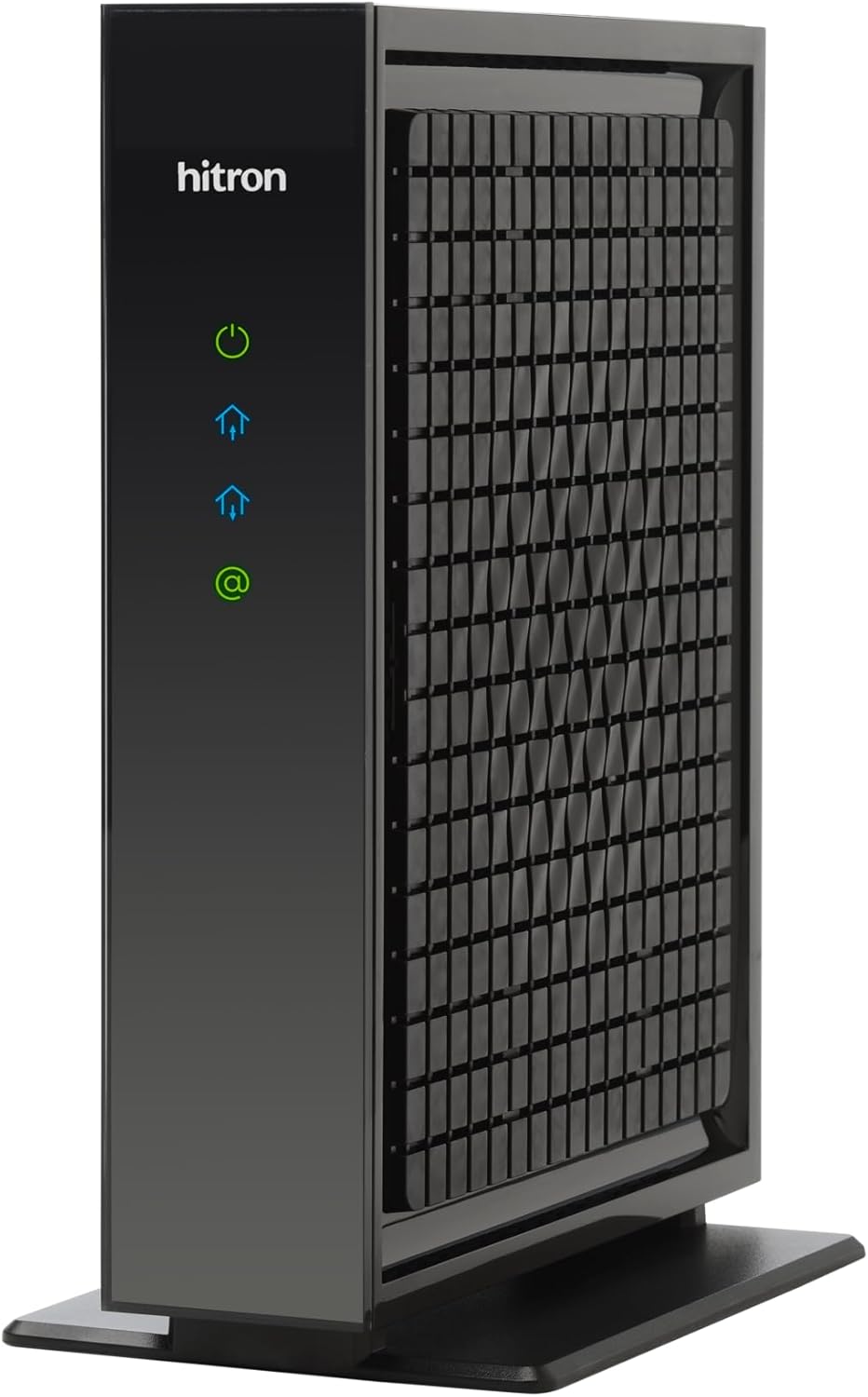
2. Hitron CODA56: Best Value Multi-Gig Modem
BEST VALUE
Hitron CODA56 DOCSIS 3.1 Multi-Gig Cable Modem
✔ 2.5 Gbps port ✔ Xfinity Business listed ✔ Wide provider list
The CODA56 is the one to look at when you run a business line on Xfinity. Hitron lists Comcast Xfinity, Xfinity Business, Charter Spectrum and Cox Gigablast as approved, plus several smaller cable providers. It also has one 2.5 Gbps port and supports plans up to 2.5 Gbps.
Still, ask Comcast Business to confirm your own plan, because an approved list does not replace that answer. Hitron also says the modem does not work with bundled voice, and its page links to a warranty statement instead of stating the terms.
WHAT WE LIKE
✓ Listed for Xfinity Business
✓ A 2.5 Gbps port
✓ A wide list of approved providers
WATCH OUT FOR
✕ Only one Ethernet port
✕ No bundled voice support
✕ Warranty terms sit on a separate Hitron page
Skip it if: you want a second wired port on the modem. Choose the S34 or the CM3000.
3. NETGEAR Nighthawk CM3000: Best for Link Aggregation

LINK AGGREGATION
NETGEAR Nighthawk CM3000 DOCSIS 3.1 Cable Modem
✔ 2.5 Gbps port ✔ Two Gigabit ports ✔ Mid/high-split
The CM3000 has one 2.5 Gbps port and two 1 Gbps ports, and NETGEAR also says it supports link aggregation. The page gives two different figures for it, 2 Gbps in one place and 2.5 Gbps in another, so treat it as a feature rather than a promise.
NETGEAR’s comparison table is useful because it lists plan limits by provider: Xfinity 2 Gbps down and 200 Mbps up, Spectrum 1 Gbps down and 35 Mbps up, and Cox 1 Gbps down and 100 Mbps up. However, the warranty applies only if you buy from an authorized reseller and register the modem.
WHAT WE LIKE
✓ Extra Gigabit ports on the modem
✓ Link aggregation support
✓ Plan limits listed for each provider
WATCH OUT FOR
✕ Warranty needs an authorized seller and registration
✕ Spectrum is listed only up to 1 Gbps
✕ No voice support
Skip it if: your router has no aggregation ports. The S34 does the same job, but with less fuss.
4. ARRIS SURFboard SB8200: Best for Plans Up to 1 Gbps

UP TO 1 GBPS
ARRIS SURFboard SB8200 DOCSIS 3.1 Cable Modem
✔ Two Gigabit ports ✔ 2-year warranty ✔ Long track record
The SB8200 has two 1 Gbps ports, and ARRIS recommends it for plans up to 1 Gbps. ARRIS also lists it for Cox, Spectrum and Xfinity, plus a 2-year limited warranty. Still, it has no WiFi and no telephone port.
This modem pairs neatly with the ER605, since both use Gigabit ports. However, it is a poor choice if your plan may pass 1 Gbps soon.
WHAT WE LIKE
✓ Two Gigabit ports
✓ 2-year limited warranty
✓ A clean match for Gigabit routers
WATCH OUT FOR
✕ Rated only for plans up to 1 Gbps
✕ No 2.5 Gbps port
✕ No phone port
Skip it if: your plan is above 1 Gbps, or will be soon. The S34 gives you room.
The 2 Best Business Routers to Pair With Your Modem
5. TP-Link ER605: Best Router for Most Small Offices

BEST ROUTER
TP-Link ER605 V2 Wired Gigabit VPN Router
✔ Up to 3 WAN ports ✔ IPsec and OpenVPN ✔ USB 4G backup
The ER605 is the router I would pick for a typical small office, because it covers the basics well. TP-Link lists five Gigabit ports: one WAN, two LAN, and two that work as either. It supports up to three WAN connections, so you can add a second internet line.
A USB 2.0 port also takes a 4G or 3G modem for backup. TP-Link lists up to 20 IPsec LAN-to-LAN tunnels and up to 50 OpenVPN tunnels as well. However, central management and cloud access need an Omada controller, and the router has no WiFi.
WHAT WE LIKE
✓ Up to three WAN connections
✓ USB port for 4G backup
✓ 20 IPsec and 50 OpenVPN tunnels
✓ Omada controller for central management
WATCH OUT FOR
✕ Gigabit ports only
✕ No WiFi, so add an access point
✕ Cloud features need an Omada controller
Skip it if: your plan is above 1 Gbps. The ER707-M2 has 2.5 Gbps ports.
6. TP-Link Omada ER707-M2: Best for Multi-Gig and Many Tunnels
MULTI-GIG ROUTER
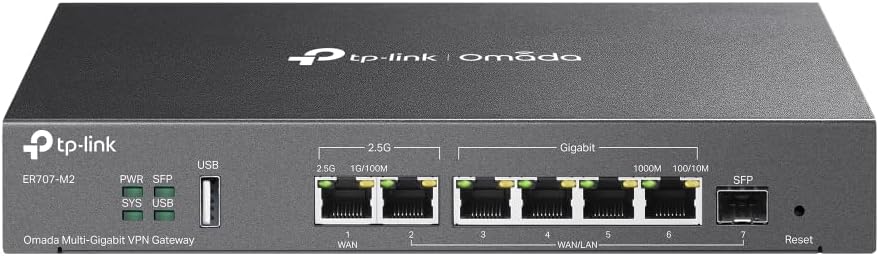
TP-Link Omada ER707-M2 Multi-Gigabit VPN Router
✔ Two 2.5 Gbps ports ✔ Up to 6 WAN ✔ 100 IPsec tunnels
The ER707-M2 is the router for a multi-gig plan, so it suits faster lines. TP-Link lists two 2.5 Gbps ports, one of them a WAN port, plus one Gigabit SFP port and four Gigabit ports. It also balances load across up to six WAN ports.
TP-Link lists 100 IPsec tunnels, 66 OpenVPN tunnels and WireGuard support, plus a USB 2.0 port for LTE backup. Still, the VPN speeds shown earlier are far below a multi-gig plan. Like the ER605, though, it has no WiFi and needs an Omada controller for central management.
WHAT WE LIKE
✓ Two 2.5 Gbps ports
✓ Up to six WAN ports
✓ 100 IPsec tunnels and WireGuard
✓ USB port for LTE backup
WATCH OUT FOR
✕ VPN speeds are far below multi-gig plans
✕ No WiFi
✕ Cloud features need an Omada controller
Skip it if: your plan is 1 Gbps or slower and you need few VPN tunnels. The ER605 covers it.
Which Pair Should You Buy?
These are rules of thumb based on the ports and features above, so treat them as guidance rather than tested limits.
| Your situation | Modem | Router | Why |
|---|---|---|---|
| Plan up to 1 Gbps, simple office | SB8200 | ER605 | Both use Gigabit ports |
| Plan up to 1 Gbps, plus a backup line | S34 | ER605 | The ER605 takes a second WAN or 4G |
| A 2.5 Gbps plan | S34 | ER707-M2 | The 2.5 Gbps ports match |
| Xfinity Business line | CODA56 | ER605 or ER707-M2 | Hitron lists Xfinity Business |
| Many VPN tunnels | Any of the four | ER707-M2 | Up to 100 IPsec tunnels |
| A server using link aggregation | CM3000 | ER707-M2 | Extra ports on both sides |
Setting Up a Modem and a Business Router
- Confirm the modem is approved for your plan and that your account allows your own equipment.
- Connect the coax cable from the wall to the modem, plug in the power and wait for the lights to settle.
- Activate the modem through your provider. Some business accounts need a phone call.
- Connect the router’s WAN port to the modem’s fastest port, then power the router on.
- Set up the router, change the default admin password and add an access point for WiFi.
- Return the rented equipment and keep the receipt, so the rental fee comes off your bill.
Frequently Asked Questions
Do I need a business router for a small office?
Not always. A simple office can still run on a home router. However, a business router helps when you need several VPN tunnels, a backup internet line or central management.
Can I use my own modem on a business internet plan?
Often yes, but it depends on the provider and the plan. I could not find a published rule from Xfinity Business or Spectrum Business, so ask first and get the answer in writing.
Do these routers include WiFi?
No. Both TP-Link routers are wired only, so add an access point for wireless. Our WiFi router guide also covers options.
Which modem is listed for Xfinity Business?
Hitron lists the CODA56 for Comcast Xfinity Business. Still, ask Comcast Business to confirm it for your plan.
Will these work with a static IP?
Static IPs are a business plan feature, but whether your own gear can use one depends on your provider. So ask before you buy.
More Guides for Your Network
- Need WiFi for the office? See the best WiFi router for small business.
- Looking for security features? Read our guide to the best business WiFi router.
- Comparing more modems? Browse seven in the best cable modem under $300.
- Running a larger site? The commercial WiFi router picks cover bigger spaces.
Final Recommendation
Overall, the ARRIS SURFboard S34 is the modem to buy, since it keeps working if your plan gets faster. Then pair it with the TP-Link ER605 on a plan up to 1 Gbps, or with the TP-Link Omada ER707-M2 on a faster one. Meanwhile, if you are on Xfinity Business, the Hitron CODA56 is worth a look. For a plan up to 1 Gbps, though, the ARRIS SB8200 is enough. Whatever you choose, still ask your provider about your plan first.