

NetBoost is the little plug-in booster that keeps showing up in ads, and “is NetBoost any good?” is one of the questions people search for most on this site. My answer in our NetBoost WiFi extender review was a cautious “maybe”: it can help a small dead zone, but the coverage claims are inflated, the brand behind it is hard to pin down, and the price swings from seller to seller.
So this page is the follow-up question: if you want the same plug-it-in-and-forget-it convenience from a company that publishes real specs and answers support emails, what should you buy instead? So these four extenders from TP-Link and NETGEAR are my picks for the best NetBoost alternatives.
Key Takeaways
- Best for most people: the TP-Link RE605X, a WiFi 6 plug-in with a Gigabit port.
- Closest to NetBoost on price: the TP-Link RE315, as long as you do not need a fast wired port.
- Neatest on the wall: the NETGEAR EAX15, with its antennas tucked inside.
- For fast plans: the TP-Link RE715X.
- The rule for all of them: plug it in halfway between the router and the weak room, never inside the dead zone.
Disclosure: This post contains affiliate links. If you buy through them, we may earn a commission at no extra cost to you.
How we chose these extenders
- Every pick is a wall-plug extender like NetBoost, so the setup experience is the same.
- Each comes from a brand that publishes full specs, ships firmware updates and offers a warranty.
- We compared official spec sheets, published reviews and owner reports. We did not test these units in our own home, and every source is listed at the end.
Last updated: October 19, 2026
NetBoost vs Brand-Name Extenders at a Glance
Prices change week to week, so I use tiers: $ is the cheapest, $$$ the most expensive of this group.
| Model | WiFi | Ethernet port | Mesh | Price | Best for |
|---|---|---|---|---|---|
| NetBoost | Varies by seller | Some models | No | $ | Light use, lowest price |
| TP-Link RE605X | WiFi 6, AX1800 | 1x Gigabit | OneMesh / EasyMesh | $$ | Most homes |
| TP-Link RE315 | WiFi 5, AC1200 | 1x 10/100 | OneMesh | $ | Tight budgets |
| NETGEAR EAX15 | WiFi 6, AX1800 | 1x Gigabit | Mesh extender | $$ | A tidy, compact unit |
| TP-Link RE715X | WiFi 6, AX3000 | 1x Gigabit | OneMesh / EasyMesh | $$$ | Fast plans, gaming |
The 4 Best NetBoost Alternatives
1. TP-Link RE605X: Best Overall Alternative

BEST OVERALL
TP-Link RE605X AX1800 WiFi 6 Range Extender
✔ WiFi 6 ✔ Gigabit Ethernet ✔ Access point mode
If someone asked me for “a NetBoost, but one I can trust,” this is what I would hand them. It is the same shape of product, a wall plug with two antennas, but it runs WiFi 6, which copes much better when a phone, a laptop and a TV are all pulling data at once. The Ethernet port is Gigabit, so a console or smart TV wired into it is not choked the way it would be on a 10/100 port.
When you pair it with a TP-Link OneMesh or EasyMesh router, it becomes part of one network with one name. Got an Ethernet jack near the weak room? Then switch it to access point mode and you skip the speed loss that comes with wireless repeating.
WHAT WE LIKE
✓ WiFi 6 at a modest price
✓ Gigabit port and access point mode
✓ Mesh support and the Tether app
WATCH OUT FOR
✕ Costs more than the cheapest NetBoost listings
✕ Speed still drops by about half as a repeater
Skip it if: all you need is a basic signal for browsing in one bedroom. Instead, the RE315 below does that for less.
2. TP-Link RE315: Closest to NetBoost on Price

The RE315 often sells for about what a NetBoost costs, and the difference is that you know exactly what you are getting. Also, TP-Link rates it for around 1,500 to 1,600 sq ft and about 30 devices, depending on the listing version. Those are believable numbers for a plug-in extender, unlike the near-10,000 sq ft claims on some booster listings. The Tether app also shows signal strength while you look for the right outlet, which saves a lot of trial and error.
Its one real weakness is the Ethernet port, which is 10/100. As a result, anything wired into it tops out around 100 Mbps. Over WiFi it is quicker, though, and for browsing, HD streaming and video calls in a single room it does the job.
WHAT WE LIKE
✓ Low price from a known brand
✓ Realistic coverage rating
✓ OneMesh and app setup
WATCH OUT FOR
✕ WiFi 5 only
✕ 10/100 Ethernet port
Skip it if: you want to wire in a console or TV on a fast plan. Instead, spend a little more on the RE605X.
3. NETGEAR EAX15: Best Compact WiFi 6 Extender
MOST COMPACT
NETGEAR EAX15 AX1800 WiFi 6 Mesh Extender
✔ Internal antennas ✔ Gigabit Ethernet ✔ WiFi 6
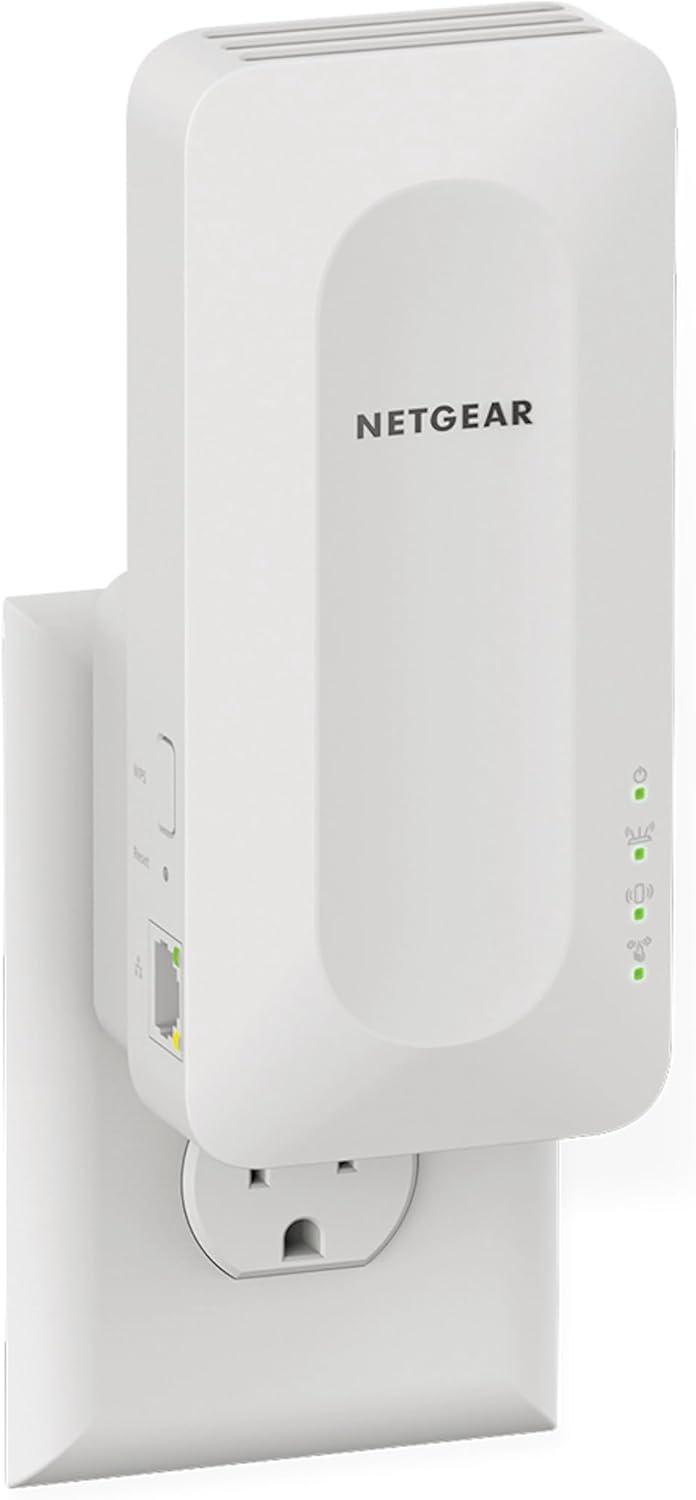
Some people just do not want an antenna-covered gadget sticking out of the hallway wall, and I get it. The EAX15 keeps its antennas inside, so it looks like a small white box. Underneath, though, it is a sensible WiFi 6 mesh extender with a quad-core processor and a Gigabit port, set up through NETGEAR’s Nighthawk app.
WHAT WE LIKE
✓ Clean look with no external antennas
✓ WiFi 6 and a Gigabit port
✓ NETGEAR app and support
WATCH OUT FOR
✕ No way to aim the antennas
✕ Usually a bit pricier than the RE605X
Skip it if: price is your main concern. The RE605X has similar specs and usually costs less than the EAX15.
4. TP-Link RE715X: Best for Fast Plans and Gaming

BEST FOR SPEED
TP-Link RE715X AX3000 WiFi 6 Range Extender
✔ 160 MHz on 5 GHz ✔ Gigabit Ethernet ✔ About 2,400 sq ft rated
On a 500 Mbps or faster plan, however, the RE715X is the step up. Its 5 GHz band supports 160 MHz channels, which gives newer WiFi 6 phones and laptops more room to move data, and it has the same Gigabit port and access point mode as the RE605X. It is also a big unit and can block the second socket on a double outlet. I also go through it in detail in the TP-Link RE715X review.
WHAT WE LIKE
✓ Fastest pick on this list
✓ Gigabit port and access point mode
✓ Adjustable coverage in the app
WATCH OUT FOR
✕ Highest price of the four
✕ Bulky, no 6 GHz band
Skip it if: your plan is under 300 Mbps. Otherwise, you would be paying for speed you cannot use.
Why I Would Pick a Brand-Name Extender Over NetBoost
First of all, the honest specs are the main reason. When TP-Link says 1,500 sq ft, that is roughly what a plug-in extender can cover in a normal home. When a booster listing says nearly 10,000 sq ft, you have no idea what you will actually get.
| Extender | Coverage on the listing | Who makes the claim |
|---|---|---|
| NetBoost (basic listings) | About 7,998 sq ft | Marketplace sellers |
| NetBoost Pro (listings) | 8,999 to 9,998 sq ft | Marketplace sellers |
| TP-Link RE315 | 1,500 to 1,600 sq ft and 30 to 32 devices (varies by listing version) | TP-Link product listings |
| TP-Link RE715X | About 2,400 sq ft and 64 devices | Retailer listings |
Look at the gap. A small wall-plug extender has two short antennas and has to stay within FCC power limits like every other WiFi device, and its signal still has to get through walls and floors. So claims of nearly 10,000 sq ft, about the size of four or five average homes, do not match what this kind of device can do. The brand-name numbers are not lab-guaranteed either, but they are in a believable range.
Then there is support. TP-Link and NETGEAR push firmware updates for security fixes, offer a warranty, and run a support site you can actually reach. Their apps also show signal strength, which turns “try every outlet in the hallway” into a two-minute job. And three of the four picks can join a compatible router as a mesh point, so your phone does not have to hop between two network names.
NetBoost still has a place. For light browsing in one room, at a very low price, from a seller with an easy return policy, it can be fine. For anything you want to rely on, however, I would buy one of the four above.
Which One Fits Your Home?
- Plan under 300 Mbps, one weak room: RE315
- Most homes, plans up to about 500 Mbps: RE605X or EAX15
- Fast plan, console or 4K TV in the far room: RE715X
When an Extender Is the Wrong Fix
- Weak signal in several rooms or on another floor
- A large home over about 2,500 sq ft
- In these cases, read mesh vs range extender first
Where to Plug It In
This is where most extender setups go wrong, NetBoost or not. An extender can only repeat the signal it hears, so if you put it in the room with the bad WiFi, it repeats a bad signal. Pick an outlet roughly halfway between the router and the weak area, in the open rather than behind a couch or TV, and check the app’s signal meter before you settle on it.
How to Tell If Your Extender Is Working
Whichever extender you buy, check it with a quick before-and-after test instead of trusting the WiFi bars:
- Before setup, run a speed test in the weak room (Speedtest by Ookla or fast.com) and note the download speed and ping.
- After setup, confirm your phone or laptop is connected to the extender, not the router, and test again in the same spot.
- Little or no change? Move the extender one outlet closer to the router and test again.
- Still no change after two or three outlets? The problem is distance or walls, and a mesh system is the better fix. Return the extender while you still can.
Frequently Asked Questions
What is better than NetBoost?
For most homes, the TP-Link RE605X. It is a WiFi 6 plug-in with a Gigabit port, mesh support and a warranty, at a price not far above many NetBoost listings.
Is there a cheap NetBoost alternative from a known brand?
Yes, the TP-Link RE315. It often costs about the same and also comes with published specs and app setup.
Will these work with my provider’s router?
Yes. All four extend any standard WiFi router, including Spectrum, Xfinity, AT&T and Verizon gateways. However, mesh features need a compatible router.
Can one plug-in extender cover my whole house?
Usually not. It fixes one or two weak areas, so for a large or multi-floor home, a mesh system works better.
Related WiFi Extender Guides
- NetBoost WiFi Extender Review – what the plug-in booster really delivers
- Best TP-Link Extenders – the full TP-Link lineup compared
- Best NETGEAR WiFi Extenders – including the WiFi 7 EXS25
- WiFi Booster vs Extender – what the different names mean
Final Recommendation
If you were about to order a NetBoost, buy the TP-Link RE605X instead. You get the same plug-in convenience plus WiFi 6, a Gigabit port and a company that stands behind it. On a tight budget, though, the RE315 costs about the same as NetBoost. Want it to disappear on the wall? Get the NETGEAR EAX15. On a fast plan, the RE715X is worth the extra money.
Sources
- TP-Link RE605X product page
- TP-Link RE715X US datasheet
- NETGEAR EAX15 specifications (Best Buy Canada)
- Our NetBoost WiFi extender review, including the marketplace listings and coverage claims we checked