
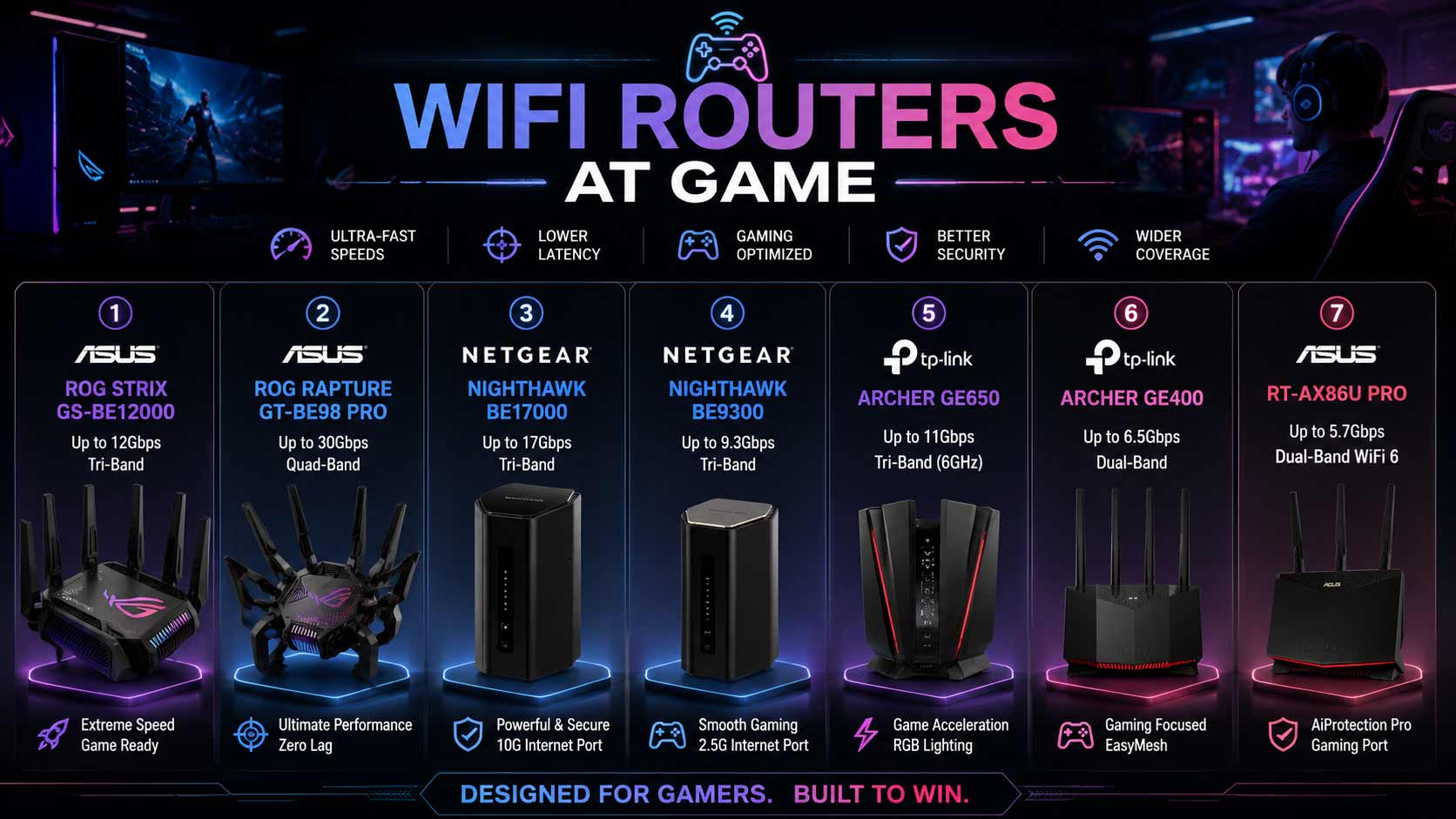

A poor connection can ruin a match faster than anything your opponent does. If you’re looking for the best wifi router at game, you want lower ping, smoother gameplay, and a stable connection even when everyone else in the house is streaming or browsing. The right gaming router prioritizes your traffic, reduces lag spikes, and holds the connection solid during the moments that matter most.
WiFi Router for Gaming: 7 That Keep You in the Fight
Modern gaming routers come packed with features that actually help: WiFi 7 for lower latency, QoS gaming router settings that put your gaming device first, multi-gig ports for wired console and PC connections, and dedicated gaming modes that separate your traffic from everything else on the network. Whether you play on PC, PS5, Xbox, or stream your sessions live, the right hardware makes a real, noticeable difference.
These routers connect directly to your modem or ISP gateway and work with all major internet providers. They support gaming PCs, PlayStation, Xbox, Nintendo Switch, smartphones, and streaming devices, and stay backward compatible with older WiFi hardware so nothing in your setup gets left behind.
Quick Top 7:
- ASUS ROG Strix GS-BE12000 (Best Tri-Band Gaming Router Overall)
- ASUS ROG Rapture GT-BE98 Pro (Best Quad-Band for Serious Gamers)
- NETGEAR BE17000 (Best Nighthawk Gaming Router for Large Homes)
- NETGEAR BE9300 (Best Mid-Range Netgear Nighthawk Gaming Router)
- TP-Link Archer GE650 (Best Dedicated Gaming Port Tri-Band)
- TP-Link Archer GE400 (Best Best Budget Gaming Router WiFi 7)
- ASUS RT-AX86U Pro (Best WiFi 6 Gaming Router)
How to Choose the Right WiFi Router for Gaming
The Real Problem Behind Gaming Lag
Most people blame their internet plan for lag. But in most cases, the router is the actual problem. When your router handles gaming traffic the same way it handles a smart thermostat or a background download, your ping suffers. A dedicated wifi router at game setup uses router QoS for gaming to put your console or PC first, so your gaming traffic gets bandwidth priority regardless of what else is running on the network.
Common mistakes gaming router buyers make:
- Buying a high-speed router without checking for dedicated gaming ports or QoS controls
- Choosing dual-band when tri-band or quad-band would separate gaming traffic from household congestion
- Not using the Ethernet port when it’s available because wired always beats wireless for gaming latency
- Overspending on flagship hardware when a best budget gaming router with good QoS handles most setups fine
Why modern WiFi 7 gaming routers are better:
- MLO connects your gaming device across two bands simultaneously for more stable latency
- Hardware-level Game Acceleration ports route gaming traffic faster than software QoS alone
- Tri-band and quad-band architectures give gaming dedicated airspace away from streaming and browsing
- 10G and multi-gig Ethernet ports wire gaming PCs and consoles at speeds that standard Gigabit ports can’t match
Who this guide is for:
- Competitive online gamers on PC, PS5, or Xbox who want lower, more consistent ping
- Streamers who game and broadcast simultaneously and need the bandwidth for both
- Households where multiple people use the internet and gaming lag spikes during peak hours
- Anyone who’s blamed their ISP for lag that’s actually a router traffic management problem
This guide helps you find the right wifi router at game for your platform, home size, and gaming intensity so you can make one solid purchase and stay focused on the match.
Top 7 Best WiFi Routers for Gaming
Disclosure: This post contains affiliate links. As an Amazon Associate I earn from qualifying purchases. If you purchase through our links, we may earn a small commission at no extra cost to you. We only recommend products we genuinely stand behind.
Every router here was selected based on gaming-specific performance features: latency management, dedicated gaming port availability, QoS controls, band architecture for separating gaming traffic, and long-term reliability for daily gaming use.
#1 ASUS ROG Strix GS-BE12000 : Best Tri-Band Gaming Router Overall
Overview: Tri-band WiFi 7 BE12000 asus gaming router with nine LAN ports and mesh compatibility | Large homes and demanding gaming setups | Up to 12 Gbps combined speed | Built for serious gamers who need maximum wired connections and strong tri-band wireless | Compatible with all ISPs and mesh expansion.
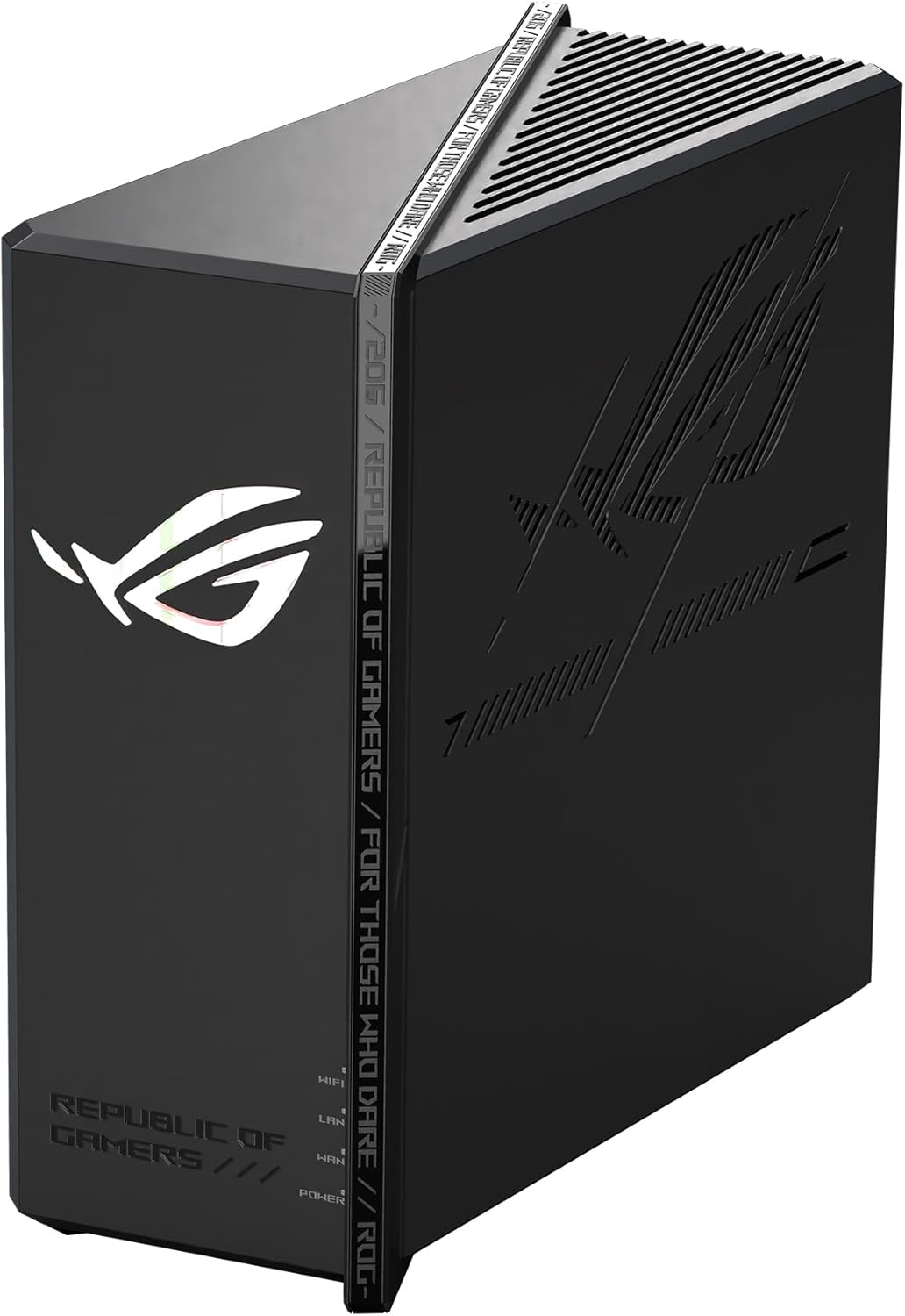
Key Benefits: Nine LAN ports is the most wired connectivity of any router on this list, letting a gaming PC, multiple consoles, a NAS, and smart home devices all connect at fast speeds simultaneously | Tri-band WiFi 7 gives gaming wireless devices a dedicated 6GHz channel away from household congestion | Mesh compatibility means coverage expands to cover the whole home without replacing the router | ROG gaming firmware includes game-optimized traffic settings | MLO keeps wireless gaming connections stable under load.
Pros: Nine LAN ports is unmatched for wired gaming setups | Tri-band WiFi 7 with ROG firmware is purpose-built for gaming performance.
Cons: Premium asus rog gaming router price reflects the flagship hardware and is more than casual gamers need.
Best For: Serious gamers and streamers with many wired devices needing simultaneous connections | Large gaming setups that require maximum LAN port density alongside strong WiFi 7 wireless.
#2 ASUS ROG Rapture GT-BE98 Pro : Best Quad-Band for Serious Gamers
Overview: Quad-band WiFi 7 gaming router up to 30 Gbps combined | Mesh compatible | Large homes | The most powerful asus rog gaming router on this list | Built for gamers who want four separate wireless bands so gaming, streaming, IoT, and general traffic never compete | Compatible with all major ISPs.

Key Benefits: Quad-band design gives gaming devices a fully dedicated band with zero competition from other household traffic | 30 Gbps combined wireless speed gives every band serious headroom even under the heaviest simultaneous household load | Mesh compatibility allows a second gaming-grade node to extend coverage without replacing hardware | ROG gaming-specific firmware optimizations keep latency consistently low under network load | MLO maintains stable gaming connections across multiple active bands simultaneously.
Pros: Quad-band is the strongest gaming band separation available in a home router | 30 Gbps ensures no band ever runs short of headroom during intense gaming sessions.
Cons: Flagship quad-band pricing is more than most standard gaming households require unless maximum separation is critical.
Best For: Hardcore competitive gamers in large households where streaming, gaming, and smart home use all run simultaneously | Anyone who wants zero wireless congestion on their gaming band regardless of household load.
Want to see how the ROG Rapture compares across the full ASUS WiFi 7 lineup? Read our guide on the best ASUS WiFi 7 router for a complete model breakdown.
#3 NETGEAR BE17000 : Best Nighthawk Gaming Router for Large Homes
Overview: Tri-band WiFi 7 nighthawk gaming router with 17 Gbps combined speed | 10G WAN port | 150-device capacity | Covers 3,300 sq. ft. | Built-in VPN | Free expert help | Best for gamers on multi-gig internet plans in large homes who want VPN alongside strong gaming-first tri-band performance.

Key Benefits: Built-in VPN removes the need for a separate device for gamers accessing geo-restricted servers or securing connections | 10G WAN delivers full multi-gig internet plan speed so the router never bottlenecks the gaming connection | Tri-band gaming architecture keeps gaming, streaming, and household traffic on separate bands | 150-device capacity handles large gaming households with consoles, PCs, phones, and smart home gear | Router QoS for gaming settings prioritize gaming traffic automatically.
Pros: Built-in VPN at 10G port tier is a rare and practical gaming feature | Tri-band dedicated gaming architecture consistently keeps latency stable.
Cons: No Armor security included so users who want built-in threat monitoring alongside VPN need to compare this against the RS700S.
Best For: Gamers on multi-gig internet plans in large homes up to 3,300 sq. ft. | Remote workers who also game and want VPN built into the same router.
#4 NETGEAR BE9300 : Best Mid-Range Nighthawk Gaming Router
Overview: Tri-band WiFi 7 netgear nighthawk gaming router with 9.3 Gbps combined speed | 2.5G internet port | 100-device capacity | Covers 2,500 sq. ft. | Built-in VPN | Free expert help | Best mid-range wifi router at game pick for standard to mid-tier internet plans where VPN and tri-band gaming performance both matter.

Key Benefits: Tri-band WiFi 7 separates gaming traffic from streaming and household browsing across three dedicated bands | Built-in VPN covers gaming connections and remote work without a separate hardware purchase | 2.5G WAN handles standard and mid-tier multi-gig Spectrum, Xfinity, and other ISP plans cleanly | QoS gaming router settings prioritize the gaming console or PC over other household devices | Free expert setup help is included for first-time gaming router buyers.
Pros: VPN plus tri-band gaming performance at mid-range pricing is strong value | Free expert help lowers the setup barrier for non-technical gamers.
Cons: 2.5G WAN limits users on plans above 2.5 Gbps who need full 10G throughput for their gaming setup.
Best For: Gamers on standard or mid-tier internet plans who want VPN and tri-band gaming performance | Households up to 2,500 sq. ft. where gaming and streaming compete for bandwidth.
#5 TP-Link Archer GE650 : Best Dedicated Gaming Port Tri-Band
Overview: Tri-band WiFi 7 BE11000 gaming router with dedicated gaming port and physical Game Panel | 2x5G + 3×2.5G ports | 320MHz, Game Acceleration, HomeShield, USB 3.0, RGB | Best best router for streaming and gaming with hardware-level traffic prioritization and the most gaming-specific physical features on this list | Works with all ISPs.

Key Benefits: Hardware dedicated gaming port routes gaming device traffic at the router level rather than through software settings, which delivers more consistent low latency than router QoS for gaming alone | Two 5G and three 2.5G ports give the most multi-gig LAN port density for wired gaming setups | Physical Game Panel provides real-time network controls during active gaming without opening an app | 320MHz on the 6GHz band delivers maximum WiFi 7 wireless throughput for wireless gaming devices | HomeShield covers every device on the network from one app.
Pros: Hardware gaming port with Game Panel is the most gamer-specific physical feature set on this list | Five multi-gig ports cover gaming PC, multiple consoles, and NAS simultaneously.
Cons: RGB lighting and physical Game Panel add to the physical footprint, which isn’t suited to every desk setup.
Best For: Serious PC and console gamers who want hardware-level traffic prioritization and a physical Game Panel | Setups with many wired gaming devices needing multi-gig connections simultaneously.
#6 TP-Link Archer GE400 : Best Budget Gaming Router with WiFi-7
Overview: Dual-band WiFi-7 BE6500 gaming router with dedicated gaming port, Game Panel, Game Acceleration, Easy Mesh, Home Shield, RGB | 2×2.5G + 3x1G ports | No 6GHz | The best budget gaming router on this list with real hardware gaming features at an accessible price | Compatible with all major ISPs.
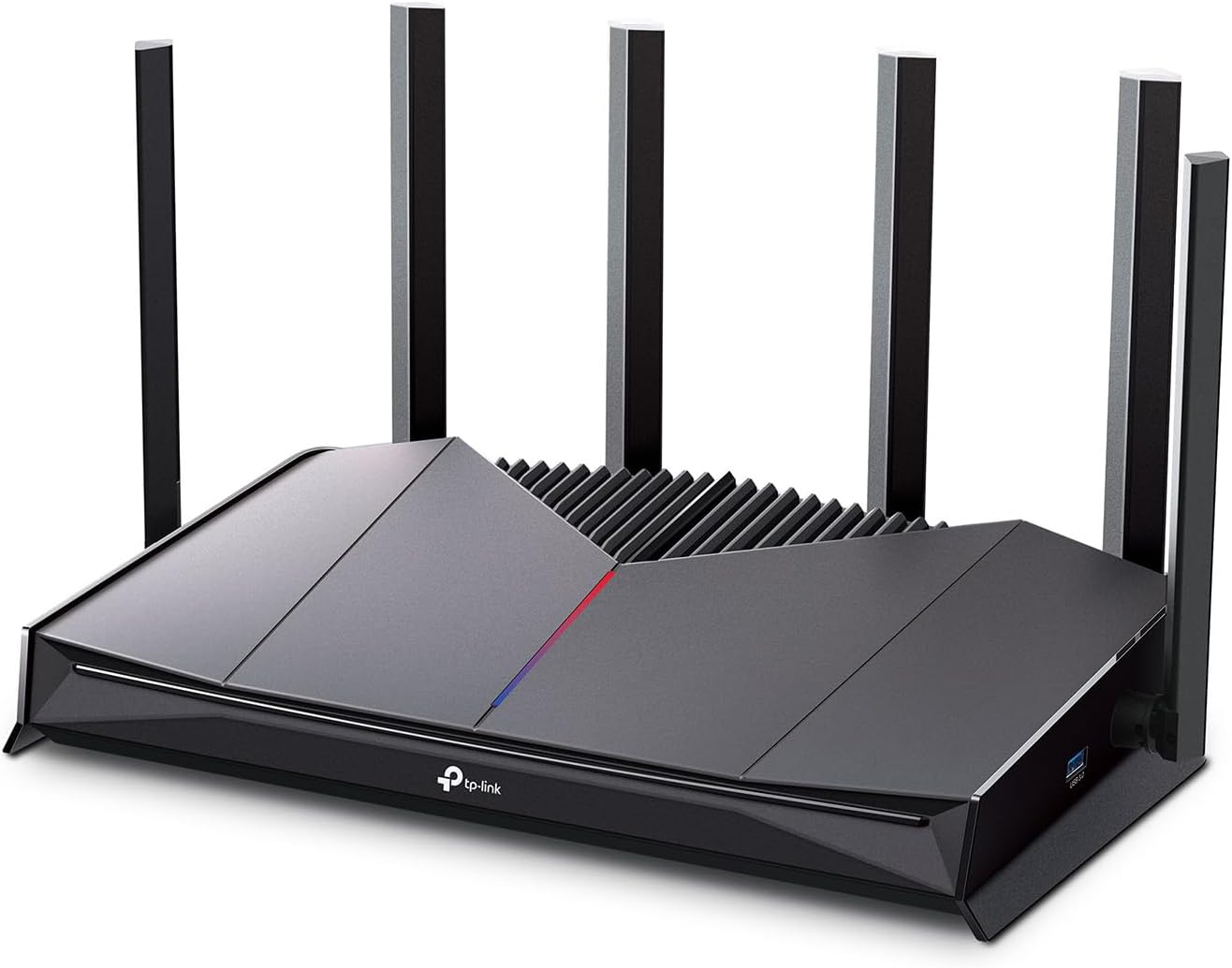
Key Benefits: Dedicated gaming port with hardware Game Acceleration prioritizes gaming traffic at the router level at the most accessible price on this list | EasyMesh means coverage extends with compatible nodes later without replacing the router | HomeShield covers security and parental controls from one app without extra hardware | Physical Game Panel provides in-session controls during active play | WiFi 7 dual-band delivers meaningful latency improvements over WiFi 6 alternatives at a similar price.
Pros: Hardware gaming port at budget pricing is genuine value for console and PC gamers | EasyMesh and HomeShield add long-term utility beyond gaming performance.
Cons: No 6GHz band limits wireless congestion management compared to tri-band alternatives in busy household environments.
Best For: Budget-conscious gamers who want dedicated gaming hardware without paying for tri-band pricing | PS5 and Xbox gamers who plan to wire directly into the gaming port for the lowest ping.
#7 ASUS RT-AX86U Pro : Best WiFi-6 Gaming Router
Overview: Dual-band WiFi 6 AX5700 gaming router with 2.5G port, dedicated gaming port, Mobile Game Mode, port forwarding, subscription-free AiProtection, VPN, AiMesh | The best gaming modem router alternative for buyers who want proven WiFi 6 gaming performance with subscription-free security | Compatible with all major ISPs.
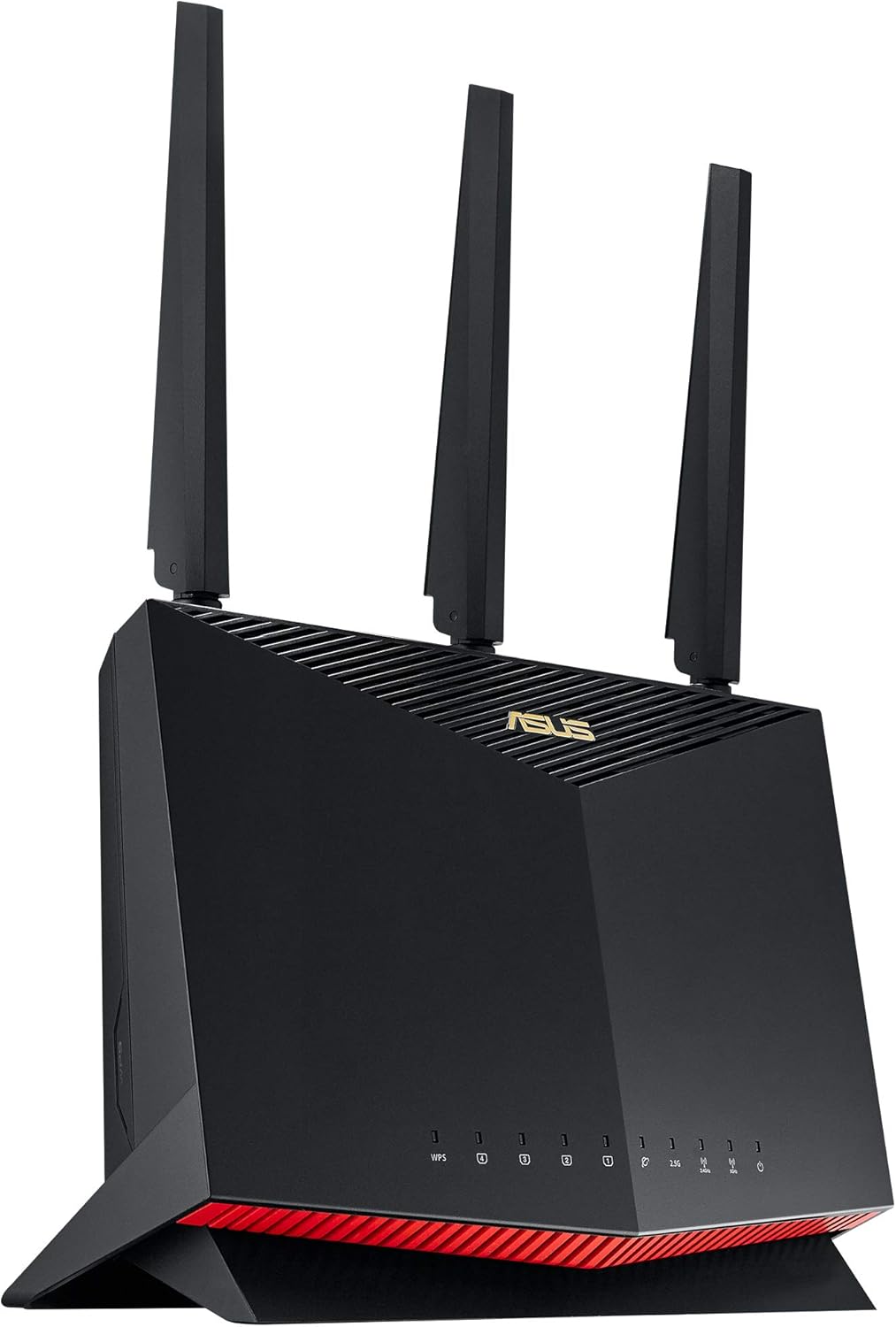
Key Benefits: Dedicated gaming port with Mobile Game Mode reduces ping for both console and mobile gaming simultaneously | Subscription-free Ai Protection covers every device on the network with threat monitoring at no annual cost | 2.5G WAN handles mid-tier multi-gig internet plans without hardware bottlenecking | VPN support is built in for remote workers who also game | Ai Mesh expands coverage without replacing the router if the gaming setup moves to a larger home.
Pros: Subscription-free security is a meaningful long-term cost advantage over competitors | Dedicated gaming port plus Mobile Game Mode serves both console and phone gamers simultaneously.
Cons: WiFi 6 rather than WiFi 7 means it misses MLO and 6GHz band access that newer models include.
Best For: Gamers who want proven WiFi 6 performance with subscription-free security and VPN | ASUS AiMesh ecosystem users who want a gaming-first primary router at a step below WiFi 7 flagship pricing.
Quick Comparison Table
| Rank & Model | WiFi Standard & Speed | Coverage & Ports | Best For |
|---|---|---|---|
| #1 ASUS ROG Strix GS-BE12000 | WiFi 7 Tri-Band • 12 Gbps | Large homes • 9× LAN | Maximum wired gaming setup |
| #2 ASUS ROG GT-BE98 Pro | WiFi 7 Quad-Band • 30 Gbps | Large homes • Multi-gig ports | Quad-band gaming separation |
| #3 NETGEAR BE17000 | WiFi 7 Tri-Band • 17 Gbps | 3,300 sq. ft. • 10G WAN | Large home gaming + VPN |
| #4 NETGEAR BE9300 | WiFi 7 Tri-Band • 9.3 Gbps | 2,500 sq. ft. • 2.5G WAN | Mid-range gaming + VPN |
| #5 TP-Link GE650 | WiFi 7 Tri-Band • 11 Gbps | Large homes • 2×5G + 3×2.5G | Hardware gaming ports |
| #6 TP-Link GE400 | WiFi 7 Dual-Band • 6.5 Gbps | Medium homes • 2×2.5G + 3×1G | Budget gaming router |
| #7 ASUS RT-AX86U Pro | WiFi 6 Dual-Band • AX5700 | Medium–Large • 2.5G + Gaming Port | WiFi 6 gaming + security |
This guide helps you choose the right wifi router at game based on your gaming platform, home size, internet plan speed, and budget.
What to Look for When Buying a WiFi Router for Gaming
Hardware Gaming Features vs. Software Labels
Not all “gaming routers” are equal. Some use the label to market standard routers with colored LEDs. The real gaming features worth paying for are hardware-dedicated gaming ports that route traffic at the chip level, physical Game Panels for in-session control, and router QoS for gaming that actually prioritizes the console or PC over background traffic automatically.
Wired Always Beats Wireless for Gaming
Every router on this list has multi-gig Ethernet ports. If you’re serious about gaming latency, wire your PS5, Xbox, or gaming PC directly to the router’s dedicated gaming port or fastest LAN port. A wired connection removes all wireless variables from your ping calculation.
Band Count Matters for Busy Households
- Dual-band works for solo gamers in quieter households
- Tri-band adds a dedicated band that separates gaming from streaming and browsing
- Quad-band (GT-BE98 Pro) gives gaming a fully isolated channel with zero competition
VPN for Gamers Is Underrated
The NETGEAR BE17000 and BE9300 both include built-in VPN. For gamers who play on international servers or want to protect their connection, VPN built into the gaming modem router removes the need for a separate device or subscription service.
Security Without Ongoing Fees
The ASUS RT-AX86U Pro’s subscription-free AiProtection and the TP-Link HomeShield free tier both cover every device without charging annually. Over a three-year ownership period, that difference adds up significantly compared to routers with mandatory security subscriptions.
How These Routers Were Selected
Every router here was evaluated specifically on gaming performance features: hardware gaming port availability, QoS implementation quality, band architecture for traffic isolation, wired port configuration, and whether the gaming-specific features are hardware or software based. Products with gaming labels but no genuine gaming hardware differentiation were excluded. VPN availability, security model, and long-term firmware reliability all shaped the final selections alongside gaming-specific specs.
Key selection factors:
- Dedicated gaming port: hardware-level or software QoS only
- Band count and traffic isolation capability for gaming households
- Wired multi-gig port configuration for consoles and gaming PCs
- VPN availability for geo-restricted gaming and remote work
- Security model: subscription-free, lifetime, or subscription-based
- Firmware gaming optimization quality from ASUS ROG, NETGEAR Nighthawk, and TP-Link gaming platforms
How to Get the Best Gaming Performance From Your Router
Initial Setup
- Wire your primary gaming device directly to the dedicated gaming port before configuring wireless settings
- Enable QoS or Game Acceleration in the router app and set your gaming console or PC to the highest priority
- Update firmware immediately after first boot because gaming latency optimization patches frequently arrive in early releases
Placement for Gaming
- For wired gaming setups, place the router where the gaming device is rather than where the modem is if cable runs allow
- For wireless gaming, position the router in the same room or one room away with no major obstructions
- Elevate the router away from large metal surfaces, other electronics, and thick concrete walls
Mistakes That Add Ping
- Gaming wirelessly when a wired connection is available because every wireless link adds latency that wired eliminates
- Not enabling the dedicated gaming port’s hardware prioritization which doesn’t always activate by default
- Leaving all devices on the same band when tri-band architecture exists to separate gaming traffic
- Skipping firmware updates because gaming performance patches come through firmware regularly
Tips That Lower Your Ping Today
- Always wire the gaming console or PC to the gaming port if within cable reach
- Enable MLO in the router settings for WiFi 7 devices to use simultaneous multi-band connections
- Assign smart home devices and phones to 2.4GHz so the 5GHz and 6GHz bands stay clear for gaming
- Use the Game Panel or router app to confirm gaming traffic is actually being prioritized during sessions
Signs Your Gaming Router Is Working Right
- In-game ping is lower and stays more consistent during peak household hours
- Lag spikes during intense moments disappear or become significantly less frequent
- Gaming downloads and updates finish faster
- Other household members can stream without visibly affecting your match quality
How to Pick the Right Gaming Router for Your Setup
Budget first: Tight budget? TP-Link GE400 gives hardware gaming features at the lowest price here. Mid-range? NETGEAR BE9300 or ASUS RT-AX86U Pro. Premium? TP-Link GE650 or the NETGEAR BE17000 with 10G WAN. Flagship? ASUS ROG Strix or GT-BE98 Pro.
Wired or wireless gaming priority: Wire your gaming device? TP-Link GE650 with five multi-gig ports or ROG Strix with nine LAN ports. Wireless gaming? Quad-band GT-BE98 Pro gives gaming a fully isolated wireless channel.
VPN needed: NETGEAR BE17000 for 10G users or BE9300 for mid-range plans. Both include VPN without extra hardware.
Must-have features: Dedicated gaming port (hardware-level), tri-band or quad-band for busy households, at least one multi-gig Ethernet port, QoS gaming router controls, and app management for monitoring during sessions.
Skip if: You’re buying a router with RGB lighting and a “Gaming” label but no dedicated gaming port, hardware QoS, or gaming-specific firmware. Those are aesthetic choices, not performance features.
Already sorted your gaming router and want faster coverage across the whole home? Read our guide on the best WiFi 7 mesh system to see how adding mesh nodes extends gaming-grade performance to every room.
Real User Feedback
- ASUS ROG Strix GS-BE12000 owners in gaming households with multiple consoles say nine LAN ports made their whole setup cleaner by eliminating the separate unmanaged switch, and that ROG firmware gaming optimizations made peak-hour ping more consistent than any previous router they’d used.
- ASUS ROG GT-BE98 Pro gamers who also live with streaming household members say quad-band separation was the first solution that genuinely eliminated the correlation between someone streaming in 4K and their in-game ping spiking.
- NETGEAR BE17000 buyers on multi-gig internet plans say the 10G WAN port combined with built-in VPN removed two separate hardware purchases from their gaming setup, and that gaming performance over the 10G connection was consistently better than their previous Gigabit router.
- NETGEAR BE9300 users upgrading from older gaming routers say the built-in VPN made accessing international gaming servers straightforward without a separate service, and that tri-band QoS kept their PS5 ping stable even during evening household peak hours.
- TP-Link GE650 gamers highlight the physical Game Panel as more useful than they expected, saying real-time traffic controls during competitive sessions made a visible difference when household download activity would have previously caused lag.
- TP-Link GE400 budget buyers say the dedicated gaming port with hardware Game Acceleration solved their peak-hour lag problem at a price that made the upgrade obvious, and EasyMesh compatibility made it feel like a long-term investment rather than a stopgap.
Buying Guide: How to Pick the Right WiFi Router at Game
Finding the perfect wifi router at game doesn’t have to be overwhelming. Instead of chasing the highest speed ratings, focus on choosing a router that complements your internet plan, gaming habits, and future needs.
Match Your Internet Plan
Your internet speed should influence your router choice.
- Gigabit internet users should prioritize WiFi 6 or WiFi 7 gaming routers.
- Multi-gig internet subscribers benefit from routers with multi-gig ports.
- Lower-speed plans don’t necessarily require flagship models.
- Avoid paying extra for performance your ISP cannot deliver.
Third-Party vs. ISP Equipment
Many gamers rely on ISP-provided equipment, but dedicated gaming routers often provide better control.
Third-Party Gaming Routers
- More customization options.
- Better traffic management.
- Improved gaming-focused features.
- Easier network expansion.
ISP Equipment
- Simpler setup.
- Often limited in advanced functionality.
- Fewer optimization controls.
If you’re considering a best gaming modem router combo, remember that standalone gaming routers generally provide greater flexibility.
Placement Matters
Even premium routers struggle when placed incorrectly.
Best practices include:
- Position the router centrally.
- Elevate it above furniture.
- Keep it away from thick walls.
- Avoid placing it near microwaves and similar electronics.
- Prioritize proximity to frequently used gaming devices.
Must-Have Features
Look for features that provide real benefits.
- Modern WiFi standards.
- Dedicated gaming modes.
- Multi-gig Ethernet ports.
- Mesh compatibility.
- VPN support.
- User-friendly management tools.
- Router qos for gaming capabilities.
- Expandability for future upgrades.
Features You Can Skip
Not every feature justifies a higher price.
Avoid overpaying for:
- Decorative extras you won’t appreciate.
- Enterprise-level capabilities for basic use.
- Excessive speed ratings unsupported by your devices.
- Complex configurations you don’t intend to manage.
The best gaming router and modem setup is the one that fits naturally into your daily life.
Real User Feedback: Common Experiences
While everyone’s setup differs, certain themes consistently emerge among gaming router users.
1. Stability Matters More Than Peak Speeds
Many gamers report that reducing connection interruptions has a bigger impact than chasing maximum throughput.
2. Proper Placement Changes Everything
Simple repositioning often improves signal quality dramatically.
3. Wired Connections Still Shine
Competitive players frequently prefer Ethernet connections whenever possible.
4. Multi-Device Homes Benefit Most
Households juggling gaming, streaming, and work notice the biggest improvements after upgrading.
5. Ease of Management Is Underrated
User-friendly apps and interfaces simplify troubleshooting and adjustments.
6. The Most Expensive Option Isn’t Always the Best
Matching the router to actual needs leads to higher satisfaction than buying purely based on specifications.
If you’re searching for the best router for streaming and gaming, remember that balance often beats extremes.
Frequently Asked Questions
Does a gaming router actually reduce ping?
A gaming router cannot eliminate internet latency caused by your ISP or game servers. However, it can help manage local network congestion and prioritize gaming traffic for a more stable experience.
Is WiFi 7 worth it for gaming?
WiFi 7 offers improved efficiency, higher speeds, and better support for multiple connected devices. For buyers planning ahead, it provides valuable future-proofing.
Can these routers work with any internet provider?
Yes. The routers featured in this guide connect to your modem or ISP gateway and are compatible with major internet providers.
What’s the difference between a gaming router and a regular router?
Gaming routers often include features such as dedicated gaming ports, enhanced traffic prioritization, advanced management options, and gaming-focused optimization tools.
Should I choose a gaming modem router combo?
A gaming modem router may simplify setup, but separate devices usually offer greater flexibility and upgrade potential.
Is Ethernet still better than WiFi for gaming?
For highly competitive gaming, Ethernet remains the preferred choice because of its consistency and stability. However, modern gaming WiFi routers have narrowed the gap significantly.
How many devices can a gaming router handle?
Capacity varies by model. Larger households with numerous connected devices should prioritize routers designed specifically for heavier usage demands.
Conclusion and Final Recommendation
Lag and dropped connections don’t have to be part of your gaming experience. The right wifi router at game gives your gaming traffic the priority it deserves, keeps your connection stable under household load, and makes sure your hardware matches the internet speed you’re paying for. Every router on this list does that job well for a different type of gamer.
This guide is for:
- Competitive gamers who are tired of blaming lag on the internet when the router is the real problem
- Households where multiple people use the network and gaming performance suffers during peak hours
- Anyone comparing asus gaming router, nighthawk gaming router, and TP-Link gaming options and wanting a clear recommendation
- Buyers who want to make one solid purchase instead of upgrading again in a year
Best overall pick: The ASUS ROG Strix GS-BE12000 is the strongest all-round wifi router at game on this list. Nine LAN ports, tri-band WiFi 7, ROG gaming firmware, and mesh compatibility together make it the most complete gaming router for serious players with demanding wired setups. If you wire everything and want no compromises, this is the router.
Short version: Wire your gaming device. Enable hardware QoS or Game Acceleration. Match the band count to your household’s concurrent usage. Any router on this list delivers noticeably better gaming performance than a standard household router at the same price point.