
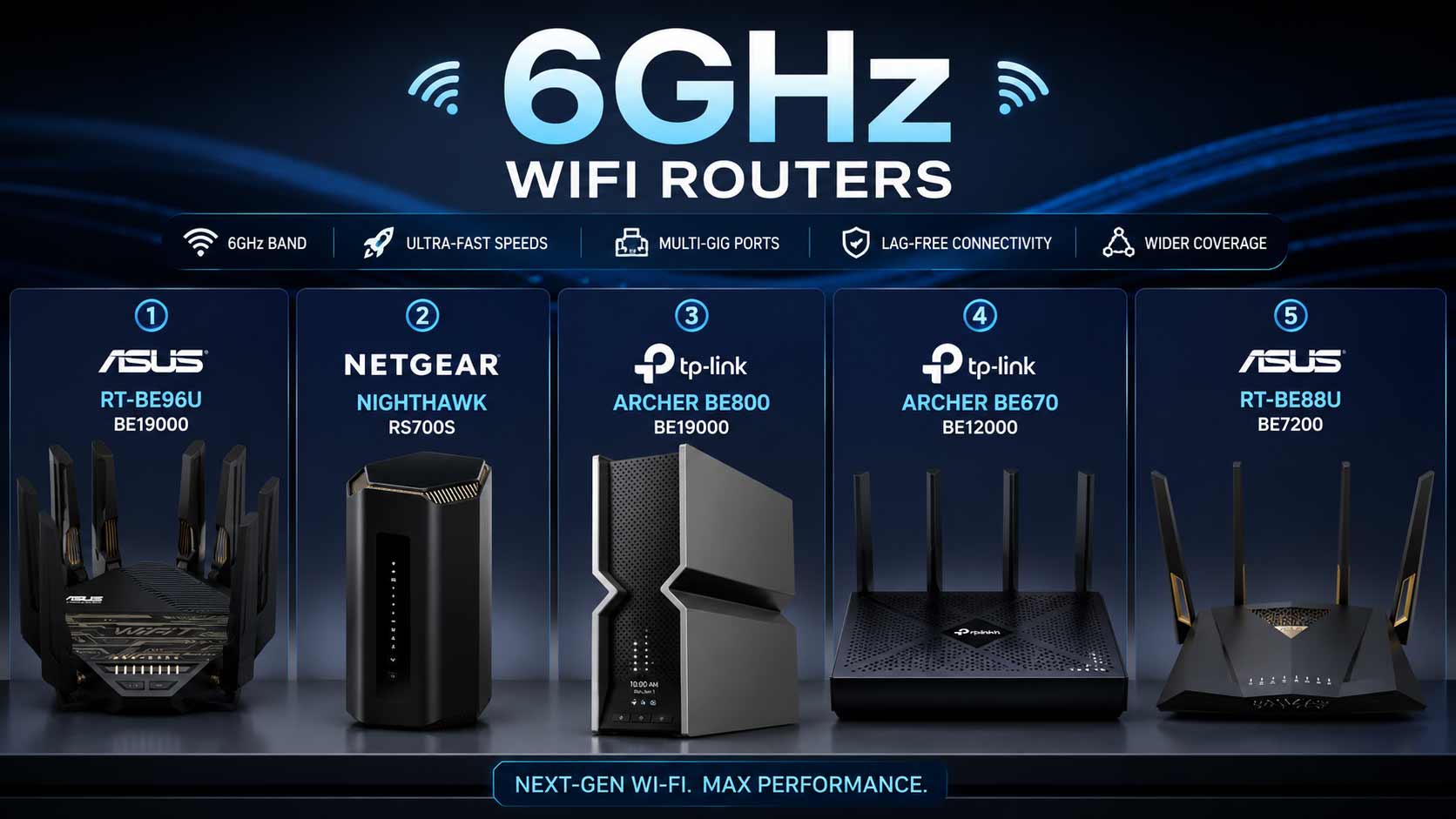

If your current network struggles with buffering, gaming lag, crowded connections, or inconsistent performance during video calls, upgrading to a 6GHz WiFi router could be one of the smartest tech decisions you’ll make this year.
Unlike the heavily congested 2.4GHz and 5GHz bands, the 6GHz spectrum offers cleaner channels, lower latency, and significantly less interference. Combined with modern WiFi 7 technology, today’s routers are built to handle everything from 4K and 8K streaming to competitive gaming, smart home ecosystems, and dozens of connected devices without breaking a sweat.
Whether you’re shopping for the best 6GHz WiFi router, comparing an ASUS WiFi 7 6GHz router, or deciding between a WiFi 6E router 6GHz upgrade and a newer WiFi 7 6GHz router, this guide will help you choose with confidence.
After comparing performance, features, reliability, and overall value, these are the top 6GHz routers worth considering in 2026.
Quick Verdict: Which 6GHz WiFi Router Should You Buy?
| Category | Recommendation |
| Best Overall | ASUS RT-BE96U |
| Best Premium Pick | NETGEAR Nighthawk RS700S |
| Best Feature-Rich Router | TP-Link Archer BE800 |
| Best Value Pick | TP-Link Archer BE670 |
| Best Mesh Alternative | ASUS ZenWiFi BT10 |
Short on Time?
- Choose the ASUS RT-BE96U if you want the most complete WiFi 7 router 6GHz experience.
- Pick the NETGEAR RS700S if premium performance and elegant simplicity matter most.
- Buy the TP-Link Archer BE800 if you want flagship features without sacrificing value.
- Go for the TP-Link Archer BE670 if you want a more affordable entry into the wifi router 6ghz category.
- Consider the ASUS ZenWiFi BT10 if whole-home mesh coverage is your top priority.
Quick Comparison: Best 6GHz Wi-Fi Routers
| Rank & Model | WiFi Standard & Speed | Coverage | Best For |
|---|---|---|---|
| #1 ASUS RT-BE96U | WiFi 7 Tri-Band, BE19000 | Large Homes | Gamers & Power Users |
| #2 NETGEAR RS700S | WiFi 7 Tri-Band, BE19000 | Up to 3,500 sq. ft. | Premium Buyers |
| #3 TP-Link Archer BE800 | WiFi 7 Tri-Band, BE19000 | Medium-Large Homes | Feature-Rich Setups |
| #4 TP-Link Archer BE670 | WiFi 7 Tri-Band, BE12000 | Medium Homes | Best Value |
| #5 ASUS ZenWiFi BT10 | WiFi 7 Mesh, High-Speed Mesh | Whole-Home Coverage | Mesh Users |
Top 5 Best 6GHz WiFi Router Picks
Disclosure: This post contains affiliate links. As an Amazon Associate I earn from qualifying purchases. If you purchase through our links, we may earn a small commission at no extra cost to you. We only recommend products we genuinely stand behind.
These routers were selected based on real-world usability, multi-device performance, reliability, port selection, future-proof features, and overall value—not simply on marketing claims.
#1. ASUS RT-BE96U BE19000 Tri-Band WiFi 7 Router
Why It’s Our Best Overall Pick
The ASUS RT-BE96U combines flagship WiFi 7 performance, premium hardware, and ASUS’s mature ecosystem into one of the strongest wifi 7 router 6ghz band options available today.
This router is built for users who don’t want compromises.
Overview:
Tri-band WiFi 7 BE19000 router with dedicated 6GHz support | Excellent coverage for large homes | Dual 10G ports and 320MHz channels | AiMesh compatibility for future expansion | Ideal for gamers, creators, and multi-gig internet users.

Best deal today – prices may change
Key Benefits:
Outstanding performance on the 6GHz band | Stable connections through Multi-Link Operation (MLO) | Easy management through the ASUS Router app | Subscription-free security features | Seamless expansion using AiMesh.
Pros:
- Exceptional real-world performance
- Powerful dual 10G connectivity
- Excellent app experience
- Trusted ASUS reliability
- Strong future-proofing potential
Cons: Premium pricing may exceed some budgets
Best For:
Gamers | Power users | Large households | Multi-gig internet subscribers | Buyers wanting the ultimate ASUS WiFi 7 6GHz router.
This flagship model delivers the balance of speed, stability, and flexibility that most buyers are searching for in the best 6GHz WiFi router.
#2. NETGEAR Nighthawk RS700S BE19000 Tri-Band WiFi 7 Router
Best Premium Standalone Router
The NETGEAR RS700S proves that a premium experience doesn’t have to be complicated.
With powerful hardware and straightforward management, it appeals to users who simply want outstanding performance without endless tweaking.
Overview:
Tri-band WiFi 7 router with dedicated 6GHz band | Covers up to 3,500 sq. ft. | Includes a 10 Gig internet port | Designed for larger homes and heavy workloads | Compatible with major ISPs.

Best deal today – prices may change
Key Benefits:
Fast and stable 6GHz performance | Excellent throughput for streaming and gaming | Easy setup through the Nighthawk app | Reliable coverage | Built-in security options.
Pros:
- Excellent speeds
- Strong coverage
- User-friendly setup
- Trusted NETGEAR ecosystem
- Great performance consistency
Cons:
- Expensive compared to mid-range alternatives
Best For:
Large families | Heavy streamers | Professionals working from home | Buyers seeking a premium wifi 6ghz router experience.
Among standalone routers, the RS700S remains one of the most polished options in the router 6ghz wifi 7 category.
#3. TP-Link Archer BE800 BE19000 Tri-Band WiFi 7 Router
Best Feature-Rich Option
If you love advanced features, flexible ports, and excellent value, the Archer BE800 deserves serious consideration.
It combines flagship specifications with practical functionality that appeals to both enthusiasts and everyday users.
Overview:
Tri-band BE19000 WiFi 7 router with dedicated 6GHz support | Features 2×10G and 4×2.5G ports | Eight antennas for improved coverage | Includes HomeShield, EasyMesh, and VPN support | Excellent smart-home compatibility.

Best deal today – prices may change
Key Benefits:
Strong wireless and wired flexibility | Reliable multi-device performance | Easy app management | Excellent security options | Built for demanding households.
Pros:
- Outstanding feature set
- Excellent value
- Impressive port selection
- Strong signal performance
- Easy to manage
Cons:
- Unique design may not appeal to everyone
Best For:
Tech enthusiasts | Smart-home users | Multi-device households | Buyers seeking a powerful wifi 7 6ghz router without overspending.
Its combination of features and value makes it one of the strongest contenders for anyone searching for the best 6ghz wifi router.
#4. TP-Link Archer BE670 BE12000 Tri-Band WiFi 7 Router
Best Value 6GHz WiFi Router
Not everyone needs the fastest BE19000 router on the market. For many households, the TP-Link Archer BE670 strikes the perfect balance between performance, features, and affordability.
It brings true tri-band WiFi 7 capabilities, including the cleaner 6GHz spectrum, at a price point that’s easier to justify.
Overview:
Tri-band BE12000 WiFi 7 router with dedicated 6GHz band | Includes 10G connectivity | Supports Alexa and Google Assistant integration | Built for gigabit and multi-gig households | Compatible with all major ISPs.

Best deal today – prices may change
Key Benefits:
Reliable speeds across all three bands | Strong device handling for busy homes | Voice assistant compatibility | Straightforward setup through the TP-Link app | Practical WiFi 7 performance without flagship pricing.
Pros:
- Excellent value for money
- True 6GHz support
- Easy setup process
- Smart home integration
- Future-ready networking
Cons:
- Lower maximum speed rating than premium BE19000 models
Best For:
Families | Smart home users | Medium-sized households | Buyers wanting an affordable wifi 7 router 6ghz upgrade.
If you’re looking for the best mix of price and performance, the Archer BE670 is one of the strongest contenders in the wifi router 6ghz category.
#5. ASUS ZenWiFi BT10
Best Mesh Alternative for Whole-Home Coverage
For homes where coverage matters more than raw benchmark numbers, the ASUS ZenWiFi BT10 offers a compelling solution.
Unlike standalone routers, this mesh system is designed to eliminate dead zones while maintaining strong performance throughout the entire house.
Overview:
Tri-band WiFi 7 mesh system with dedicated 6GHz support | Designed for whole-home coverage | AiMesh ecosystem compatibility | Advanced security features included | Ideal for expanding into larger properties.

Best deal today – prices may change
Key Benefits:
Excellent roaming performance | Simplified network management | Whole-home coverage without dead zones | Subscription-free protection | Easy expansion as your needs grow.
Pros:
- Outstanding mesh performance
- Strong ASUS ecosystem support
- Easy expansion capabilities
- Reliable roaming experience
- User-friendly management
Cons:
- More expensive than a single-router setup
Best For:
Large homes | Multi-story properties | Families | Buyers seeking a premium wifi 7 6ghz router mesh experience.
If dead zones are your biggest frustration, the ZenWiFi BT10 may be the smartest best 6ghz wifi router alternative on this list.
Gaming across multiple devices specifically? Read our guide on the best WiFi 7 router for gaming to see how the ROG GT-BE98 Pro compares against other gaming-first WiFi 7 routers.
How to Choose the Right 6GHz WiFi Router
Choosing the right 6ghz wifi router isn’t about buying the most expensive model. It’s about matching the router to your internet plan, home size, and daily usage habits.
Start With Your Internet Plan
Ask yourself:
- Do you have gigabit or multi-gig internet?
- Are you paying for speeds your current router can’t fully deliver?
If yes, investing in a modern wifi 6e 6ghz router or WiFi 7 model makes sense.
Consider Your Home Size
Small Homes and Apartments: Choose: TP-Link Archer BE670
For the Medium to Large Homes: ASUS RT-BE96U | NETGEAR RS700S | TP-Link Archer BE800
Large Multi-Story Homes: ASUS Zen WiFi BT10
Think About Your Usage
Gamers: Prioritize: ASUS RT-BE96U | NETGEAR RS700S
Smart Home Enthusiasts : TP-Link Archer BE800 | TP-Link Archer BE670
Remote Workers: ASUS RT-BE96U | NETGEAR RS700S
Families: ASUS ZenWiFi BT10 | TP-Link Archer BE670
What to Look for When Buying a 6GHz WiFi Router
1. Dedicated 6GHz Support
Not all WiFi 7 routers use the 6GHz spectrum. If your goal is accessing cleaner channels and lower latency, make sure your wifi 6ghz router includes dedicated 6GHz capability.
2. Multi-Gig Ports
Look for:2.5G Ethernet, 10G Internet Ports, help future-proof your setup.
3. Easy Management
Choose routers with: Mobile apps| Clear interfaces| Automatic updates| Simple parental controls
4. Reliable Brand Support
Trusted manufacturers often provide: Better firmware updates| Longer support cycles | Easier troubleshooting
How These 6GHz WiFi Routers Were Selected
We selected these recommendations based on factors that matter in everyday use.
Our evaluation included:
- Real-world usability
- Coverage capabilities
- Device handling performance
- Ease of setup
- Security features
- Long-term value
- Brand reputation
- Future-proofing potential
Rather than focusing only on theoretical speed claims, we prioritized routers that deliver a consistently strong experience.
How to Get the Best Performance From Your Router
Even the best wifi 7 router 6ghz band won’t perform at its peak if it’s poorly configured.
Proper Setup Tips
- Update firmware immediately.
- Follow the manufacturer’s setup guide.
- Use the companion app.
- Enable recommended security settings.
Optimize Placement
Position your router:
- In a central location.
- Elevated off the floor.
- Away from microwaves.
- Away from thick concrete walls.
- Out in the open.
Avoid Common Mistakes
Don’t:
- Hide your router in cabinets.
- Ignore firmware updates.
- Connect every device to one band.
- Place the router behind televisions.
Performance Optimization
For compatible devices:
- Use the 6GHz band for gaming.
- Prioritize 6GHz for 4K and 8K streaming.
- Enable QoS when available.
- Reboot periodically if performance declines.
Real User Feedback
Across these products, users consistently report:
What Buyers Love
- Faster speeds
- Lower latency
- Improved streaming performance
- Better device handling
- Stronger coverage
- Cleaner wireless connections
Common Complaints
- Premium models can be expensive.
- Some advanced features require learning.
- Older devices cannot utilize 6GHz benefits.
Overall, buyers who own compatible devices report high satisfaction after upgrading to a modern wifi 6e 6ghz router or WiFi 7 system.
Frequently Asked Questions
Is a 6GHz WiFi router worth it?
Yes. If you own compatible devices and want faster speeds with less interference, upgrading to a 6ghz wifi router can significantly improve your network experience.
Is 6GHz better than 5GHz?
For supported devices, yes.
The 6GHz spectrum offers:
- Cleaner channels
- Less congestion
- Lower latency
- Better high-speed performance
However, 5GHz often provides a slightly better range.
Do I need WiFi 7 to use 6GHz?
No.
Many wifi 6e 6ghz router models support the 6GHz band.
WiFi 7 simply builds upon those capabilities with additional performance enhancements.
Can older devices connect?
Yes.
These routers remain backward compatible with 2.4GHz and 5GHz devices.
Only compatible devices can access the 6GHz band.
Which is the best 6GHz WiFi router overall?
For most buyers, the ASUS RT-BE96U delivers the strongest combination of performance, ports, coverage, and long-term value.
Final Recommendation
Choosing the right 6ghz wifi router doesn’t have to be complicated.
If you want the absolute best overall experience, the ASUS RT-BE96U remains our top recommendation thanks to its exceptional WiFi 7 performance, dual 10G ports, and mature ASUS ecosystem.
However:
- Choose the NETGEAR RS700S for premium simplicity.
- Choose the TP-Link Archer BE800 for flagship features.
- Choose the TP-Link Archer BE670 for the best value.
- Choose the ASUS ZenWiFi BT10 for whole-home mesh coverage.
The right router isn’t necessarily the most expensive one it’s the one that matches your home, internet plan, and daily needs.
Ready to Upgrade?
Pick the router that fits your lifestyle, compare current pricing, and take advantage of the cleaner, faster, and more reliable performance that the 6GHz era has to offer.
Ready to find the perfect router for your home? Read our complete guide on the best WiFi 7 router for smart homes to see how multi-device management pairs with IoT security and dedicated smart home network features.