

Most people don’t realize their router is the problem until they’ve already blamed the internet, the device, and the ISP three times each. TP-Link’s WiFi 7 lineup fixes that frustration at every price point. Whether you’re gaming, streaming 4K on three TVs at once, or trying to keep 40 smart home devices connected without dropouts, there’s a best TP-Link WiFi 7 router built specifically for your situation.
Best TP-Link WiFi 7 Router: Stop Settling for Slow and Upgrade Right
What makes TP-Link stand out in the WiFi 7 market right now isn’t just speed. It’s the combination of HomeShield security, EasyMesh expansion, multi-gig port configurations, and practical features like voice assistant support and Private IoT networks, all without pushing every useful feature behind a premium paywall. They also connect directly to any modem or ISP gateway, stay fully backward compatible with older devices, and support EasyMesh so your investment scales instead of becoming obsolete when coverage needs grow.
Five picks. Five different types of buyer. One clear recommendation for each.
Quick Top 5 Preview:
- TP-Link Archer BE670 BE12000 (Best for Smart Home and Voice Control)
- TP-Link Archer BE600 BE9700 (Best Port-Dense Mid-Range Pick)
- TP-Link Archer BE800 BE19000 (Best Flagship for Power Users)
- TP-Link Archer GE650 BE11000 (Best Tri-Band Gaming Router)
- TP-Link Archer GE400 BE6500 (Best Entry-Level Gaming Pick)
How to Choose the Best TP-Link WiFi 7 Router for Your Home
Why This Decision Is Easier Than You Think
The TP-Link WiFi 7 lineup looks overwhelming at first glance because there are models for smart homes, gaming setups, large properties, and everything in between. But the decision actually comes down to three things: how many devices you’re running, what you mainly use the network for, and whether your internet plan needs a 10G port or a 2.5G port to keep up. Get those three things right and the correct router becomes obvious.
The frustration most buyers face is buying based on price alone. Too cheap means the wrong band configuration for a busy household. Too expensive means paying for dual 10G ports when the internet plan tops out at 500 Mbps. Neither mistake helps your network.
Common Mistakes That Cost People Money
- Choosing a gaming router when the actual problem is coverage, not latency
- Picking a dual-band unit for a household with 30 or more active devices and then wondering why things feel congested after dinner
- Ignoring EasyMesh compatibility and then discovering the router won’t work with Deco nodes they want to add to a back bedroom
- Paying for the BE800 flagship features when the BE600 handles everything their setup actually needs
What WiFi 7 Changes in Practice
WiFi 7 isn’t a small step forward. The 6GHz band access reduces wireless congestion dramatically because almost no one else in your neighborhood is using it yet. 320MHz channel support doubles the data pipe compared to WiFi 6E. And multi-gig port configurations across the TP-Link lineup mean wired devices aren’t bottlenecked by the router hardware even when internet plans get faster. These improvements show up in daily use, not just benchmark tests.
Who This Guide Helps Most
- Homeowners upgrading from an older router who want the right WiFi 7 model the first time
- Gamers choosing between TP-Link’s gaming models and needing a clear comparison
- Smart home users who want HomeShield, Private IoT, and voice assistant support without a complicated setup
- Anyone on a multi-gig internet plan whose current router is limiting their speeds
- Buyers comparing TP-Link against ASUS and NETGEAR who want honest context
This guide gives you a clear, specific recommendation matched to your actual situation so you don’t have to second-guess the purchase.
Top 5 Best TP-Link WiFi-7 Routers
Disclosure: This post contains affiliate links. As an Amazon Associate I earn from qualifying purchases. If you purchase through our links, we may earn a small commission at no extra cost to you.
These five routers were chosen because each one genuinely leads its category within the TP-Link WiFi 7 lineup. Performance, port configuration, TP-Link-specific features, and real-world suitability for different household types all shaped the final selections. No picks based on marketing claims or box design.
#1 TP-Link Archer BE670 BE12000 – Best for Smart Home and Voice Control
Overview: Tri-band WiFi 7 BE12000 router with 6GHz band support, 10G connectivity, and built-in Alexa and Google Assistant compatibility | Designed for large smart home households where voice-controlled network management is a daily reality | Works with all major ISPs and slots naturally into Alexa and Google Home setups | The strongest tp-link wifi 7 router for large homes that center their daily routines around voice-controlled smart home automation.

Best deal today – prices may change
Key Benefits: Alexa and Google Assistant integration means you manage the network, check speeds, and run diagnostics by voice without picking up your phone or opening an app | 6GHz band provides the cleanest wireless channel for fast devices and separates them from lower-bandwidth IoT traffic | BE12000 tri-band speed gives each band enough headroom so smart devices, streaming, gaming, and personal browsing coexist without slowing each other down | 10G connectivity handles multi-gig internet plans without the router becoming the bottleneck | WiFi 7’s improved spectrum efficiency handles the large device counts common in smart homes far better than older standards.
Pros:
Voice assistant integration is a genuinely useful daily feature rather than a gimmick for households that already use Alexa or Google Home | 10G connectivity and 6GHz band together make this a future-ready investment | Tri-band architecture handles the mixed traffic load of large smart home setups cleanly | TP-Link firmware support is consistent and reliable across this lineup.
Cons: Buyers who don’t use voice assistants regularly won’t benefit from the main differentiating feature, and the tri-band price premium may not be justified for smaller simpler setups.
Best For: Smart home households using Alexa or Google Home as daily network and home management tools | Large homes needing 6GHz and 10G connectivity with voice control convenience | Families who want a router that feels like a natural part of their smart home ecosystem | Anyone looking for a high performance tp-link wifi 7 router that goes beyond standard network management.
#2 TP-Link Archer BE600 BE9700 – Best Port-Dense Mid-Range Pick
Overview: Tri-band WiFi 7 BE9700 router with a 10G WAN port, a 2.5G WAN port, three 2.5G LAN ports, 320MHz channel support, up to 2,600 sq. ft. coverage, and 120-device capacity | Includes VPN and HomeShield security | The best tp-link wifi 7 router price-to-hardware-ratio pick on this list because no competitor at this tier offers five multi-gig ports in a tri-band WiFi 7 unit | Compatible with all ISPs.

Best deal today – prices may change
Key Benefits: Three 2.5G LAN ports plus a 10G WAN port means wired devices including gaming PCs, NAS drives, and smart home hubs all connect at multi-gig speeds without port contention | 320MHz channel bandwidth is the full WiFi 7 implementation, not a limited version, so wireless throughput is maximized for the fastest wireless devices | 120-device capacity handles large mixed households including smart home devices without congestion during peak hours | HomeShield covers network security and parental controls from the same Tether app dashboard | 2,600 sq. ft. coverage suits most large homes from a single unit without mesh expansion.
Pros:
Five multi-gig ports in a mid-range tri-band WiFi 7 router is the standout hardware specification at this price tier | 320MHz full channel support differentiates this from budget WiFi 7 models that implement narrower channels | HomeShield value is strong for family homes even on the free tier | Coverage and device capacity suit most large family homes without requiring mesh expansion.
Cons: HomeShield’s advanced features including detailed parental controls and threat analytics require a paid subscription after the initial free trial period.
Best For: Large households who need multi-gig wired connections for multiple devices alongside strong tri-band wireless coverage | Families who want HomeShield and VPN without paying flagship prices | Anyone searching for the best tp-link wifi 7 router for multiple devices with strong wired port density | Buyers on multi-gig internet plans who want a 10G WAN port and 2.5G LAN ports at a practical price.
Already planning to expand into a full mesh network? Read our guide on the best TP-Link Deco WiFi 7 mesh systems to see how the BE600 works as a primary node in a larger EasyMesh whole-home setup.
#3 TP-Link Archer BE800 BE19000 – Best Flagship for Power Users
Overview: TP-Link’s flagship tri-band WiFi 7 BE19000 router with 12-stream 19 Gbps combined speed, two 10G and four 2.5G Ethernet ports, a built-in LED screen, eight high-performance antennas, Private IoT network, VPN, HomeShield, EasyMesh, and free expert help | The fastest tp-link wifi 7 router on this list and the most feature-complete home router TP-Link currently makes | Compatible with all ISPs and EasyMesh for expansion.

Best deal today – prices may change
Key Benefits: Two 10G ports and four 2.5G ports give you six multi-gig Ethernet connections, the best wired port configuration of any TP-Link router available right now | Eight high-performance antennas push signal further and more evenly across very large homes than four-antenna designs, which matters for coverage at range | Built-in LED screen provides real-time network status without opening any app or browser panel | Private IoT network setup is a single tap in the Tether app, making smart device isolation genuinely accessible without manual VLAN configuration | BE19000 across 12 streams means simultaneous heavy use across gaming, 4K streaming, and smart home traffic never congests any single band.
Pros:
The strongest port density, highest antenna count, and fastest combined speed in the TP-Link WiFi 7 lineup | LED screen is a practical daily convenience exclusive to this model | Private IoT isolation is built in and accessible to non-technical users through the Tether app | Easy Mesh support means the BE800 functions as a powerful standalone router now and a mesh hub later.
Cons: The flagship price reflects the dual 10G ports and eight-antenna design. Buyers who don’t need both 10G ports or who have homes under 2,500 sq. ft. are paying for hardware their specific setup won’t fully use.
Best For: Power users and multi-gig internet subscribers who want the best premium tp-link wifi 7 router available | Large homes needing maximum signal reach from a single unit before considering mesh expansion | Smart home power users who want Private IoT, dual 10G, and HomeShield in a single package | Anyone building a network foundation that needs to scale seamlessly with EasyMesh nodes over time.
#4 TP-Link Archer GE650 BE11000 – Best Tri-Band Gaming Router
Overview: Tri-band WiFi 7 BE11000 gaming router with a dedicated gaming port and physical Game Panel, Game Acceleration, 6-stream 320MHz support, two 5G ports, three 2.5G ports, USB 3.0, RGB lighting, and HomeShield | The best tp-link wifi 7 router for gaming buyers who want hardware-level traffic prioritization and a gaming-first feature set across a tri-band WiFi 7 platform | Compatible with all ISPs and EasyMesh.

Best deal today – prices may change
Key Benefits: Dedicated gaming port with hardware Game Acceleration prioritizes gaming device traffic at the router level so ping stays consistent regardless of what the rest of the household is doing | Two 5G + three 2.5G Ethernet ports is the best multi-gig LAN configuration for gaming setups on this list, covering a gaming PC, console, NAS, and streaming hardware simultaneously at speeds above Gigabit | 320MHz tri-band support delivers full WiFi 7 wireless performance for wireless gaming devices | Physical Game Panel provides real-time traffic and priority controls during active gaming sessions without needing to open a browser or app | HomeShield covers the whole network without a separate security solution.
Pros:
Hardware dedicated gaming port with Game Acceleration is the most impactful gaming feature in the tp-link archer wifi 7 router lineup | Port configuration with two 5G LAN ports is exceptional and uncommon even at higher price tiers | 320MHz and 6-stream design ensure wireless gaming clients get real WiFi 7 performance | Game Panel adds practical real-time control during gameplay that software dashboards can’t match for convenience.
Cons: The gaming aesthetic with RGB lighting and a large physical panel adds to the physical footprint and isn’t suited to every home environment or setup preference.
Best For: Serious PC and console gamers who want hardware-level gaming traffic prioritization from a tri-band router | Setups where a gaming PC, NAS drive, console, and streaming device all need multi-gig wired connections simultaneously | Anyone who wants the best tp-link wifi 7 router for gaming with a physical Game Panel and dedicated hardware acceleration | Households where gaming performance and whole-home HomeShield security are equally non-negotiable.
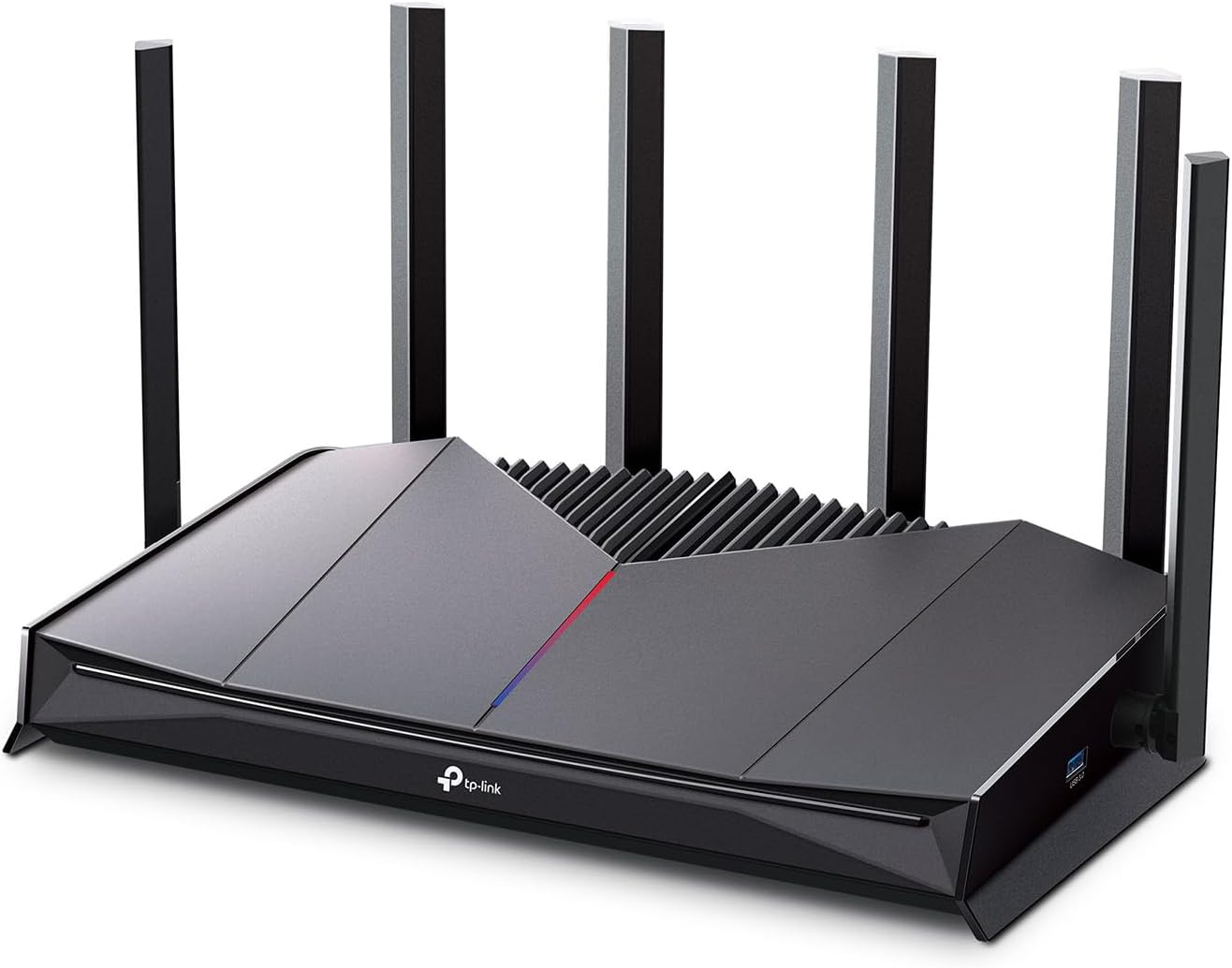
#5 TP-Link Archer GE400 BE6500 – Best Entry-Level Gaming Pick
Best deal today – prices may change
Overview: Dual-band WiFi 7 BE6500 gaming router with a dedicated gaming port, physical Game Panel, Game Acceleration, EasyMesh, HomeShield, and RGB lighting | 6-stream design with two 2.5G and three 1G Ethernet ports | A practical budget tp-link wifi 7 router for gamers who want dedicated gaming hardware features at an accessible price | No 6GHz band | Compatible with all major ISPs and EasyMesh for coverage expansion.
Key Benefits: Dedicated gaming port with Game Acceleration delivers hardware-level gaming traffic priority at the lowest price on this list so console and PC gamers get consistent ping without paying for tri-band hardware they may not need | EasyMesh support means coverage expands with Deco nodes or compatible units later without replacing this router | HomeShield covers security and parental controls from the same Tether app dashboard used across the whole TP-Link lineup | Physical Game Panel provides in-session network controls during active gaming without navigating away from the game | Dual-band WiFi 7 still delivers measurable speed and latency improvements over WiFi 6 for gaming households.
Pros:
Most accessible price for a TP-Link WiFi 7 router with actual dedicated gaming hardware | Easy Mesh compatibility means this isn’t a dead-end purchase if coverage needs grow | Home Shield free tier provides functional security without an immediate subscription decision | Game Acceleration and the physical panel are practical gaming tools even in this entry-level tier.
Cons: No 6GHz band is the meaningful limitation versus the GE650. In households with many wireless devices competing for bandwidth, the absence of the 6GHz channel shows up during peak usage hours.
Best For: Budget-conscious gamers who want a dedicated gaming port and Game Panel without tri-band pricing | PS5 and Xbox gamers who plan to wire directly into the gaming port and want EasyMesh expansion available later | Apartment and smaller home setups where tri-band coverage capacity isn’t needed | Anyone who wants to start gaming-first and expand home coverage with Deco nodes over time without buying a new router.
Quick Comparison Table
| Rank & Model | Standard & Speed | Coverage & Ports | Best For |
|---|---|---|---|
| #1 Archer BE670 | WiFi 7 Tri-Band, BE12000 | Large homes, 10G + multi-gig | Smart home and voice control |
| #2 Archer BE600 | WiFi 7 Tri-Band, BE9700 | 2,600 sq. ft., 10G + 3x 2.5G | Port-dense mid-range value |
| #3 Archer BE800 | WiFi 7 Tri-Band, BE19000 | Large homes, 2x 10G + 4x 2.5G | Flagship power users |
| #4 Archer GE650 | WiFi 7 Tri-Band, BE11000 | Large homes, 2x 5G + 3x 2.5G | Tri-band gaming |
| #5 Archer GE400 | WiFi 7 Dual-Band, BE6500 | Medium homes, 2x 2.5G + 3x 1G | Entry-level gaming |
This guide helps you choose the right best TP-Link WiFi 7 router based on your internet plan speed, household device count, main usage scenario, and whether EasyMesh expansion is part of the plan.
What to Look for When Buying the Best TP-Link WiFi 7 Router
Fit Your Real Setup First
- Count your actual active devices because 10 devices and 50 devices need very different band configurations and capacity ratings
- Match the WAN port to your internet plan because a 10G port adds cost that helps only if your plan delivers speeds above 2.5 Gbps
- Check whether your main use case is gaming, smart home management, streaming, or general household coverage because TP-Link has specific models designed around each of those scenarios
- Confirm EasyMesh compatibility if you’re buying in a large home where mesh expansion is likely in the future
TP-Link Features That Actually Matter Day to Day
- HomeShield covers network-level security and parental controls from the Tether app and the free tier is functional for most households without upgrading to paid
- EasyMesh is the practical reason to stay within the TP-Link ecosystem because it lets Archer routers and Deco nodes work together in a single unified network
- Private IoT on the BE800 is a one-tap smart home security feature that most routers require manual VLAN setup to replicate
- Game Acceleration on the GE650 and GE400 is hardware routing prioritization, not a marketing label, so the performance impact is real and measurable
Consistent Performance Under Load
- Tri-band routers handle busy households better than dual-band because the third band absorbs traffic overflow from the main two bands during peak hours
- Multi-gig LAN ports matter most for wired gaming PCs, NAS drives, and smart home hubs that can actually benefit from speeds above 1 Gbps
- 320MHz channel support delivers the full WiFi 7 wireless throughput benefit and is worth checking because some lower-tier WiFi 7 routers use narrower channel implementations
TP-Link Support and Long-Term Reliability
- TP-Link firmware updates come through the Tether app and are pushed regularly across the WiFi 7 lineup including security and HomeShield patches
- Free expert setup help included with the BE800 and available through TP-Link support for all other models
- EasyMesh firmware maintains compatibility between Archer routers and Deco nodes across product generations
Value Over Time
- EasyMesh across all five routers means none of these purchases is a dead end when coverage needs grow
- The BE600’s port density at mid-range pricing makes it an especially strong long-term value for homes that will upgrade to faster internet plans
- HomeShield’s free tier covers basic security and parental controls indefinitely without requiring the paid upgrade for most standard household use
How These Routers Were Selected
Every router on this list was evaluated on TP-Link-specific feature value, port configuration, practical usability for the buyer type each model serves, and how well it delivers on its stated purpose. Gaming models were assessed on gaming hardware features, not just speed ratings. Coverage models were assessed on antenna design and rated square footage. HomeShield accessibility, EasyMesh long-term compatibility, and Tether app management quality all shaped the final picks alongside the hardware specs.
Selection factors used:
- HomeShield accessibility and subscription model transparency
- EasyMesh compatibility for future network scaling
- WAN and LAN port speed configuration relative to real usage needs
- Gaming hardware features: dedicated port, Game Panel, hardware-level QoS
- Tri-band vs dual-band suitability for different household device counts
- Firmware update history and ongoing TP-Link support quality
How to Get the Best Out of Your TP-Link WiFi 7 Router
The Tether app does most of the heavy lifting, but a few setup decisions at the start make a significant difference in how the router performs months later.
Initial Setup Steps
- Open the TP-Link Tether app before connecting the router to power because the guided setup flow handles ISP detection, band naming, and HomeShield activation in one clean process
- Run the firmware update immediately after the initial setup wizard completes because TP-Link frequently releases performance improvements shortly after hardware launches
- Create your HomeShield device categories and parental control groups during setup rather than retrofitting them weeks later after your devices have already been assigned to default groups
Placement for Different TP-Link Models
- For the BE800 with eight antennas, place it centrally and elevated on a shelf because the antenna array benefits most from clear line-of-sight toward the main usage areas
- For the gaming models GE650 and GE400, place the router as close to your gaming setup as possible because even the dedicated gaming port benefits from shorter cable runs with less noise
- For the BE600 or BE670 in a large home, plan your EasyMesh node locations at the same time so the primary router sits in the optimal spot for the whole network layout, not just the room it’s in
Mistakes Worth Avoiding
- Not enabling Game Acceleration for the dedicated gaming port during setup because it doesn’t always activate automatically depending on firmware version
- Leaving Private IoT off on the BE800 because the one-tap setup in the Tether app takes under a minute and immediately improves security for every smart device on the network
- Choosing wireless backhaul for EasyMesh nodes when Ethernet runs are available because wired backhaul delivers significantly better mesh performance
- Skipping the HomeShield device scan on first setup because it baseline-profiles your network and makes anomaly detection more accurate over time
Tips for Stronger Daily Performance
- Manually assign smart home sensors, locks, and cameras to the 2.4GHz band because they need range more than speed and 2.4GHz delivers better wall penetration for those devices
- Reserve 5GHz and 6GHz for streaming devices, gaming consoles, and laptops that actually benefit from the higher speeds and lower interference
- Use the Tether app’s bandwidth monitor monthly to identify devices consuming unexpected data which often indicates a configuration issue or a security concern
- Enable automatic firmware updates in the Tether app if you don’t want to check manually because TP-Link pushes security patches that matter for HomeShield effectiveness
How to Know It’s Working Correctly
- Gaming ping is lower and more stable than on the previous router even during evenings when the whole household is online
- 4K streams on multiple TVs run without buffering or quality drops simultaneously
- Smart home devices stay connected overnight without random dropouts that trigger false automation alerts
- New devices pair to the correct SSID and band on the first connection attempt
How to Pick the Right TP-Link WiFi 7 Router for Your Setup
Internet plan first: Multi-gig plan above 2.5 Gbps? You need the BE800 or BE600 with 10G WAN ports because every other model here caps the wired speed below your plan’s potential. Standard Gigabit or below? Any of the five delivers full plan speed without a 10G port premium.
Gaming or general household: For hardware gaming prioritization, the GE650 is the right call over general tri-band models because Game Acceleration and the dedicated port deliver more consistent gaming ping than any wireless band setting alone. GE400 covers the same need at a lower price if the 6GHz band isn’t a requirement.
Smart home and family households:
The BE670 handles Alexa and Google Home voice integration cleanly. The BE800 handles Private IoT isolation at the tap of a button. The BE600 handles Home Shield parental controls and strong multi-gig LAN density at mid-range pricing. Each one fits a slightly different family network profile.
Must-have features across the lineup: EasyMesh support, HomeShield security, tri-band for households above 20 active devices, and at minimum one multi-gig Ethernet port.
Skip if: You’re buying dual-band for a household with more than 30 simultaneous devices. Choosing based on RGB lighting without checking port configuration. Or paying for the BE800 when the BE600 covers your actual usage without the dual 10G ports and eight antennas.
Want to see how TP-Link stacks up against ASUS for WiFi 7 performance? Read our guide on the best ASUS WiFi 7 router to compare AiMesh, Lifetime Security, and MLO features against TP-Link’s HomeShield and EasyMesh ecosystem head to head.
Matching a Model to How You’ll Actually Use It
The clearest way to narrow these five down is by your primary use case rather than budget alone. If voice control is already part of your daily routine through Alexa or Google Home, the BE670’s integration makes that genuinely more convenient than opening an app every time. If you’re running a NAS, a gaming PC, and a smart home hub simultaneously, the BE600’s three 2.5G LAN ports solve a real wired-bandwidth bottleneck that most mid-range routers don’t address. For competitive multiplayer households, the GE650’s dedicated gaming port matters most when someone else in the house starts a large download, that’s exactly the scenario hardware-level prioritization is built to prevent, unlike software-only QoS on general-purpose routers.
Alternatives Worth Considering
- ASUS RT-BE9700 Tri-Band — The most direct competitor to the BE600 for buyers who prefer AiMesh and ASUS AiProtection over EasyMesh and HomeShield at the mid-range tri-band WiFi 7 tier
- NETGEAR Nighthawk RS600 BE18000 — A strong alternative to the BE800 for power users who want NETGEAR’s platform, 150-device capacity, and no security subscription model instead of TP-Link’s ecosystem
- TP-Link Deco BE77 3-Pack — The whole-home mesh alternative for buyers whose large homes need distributed node coverage rather than a single powerful router pushing signal from one central location
- ASUS TUF Gaming BE6500 — A direct gaming router competitor to the GE400 with four 2.5G ports and subscription-free security, worth comparing specifically for wired gaming port density at the budget tier
Conclusion and Final Recommendation
TP-Link has genuinely built one of the strongest WiFi 7 router lineups available right now. Every model here covers a real use case without padding the spec sheet with features the target buyer doesn’t need. The best TP-Link WiFi 7 router for your home is whichever one matches your actual device count, internet plan, and primary usage scenario, not just the most expensive one in the lineup.
This guide is best for:
- TP-Link buyers who want a clear recommendation instead of a list of specs to compare themselves
- Gamers choosing between the GE650 and GE400 and needing an honest breakdown of the trade-offs
- Smart home and family households who want HomeShield, Private IoT, and EasyMesh without complicated setup
- Anyone comparing TP-Link against ASUS or NETGEAR who wants context on where each brand’s ecosystem stands
Best overall pick: The TP-Link Archer BE800 BE19000 earns the top spot because it’s the most complete router TP-Link makes right now. Dual 10G ports, eight antennas, 12-stream BE19000 speed, Private IoT, HomeShield, EasyMesh, an LED screen, and free expert help together make it the strongest single purchase for users who want the best tp-link wifi 7 router and plan to stay with it for years. For multi-gig internet plans and demanding large-home setups, nothing else in the TP-Link lineup comes close.
Bottom line: Match the router to your internet plan, device count, and main use case. If you do those three things, any of the five picks above will deliver a noticeably better network than what you’re running today. And because every one of them supports EasyMesh, none of them is a purchase you’ll regret when your coverage needs to change.
Ready to complete your whole-home TP-Link network? Browse our full comparison of the best WiFi 7 routers across gaming, smart homes, and large home coverage to see every top option side by side before you decide.