

Every phone, laptop, smart TV, gaming console, smart speaker, and thermostat in your home is competing for the same Wi-Fi bandwidth. The more devices you add, the more your router struggles to keep up. Speeds drop, connections get unstable, and gaming or video calls lag at the worst possible moment. The best Wi-Fi router for multiple devices handles this load without breaking a sweat, giving every device a fast, stable connection regardless of how many are online at once.
Best Wi-Fi Router for Multiple Devices: 5 That Keep Up With Everything
These routers connect directly to your modem or ISP gateway and work with all major internet providers. They stay fully backward compatible with every device you already own while unlocking WiFi 7 advantages for newer hardware. Tri-band and quad-band architectures separate device traffic so high-demand devices like gaming consoles and 4K TVs don’t steal bandwidth from everything else. Multi-gig Ethernet ports, MLO, and mesh expansion support mean the network grows with your household instead of falling behind it.
Quick Top 5:
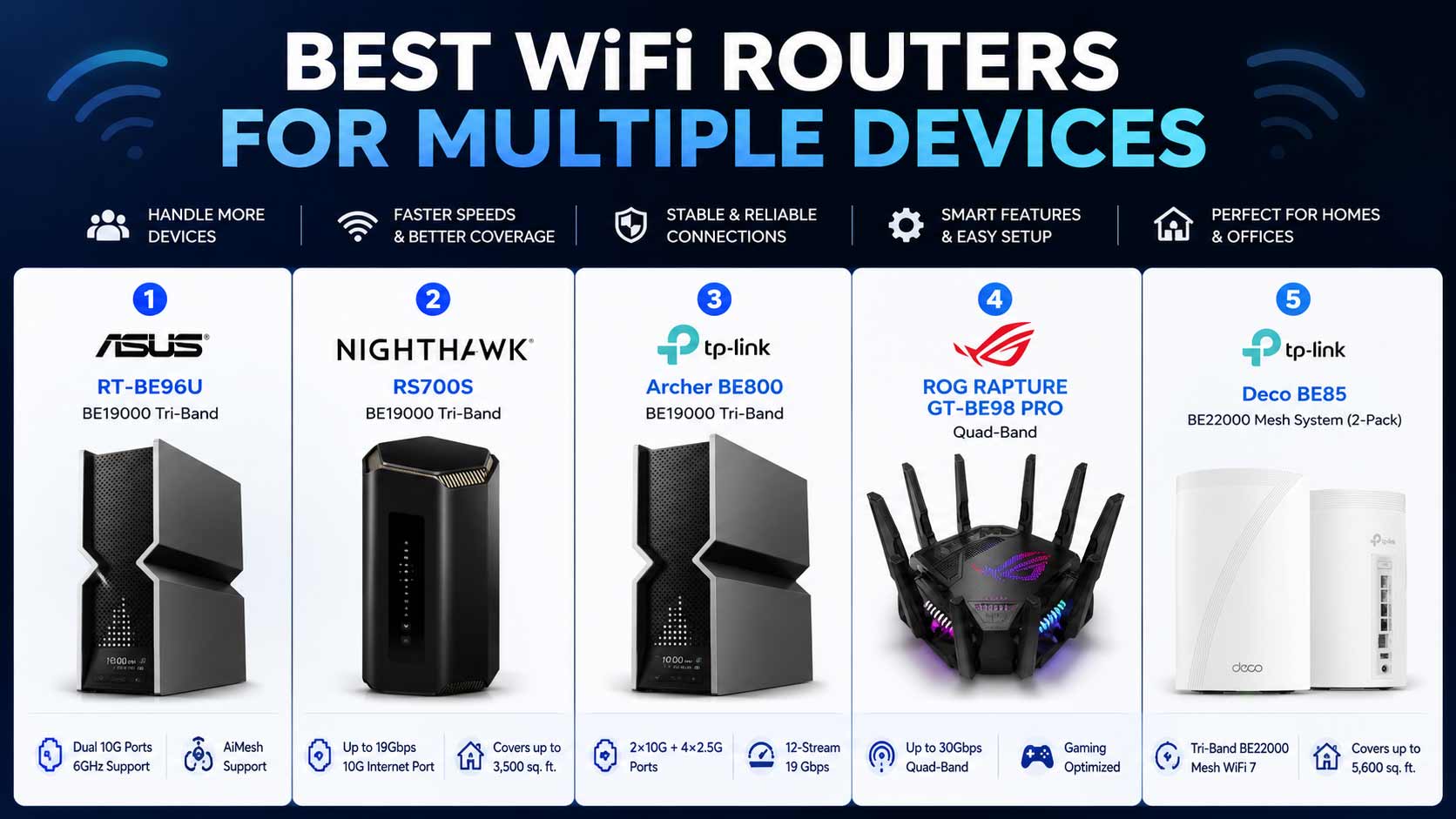
- ASUS RT-BE96U (Best Overall Multi-Device Router)
- NETGEAR RS700S (Best for Large-Home Device Coverage)
- TP-Link Archer BE800 (Best Wired Port Density)
- ASUS ROG Rapture GT-BE98 Pro (Best Quad-Band for Heavy Use)
- TP-Link Deco 7 Elite BE85 2-Pack (Best Mesh for Whole-Home Devices)
Why More Devices Makes Your Router Struggle
Most routers handle five or ten devices without issue. But the average home now runs 20 to 30 connected devices at once, and when all of them compete for bandwidth on the same two bands, performance drops for everyone. The best WiFi router for multiple devices separates that traffic across more bands, handles connections more efficiently, and makes sure no single device hogs the network at everyone else’s expense.
What most buyers get wrong:
- Buying a dual-band router for a household that has 20 or more active devices
- Picking based on max speed numbers instead of device capacity and band separation
- Not using wired Ethernet for high-demand devices like gaming PCs when ports are available
- Ignoring mesh expansion support when the home has rooms that the router struggles to reach
Why modern WiFi 7 routers handle multiple devices better:
- Tri-band and quad-band architectures give devices more separate channels to use
- MLO lets devices connect across two bands at once for more stable connections under load
- Higher device capacity ratings mean the router manages more simultaneous connections cleanly
- QoS and traffic prioritization tools let you put gaming or streaming devices first
Who this guide is for:
- Households with 20 or more connected devices across phones, TVs, consoles, and smart home gear
- Families where gaming, streaming, video calls, and browsing all happen simultaneously
- Remote workers who need reliable video call performance regardless of household WiFi load
- Smart home users with cameras, lights, thermostats, and sensors all needing consistent connections
This guide helps you find the best WiFi router for home with multiple devices based on your actual household size, device count, and what you need the network to handle every day.
Top 5 Best WiFi Routers for Multiple Devices
Disclosure: This post contains affiliate links. As an Amazon Associate I earn from qualifying purchases. If you purchase through our links, we may earn a small commission at no extra cost to you. We only recommend products we genuinely stand behind.
Every router here was selected based on device capacity, band architecture for handling simultaneous connections, and practical features that make multi-device management easier. These aren’t just fast routers. They’re routers built to handle busy households.
#1 ASUS RT-BE96U : Best Overall Multi-Device Router
Overview: Tri-band WiFi 7 BE19000 router with dual 10G ports | Large homes with many simultaneous devices | MLO, Lifetime Internet Security, AiMesh | Best for power users who want the best wifi router for multiple devices without any ongoing security subscription.

Best deal today – prices may change
Key Benefits: MLO connects devices across two bands simultaneously so heavy household loads don’t drop anyone’s connection | Lifetime Internet Security covers every device on the network forever with no renewal fee | Dual 10G ports handle multi-gig internet and a 10G wired device simultaneously | Tri-band separates smart home, streaming, and gaming traffic cleanly | AiMesh expands coverage as the household grows.
Pros: Lifetime Security is the best long-term value at this tier | MLO keeps multi-device stability high | AiMesh scales without replacing hardware.
Cons: Dual 10G port value is maximized only with a multi-gig internet plan.
Best For: Demanding households with many devices all running at once | Power users who want no ongoing security fees alongside multi-device performance.
#2 NETGEAR RS700S : Best for Large-Home Device Coverage
Overview: Tri-band WiFi 7 BE19000 router with a 10G WAN port covering 3,500 sq. ft. | 1-Year Armor security and free expert help | Best wifi router for large home and multiple devices where coverage and device stability across rooms matter equally.

Best deal today – prices may change
Key Benefits: 3,500 sq. ft. from a single router means every device in every room gets strong signal rather than a weakened connection from a distant router | 10G WAN delivers full multi-gig internet plan speed without hardware bottlenecking | Armor monitors every connected device for threats from day one | Tri-band keeps gaming, streaming, and IoT traffic on separate bands | Free expert setup help is included.
Pros: Strongest single-router coverage on this list | 10G WAN handles fast internet plans | Armor included from day one.
Cons: Armor renews at an annual cost after the first year.
Best For: Large homes up to 3,500 sq. ft. on multi-gig plans | Households where strong whole-home coverage is as important as managing many devices.
Want to compare the RS700S across NETGEAR’s full WiFi 7 lineup? Read our guide on the best NETGEAR WiFi 7 router for a complete comparison of all five Nighthawk models.
#3 TP-Link Archer BE800 : Best Wired Port Density for Multiple Devices
Overview: Tri-band WiFi 7 BE19000 router with two 10G and four 2.5G ports | Eight high-performance antennas and built-in LED screen | VPN, EasyMesh, HomeShield, Private IoT | Best wifi router for multiple devices and gaming where wired connections for many devices matter as much as wireless performance.

Best deal today – prices may change
Key Benefits: Two 10G plus four 2.5G ports give six total multi-gig connections so gaming PCs, consoles, NAS drives, and smart home hubs all wire in at fast speeds without a separate switch | Eight antennas push strong wireless signal to every corner for devices that can’t be wired | Private IoT separates smart devices from personal devices in one tap | LED screen monitors all connected devices at a glance | HomeShield covers the whole network from one app.
Pros: Best wired port density of any single router on this list | Eight antennas deliver strong coverage at range | LED screen is a practical daily monitoring tool.
Cons: Dual 10G port value requires multi-gig internet and a 10G LAN device to fully justify.
Best For: Power users who need multi-gig wired connections for many devices simultaneously | Smart home households want Private IoT isolation alongside maximum port density.
#4 ASUS ROG Rapture GT-BE98 Pro : Best Quad-Band for Heavy Multi-Device Use
Overview: Quad-band WiFi 7 router with up to 30 Gbps combined speed | Mesh compatible | Built for gaming households with many high-demand devices running simultaneously | Best wifi router for multiple devices and gaming where four separate wireless bands prevent any device from congesting the others.

Best deal today – prices may change
Key Benefits: Quad-band design gives the router four separate signal paths so gaming, streaming, smart home, and personal devices each have dedicated bandwidth and never compete directly | 30 Gbps combined speed means no band runs short of headroom even under the heaviest simultaneous household load | Mesh compatibility allows a second gaming-grade node to extend coverage to distant rooms | Gaming-specific traffic optimization keeps latency low even with dozens of devices active | WiFi 7 MLO maintains stable gaming connections across multiple bands.
Pros: Quad-band is the strongest multi-device band separation available | 30 Gbps combined speed gives maximum headroom | Mesh support provides coverage expansion.
Cons: Premium quad-band pricing is more than most households need unless gaming is the primary priority.
Best For: Heavy gaming households with many simultaneous high-demand devices | Anyone who wants maximum band separation so gaming traffic never competes with streaming or smart home devices.
#5 TP-Link Deco 7 Elite BE85 2-Pack : Best Mesh for Whole-Home Device Coverage
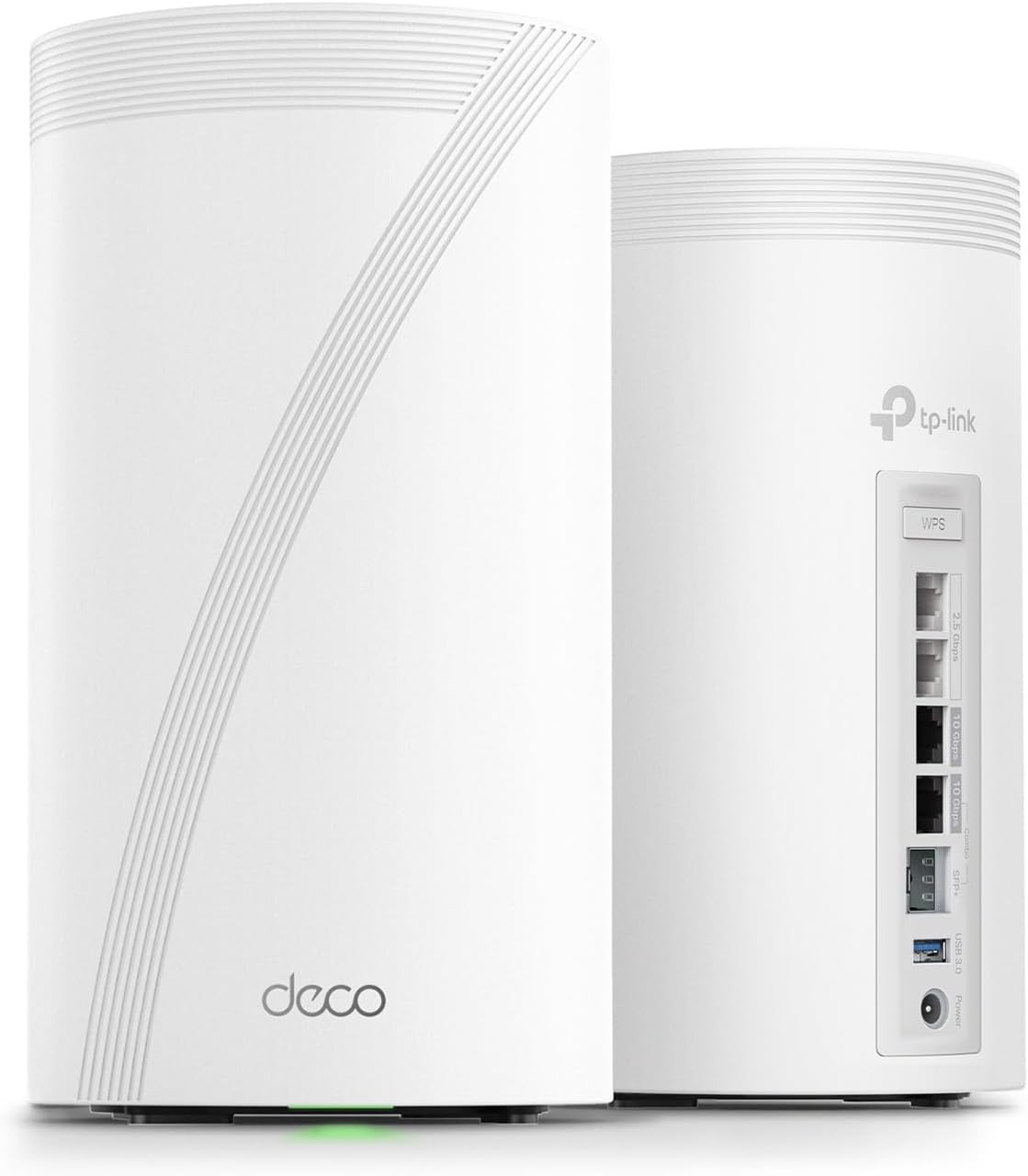
Overview: Tri-band WiFi 7 BE22000 whole-home mesh in a 2-pack with dual 10G and two 2.5G ports per node | Eight high-gain antennas | AI-Roaming, VPN, HomeShield | Best for large households with many devices spread across multiple rooms that a single router can’t reliably reach.
Best deal today – prices may change
Key Benefits: Two nodes distribute strong signal across the whole home so devices in every room connect at full speed rather than pulling on a weakened signal from one location | AI-Roaming connects each device to the nearest node automatically as people move between rooms | Dual 10G per node handles multi-gig internet and a 10G wired device at each node location | Eight antennas per node push signal further for better device coverage at range | HomeShield covers every device on both nodes from one app.
Pros: Dual 10G per node is unique in the 2-pack mesh tier | AI-Roaming makes whole-home multi-device management seamless | Eight antennas deliver the strongest node-level signal reach.
Cons: Premium price reflects dual 10G and 8-antenna design per node.
Best For: Large homes with devices spread across multiple rooms and floors | Multi-gig internet subscribers who want maximum wireless and wired device performance at every node.
Quick Comparison Table
| Rank & Model | Wi-Fi Standard & Speed | Coverage & Ports | Best For |
|---|---|---|---|
| #1 ASUS RT-BE96U | WiFi 7 Tri-Band, BE19000 | Large homes, 2x 10G + multi-gig | Overall multi-device performance |
| #2 NETGEAR RS700S | WiFi 7 Tri-Band, BE19000 | 3,500 sq. ft., 10G WAN | Large-home device coverage |
| #3 TP-Link BE800 | WiFi 7 Tri-Band, BE19000 | Large homes, 2x 10G + 4x 2.5G | Wired port density |
| #4 ASUS ROG GT-BE98 Pro | WiFi 7 Quad-Band, 30 Gbps | Large homes, Multi-gig | Heavy gaming multi-device |
| #5 Deco 7 Elite BE85 2-Pack | WiFi 7 Tri-Band, BE22000 | Large homes, 2x 10G + 2x 2.5G per node | Whole-home mesh |
This guide helps you choose the right best Wi-Fi router for multiple devices based on your household size, device count, internet plan speed, and whether wireless coverage or wired port density matters most.
What to Look for When Buying a WiFi Router for Multiple Devices
Band Architecture Matters Most
- Dual-band routers work for standard households but struggle when 20 or more devices are active simultaneously
- Tri-band routers add a third band so device traffic is spread across three separate channels, which is the right architecture for most busy households
- Quad-band routers like the ROG GT-BE98 Pro give the most separation and are the right choice when gaming and streaming both run at heavy demand at the same time
Device Capacity and Traffic Management
- Check the router’s stated device capacity because routers that hit their connection limit slow down for every connected device simultaneously
- QoS and traffic prioritization features let you make sure gaming consoles and video call devices get bandwidth priority over lower-demand IoT devices
- MLO on WiFi 7 models keeps individual device connections stable even when the whole network is busy
Wired Connections Reduce Wireless Load
- Every device you wire directly to the router removes it from the wireless bandwidth competition
- Multi-gig Ethernet ports on the BE800 give the most options for wiring high-demand devices across the home
- Gaming PCs and consoles always benefit from wired connections regardless of how fast the wireless network is
Security Across All Devices
- Lifetime Security on the ASUS RT-BE96U covers every device without annual renewal costs
- HomeShield on TP-Link models provides free-tier security and parental controls for every connected device
- Armor on the NETGEAR RS700S monitors threats across all devices with real-time detection during the included year
How These Routers Were Selected
Every router here was evaluated specifically on multi-device handling capability: band architecture for traffic separation, device capacity ratings, QoS and traffic prioritization features, and the wired port configuration available for offloading high-demand devices from the wireless network. Coverage area relative to large households was also weighted heavily because multi-device performance drops significantly when devices are at the edge of the router’s range. Brand firmware reliability shaped the final selections alongside hardware specs.
Key selection factors:
- Band count and traffic separation for simultaneous multi-device households
- Device capacity rating and congestion management under load
- Wired Ethernet port configuration and speed for high-demand device offloading
- MLO support for connection stability under heavy network use
- Security coverage across all devices without requiring separate hardware
- Mesh expansion support for large homes where coverage affects device performance
How to Get the Most From Your Multi-Device Router
Initial Setup
- Connect your highest-demand wired devices, gaming PC, console, NAS, to the router’s fastest Ethernet ports before configuring wireless settings
- Enable QoS or traffic prioritization in the router app and set gaming and video call devices to the highest priority
- Update firmware immediately after initial setup because multi-device handling patches often come through firmware updates
Placement for Multi-Device Homes
- Central placement maximizes the number of devices that get strong signal without relying on the farthest bands
- For the Deco BE85 mesh, space the two nodes to cover the home evenly so every device connects to a nearby node rather than a distant one
- Keep the router elevated and away from large metal appliances and other 2.4GHz devices that create interference
Mistakes That Slow Multi-Device Performance
- Leaving all devices on auto band selection when manually assigning high-demand devices to the 5GHz or 6GHz band prevents them from overcrowding 2.4GHz
- Not wiring devices that can be wired because every wireless device adds to the concurrent connection count
- Skipping firmware updates because multi-device management improvements come through firmware regularly
- Overloading a single band with too many high-demand devices when tri-band or quad-band architecture exists specifically to spread that load
Tips for Consistent Multi-Device Performance
- Assign all smart home sensors, locks, and low-demand IoT devices to the 2.4GHz band to free up 5GHz and 6GHz for high-demand devices
- Use the router app’s device list monthly to check which devices are using the most bandwidth and identify any unexpected high-usage connections
- Wire gaming PCs and consoles directly to multi-gig Ethernet ports whenever cable runs are possible
- Reboot the router weekly if you have a large number of connected devices because connection table clearing keeps per-device performance consistent
Signs Your Router Is Handling Multiple Devices Well
- No noticeable slowdown when additional household members come online in the evening
- Gaming ping stays consistent during peak household usage hours
- 4K streaming runs without buffering on multiple TVs simultaneously
- Video calls stay clear and stable regardless of how many other devices are active
How to Pick the Right Router for Your Multi-Device Home
Band count first: Under 20 devices on a standard plan? The RT-BE96U or RS700S handles it comfortably. 20 to 40 devices in a large home? Add the BE800’s port density or move to the Deco BE85 mesh for whole-home coverage. Heavy gaming household with many simultaneous high-demand devices? ROG GT-BE98 Pro’s quad-band separation is built for exactly that.
Wired or wireless priority: Want to wire as many devices as possible? TP-Link BE800 with six total multi-gig ports gives the most flexibility. Want whole-home wireless coverage for devices in every room? Deco BE85 2-pack distributes signal so every device connects to a nearby node.
Security and no ongoing fees: ASUS RT-BE96U’s Lifetime Security means no annual renewal for covering every device. TP-Link HomeShield’s free tier covers basic security across all connected devices without a subscription decision.
Must-have features for multi-device homes: Tri-band or quad-band architecture, device capacity above 100, QoS or traffic prioritization, multi-gig Ethernet ports for wired offloading, and mesh expansion support for large homes.
Skip if: You’re buying a quad-band gaming router for a standard household where most devices are phones and laptops because you’ll pay for band separation you’ll never fully use.
Gaming across multiple devices specifically? Read our guide on the best WiFi 7 router for gaming to see how the ROG GT-BE98 Pro compares against other gaming-first WiFi 7 routers.
Real User Feedback
- ASUS RT-BE96U owners in large households say MLO made the biggest noticeable difference during evening hours when the whole family is online, reporting that gaming and video calls stayed stable in a way their previous router couldn’t maintain under the same load.
- NETGEAR RS700S buyers in large homes highlight the 3,500 sq. ft. coverage as the feature that finally gave them consistent multi-device performance in rooms that were previously too far from the router, with Armor adding security confidence for their smart home devices.
- TP-Link BE800 users who run a NAS, gaming PC, and multiple consoles say the six multi-gig ports eliminated the separate unmanaged switch they’d been using, and that Home Shield gave them visibility into all connected devices from one dashboard for the first time.
- ASUS ROG GT-BE98 Pro gaming households report that quad-band separation made the most noticeable difference in households where streaming and gaming happen simultaneously, saying gaming latency stayed consistent during times when it previously spiked under household load.
- Deco 7 Elite BE85 2-pack buyers in large homes with 30 or more devices say the two-node mesh setup gave every device in every room consistently strong signal, and that AI-Roaming kept their laptops and phones connected to the nearest node automatically as they moved through the house.
- Across all five routers, buyers consistently note that enabling QoS and assigning IoT devices to the 2.4GHz band made a meaningful improvement in the consistency of high-demand device performance without any hardware changes after the initial setup.
Conclusion and Final Recommendation
A busy household deserves a router that was actually built for it. The best WiFi router for multiple devices separates traffic across more bands, handles more concurrent connections without congestion, and gives wired devices fast ports so they don’t compete with everything else for wireless bandwidth. Every router on this list does that job well for a different type of buyer.
This guide is for:
- Households where many devices are always online simultaneously
- Anyone who notices speed drops during peak evening usage hours
- Gamers and remote workers who need reliable performance regardless of household WiFi load
- Buyers comparing multi-device routers across ASUS, NETGEAR, and TP-Link for a clear recommendation
Best overall pick: The ASUS RT-BE96U is the strongest choice for most multi-device households. Tri-band WiFi 7, MLO for connection stability under load, Lifetime Security for every device, dual 10G ports, and AiMesh expansion together make it the best home wifi router for multiple devices for demanding households that want to buy once and own it for years without ongoing fees.
Short version: Match the band count to your device count. Wire your highest-demand devices. Enable QoS so gaming and streaming stay prioritized. Any router on this list delivers a noticeably better multi-device experience than standard Gigabit hardware at the same price point.
Ready to find the perfect router for your home? Read our complete guide on the best WiFi 7 router for smart homes to see how multi-device management pairs with IoT security and dedicated smart home network features.
Homes with smart pet devices add even more connected equipment to your network. See our recommendations for pet products at Pet Choice Center.