

A smart home is only as reliable as the network behind it. When multiple cameras, thermostats, smart lights, door locks, speakers, and sensors connect at once, an outdated router starts showing its limits.
Devices can go offline randomly, automations may lag, and voice assistants often respond slowly. The best WiFi 7 router for smart homes handles heavy device loads with faster speeds, lower latency, and dedicated features like private IoT networks and commercial-grade security.
Best WiFi 7 Router for Smart Homes: 5 That Handle Every Device You Own
These routers connect directly to your modem or ISP gateway and work with all major internet providers. They also remain backward compatible with older WiFi devices, so your current smart home products continue working properly.
Many models include dedicated IoT network separation, multiple SSIDs, VPN support, AiMesh or EasyMesh expansion, and parental controls. As a result, they provide a strong upgrade for large or growing smart home setups.
Here are five routers that handle the complexity of modern smart homes without making your life complicated.
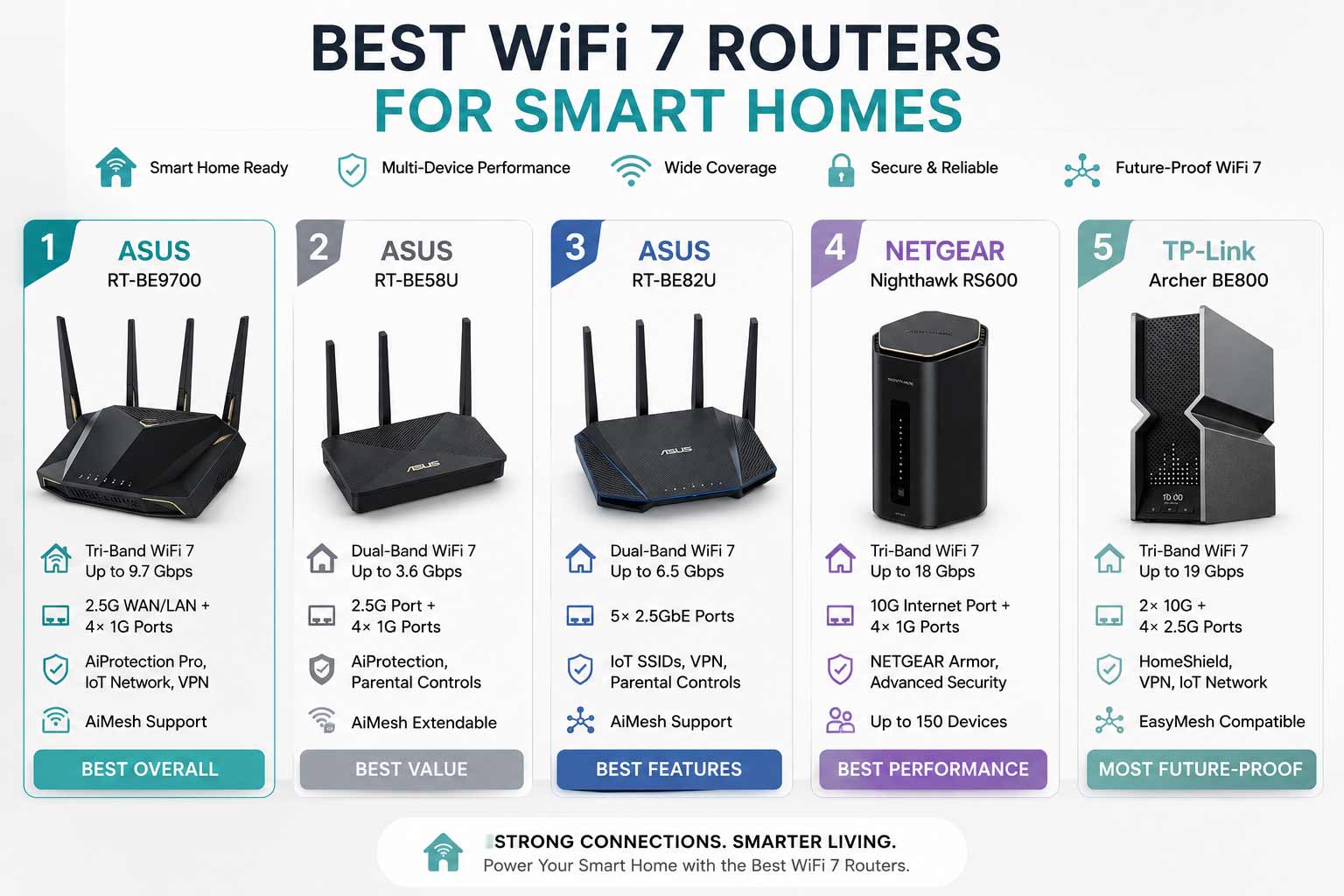
Quick Top 5 Preview:
- ASUS RT-BE9700 Tri-Band (Best Overall Smart Home Router)
- ASUS RT-BE58U BE3600 (Best for IoT Security and Parental Controls)
- ASUS RT-BE82U Dual-Band (Best Multi-SSID Budget Smart Home Router)
- NETGEAR Nighthawk RS600 BE18000 (Best for Large Smart Homes)
- TP-Link Archer BE800 BE19000 (Best Premium All-in-One Smart Home Router)
How to Choose the Best WiFi 7 Router for Smart Homes
The Real Problem With Smart Homes and Old Routers
A smart home with 30 or 40 connected devices is a very different network challenge than a home with a few laptops and phones. Every device, even a light bulb, holds a connection slot and creates occasional traffic. Older routers weren’t designed for this. They run out of stable connections, mix IoT traffic with your personal devices, and can’t prioritize what matters when everything is competing for the same bandwidth. The best WiFi 7 router for smart homes separates that traffic, handles more concurrent connections efficiently, and keeps your automations and streaming devices running without stepping on each other.
What Smart Home Buyers Usually Get Wrong
- Choosing a gaming router with no IoT network isolation, which puts smart home devices on the same network as personal laptops and phones
- Buying a router based on speed alone without checking device capacity for large smart home setups
- Picking a model with no mesh support, so they can’t expand coverage when they add more devices in distant rooms
- Underestimating security needs and ignoring routers with built-in threat protection for IoT devices, which are frequent attack targets
Why WiFi 7 Routers Handle Smart Homes Better
Modern smart home routers solve real IoT problems. Dedicated IoT network separation keeps your smart bulbs, sensors, and cameras on their own SSID away from your personal devices, which improves both security and network stability. Multiple SSID support means you can create separate networks for family, guests, and automation devices all from one router. AiMesh and EasyMesh let you expand coverage without replacing hardware as your smart home grows into more rooms. And WiFi 7’s improved spectrum efficiency handles many more concurrent connections without the congestion that slows older systems down.
Who This Guide Is For
- Smart home enthusiasts with 20 or more connected devices who need stable whole-home coverage
- Families who want parental controls and IoT isolation without managing a complicated network setup
- Remote workers with busy home offices sharing a network with smart home automation
- Anyone using Alexa, Google Home, Apple HomeKit, or SmartThings who wants seamless device connectivity
- Tech-forward buyers who want a router that grows with their smart home without needing replacement
By the end of this guide you’ll know exactly which best WiFi 7 router for smart homes fits your device count, home size, and how you actually use your smart home day to day.
Top 5 Best WiFi 7 Routers for Smart Homes
Disclosure: This post contains affiliate links. As an Amazon Associate I earn from qualifying purchases. If you purchase through our links, we may earn a small commission at no extra cost to you.
Every router here was selected based on IoT-specific features, device capacity, network isolation capabilities, security tools, and coverage relative to typical smart home household sizes. Smart home performance isn’t just about speed. It’s about managing many small devices reliably and securely, which is what drove every pick on this list.
#1 ASUS RT-BE9700 : Best Overall Smart Home Router
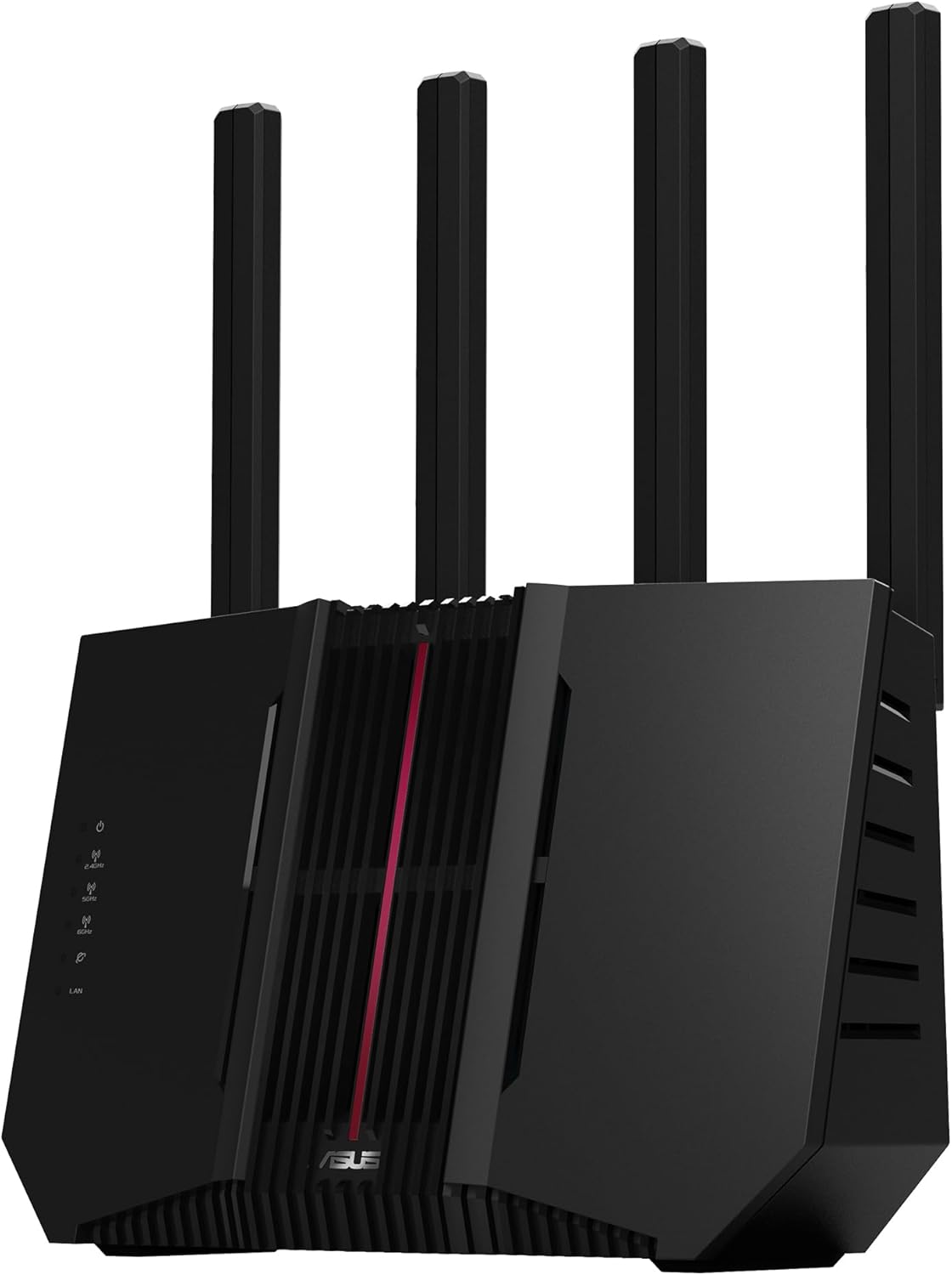
Overview: Tri-band WiFi 7 router with strong whole-home coverage and AiMesh support for seamless network expansion | Delivers fast tri-band performance across 2.4GHz, 5GHz, and 6GHz bands for separating smart home, personal, and gaming traffic | Compatible with all major ISPs and works within the ASUS AiMesh ecosystem | Best suited for large smart homes where coverage consistency and multi-device stability matter most.
Best deal today – prices may change
Key Benefits: Tri-band architecture keeps IoT devices, personal devices, and high-bandwidth tasks on separate bands so they don’t slow each other down | 6GHz band provides a clean, uncongested channel for the highest-priority devices in the home | AiMesh support allows you to add ASUS nodes and expand coverage as your smart home grows into more rooms without replacing the router | ASUS AI features help optimize band assignment automatically so devices connect to the most appropriate channel | Backward compatible with older WiFi devices so existing smart home products keep working.
Pros:
Tri-band with 6GHz is the right architecture for large smart homes with mixed device types | AiMesh is one of the most reliable mesh expansion platforms available for home networks | ASUS pushes regular firmware updates which matters for long-term IoT security | Strong whole-home coverage without needing a second node in most large homes.
Cons: Advanced ASUS router settings can feel overwhelming for users who just want a simple plug-and-play experience without exploring the full dashboard.
Best For: Large smart homes with many concurrent IoT and personal devices | ASUS ecosystem users who want to build an AiMesh network over time | Households with a mix of smart home automation, streaming, and gaming all running on the same network | Anyone who wants strong 6GHz band access for their fastest devices without paying flagship pricing.
#2 ASUS RT-BE58U BE3600 : Best for IoT Security and Family-First Smart Homes
Overview: WiFi 7 BE3600 AiMesh extendable router with dedicated IoT Network, Kid’s Network, and VPN Network support | Features MLO, AI Detection, a 2.5G port, and four 1G ports | Includes commercial-grade network security and parental controls built in | Built for families and security-conscious smart home users who need separate, managed networks for different device types | Compatible with all ISPs and integrates into ASUS AiMesh setups.

Best deal today – prices may change
Key Benefits: Dedicated IoT Network, Kid’s Network, and VPN Network give you three purpose-built separate network environments without requiring manual VLAN configuration | Commercial-grade network security protects smart home devices which are common entry points for network attacks | MLO keeps the connection stable across bands for demanding devices even during peak household usage | AI Detection automatically identifies device types and assigns them to the appropriate network | 4K-QAM encoding pushes more data through the same airspace compared to older WiFi standards, so device capacity scales better.
Pros:
Three dedicated network types built in are an exceptional feature for family smart home management | Commercial-grade security is a genuine differentiator for homes with many IoT devices | Ai Mesh integration means this router fits cleanly into a larger ASUS whole-home network | Parental controls are accessible through the ASUS app without requiring a separate subscription.
Cons: BE3600 combined speed is lower than tri-band options on this list, so it’s better suited for homes on standard Gigabit plans rather than multi-gig internet service.
Best For: Families with children who need kid-safe network separation alongside smart home management | Security-focused smart home users who want commercial-grade threat protection | Homes running Alexa, Google Home, or Apple HomeKit alongside personal and family devices | Anyone who wants IoT isolation and parental controls without manually configuring separate networks.
Managing a smart home and want to understand how IoT network isolation actually works? A dedicated SSID for smart devices, separate from your phones and laptops, is one of the simplest security upgrades you can make, and most of the routers on this list set it up in a single guided step.
#3 ASUS RT-BE82U : Best Multi-SSID Budget-Smart Option
Overview: Dual-band WiFi 7 router with 6,500 Mbps combined speed, five 2.5G Ethernet ports, and up to three SSIDs for IoT device separation | Supports 4096-QAM, parental controls, VPN support, and advanced network security | AiMesh extendable for whole-home coverage expansion | A strong smart home wifi 7 router for users who need multi-SSID IoT management and excellent wired port density at a practical price | Compatible with all ISPs.

Best deal today – prices may change
Key Benefits: Up to three SSIDs let you run separate networks for personal devices, IoT automation, and guests from a single router without extra hardware | Five 2.5G Ethernet ports is the highest wired port density on this list, making it ideal for smart home hubs, NAS drives, wired cameras, and gaming devices all connected simultaneously | 4096-QAM encoding handles device-heavy smart home networks more efficiently than older WiFi standards | AiMesh support means the network can expand into larger homes as the smart home setup grows | VPN support protects both personal traffic and smart home device communication.
Pros:
Five 2.5G ports is genuinely outstanding for a dual-band router at this tier | Three-SSID IoT separation covers most smart home network management needs without requiring a separate managed switch | AiMesh compatibility keeps it relevant as the home network grows | Advanced security built in protects IoT devices without an additional subscription.
Cons: Dual-band without a 6GHz band means wireless congestion management in very dense smart home environments won’t match the tri-band options on this list.
Best For: Smart home users with many wired devices who need a high-density 2.5G port router | Anyone who wants multi-SSID IoT separation without paying for a tri-band system | Homes running smart hubs, NAS devices, IP cameras, and streaming devices all on wired connections | AiMesh users are looking to add a capable wired-first node to an existing ASUS network.
#4 NETGEAR Nighthawk RS600 BE18000 : Best for Large Smart Homes with High Device Count
Overview: Tri-band WiFi 7 router with 18 Gbps combined speed, a 10 Gig internet port, and support for 150 simultaneous devices | Covers up to 3,300 sq. ft. | No security subscription required and includes free expert setup help | A high performance wifi 7 router for smart homes that prioritizes device capacity and coverage in large properties | Compatible with all major ISPs and works with both wired and wireless smart home setups.

Best deal today – prices may change
Key Benefits: 150-device capacity is one of the highest on this list and makes this the right choice for smart homes with dozens of concurrent IoT connections | 10 Gig WAN port means the router won’t bottleneck homes upgrading to multi-gig internet plans | Tri-band architecture separates IoT, streaming, and personal device traffic across three bands for consistent performance | No subscription requirement keeps total cost of ownership lower over time compared to routers with mandatory security renewals | 3,300 sq. ft. coverage handles most large smart homes from a single router without needing mesh nodes.
Pros:
150-device capacity is a standout feature for large smart homes with many IoT devices | No ongoing subscription makes it a better long-term value for buyers who don’t want recurring costs | 10G WAN port future-proofs the router for faster internet plans | NETGEAR’s firmware update cadence and support reputation are both reliable.
Cons: No built-in dedicated IoT SSID management as granular as ASUS options, so advanced IoT network separation requires manual configuration through the admin panel.
Best For: Large smart homes with 50 or more active devices that need maximum device capacity | Households on or upgrading to multi-gig internet plans | Anyone who wants strong tri-band WiFi 7 coverage for a large property without an ongoing security subscription | Smart home users who prioritize coverage and device capacity over granular network segmentation features.
#5 TP-Link Archer BE800 BE19000 : Best Premium All-in-One Smart Home Router

Best deal today – prices may change
Overview: Tri-band WiFi 7 BE19000 router with 12-stream 19 Gbps combined speed, two 10G and four 2.5G Ethernet ports, a built-in LED screen, and eight high-performance antennas | Includes Private IoT network, VPN, HomeShield security, EasyMesh support, and free expert help | Built for smart home power users who want the most complete set of features in a single premium router | Compatible with all ISPs and EasyMesh for network expansion.
Key Benefits: Private IoT network is built in and accessible through the TP-Link app, making IoT separation a one-step process rather than a manual configuration task | Two 10G + four 2.5G ports give you the most comprehensive wired port setup on this list for connecting smart home hubs, NAS devices, and multi-gig capable hardware | Eight high-performance antennas and 12-stream design push signal further and more consistently across large homes | Built-in LED screen provides real-time network status at a glance without opening an app | Home Shield security protects IoT devices with threat detection and content filtering built in.
Pros:
The most complete feature set for smart home management on this list combining IoT isolation, premium port density, Home Shield security, and Easy Mesh in one package | LED screen is a practical real-time dashboard that no other router on this list includes | Two 10G ports future-proof both the WAN connection and high-speed wired device connections | TP-Link’s Home Shield and Easy Mesh platforms are both well supported and regularly updated.
Cons: The premium price is justified by the feature set but it’s more than most standard smart home setups need unless you’re managing a very large or complex network.
Best For: Smart home power users who want built-in IoT separation, premium port density, and HomeShield security in a single unit | Large homes with complex smart home setups running many device categories simultaneously | Anyone on a multi-gig internet plan who also needs strong IoT management | Users who want a visual network status display and don’t want to open an app for basic monitoring.
Quick Comparison Table
| Rank & Model | WiFi & Speed | Coverage & Ports | Best For |
|---|---|---|---|
| #1 ASUS RT-BE9700 | WiFi 7 Tri-Band, High | Large homes, Multi-port | Overall smart home performance |
| #2 ASUS RT-BE58U | WiFi 7, BE3600 | Medium-large, 1x 2.5G + 4x 1G | IoT security and family networks |
| #3 ASUS RT-BE82U | WiFi 7 Dual-Band, 6,500 Mbps | Medium-large, 5x 2.5G | Multi-SSID and wired density |
| #4 NETGEAR RS600 | WiFi 7 Tri-Band, BE18000 | 3,300 sq. ft., 1x 10G WAN + ports | Large homes, 150 devices |
| #5 TP-Link BE800 | WiFi 7 Tri-Band, BE19000 | Large homes, 2x 10G + 4x 2.5G | Premium all-in-one smart home |
This guide helps you choose the right best WiFi 7 router for smart homes based on your device count, home size, IoT management needs, and long-term budget.
What to Look for When Buying the Best WiFi 7 Router for Smart Homes
Match It to Your Smart Home Reality
- Count your actual connected devices including every smart bulb, sensor, camera, and hub because total device count drives the minimum capacity you need
- Check for dedicated IoT network or SSID support because keeping smart home devices off your personal network is one of the most important security practices for any connected home
- Make sure the router supports AiMesh or EasyMesh if your home is large because smart home devices in distant rooms need strong local signal, not a weak signal stretching from one router
- Confirm your modem or gateway supports the WAN port speed the router is rated for
Practical Features That Actually Matter for Smart Homes
- IoT network isolation is the most important smart-home-specific feature because it separates potentially vulnerable smart devices from your personal laptops and phones
- Multiple SSIDs give you the flexibility to create separate networks for family, IoT devices, and guests without extra hardware
- Parental controls at the router level cover every device on the network, including smart TVs and gaming consoles, which app-based solutions miss
- VPN support protects smart home device traffic from external monitoring, which is worth having even if you don’t use it immediately
Performance Under Device Load
- Device capacity matters as much as speed for smart homes because a router that maxes out at 32 stable connections will struggle with a large IoT setup even if the speed rating sounds impressive
- Tri-band routers manage smart home congestion better than dual-band because the extra band gives IoT devices their own airspace
- Multi-gig Ethernet ports for wired smart home hubs and NAS devices deliver the most stable connections for devices that support them
Brand Support and Security Updates
- Smart home routers need regular security firmware updates because IoT devices are frequently targeted and the router is the first line of defense
- ASUS AiProtection, NETGEAR Armor, and TP-Link HomeShield all provide router-level security monitoring but check whether they require a paid subscription after the first year
- App management quality matters for smart home users because you’ll check device connections, run speed tests, and manage IoT networks more often than a standard household
Long-Term Thinking for Smart Homes
- Your smart home will keep growing, so pick a router with mesh expansion support so you don’t have to replace it when you add devices in new rooms
- WiFi 7 backward compatibility means new purchases stay compatible with your existing smart devices for years
- EasyMesh and AiMesh ecosystems let you mix nodes and extenders from the same brand as the network grows
How These Routers Were Selected
Every router here was evaluated on IoT-specific capabilities, device capacity, network isolation features, security tool quality, and how well it handles the unique demands of a busy smart home network. Theoretical peak speeds were given less weight than practical multi-device management features and the reliability of brand firmware support. The goal was to find routers that make smart home management easier, not more complicated.
Key selection factors:
- Dedicated IoT network or SSID separation support
- Device capacity for large and growing smart home setups
- Built-in security tools and their ongoing subscription requirements
- AiMesh or EasyMesh support for whole-home coverage expansion
- Ethernet port density for wired smart home hardware
- App management quality for non-technical smart home users
How to Get the Most Out of Your Smart Home WiFi 7 Router
A well-chosen router configured poorly still leaves smart home devices dropping offline. These tips apply to all five picks and make a real difference in daily smart home reliability.
Initial Setup
- Connect to the router app immediately after powering on and run the full setup wizard because it handles ISP detection, band configuration, and IoT network creation in a single flow
- Update firmware before pairing any smart home devices because security and stability patches often apply to IoT handling
- Create your IoT network or SSID during initial setup, not as an afterthought, so all smart devices are paired to the correct network from the start
Placement Tips for Smart Homes
- Central placement covers the most devices evenly because smart home devices are spread throughout the house, not clustered near the modem
- If you have smart devices in a garage, basement, or outdoor area connected via WiFi, a mesh node placed near those spaces dramatically improves reliability
- Keep the router away from other 2.4GHz devices like baby monitors and older cordless phones because smart home devices heavily use the 2.4GHz band and interference is common
Mistakes That Affect Smart Home Reliability
- Putting all smart home devices on the personal network instead of a dedicated IoT SSID because this exposes your laptops and phones to potentially vulnerable smart device firmware
- Skipping regular firmware updates because security patches for IoT handling come through firmware and outdated routers are easier to exploit
- Not enabling parental controls or content filtering if children use smart TVs, tablets, or gaming consoles connected to the same network
- Overloading one band with too many devices by leaving everything on auto band selection when manual assignment works better for large smart home setups
Tips for Better Smart Home Network Performance
- Put all smart home automation devices on the 2.4GHz IoT SSID because 2.4GHz provides better range for the low-bandwidth sensors and controllers that make up most smart home setups
- Reserve 5GHz and 6GHz for streaming devices, gaming consoles, and laptops that need actual speed and lower latency
- Use the router app’s device list monthly to identify unused connections and remove them because stale device slots slow connection negotiation for new devices
- Enable threat detection features in ASUS AiProtection, NETGEAR Armor, or TP-Link HomeShield because smart cameras, doorbells, and locks are common attack targets
Smart homes often include connected pet devices such as automatic feeders, pet cameras, and self-cleaning litter boxes. If you’re looking for expert buying guides on these products, visit Pet Choice Center.
Signs Your Smart Home Network Is Running Right
- Automations trigger on time without delays
- Smart speakers respond instantly to voice commands
- Security cameras stay online consistently and without buffering
- New smart devices pair to the correct SSID on the first attempt
How to Pick the Right Router for Your Smart Home
Match your device count first: Under 30 connected devices? Any of the five picks handle it. Between 30 and 80 devices? The ASUS RT-BE9700 or NETGEAR RS600 with higher device capacity are safer choices. Over 80 devices? The NETGEAR RS600’s 150-device capacity is specifically built for that scale.
IoT isolation vs. speed priority: If network security and IoT separation are your main concerns, the ASUS RT-BE58U’s three dedicated network types make it the most family-friendly and security-focused option. If raw speed and coverage for a very large home matter most, the TP-Link BE800 or NETGEAR RS600 are the stronger picks.
Wired smart home hubs and devices: Running a SmartThings hub, Philips Hue Bridge, NAS, or wired IP cameras? The ASUS RT-BE82U’s five 2.5G ports or the TP-Link BE800’s six multi-gig ports give you the most flexibility for wired smart home hardware.
Must-have features for smart homes: Dedicated IoT SSID or network, multi-device capacity, AiMesh or EasyMesh support, built-in security tools, and parental controls.
Things to avoid: Single-band routers that dump all IoT and personal device traffic onto one congested network. Routers with no mesh expansion support if your home is larger than 2,000 sq. ft. And any router without regular firmware updates because smart home security depends on them.
Want to extend your smart home WiFi coverage to every room without replacing your router? Read our guide on the best TP-Link Deco WiFi 7 mesh systems to see how whole-home mesh coverage handles large IoT setups.
Matching Device Count to the Right Pick
The device-count breakdown earlier in this guide is worth repeating here because it’s the single most useful filter for a smart home purchase: most households genuinely don’t know how many connected devices they actually have until they count. A quick tally of every bulb, sensor, camera, hub, and speaker is usually double what people expect, and it’s the number that should drive the decision more than any other spec on this list, more than raw speed, more than price. If you’re already close to 30+ devices and growing, the NETGEAR RS600’s 150-device capacity is the one pick here with real headroom to spare.
Alternatives Worth Considering
- ASUS ZenWiFi BQ16 Pro — A premium WiFi 7 mesh system from ASUS with AiMesh and AiProtection, worth considering for very large smart homes that need whole-home mesh coverage with IoT security built in
- TP-Link Deco BE65 2-Pack — A more affordable Deco WiFi 7 mesh system with HomeShield and IoT network support for smart home users who prefer mesh over a single powerful router
- NETGEAR Orbi 970 WiFi 7 — NETGEAR’s flagship mesh option for large smart homes with a dedicated backhaul band and strong device capacity across a whole-home mesh setup
- TP-Link Archer BE550 — A mid-range WiFi 7 dual-band option from TP-Link with HomeShield and EasyMesh support for smaller smart home setups that don’t need tri-band performance
Conclusion and Final Recommendation
A smart home with unreliable WiFi isn’t really smart at all. The best WiFi 7 router for smart homes keeps every device connected, separates IoT traffic from personal devices, and stays secure without requiring a networking degree to manage. Every pick on this list solves a specific smart home problem, so there’s a real answer here no matter how big or complex your setup is.
This guide is for:
- Smart home enthusiasts comparing WiFi 7 options before committing to a purchase
- Families who want IoT isolation and parental controls without complicated manual configuration
- Anyone whose current router drops smart devices randomly and wants a permanent fix
- Buyers building a new smart home network from scratch who want hardware that grows with them
Best overall pick: The ASUS RT-BE9700 is the most balanced choice for most smart homes. Tri-band WiFi 7 with 6GHz band access, AiMesh expansion, ASUS AI band management, and strong coverage make it a capable and future-proof foundation for any smart home network. It handles mixed device types well, stays expandable as the smart home grows, and ASUS’s firmware support keeps it reliable long after purchase.
The short version: Count your devices, check for IoT SSID support, and make sure the router has mesh expansion capability for the future. Match those three things and any of the five picks above will give your smart home the stable, secure network it actually needs. The best wifi 7 router for smart homes is the one that manages your devices reliably every single day, not just on the spec sheet.
Ready to build your smart home network the right way? Browse our full guide on the best WiFi 7 routers across all brands and use cases to compare every top option before you decide.