

In competitive gaming, every millisecond matters. High ping, random lag spikes, and an unstable connection can ruin a match you were actually winning. The best WiFi 7 router for gaming is built to fix exactly that by minimizing latency, prioritizing your gaming traffic, and delivering fast, consistent speeds for online play, streaming, and large game downloads.
Best WiFi 7 Router for Gaming: 5 Picks That Keep You in the Game
These routers connect directly to your modem or ISP gateway and work with all major internet providers. They stay backward compatible with older devices while unlocking advanced features like Multi-Link Operation, 320MHz channels, and multi-gig Ethernet ports for newer gaming PCs and consoles. Many also include dedicated gaming ports, traffic prioritization tools, and VPN support so your network actually works for you instead of against you.
Here are five options that cover every type of gamer, from budget-conscious players to serious competitive setups.
Quick Top 5 Preview:
- NETGEAR Nighthawk BE17000 (Best for Multi-Gig Gaming Setups)
- NETGEAR Nighthawk BE9300 (Best Mid-Range WiFi 7 Gaming Router)
- TP-Link Archer GE650 BE11000 (Best Dedicated Gaming Router with Full Features)
- TP-Link Archer GE400 BE6500 (Best Dual-Band Budget Gaming Router)
- ASUS TUF Gaming BE6500 (Best for Subscription-Free Security and MLO)
How to Choose the Best WiFi 7 Router for Gaming
The Core Problem With Gaming on a Basic Router
Your ISP router is designed to handle everyone’s needs, which means gaming traffic gets treated the same as someone watching YouTube or downloading a software update. The result is inconsistent ping, occasional lag spikes, and a connection that works fine until the rest of the household gets online. A dedicated best WiFi 7 router for gaming changes that by giving your gaming traffic priority, reducing congestion through better band management, and delivering the kind of low-latency stability that actually holds up under pressure.
What Most Gaming Router Buyers Get Wrong
- Buying a WiFi 6 gaming router when WiFi 7 is now available at comparable price points for the performance tier they need
- Choosing a dual-band unit for a house where tri-band would separate gaming traffic more effectively
- Ignoring the WAN port speed and then wondering why a 10 Gbps router doesn’t help on a 500 Mbps plan
- Paying for RGB lighting and a game dashboard without checking whether the actual networking specs match their setup
Why WiFi 7 Gaming Routers Are Worth It
WiFi 7 brings practical gaming improvements, not just marketing numbers. Multi-Link Operation lets your gaming device connect across two bands simultaneously, which means if one path gets congested the other keeps your ping stable. 320MHz channels deliver more data throughput per transmission, so large game downloads and updates run faster without pulling from your gaming bandwidth. And dedicated gaming ports with QoS settings mean your console or PC gets first access to the network, regardless of what everyone else in the house is doing.
Who This Guide Is For
- Competitive online gamers on PS5, Xbox, or PC who want lower, more consistent ping
- Households where multiple people game or stream at the same time
- Anyone who’s blamed their internet for losses that were really a router problem
- Remote workers who also game and need a setup that handles both without compromise
- Buyers ready to invest in hardware that stays relevant for the next several years
This guide helps you pick the best WiFi 7 router for gaming based on your platform, home size, internet plan speed, and how seriously you game.
Top 5 Best WiFi 7 Routers for Gaming
Disclosure: This post contains affiliate links. As an Amazon Associate I earn from qualifying purchases. If you purchase through our links, we may earn a small commission at no extra cost to you.
Every router here was selected based on real gaming performance priorities: latency management, port configuration, gaming-specific features, and the value each delivers for different types of gamers and home setups. No picks based on box design or brand loyalty alone.
#1 NETGEAR Nighthawk BE17000 : Best for Multi-Gig Gaming Setups
Overview: Tri-band WiFi 7 gaming router with 17 Gbps combined wireless speed and a 10 Gig internet port | Covers up to 3,300 sq. ft. and supports 150 devices | Includes VPN support and free expert setup help | Built for serious gamers on multi-gig internet plans who want the fastest and most future-proof home gaming network available | Compatible with all major ISPs and works with both wired and wireless gaming setups.

Best deal today – prices may change
Key Benefits:
10 Gig WAN port matches the speed of the fastest current residential internet plans so the router never bottlenecks your connection | 17 Gbps tri-band combined speed means gaming, streaming, and general household traffic all have dedicated bandwidth without competing | VPN support lets you secure your gaming connection or access geo-restricted game servers without a separate device | 150-device capacity handles a full smart home alongside active gaming sessions | Free expert help removes the setup barrier for buyers who want it running right immediately.
Pros: 10G WAN port is a standout feature for anyone on or planning to upgrade to a multi-gig plan | Tri-band architecture keeps gaming traffic separated from household congestion | NETGEAR’s firmware reliability and app management are both well-established | 3,300 sq. ft. coverage suits most large gaming households from a single router.
Cons: The 10G WAN port delivers its full benefit only on internet plans above 2.5 Gbps, so buyers on standard Gigabit plans won’t feel the difference in plan speed.
Best For: Serious gamers and power users on multi-gig internet plans | Large homes up to 3,300 sq. ft. with many simultaneous users | PC and console gamers who want to wire directly into the router for the lowest possible latency | Anyone who wants a gaming router that stays future-proof as residential internet speeds increase.
#2 NETGEAR Nighthawk BE9300 : Best Mid-Range WiFi-7 Gaming Router
Overview: Tri-band WiFi 7 gaming router with 9.3 Gbps combined wireless speed and a 2.5 Gig internet port | Covers up to 2,500 sq. ft. and supports 100 devices | Includes VPN support and free expert setup help | A well-balanced wifi 7 gaming router for households on standard to mid-tier multi-gig plans who want genuine WiFi 7 gaming performance without flagship pricing | Compatible with all major ISPs and gaming platforms.

Best deal today – prices may change
Key Benefits:
Tri-band WiFi 7 keeps gaming, streaming, and general browsing traffic separated across three bands so your ping doesn’t spike when others in the house get online | 2.5G WAN port covers internet plans up to 2.5 Gbps which handles the vast majority of current residential service tiers | VPN support built in means no extra hardware for secured or geo-adjusted gaming connections | 9.3 Gbps combined speed gives each band strong headroom for simultaneous high-demand use | 100-device capacity suits most households comfortably.
Pros: Solid tri-band WiFi 7 performance at a more accessible price than the BE17000 | 2.5G WAN port is the right match for most current residential internet plans | Free expert setup help is a genuine bonus for first-time gaming router buyers | NETGEAR’s build quality and firmware support track record are consistent.
Cons: The 2.5G WAN port limits you if you’re already on or planning to upgrade to an internet plan faster than 2.5 Gbps.
Best For: Gamers on standard Gigabit or multi-gig plans up to 2.5 Gbps | Homes up to 2,500 sq. ft. with multiple simultaneous users | PS5, Xbox, and PC gamers who want low latency wifi 7 router performance without paying for a 10G port they won’t use | Anyone moving from WiFi 6 to WiFi 7 for the first time.
Already decided on WiFi 7 but still need coverage in distant rooms? Read our guide on the best WiFi extenders for gaming to see how to extend your router’s signal to your gaming setup.
#3 TP-Link Archer GE650 BE11000 : Best Dedicated Gaming Router with Full Features
Overview: Tri-band WiFi 7 gaming router with 11 Gbps combined speed, a dedicated gaming port, and a physical gaming panel | 6-stream setup with 320MHz support, two 5G ports, and three 2.5G ports | Includes Game Acceleration, Home Shield security, USB 3.0, and RGB lighting | Built for serious gamers who want hardware-level gaming optimization with multi-gig port flexibility | Compatible with all ISPs and Easy Mesh for network expansion.

Best deal today – prices may change
Key Benefits:
Dedicated gaming port with Game Acceleration prioritizes your gaming device’s traffic at the hardware level, not just through a software setting | Two 5G + three 2.5G ports give you more multi-gig wired connection options than any other router on this list | 320MHz channel support delivers maximum WiFi 7 throughput for wireless gaming devices | Physical gaming panel gives you real-time network controls and monitoring without opening an app | HomeShield protects every device on the network with built-in security filtering.
Pros: Dedicated gaming port and Game Acceleration panel are the most gamer-specific hardware features on this list | Port configuration with two 5G and three 2.5G ports is exceptional for a home gaming router | 320MHz support and 6-stream design deliver strong real-world WiFi 7 wireless performance | TP-Link’s firmware update cadence and HomeShield security are both reliable long-term.
Cons: The RGB lighting and gaming panel aesthetics aren’t for everyone, and the router’s physical size is larger than standard home networking hardware.
Best For: Hardcore PC and console gamers who want hardware-level gaming traffic prioritization | Multi-gig wired setups with gaming PCs, NAS drives, and consoles all needing fast Ethernet ports | Anyone who wants the most gaming-specific feature set in a WiFi 7 router | Households where both gaming performance and whole-home security matter equally.
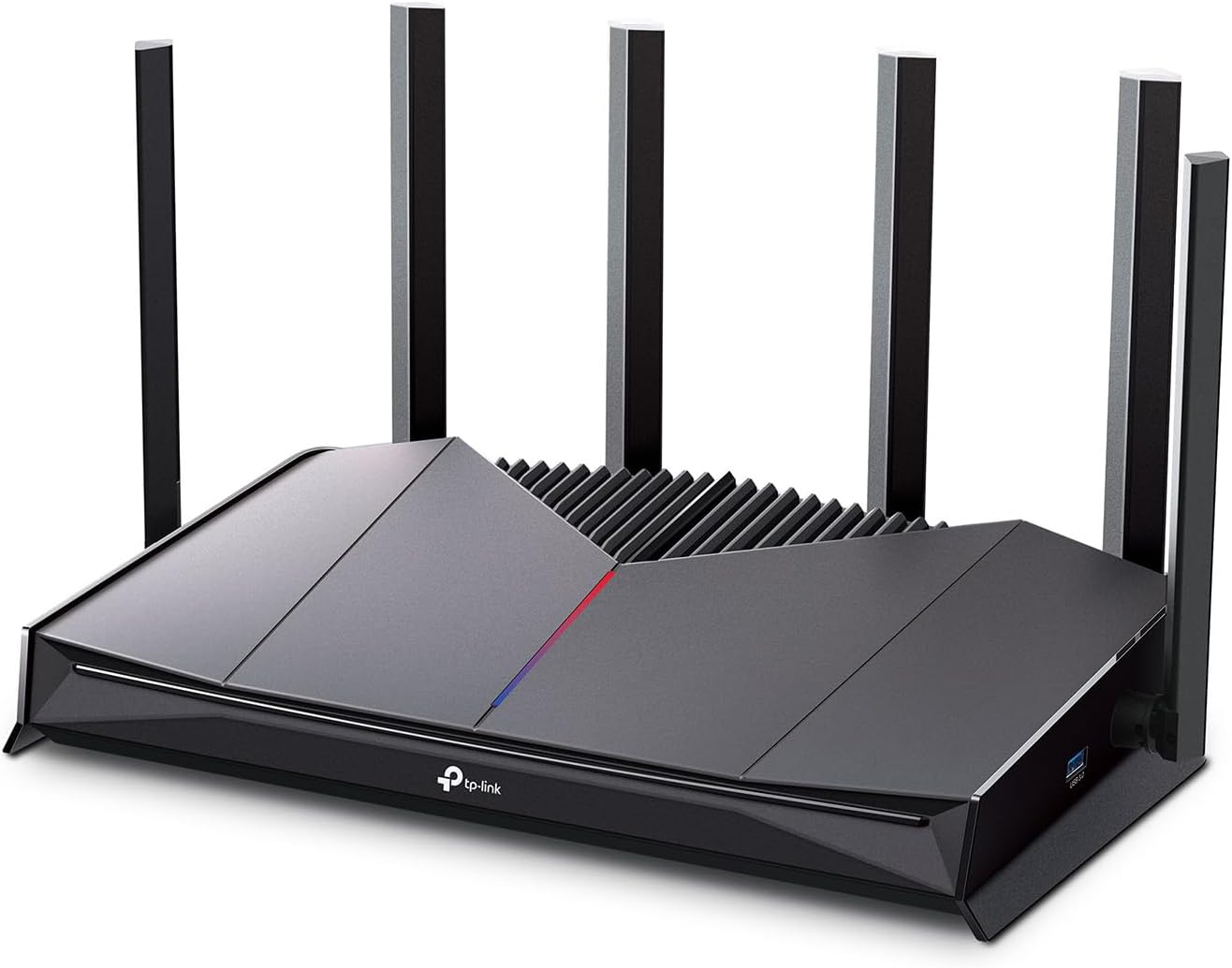
#4 TP-Link Archer GE400 BE6500 : Best Dual-Band Budget Gaming Router
Overview: Dual-band WiFi 7 gaming router with 6.5 Gbps combined speed and a dedicated gaming port | 6-stream design with two 2.5G and three 1G Ethernet ports | Includes Game Acceleration, a physical gaming panel, HomeShield, EasyMesh support, and RGB lighting | A solid and affordable gaming wifi 7 router for gamers who want dedicated gaming features without paying for a tri-band system they don’t need | Note: does not include a 6GHz band.
Best deal today – prices may change
Key Benefits:
Dedicated gaming port with Game Acceleration delivers hardware-level traffic prioritization at a more accessible price than the GE650 | EasyMesh support means you can add Deco or other TP-Link mesh nodes later to extend coverage without replacing the router | HomeShield provides network-level security for every device without a complicated setup | Physical gaming panel gives you quick control over network priorities during active gaming sessions | Dual-band design simplifies the network for users who don’t need the complexity of tri-band management.
Pros: Most affordable dedicated gaming router on this list with actual gaming-specific hardware features | EasyMesh compatibility is excellent for users who want to expand coverage later | HomeShield included without requiring an immediate subscription decision | Game Acceleration and the physical panel are practical, not just cosmetic additions.
Cons: No 6GHz band means you miss out on the least congested WiFi 7 channel, which limits the ceiling on wireless gaming performance compared to tri-band options.
Best For: Budget-conscious gamers who still want a dedicated gaming port and Game Acceleration | Apartments and smaller homes where tri-band coverage isn’t necessary | PS5 and Xbox gamers who plan to wire directly into the gaming port | Anyone who wants to start with a single gaming router and expand coverage with mesh nodes later.
#5 ASUS TUF Gaming BE6500 : Best for Subscription-Free Security and MLO
Overview: Dual-band WiFi 7 gaming router with 6.5 Gbps combined speed and four 2.5G Ethernet ports | Includes Multi-Link Operation, Game Accelerator, mesh support, VPN compatibility, and subscription-free network security | Built for gamers who want MLO’s latency benefits and strong wired port configuration without ongoing security costs | Works with any ISP and is backward compatible with all standard WiFi devices.

Best deal today – prices may change
Key Benefits:
Multi-Link Operation lets your gaming device connect across both bands simultaneously, which is the single most effective WiFi 7 feature for reducing gaming latency | Four 2.5G Ethernet ports give you the best wired multi-gig port density on a dual-band gaming router at this price | Subscription-free network security means full protection for every device on your network with no recurring cost | Game Accelerator prioritizes gaming traffic at the router level for consistent low-latency performance | Mesh compatibility allows network expansion without replacing the hardware.
Pros: MLO at this price point is genuinely rare and makes a noticeable difference in gaming connection stability | Four 2.5G Ethernet ports is the strongest wired port configuration in this tier | No security subscription is a meaningful long-term cost saving versus competitors | ASUS has a strong reputation for gaming router firmware support and performance consistency.
Cons: Dual-band without a 6GHz band means wireless congestion management isn’t as strong as tri-band options in crowded network environments.
Best For: Gamers who want MLO’s latency advantages in a dual-band package | Setups where multiple devices need 2.5G wired connections, such as a gaming PC, NAS, and console all plugged in simultaneously | Budget-aware buyers who want long-term value with no security subscription fees | Anyone upgrading from a standard WiFi 6 router who wants a meaningful step up in gaming performance.
Quick Comparison Table
| Rank & Model | WiFi & Speed | Coverage & Ports | Best For |
|---|---|---|---|
| #1 NETGEAR BE17000 | WiFi 7 Tri-Band, 17 Gbps | 3,300 sq. ft., 1x 10G WAN + Multi-Gig | Multi-gig gaming setups |
| #2 NETGEAR BE9300 | WiFi 7 Tri-Band, 9.3 Gbps | 2,500 sq. ft., 1x 2.5G WAN + ports | Mid-range WiFi 7 gaming |
| #3 TP-Link GE650 | WiFi 7 Tri-Band, 11 Gbps | Large homes, 2x 5G + 3x 2.5G | Dedicated gaming features |
| #4 TP-Link GE400 | WiFi 7 Dual-Band, 6.5 Gbps | Medium homes, 2x 2.5G + 3x 1G | Budget gaming router |
| #5 ASUS TUF BE6500 | WiFi 7 Dual-Band, 6.5 Gbps | Medium homes, 4x 2.5G | MLO + wired ports value |
This guide helps you choose the right best WiFi 7 router for gaming based on your platform, home size, internet plan, and what gaming performance actually means to your setup.
What to Look for When Buying the Best WiFi-7 Router for Gaming
Does It Fit How You Actually Game?
- Check your internet plan speed first and match the WAN port accordingly because a 10G port doesn’t help on a 500 Mbps plan
- Think about your gaming platform: PS5 and Xbox benefit most from a dedicated gaming Ethernet port, while PC gamers often want multi-gig LAN ports too
- Tri-band is worth it for households where multiple people are online simultaneously because it separates gaming traffic from general use
- Confirm backward compatibility with your current non-gaming devices so nothing gets knocked off the network
Keep It Practical and Honest
- Dedicated gaming ports with hardware-level QoS matter more than software traffic prioritization because hardware routing is faster and more consistent
- MLO is the most meaningful WiFi 7 feature specifically for gaming latency, so prioritize it if you’re staying on wireless
- 6GHz band access reduces wireless congestion significantly, which is why tri-band models with 6GHz outperform dual-band in crowded environments
Performance That Holds Up Under Load
- Consistent low latency during peak household usage matters far more than peak theoretical speed for gaming
- Multi-gig Ethernet ports are essential if you want to wire your console or PC directly for the most stable connection possible
- Device capacity ratings matter in smart homes because an overloaded router raises everyone’s ping
Brand and Support
- NETGEAR, TP-Link, and ASUS all push regular firmware updates to their gaming router lines which is important for both performance patches and security
- Gaming-specific app dashboards make monitoring ping, device priority, and bandwidth allocation practical for non-technical users
- Free expert help (NETGEAR) and subscription-free security (ASUS TUF) are both practical long-term value considerations
Long-Term Value for Gamers
- WiFi 7 with MLO and 6GHz band access stays relevant as gaming hardware adopts the standard over the next several years
- Multi-gig Ethernet ports mean your router won’t become the wired bottleneck even as gaming PCs and consoles get faster
- EasyMesh and mesh support on TP-Link and ASUS models mean you can expand coverage without replacing the router
How These Routers Were Selected
Every router here was evaluated on what matters specifically for gaming: latency management, gaming-specific hardware features, port configuration, and real-world performance under household load. Spec sheet maximums were ignored in favor of what these routers actually deliver for gamers in everyday environments. Brand firmware history, gaming app usability, and long-term value all shaped the final list.
Factors that drove selection:
- Dedicated gaming port availability and hardware-level QoS
- MLO and 320MHz support for wireless gaming latency reduction
- WAN and LAN port speed relative to typical gaming household needs
- Tri-band vs dual-band suitability for different home environments
- Gaming-specific software features like Game Acceleration and traffic dashboards
- Firmware reliability and gaming community support reputation
How to Get the Best Gaming Performance From Your WiFi-7 Router
The right router in the wrong configuration still means lag. These tips apply to all five picks and directly affect your in-game experience.
Initial Setup
- Place the router centrally in your home or as close to your gaming setup as the cable run allows
- Run setup through the manufacturer’s app because it automatically applies recommended gaming settings during configuration
- Update firmware immediately after setup before connecting any gaming devices
Placement for Gaming
- If you can run an Ethernet cable from the router to your gaming setup, always do it because even the best wireless connection adds latency that wired eliminates
- For wireless gaming, place the router in the same room or one room away from your gaming setup with no major obstructions between them
- Keep the router elevated and away from other electronics, especially other 2.4GHz devices like cordless phones and baby monitors
Mistakes That Add Ping
- Leaving QoS or Game Acceleration turned off after setup because most routers don’t enable traffic prioritization by default
- Using the 2.4GHz band for gaming when 5GHz or 6GHz is available because 2.4GHz is significantly more congested
- Skipping firmware updates because gaming performance patches come through firmware, not just security fixes
- Connecting too many high-demand devices wirelessly when wired connections are available nearby
Tips That Actually Lower Your Ping
- Wire your gaming device directly into the dedicated gaming port if the router has one because hardware-level QoS is faster than any wireless connection
- Enable MLO in the router settings if your device supports it because connecting across two bands simultaneously reduces effective latency
- Use the 6GHz band for gaming if you have a tri-band router because it’s significantly less congested than 5GHz in most homes
- Run a QoS priority test through the app after setup to confirm your gaming device is actually being prioritized
Signs It’s Working the Way It Should
- Your in-game ping is lower and more stable than on your previous router
- Lag spikes during peak household usage disappear or become much less frequent
- Game downloads and updates complete noticeably faster
- Other household devices stay connected without affecting your gaming session
How to Pick the Right WiFi-7 Gaming Router for Your Setup
Match your internet plan: On a multi-gig plan above 2.5 Gbps? The NETGEAR BE17000 with its 10G port is built for it. On a standard Gigabit to 2.5 Gbps plan? The BE9300 or either TP-Link covers it cleanly. Staying on a 500 Mbps to 1 Gbps plan? The ASUS TUF or GE400 handles it without any bottleneck.
Tri-band or dual-band: If multiple people game, stream, or work from home simultaneously, tri-band is worth the extra cost because the dedicated 6GHz band keeps gaming traffic clean. If you’re a solo gamer in a smaller home, a dual-band WiFi 7 router with MLO gets you the most important latency improvement at a lower price.
Placement and wired vs. wireless: Always wire your main gaming device to the router if possible. Every router on this list has at least one multi-gig Ethernet port, so pick the one that matches your port needs and run the cable. If you game wirelessly, prioritize MLO support and 6GHz band access.
Must-have features for gaming: Dedicated gaming port or hardware QoS, MLO support, multi-gig Ethernet ports, and a gaming-focused app for traffic monitoring and priority management.
Things to avoid: Single-band routers marketed as gaming routers. Any WiFi 7 router without at least one multi-gig Ethernet port. And don’t buy based on RGB lighting or panel aesthetics alone without checking whether the underlying specs match your gaming needs.
Thinking about upgrading your whole home network for gaming? Read our guide on the best TP-Link Deco WiFi 7 mesh systems to see how whole-home gaming coverage compares to a single powerful router.
Real User Feedback
- NETGEAR BE17000 owners on multi-gig plans consistently say it was the first router that stopped the router being the bottleneck, and that gaming ping dropped noticeably after the switch from their previous WiFi 6 unit.
- NETGEAR BE9300 buyers upgrading from WiFi 6 report that the tri-band separation makes a visible difference during evening hours when the whole household is online, and that VPN gaming worked smoothly without lag out of the box.
- TP-Link GE650 users highlight the dedicated gaming port and physical Game Panel as genuinely useful features, not gimmicks, particularly in households where multiple devices compete for bandwidth during peak hours.
- TP-Link GE400 buyers on tighter budgets say the dedicated gaming port and EasyMesh compatibility make it the most practical affordable gaming wifi 7 router they’ve found at this price, especially for console gamers who just need a clean Ethernet priority setup.
- ASUS TUF BE6500 owners specifically call out the four 2.5G ports and subscription-free security as the two features that pushed them toward this router over competitors, and MLO performance in gaming is consistently praised as a real improvement over their previous dual-band setup.
Conclusion and Final Recommendation
Lag doesn’t have to be your normal. The best WiFi 7 router for gaming gives your connection the hardware it deserves, whether that means a 10G port for a multi-gig plan, dedicated gaming traffic prioritization, MLO for lower wireless latency, or simply a tri-band system that stops your household from fighting over bandwidth during prime gaming hours.
This guide is for:
- Gamers who’ve been blaming their internet when the real problem is the router
- Anyone comparing WiFi 7 gaming options and wanting a clear, practical recommendation
- Buyers unsure whether tri-band, MLO, or a dedicated gaming port matters most for their setup
- Anyone ready to invest in hardware that delivers real gaming performance for years to come
Best overall pick: The NETGEAR Nighthawk BE17000 is the most complete gaming router on this list. A 10 Gig WAN port, 17 Gbps tri-band speed, 3,300 sq. ft. coverage, 150-device capacity, and VPN support make it the most future-proof high performance wifi 7 gaming router at this tier. If you’re on a multi-gig plan or planning to upgrade, this is the router that removes every hardware bottleneck from your gaming setup.
The short version: Match the WAN port to your internet plan, pick tri-band if multiple people share your network, and wire your main gaming device directly to the router. Do those three things and any of the five picks above will deliver a noticeably better gaming experience from the first session. The best wifi 7 router for gaming is the one that fits your actual setup, not the one with the highest number on the box.
Already upgraded your router? need extender for coverage your dead zone? Check our Highest Range WiFi Extender (2026): Long-Range Picks
Disclosure: This article contains affiliate links. If you purchase through these links, we may earn a commission at no extra cost to you. We only recommend products we believe are worth considering.
Do you have any Pet in your house and you are searching new product for treat them specially highly recommendation for your pet check our pet supply website http://www.mahbubalamgloballlc.com for solve your pet food problems.