

Spectrum gives you good speed at the router, on plans from 100 Mbps up to gigabit. The trouble starts a few rooms away. Upstairs bedrooms, the basement and the far end of a big house often get a weak signal or none at all.
A WiFi extender is the cheapest way to fix that. You plug it in between the router and the dead zone, and it passes the signal on. You keep your Spectrum equipment, and you do not have to rent Spectrum’s WiFi pods.
The best WiFi extender for Spectrum does three things well. It connects to a Spectrum router without trouble, by WPS button or Ethernet cable. It is fast enough for your plan, which today usually means WiFi 6. And it reaches the rooms you actually use. These are our top picks:
- TP-Link RE715X (AX3000): Best overall
- Netgear Nighthawk EAX80 (AX6000): Best high-speed
- Linksys RE9000 (AC3000): Best for large homes
- Asus RP-AX58 (AX3000): Best for gaming
- Rock Space AX1800: Best budget
All five work with the usual Spectrum gateways from Sagemcom, Arris and Technicolor. You can pair them with the WPS button or connect them with an Ethernet cable, and they suit most Spectrum plans up to 1 Gbps.
Why Choose a WiFi Extender for Spectrum?
Benefits of WiFi Extenders for Spectrum
An extender picks up the signal from your Spectrum gateway and sends it further. That helps most in homes with more than one floor and in apartments with thick walls. Video stops buffering in the far rooms, games stay connected, and you do not need Spectrum’s pods or a full mesh system.
An extender makes sense if you have:
- Weak upstairs or basement signal
- Thick interior walls blocking WiFi
- Streaming/gaming in far rooms
- Adding outdoor/patio coverage
- Avoiding Spectrum Advanced WiFi pod rental fees
Key advantages:
- Easy plug-and-play setup (WPS button works with most Spectrum routers)
- WiFi 6 models handle Spectrum’s higher-speed plans better
- Ethernet backhaul option maximizes speed (recommended for gigabit)
- Much cheaper than replacing your Spectrum gateway or buying a full mesh kit
Top 5 Best WiFi Extenders for Spectrum in 2026
Disclosure: This post contains affiliate links. As an Amazon Associate I earn from qualifying purchases. If you purchase through our links, we may earn a small commission at no extra cost to you.
1. TP-Link RE715X (AX3000): Best Overall
The RE715X is the one we would suggest to most Spectrum customers. It is a WiFi 6 extender that covers about 2,000 square feet and pairs with the WPS button. It has one Ethernet port, so you can wire in a TV or a console. It is a good match for plans from 500 Mbps to 1 Gbps.
- WiFi Standard: WiFi 6 AX3000 (dual-band)
- Max Speed: Up to 3 Gbps combined
- Coverage: ~2,000 sq ft
- Ports: 1× Gigabit Ethernet
- Features: OneMesh compatible, MU-MIMO, beamforming, Tether app setup
- Pros: Excellent real-world performance with Spectrum gateways, strong range, easy WPS pairing, reliable for 500–1,000 Mbps plans
- Cons: No tri-band dedicated backhaul
- Best for: Most Spectrum users wanting a reliable, future-proof boost

Best deal today, prices may change.
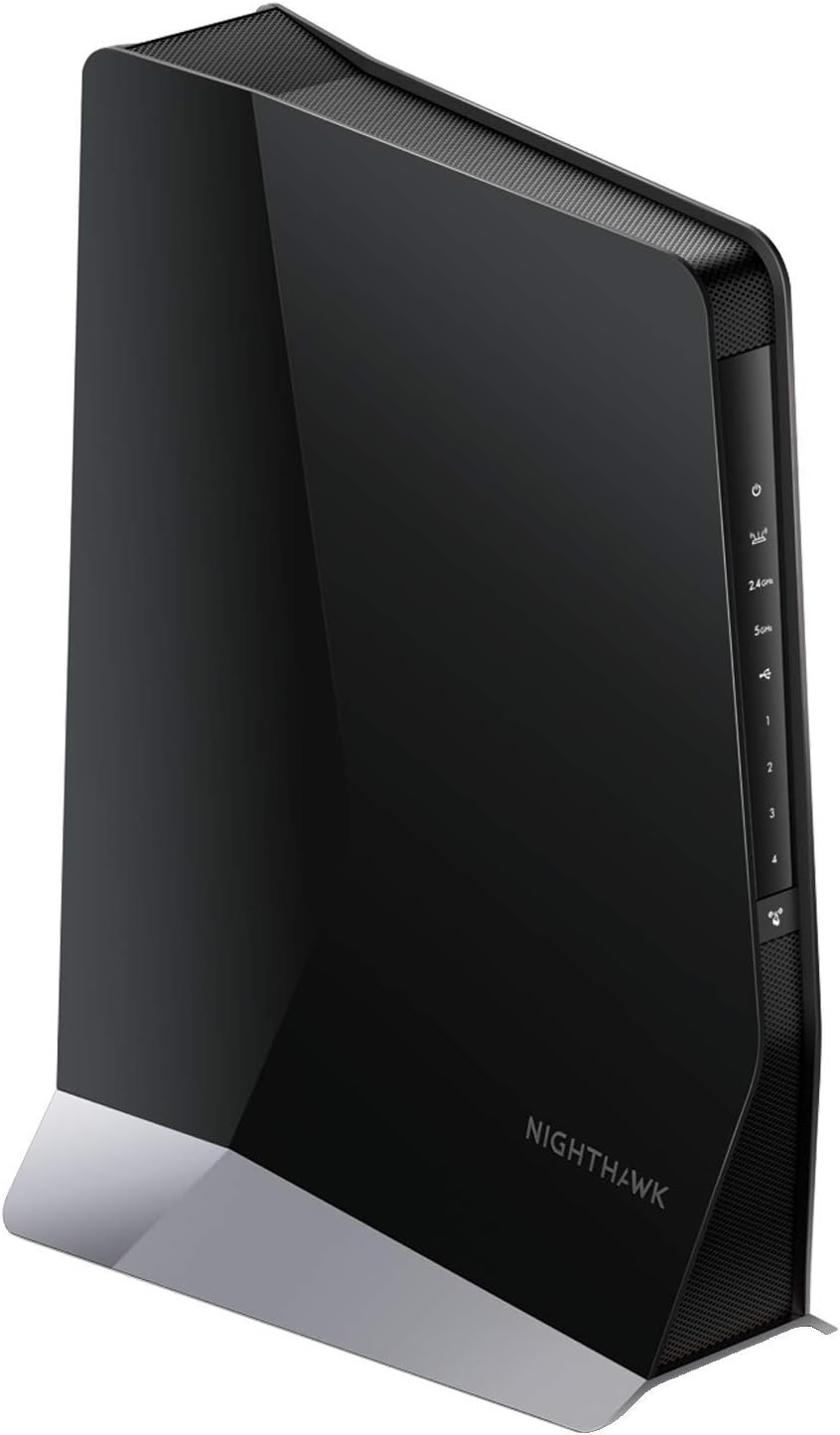
2. Netgear Nighthawk EAX80 (AX6000): Best High-Speed
The EAX80 is the pick for a gigabit plan and a busy home. It is the fastest extender on this list and covers about 2,500 square feet. Four Ethernet ports let you wire in several devices at once. The price is the highest here, so it only makes sense if you will use that speed.
- WiFi Standard: WiFi 6 AX6000 (dual-band)
- Max Speed: Up to 6 Gbps combined
- Coverage: ~2,500 sq ft
- Ports: 4× Gigabit Ethernet
- Features: MU-MIMO, OFDMA, Nighthawk app, high-power amplifiers
- Pros: Handles Spectrum gigabit speeds with headroom, excellent throughput, great for multiple 4K streams/gaming
- Cons: Higher price
- Best for: Heavy users on Spectrum gigabit plans
Best deal today, prices may change
3. Linksys RE9000 (AC3000): Best for Large Homes
The RE9000 is built for bigger homes with more than one dead zone. It is a tri-band extender, which means one band is kept just for talking to your router, so you lose less speed. It is WiFi 5, not WiFi 6, but that is still enough for most Spectrum plans. It also has four Ethernet ports.
- WiFi Standard: WiFi 5 AC3000 (tri-band)
- Max Speed: Up to 3 Gbps combined
- Coverage: ~2,500 sq ft
- Ports: 4× Gigabit Ethernet
- Features: Tri-band with dedicated backhaul, Spot Finder tech, MU-MIMO
- Pros: Dedicated backhaul reduces speed loss, strong roaming, good for multi-story Spectrum homes
- Cons: WiFi 5 (still very capable for Spectrum)
- Best for: Larger homes with multiple dead zones

Best deal today, prices may change
4. Asus RP-AX58 (AX3000): Best for Gaming
The RP-AX58 is the one for gamers. It is a WiFi 6 extender with a gaming mode that keeps lag low, and it covers about 2,000 square feet. Setup is done in the Asus app. If you already own an Asus router, it can join it as part of an AiMesh network.
- WiFi Standard: WiFi 6 AX3000 (dual-band)
- Max Speed: Up to 3 Gbps combined
- Coverage: ~2,000 sq ft
- Ports: 1× Gigabit Ethernet
- Features: AiMesh compatible, low-latency gaming mode, Asus app
- Pros: Very low lag for Spectrum gaming, excellent app control, works great with any router
- Cons: Setup is app-focused
- Best for: Gamers and low-latency Spectrum users

Best deal today, prices may change
5. Rock Space AX1800: Best Budget
The Rock Space AX1800 is the budget choice. You still get WiFi 6, with coverage of about 1,500 square feet, which fits Spectrum plans from 300 to 500 Mbps. The brand is less known and the range is a little shorter than the bigger names, but it costs much less.
- WiFi Standard: WiFi 6 AX1800 (dual-band)
- Max Speed: Up to 1.8 Gbps combined
- Coverage: ~1,500 sq ft
- Ports: 1× Gigabit Ethernet
- Features: Easy WPS setup, MU-MIMO, compact design
- Pros: Affordable WiFi 6 performance, solid for Spectrum 300–500 Mbps plans
- Cons: Lesser-known brand, slightly less range than premium models
- Best for: Budget-conscious Spectrum users

Best deal today, prices may change
Which Extender for Which Room
The room with the weak signal tells you which model to buy and where to plug it in.
- Upstairs bedrooms: plug the extender in on the stair landing or in the upstairs hall, not in the bedroom itself. The TP-Link RE715X is enough for most two-floor homes.
- Basement: floors block more signal than walls. If you can run an Ethernet cable down, a wired extender gives the best speed. Without a cable, the tri-band Linksys RE9000 loses the least speed.
- Far end of a big house: the Netgear EAX80 or the Linksys RE9000. Both cover about 2,500 square feet.
- Gaming room: the Asus RP-AX58. Connect the console to its Ethernet port with a cable.
- One small room or home office: the Rock Space AX1800 does the job for less money.
How We Chose the Best WiFi Extender for Spectrum
- Compatibility: it has to pair easily with Spectrum gateways (Sagemcom, Arris, Technicolor) by WPS or Ethernet.
- Performance: WiFi 6 where possible, to keep up with Spectrum’s faster plans.
- Features: an Ethernet port, MU-MIMO, app control and WPA3 security.
- User feedback: good reviews from Spectrum customers on Amazon, Reddit (r/Spectrum) and Best Buy.
- Value: a fair price ($40 to $220) for the coverage and speed you get.
Quick Comparison of Best WiFi Extenders for Spectrum
| Rank & Model | WiFi & Speed | Coverage & Price | Best For |
|---|---|---|---|
| 1. TP-Link RE715X | WiFi 6 AX3000, 3 Gbps | 2,000 sq ft, $90–$110 | Best overall |
| 2. Netgear Nighthawk EAX80 | WiFi 6 AX6000, 6 Gbps | 2,500 sq ft, $180–$220 | High-speed / gigabit |
| 3. Linksys RE9000 | WiFi 5 AC3000, 3 Gbps | 2,500 sq ft, $120–$150 | Large homes |
| 4. Asus RP-AX58 | WiFi 6 AX3000, 3 Gbps | 2,000 sq ft, $110–$140 | Gaming / low latency |
| 5. Rock Space AX1800 | WiFi 6 AX1800, 1.8 Gbps | 1,500 sq ft, $40–$60 | Budget-friendly |
Why Use a WiFi Extender with Spectrum?
- Extends coverage to upstairs, basement, or far rooms
- Boosts speeds for 4K streaming, gaming, video calls
- Supports dozens of smart devices without slowdowns
- Much cheaper than Spectrum Advanced WiFi pods or mesh upgrades
- Ethernet backhaul option gives near-full Spectrum speeds
What Users Say About These WiFi Extenders for Spectrum
Summarized from Amazon, Reddit (r/Spectrum), Best Buy:
- TP-Link RE715X: “Perfect with my Spectrum modem, full house coverage now”
- Netgear EAX80: “Handles gigabit Spectrum speeds with no drops”
- Linksys RE9000: “Great for upstairs, stable with Spectrum”
- Asus RP-AX58: “Low lag for Spectrum gaming”
- Rock Space AX1800: “Cheap fix for Spectrum dead spots”
The same three tips come up again and again: put the extender in the right spot, use an Ethernet cable if you have a gigabit plan, and keep the firmware updated.
Tips for Using WiFi Extenders for Spectrum
- Place extender halfway between Spectrum gateway and dead zone
- Use WPS button for quick pairing (most Spectrum routers support it)
- Connect via Ethernet cable for maximum speed (especially on gigabit plans)
- Give the extender the same WiFi name and password as your Spectrum router, so your devices switch over on their own
- Update extender firmware via app for best Spectrum compatibility
- Test signal with apps like NetSpot or WiFi Analyzer
Which WiFi Extender Should You Buy for Spectrum?
- Best overall: TP-Link RE715X
- Best for gigabit/high-speed: Netgear Nighthawk EAX80
- Best budget: Rock Space AX1800
Looking for a gaming-focused pick instead? Check out our Best Gaming WiFi Extender guide.
Frequently Asked Questions
Where should I plug in the extender for an upstairs room?
About halfway between the router and the room, usually the stair landing or the upstairs hall. In the weak room itself, the extender gets a poor signal and can only pass on a poor signal.
Can one extender cover both the basement and the upstairs?
Usually not. One extender covers the area around it. Put it near the rooms that matter most, or use two extenders if both areas are important.
Do I need WiFi 6 for my Spectrum plan?
On a plan of 500 Mbps or more, WiFi 6 is worth it. On a slower plan, a good WiFi 5 extender like the Linksys RE9000 is still fast enough.
Will these extenders work with my Spectrum router?
Yes. All five use standard WiFi and connect to a Spectrum router by WPS button, app or Ethernet cable.